
Logseq API MCP Server
About
A MCP server that uses Logseq API to extract and interact with Logseq notes.
Details
- License
- MIT
Explore
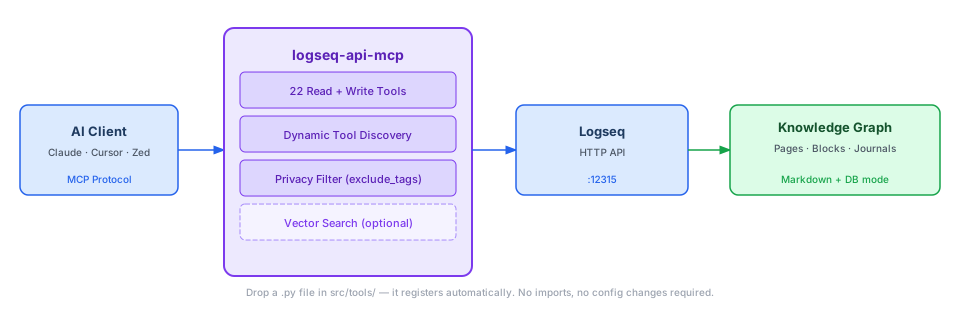
- 21 tools: 12 read (search, query, page/block retrieval) and 10 write (create, edit, delete pages/blocks)
- Automatic tool discovery: drop a Python file into src/tools/ — no registration needed
- Privacy filter: pages tagged with tags from LOGSEQ_EXCLUDE_TAGS are hidden from all read operations
- DB‑mode support: set LOGSEQ_DB_MODE=true to enable database‑format API paths and Datalog‑powered queries
- Full‑text search across blocks, pages, and file names
- Backlink analysis including block‑level references

Setting up with Highlight
This MCP is not yet compatible with Highlight’s one-click setup. However, you can still use it with Highlight by following these steps:
- Download and install Highlight from highlightai.com/download
- Navigate to the plugins tab and select "Add Custom Plugin"
-
Configure the plugin with the settings below
Plugin Name
Logseq API MCP ServerCommand (node, npx, python, etc.)Please refer to the README for specific instructions on how to obtain API keys or other required environment variables.
- Enable "Start Automatically" if you want the plugin to start when Highlight launches





From the repository
Step 1 — Install
git clone https://github.com/gustavo-meilus/logseq-api-mcp.git
cd logseq-api-mcp
uv sync
Step 2 — Configure
```bash
cp .env.template .env
get_all_pages
Every page with ID, UUID, journal flag, and namespace
get_page_blocks
Hierarchical block tree with IDs, UUIDs, and child counts
get_page_links
Pages linking to a target page
get_page_backlinks
Full backlink analysis including block-level references
get_block_content
Block detail with properties and immediate children
get_all_page_content
Complete page: properties, blocks, DB refs expanded
get_linked_flashcards
Q&A flashcard pairs from a page and all linked pages
search
Full-text search across blocks, pages, and file names
query
Raw Datalog / DSL queries against the graph
find_pages_by_property
Filter pages by property key and optional value
get_pages_from_namespace
All pages under a Logseq namespace
get_pages_tree_from_namespace
Nested tree of namespace pages
create_page
Create a page with optional properties and format
delete_page
Remove a page permanently
rename_page
Rename a page and update all references
update_page
Append or replace content on an existing page
append_block_in_page
Add blocks at the end of a page
edit_block
Replace a block's content by UUID
update_block
Update block content by UUID
insert_nested_block
Insert a child or sibling block relative to another block
delete_block
Delete a block by UUID
set_block_properties
Set structured properties on a block (DB-mode only)
| Tool | What it does |
|---|---|
| get_all_pages | Every page with ID, UUID, journal flag, and namespace |
| get_page_blocks | Hierarchical block tree with IDs, UUIDs, and child counts |
| get_page_links | Pages linking to a target page |
| get_page_backlinks | Full backlink analysis including block-level references |
| get_block_content | Block detail with properties and immediate children |
| get_all_page_content | Complete page: properties, blocks, DB refs expanded |
| get_linked_flashcards | Q&A flashcard pairs from a page and all linked pages |
| search | Full-text search across blocks, pages, and file names |
| query | Raw Datalog / DSL queries against the graph |
| find_pages_by_property | Filter pages by property key and optional value |
| get_pages_from_namespace | All pages under a Logseq namespace |
| get_pages_tree_from_namespace | Nested tree of namespace pages |
| Tool | What it does |
|---|---|
| create_page | Create a page with optional properties and format |
| delete_page | Remove a page permanently |
| rename_page | Rename a page and update all references |
| update_page | Append or replace content on an existing page |
| append_block_in_page | Add blocks at the end of a page |
| edit_block | Replace a block's content by UUID |
| update_block | Update block content by UUID |
| insert_nested_block | Insert a child or sibling block relative to another block |
| delete_block | Delete a block by UUID |
| set_block_properties | Set structured properties on a block (DB-mode only) |
---
Create src/tools/my_tool.py. No imports, no registration, no config changes needed. The discovery system picks it up on the next server start.
from typing import List
from mcp.types import TextContent
from src.client.logseq_client import LogseqClient
from src.client.config import LogseqConfig, load_config
from src.logging_setup import get_logger
_log = get_logger(__name__)
async def _run(
client: LogseqClient, config: LogseqConfig, param: str
) -> List[TextContent]:
try:
_log.debug("%s called", __name__)
result = await client.some_api_method(param)
return [TextContent(type="text", text=str(result))]
except Exception as exc:
_log.error("exception in %s: %s", __name__, exc, exc_info=True)
return [TextContent(type="text", text=f"❌ Error: {exc}")]
async def my_tool(param: str) -> List[TextContent]:
"""One-line description — this becomes the MCP tool description."""
cfg = load_config()
return await _run(LogseqClient(cfg), cfg, param)
The _run(client, config, ...) pattern keeps the logic testable via FakeLogseqClient in tests/conftest.py. Function names starting with _ are not registered.
---
Claude Desktop / Cursor
Paste into your MCP client config file to install this server.
{
    "mcpServers": {
        "logseq api mcp server": {
            "logseq-api-mcp": {
                "command": "uv",
                "args": [
                    "sync"
                ]
            }
        }
    }
}McpServers
{
"logseq-api-mcp": {
"command": "uv",
"args": [
"sync"
]
}
}Your AI assistant starts every session blind to your Logseq knowledge graph. logseq-api-mcp fixes that: 21 tools to read, write, query, and search your notes — auto-registered the moment you drop a Python file into src/tools/.

[
[


<picture>
<source media="(prefers-color-scheme: dark)" srcset="assets/architecture-dark.svg">
<source media="(prefers-color-scheme: light)" srcset="assets/architecture-light.svg">
</picture>
---
Quick Start
Step 1 — Install
git clone https://github.com/gustavo-meilus/logseq-api-mcp.git
cd logseq-api-mcp
uv sync
Step 2 — Configure
```bash
cp .env.template .env
Sign in to leave a review
Use Google, GitHub, or an email account so ratings stay tied to real people.
No reviews posted yet.



