
Master Mcp Server
About
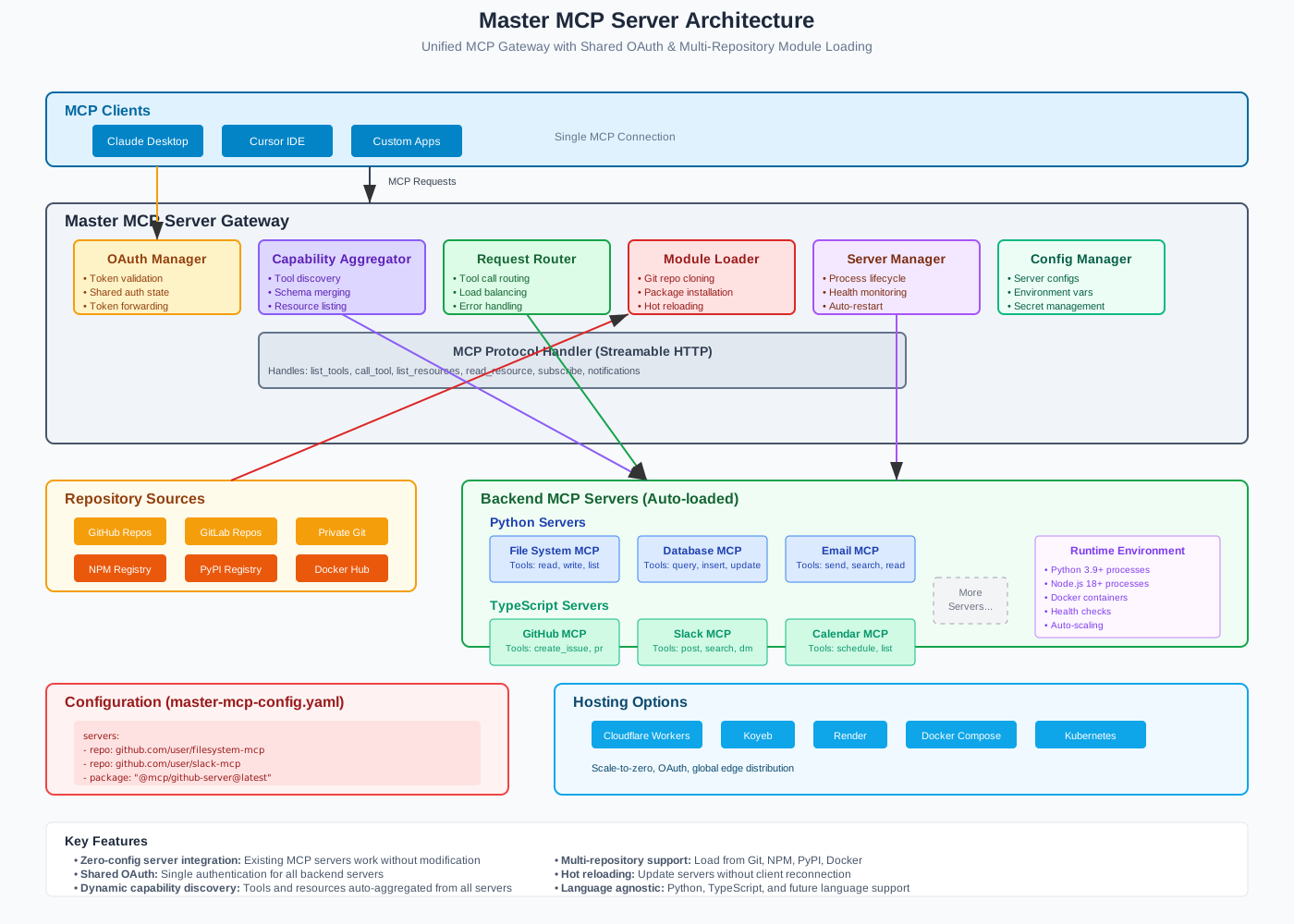
Master Mcp Server aggregates multiple MCP servers behind a single, secure endpoint. It provides configuration-driven module loading, unified capability discovery, request routing with resilience, and first-class OAuth flows for multi-backend authentication. It is built for…
Explore
- Aggregates multiple MCP servers with tool/resource discovery and namespacing
- OAuth support: master token pass-through, delegated provider flows, proxy refresh
- Config-driven setup with JSON/YAML, schema validation, and secret resolution
- Resilient routing: load-balancing, retries with backoff/jitter, circuit-breakers
- Cross-platform: Node.js server and Cloudflare Workers runtime
- Production-ready deployment: Docker, Cloudflare Workers, Koyeb

Setting up with Highlight
This MCP is not yet compatible with Highlight’s one-click setup. However, you can still use it with Highlight by following these steps:
- Download and install Highlight from highlightai.com/download
- Navigate to the plugins tab and select "Add Custom Plugin"
-
Configure the plugin with the settings below
Plugin Name
Master Mcp ServerCommand (node, npx, python, etc.)Please refer to the README for specific instructions on how to obtain API keys or other required environment variables.
- Enable "Start Automatically" if you want the plugin to start when Highlight launches





From the repository
1) Install dependencies (requires network):
npm ci
2) Configure environment (copy and edit):
cp .env.example .env
3) Run in dev mode:
npm run dev
4) Health and Metrics:
- GET /health → { ok: true }
- GET /metrics → basic system metrics
5) MCP endpoints (HTTP gateway):
- POST /mcp/tools/list
- POST /mcp/tools/call with { name, arguments }
- POST /mcp/resources/list
- POST /mcp/resources/read with { uri }
See docs/ for full guides and end-to-end examples.
- Docker: deploy/docker/ and top-level Dockerfile / docker-compose.yml
- Cloudflare Workers: deploy/cloudflare/ with wrangler.toml
- Koyeb: deploy/koyeb/koyeb.yaml
- CI/CD examples: see docs/deployment/cicd.md
Claude Desktop / Cursor
Paste into your MCP client config file to install this server.
{
    "mcpServers": {
        "master mcp server": {
            "master-mcp-server": {
                "url": "http://localhost:3000"
            }
        }
    }
}McpServers
{
    "master-mcp-server": {
        "url": "http://localhost:3000"
    }
}
Master MCP Server aggregates multiple MCP servers behind a single, secure endpoint. It provides configuration-driven module loading, unified capability discovery, request routing with resilience, and first-class OAuth flows for multi-backend authentication.
Highlights
- Aggregates multiple MCP servers with tool/resource discovery and namespacing
- OAuth support: master token pass-through, delegated provider flows, proxy refresh
- Config-driven setup with JSON/YAML, schema validation, and secret resolution
- Resilient routing: load-balancing, retries with backoff/jitter, circuit-breakers
- Cross-platform: Node.js server and Cloudflare Workers runtime
- Production-ready deployment: Docker, Cloudflare Workers, Koyeb
- Testing strategy and CI-ready structure
Quick Start (Node.js)
1) Install dependencies (requires network):
npm ci
2) Configure environment (copy and edit):
cp .env.example .env
3) Run in dev mode:
npm run dev
4) Health and Metrics:
- GET /health → { ok: true }
- GET /metrics → basic system metrics
5) MCP endpoints (HTTP gateway):
- POST /mcp/tools/list
- POST /mcp/tools/call with { name, arguments }
- POST /mcp/resources/list
- POST /mcp/resources/read with { uri }
See docs/ for full guides and end-to-end examples.
Documentation
- Docs index: docs/index.md
- Getting started: docs/getting-started/overview.md
- Guides: docs/guides/
- API reference: generated into docs/api/reference/ (see below)
- Configuration reference: docs/configuration/
- Deployment: docs/deployment/
- Troubleshooting: docs/troubleshooting/
- Contributing: docs/contributing/
Generate API Docs
We use TypeDoc (Markdown) to generate API docs from TypeScript.
1) Install (requires network):
npm i -D typedoc typedoc-plugin-markdown
2) Generate docs:
npm run docs:api
Outputs to docs/api/.
Examples
Working examples live in examples/:
- Basic Node: examples/basic-node
- Cloudflare Worker: examples/cloudflare-worker
- Advanced Routing: examples/advanced-routing
- OAuth Delegation: examples/oauth-delegation
- Testing Patterns: see /tests and docs/examples/testing.md
Each example has a README with run instructions.
Deployment
- Docker: deploy/docker/ and top-level Dockerfile / docker-compose.yml
- Cloudflare Workers: deploy/cloudflare/ with wrangler.toml
- Koyeb: deploy/koyeb/koyeb.yaml
- CI/CD examples: see docs/deployment/cicd.md
Architecture
Contributing & Support
- See docs/contributing/ for development workflow and guidelines
- See docs/troubleshooting/index.md for solutions
- Open an issue or discussion for help and ideas
License
See LICENSE. This repository currently uses UNLICENSED for private/internal use.
Sign in to leave a review
Use Google, GitHub, or an email account so ratings stay tied to real people.
No reviews posted yet.



