
MCP Alchemy
About
A MCP (model context protocol) server that gives the LLM access to and knowledge about relational databases like SQLite, Postgresql, MySQL & MariaDB, Oracle, and MS-SQL.
Details
- License
- MPL-2.0
Explore
- Four built-in tools: all_table_names, filter_table_names, schema_definitions, execute_query
- Supports 10+ SQLAlchemy-compatible databases
- Connection pooling optimized for long-running MCP servers
- Integration with claude-local-files for large dataset analysis
- Smart truncation and clean vertical output for query results
Ensure you have uv installed:
curl -LsSf https://astral.sh/uv/install.sh | sh
Add to your claude_desktop_config.json. You need to add the appropriate database driver in the `--with parameter.
_Note: After a new version release there might be a period of up to 600 seconds while the cache clears locally
cached causing uv to raise a versioning error. Restarting the MCP client once again solves the error._
- DB_URL: SQLAlchemy database URL (required)CLAUDE_LOCAL_FILES_PATH
- : Directory for full result sets (optional)EXECUTE_QUERY_MAX_CHARS
- : Maximum output length (optional, default 4000)DB_ENGINE_OPTIONS`: JSON string containing additional SQLAlchemy engine options (optional)
-
query
(string): SQL query
params
(object, optional): Query parameters
- all_table_names
- Return all table names in the database
- No input required
- Returns comma-separated list of tables
users, orders, products, categories
- filter_table_names
- Find tables matching a substring
- Input: q (string)
- Returns matching table names
  Input: "user"

  Returns: "users, user_roles, user_permissions"
- schema_definitions
- Get detailed schema for specified tables
- Input: table_names (string[])
- Returns table definitions including:
- Column names and types
- Primary keys
- Foreign key relationships
- Nullable flags
  users:

      id: INTEGER, primary key, autoincrement

      email: VARCHAR(255), nullable

      created_at: DATETIME


      Relationships:

        id -> orders.user_id
- execute_query
- Execute SQL query with vertical output format
- Inputs:
- query (string): SQL query
- params (object, optional): Query parameters
- Returns results in clean vertical format:
  1. row

  id: 123

  name: John Doe

  created_at: 2024-03-15T14:30:00

  email: NULL
Result: 1 rows
- Features:
- Smart truncation of large results
- Full result set access via claude-local-files integration
- Clean NULL value display
- ISO formatted dates
- Clear row separation
<a href="https://www.pulsemcp.com/servers/runekaagaard-alchemy"></a>
Status: Works great and is in daily use without any known bugs.
Status2: I just added the package to PyPI and updated the usage instructions. Please report any issues :)
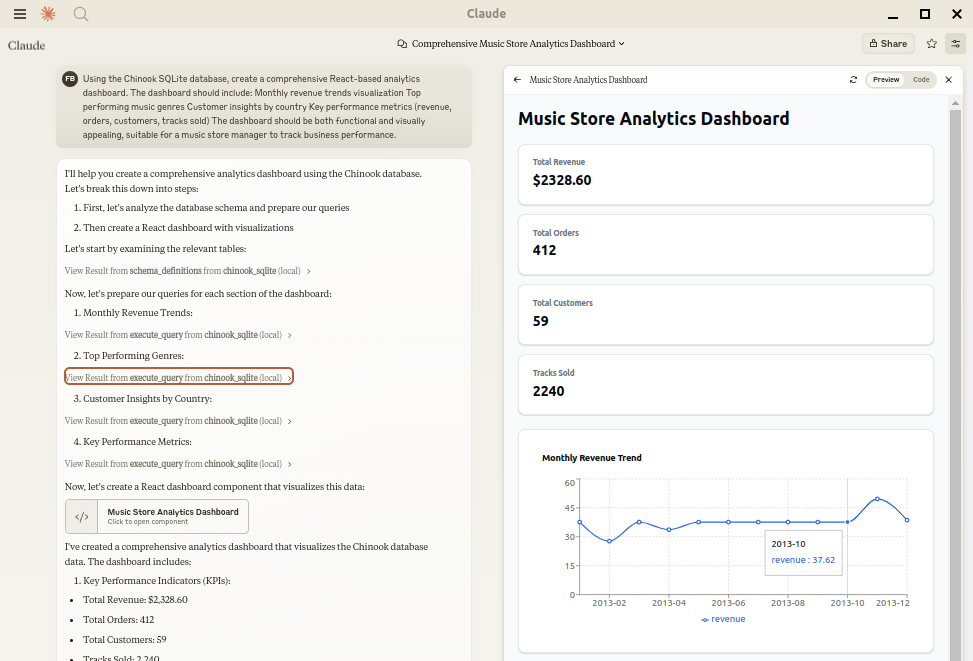
Let Claude be your database expert! MCP Alchemy connects Claude Desktop directly to your databases, allowing it to:
- Help you explore and understand your database structure
- Assist in writing and validating SQL queries
- Displays relationships between tables
- Analyze large datasets and create reports
- Claude Desktop Can analyse and create artifacts for very large datasets using claude-local-files.
Works with PostgreSQL, MySQL, MariaDB, SQLite, Oracle, MS SQL Server, CrateDB, Vertica,
and a host of other SQLAlchemy-compatible databases.
Installation
Ensure you have uv installed:
```bash
Sign in to leave a review
Use Google, GitHub, or an email account so ratings stay tied to real people.
No reviews posted yet.



