
A Remote MCP Server for ATproto Docs
About
A MCP server to query and generate answers based on the ATproto documentation available online
Details
- License
- CC0-1.0
Explore
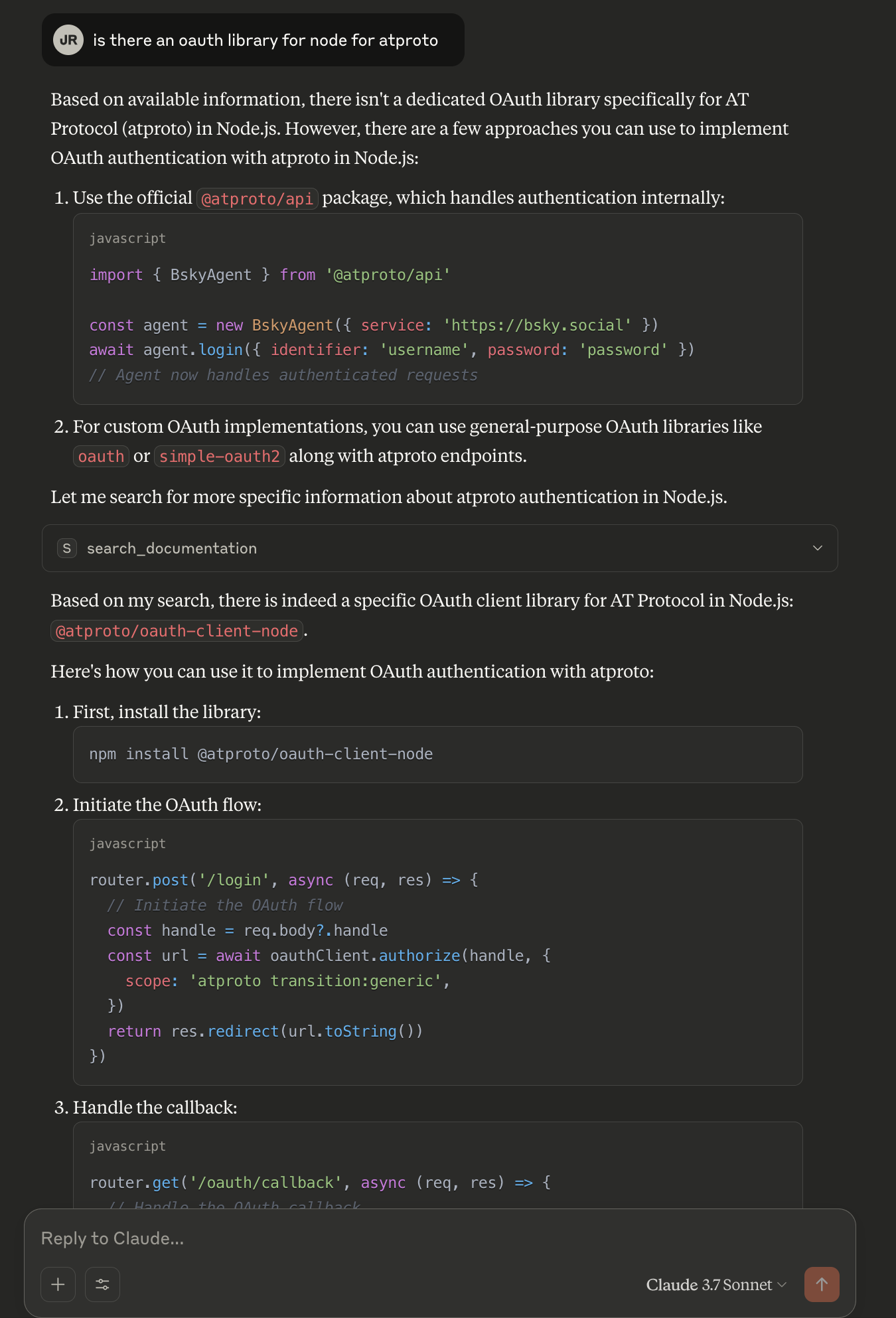
- Provides a single search_documentation tool for ATprotocol docs.
- Powered by Cloudflare AutoRAG with a Vectorize database.
- Documentation is crawled weekly by a cron worker and stored in R2.
- No authentication required (authless remote MCP server).
- Publicly accessible via SSE at a fixed Cloudflare Workers URL.

Setting up with Highlight
This MCP is not yet compatible with Highlight’s one-click setup. However, you can still use it with Highlight by following these steps:
- Download and install Highlight from highlightai.com/download
- Navigate to the plugins tab and select "Add Custom Plugin"
-
Configure the plugin with the settings below
Plugin Name
A Remote MCP Server for ATproto DocsCommand (node, npx, python, etc.)Please refer to the README for specific instructions on how to obtain API keys or other required environment variables.
- Enable "Start Automatically" if you want the plugin to start when Highlight launches





From the repository
This remote MCP server publishes a tool for searching and querying the documentation for ATprotocol.
| Tool | Description |
|------------------------|-------------------------|
| search_documentation | Searches the atproto docs |
Created with love 💙, to make life easier for developers building on the protocol.
This remote MCP server is publicly available at:
https://mcp-atproto-docs.immber.workers.dev/sse
search_documentation
Search the documentation for the given query. This tool can be used to answer questions about documentation. Results are limited and returned as semantically similar chunks to the query.
Connect with any MCP compatible client. Then ask your AI agent of choice to use the search_documentation tool.
Claude Desktop / Cursor
Paste into your MCP client config file to install this server.
{
    "mcpServers": {
        "a remote mcp server for atproto docs": {
            "search_atproto_docs": {
                "command": "npx",
                "args": [
                    "mcp-remote",
                    "https://mcp-atproto-docs.immber.workers.dev/sse"
                ]
            }
        }
    }
}McpServers
{
    "search_atproto_docs": {
        "command": "npx",
        "args": [
            "mcp-remote",
            "https://mcp-atproto-docs.immber.workers.dev/sse"
        ]
    }
}Deployed to Cloudflare
This remote MCP server publishes a tool for searching and querying the documentation for ATprotocol.
| Tool | Description |
|------------------------|-------------------------|
| search_documentation | Searches the atproto docs |
Created with love 💙, to make life easier for developers building on the protocol.
This remote MCP server is publicly available at:
https://mcp-atproto-docs.immber.workers.dev/sse
Depends on
Created using the remote MCP authless server template CloudFlare provides.
This MCP server queries a CloudFlare AutoRAG instance that is fed by a Cloudflare worker with ATprocol's public documentation.
- cron worker
=>R2 storage bucket=>AutoRAG Vectorize DB
This project was originally inspired by Cloudflare's Documentation MCP Server.
Sources
atproto-docs-worker is a cloudflare worker that crawls and saves documentation to an R2 bucket. It runs on a weekly cron schedule.
To view or request changes to the list of resources currently being included, please visit that repo.
Using the tool
Connect with any MCP compatible client. Then ask your AI agent of choice to use thesearch_documentation tool.
Connect to Cloudflare AI Playground
You can connect to this MCP server from the Cloudflare AI Playground, which is a remote MCP client:
1. Go to https://playground.ai.cloudflare.com/
2. Enter your deployed MCP server URL ( https://mcp-atproto-docs.immber.workers.dev/sse)
3. You can now use this MCP tool directly from the playground!
Connect Claude Desktop to your MCP server
To connect to this MCP server from Claude Desktop, follow Anthropic's Quickstart and within Claude Desktop go to Settings > Developer > Edit Config.
Update with this configuration:
{
  "mcpServers": {
    "search_atproto_docs": {
      "command": "npx",
      "args": [
        "mcp-remote",
        "https://mcp-atproto-docs.immber.workers.dev/sse"
      ]
    }
  }
}
Restart Claude and you should see the tools become available.
Sample Queries
Sign in to leave a review
Use Google, GitHub, or an email account so ratings stay tied to real people.
No reviews posted yet.



