
Overview
About
This MCP server enables querying Microsoft Dataverse environments using SQL through AI tools such as GitHub Copilot and Claude Desktop. It is built on the Sql4Cds framework and distributed as a .NET global tool or Docker container.
Details
- License
- MIT
Explore
- Query Dataverse using standard SQL syntax
- Works with GitHub Copilot and Claude Desktop
- Installable as dotnet tool or Docker container
- Leverages Azure Identity for authentication
- Built on the Sql4Cds framework
Below is a sample .env file that you can use if you choose to run the MCP Server inside a container. Create the .env on the workspace folder (same level as the README.md).
AZURE_CLIENT_ID=aba9829f-6288-44d7-9168-53eca9a1f4a5
AZURE_CLIENT_SECRET=abcd
AZURE_TENANT_ID=2caa17e6-884b-473b-80c5-c05d8859a2fa
DATAVERSE_ENVIRONMENT_URL=https://abc.crm6.dynamics.com
DOCKER_CONTAINER=true
If you are using this MCP Server on a new folder (not in the cloned repo), make sure that you are have .github/copilot-instructions.md setup. If you already have a different copilot-instructions.md file, you can also create this as a custom prompt under .github/prompts folder e.g. dataverse.main.prompt.md and use it in the chat.
1. VSCode March (minimum March 2025 version) or Claude Desktop
2. Azure CLI installed and authenticated on your local machine, if you are not using the DevContainer option. While interactive browser authentication is possible using Azure Identity framework, using Azure CLI to manage the authentication is little easier.
3. Docker, if you want to run Dev Containers or the MCP Server inside DevContainer.
4. dotnet 9.0 SDK if you want to install the dotnet tool.

If the button above does not work, paste the below URL to the address bar.
vscode:mcp/install?%7B%0A%20%20%20%20%22name%22%3A%20%22dataverse-mcp-dotnet-tool%22%2C%0A%20%20%20%20%22type%22%3A%20%22stdio%22%2C%0A%20%20%20%20%22command%22%3A%20%22mcp-dataverse%22%2C%0A%20%20%20%20%22env%22%3A%20%7B%0A%20%20%20%20%20%20%20%20%22DATAVERSE_ENVIRONMENT_URL%22%3A%20%22https%3A%2F%2Fxyz.crm.dynamics.com%22%0A%20%20%20%20%7D%0A%7D

If the button above does not work, paste the below URL to the address bar.
vscode:mcp/install?%7B%0A%20%20%20%20%22name%22%3A%20%22dataverse-mcp-docker%22%2C%0A%20%20%20%20%22type%22%3A%20%22stdio%22%2C%0A%20%20%20%20%22command%22%3A%20%22docker%22%2C%0A%20%20%20%20%22args%22%3A%20%5B%0A%20%20%20%20%20%20%20%20%22run%22%2C%0A%20%20%20%20%20%20%20%20%22--env-file%22%2C%0A%20%20%20%20%20%20%20%20%22%24%7BworkspaceFolder%7D%2F.env%22%2C%0A%20%20%20%20%20%20%20%20%22-i%22%2C%0A%20%20%20%20%20%20%20%20%22--rm%22%2C%0A%20%20%20%20%20%20%20%20%22rajyraman%2Fmcp-stdio-dataverse%22%0A%20%20%20%20%5D%0A%7D
You can click the buttons above to get the MCP Server config settings. You have two options to use this MCP Server:
1. Docker Container
2. dotnet tool
Below is the recommendation based on the where you plan to use this MCP
| In | Client | Recommendation |
| ----------------- | ------------------------------ | -------------------------------------------------------------------- |
| Windows | GitHub Copilot | dotnet tool. Use Docker/Podman as fallback, if you have auth issues. |
| Windows | Claude Desktop | dotnet tool |
| MacOS | Claude Desktop, GitHub Copilot | dotnet tool |
| Linux | Claude Desktop, GitHub Copilot | dotnet tool |
| GitHub Codespaces | GitHub Copilot | dotnet tool |
Since this MCP server is built with MCP C# SDK, it is distributed via nuget as a dotnet tool. dotnet 9.0 SDK can be installed in all major OSes.
You can install the Dataverse MCP Server as a global dotnet tool using the command below.
dotnet tool install -g Mcp.Dataverse.Stdio
{
    "servers": {
        "dataverse-mcp-dotnet-tool": {
            "type": "stdio",
            "command": "mcp-dataverse",
            "env": {
                "DATAVERSE_ENVIRONMENT_URL": "https://abc.crm6.dynamics.com"
            }
        }
    }
}
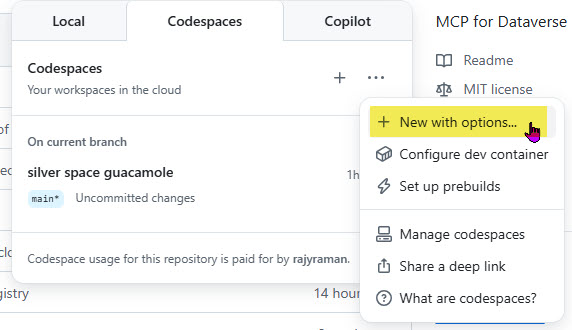
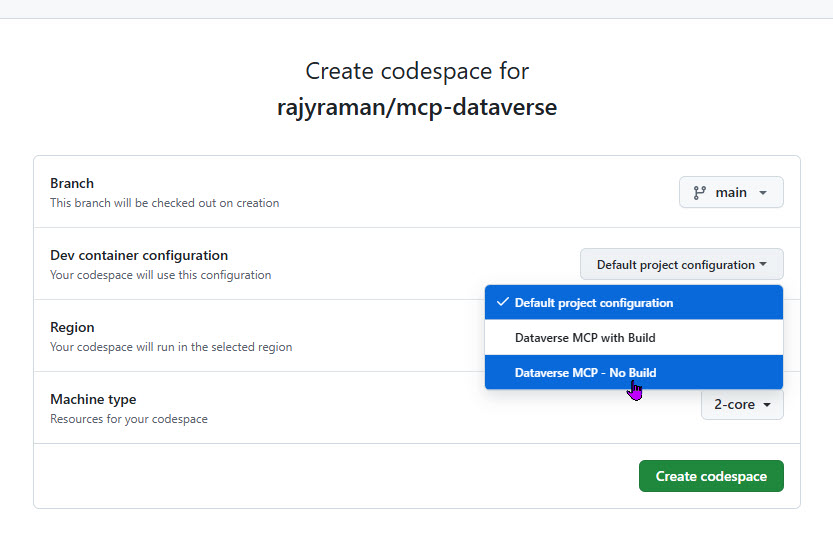
When you create you Codespace make sure you select the devcontainer.json inside the nuget-tool folder. You should also change the dataverse-nosecrets.env so that the DATAVERSE_ENVIRONMENT_URL environment variable is pointing to the right environment URL.
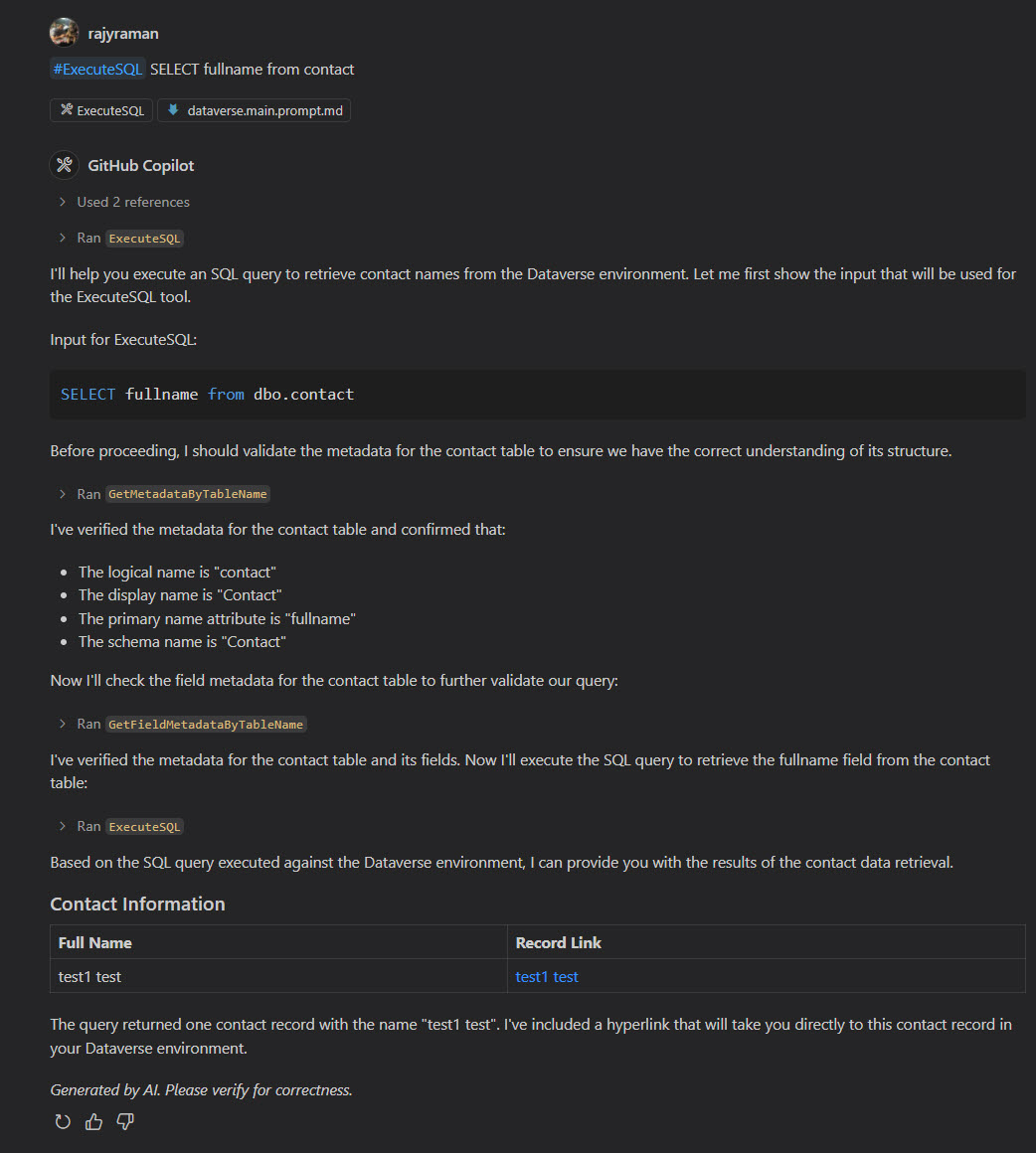
The objective of this repo is to enable querying of Dataverse environment using SQL. You can use popular AI tools such as GitHub Copilot or Claude Desktop to query Dataverse, provided you add this MCP Server in the configuration.
A big thank you to Mark Carrington for creating Sql4Cds, without whom this project would not exist. 🙏
Sign in to leave a review
Use Google, GitHub, or an email account so ratings stay tied to real people.
No reviews posted yet.



