mcp-k8s
About
A Kubernetes MCP (Model Control Protocol) server that enables interaction with Kubernetes clusters through MCP tools.
Explore
- Query supported Kubernetes resource types (built-in resources and CRDs)
- Kubernetes resource operations with fine-grained control
- Read operations: get resource details, list resources by type with filtering options
- Write operations: create, update, and delete resources (each can be independently enabled/disabled)
- Support for all Kubernetes resource types, including custom resources
- Connects to Kubernetes cluster using kubeconfig
- Helm support with fine-grained control
- Helm releases management (list, get, install, upgrade, uninstall)
- Helm repositories management (list, add, remove)
- Each operation can be independently enabled/disabled

Setting up with Highlight
This MCP is not yet compatible with Highlight’s one-click setup. However, you can still use it with Highlight by following these steps:
- Download and install Highlight from highlightai.com/download
- Navigate to the plugins tab and select "Add Custom Plugin"
-
Configure the plugin with the settings below
Plugin Name
mcp-k8sCommand (node, npx, python, etc.)Please refer to the README for specific instructions on how to obtain API keys or other required environment variables.
- Enable "Start Automatically" if you want the plugin to start when Highlight launches





From the repository
mcp-k8s supports three communication modes:
You can directly download the binary for your platform from the releases page and use it immediately.
go install github.com/silenceper/mcp-k8s/cmd/mcp-k8s@latest
- --transport: Transport type (stdio, sse, or streamable-http) (default: "stdio")
- --host: Host for HTTP transport (SSE or Streamable HTTP) (default: "localhost")
- --port: TCP port for HTTP transport (SSE or Streamable HTTP) (default: 8080)
- --endpoint-path: Endpoint path for Streamable HTTP transport (default: "/mcp")
get_api_resources
Get all supported API resource types in the cluster
get_resource
Get detailed information about a specific resource
list_resources
List all instances of a resource type
create_resource
Create new resources (can be disabled)
update_resource
Update existing resources (can be disabled)
delete_resource
Delete resources (can be disabled)
list_helm_releases
List all Helm releases in the cluster
get_helm_release
Get detailed information about a specific Helm release
install_helm_chart
Install a Helm chart (can be disabled)
upgrade_helm_chart
Upgrade a Helm release (can be disabled)
uninstall_helm_chart
Uninstall a Helm release (can be disabled)
list_helm_repositories
List configured Helm repositories
add_helm_repository
Add a new Helm repository (can be disabled)
remove_helm_repository
Remove a Helm repository (can be disabled)
- get_api_resources: Get all supported API resource types in the cluster
- get_resource: Get detailed information about a specific resource
- list_resources: List all instances of a resource type
- create_resource: Create new resources (can be disabled)
- update_resource: Update existing resources (can be disabled)
- delete_resource: Delete resources (can be disabled)
- list_helm_releases: List all Helm releases in the cluster
- get_helm_release: Get detailed information about a specific Helm release
- install_helm_chart: Install a Helm chart (can be disabled)
- upgrade_helm_chart: Upgrade a Helm release (can be disabled)
- uninstall_helm_chart: Uninstall a Helm release (can be disabled)
- list_helm_repositories: List configured Helm repositories
- add_helm_repository: Add a new Helm repository (can be disabled)
- remove_helm_repository: Remove a Helm repository (can be disabled)
Claude Desktop / Cursor
Paste into your MCP client config file to install this server.
{
    "mcpServers": {
        "mcp-k8s": {
            "mcp-k8s": {
                "command": "mcp-k8s",
                "args": [
                    "-kubeconfig",
                    "/Users/demo/.kube/config",
                    "-enable-create",
                    "-enable-delete",
                    "-enable-update"
                ]
            }
        }
    }
}McpServers
{
    "mcp-k8s": {
        "command": "mcp-k8s",
        "args": [
            "-kubeconfig",
            "/Users/demo/.kube/config",
            "-enable-create",
            "-enable-delete",
            "-enable-update"
        ]
    }
}




A Kubernetes MCP (Model Control Protocol) server that enables interaction with Kubernetes clusters through MCP tools.
Features
- Query supported Kubernetes resource types (built-in resources and CRDs)
- Kubernetes resource operations with fine-grained control
- Read operations: get resource details, list resources by type with filtering options
- Write operations: create, update, and delete resources (each can be independently enabled/disabled)
- Support for all Kubernetes resource types, including custom resources
- Connects to Kubernetes cluster using kubeconfig
- Helm support with fine-grained control
- Helm releases management (list, get, install, upgrade, uninstall)
- Helm repositories management (list, add, remove)
- Each operation can be independently enabled/disabled
Preview
> Interaction through cursor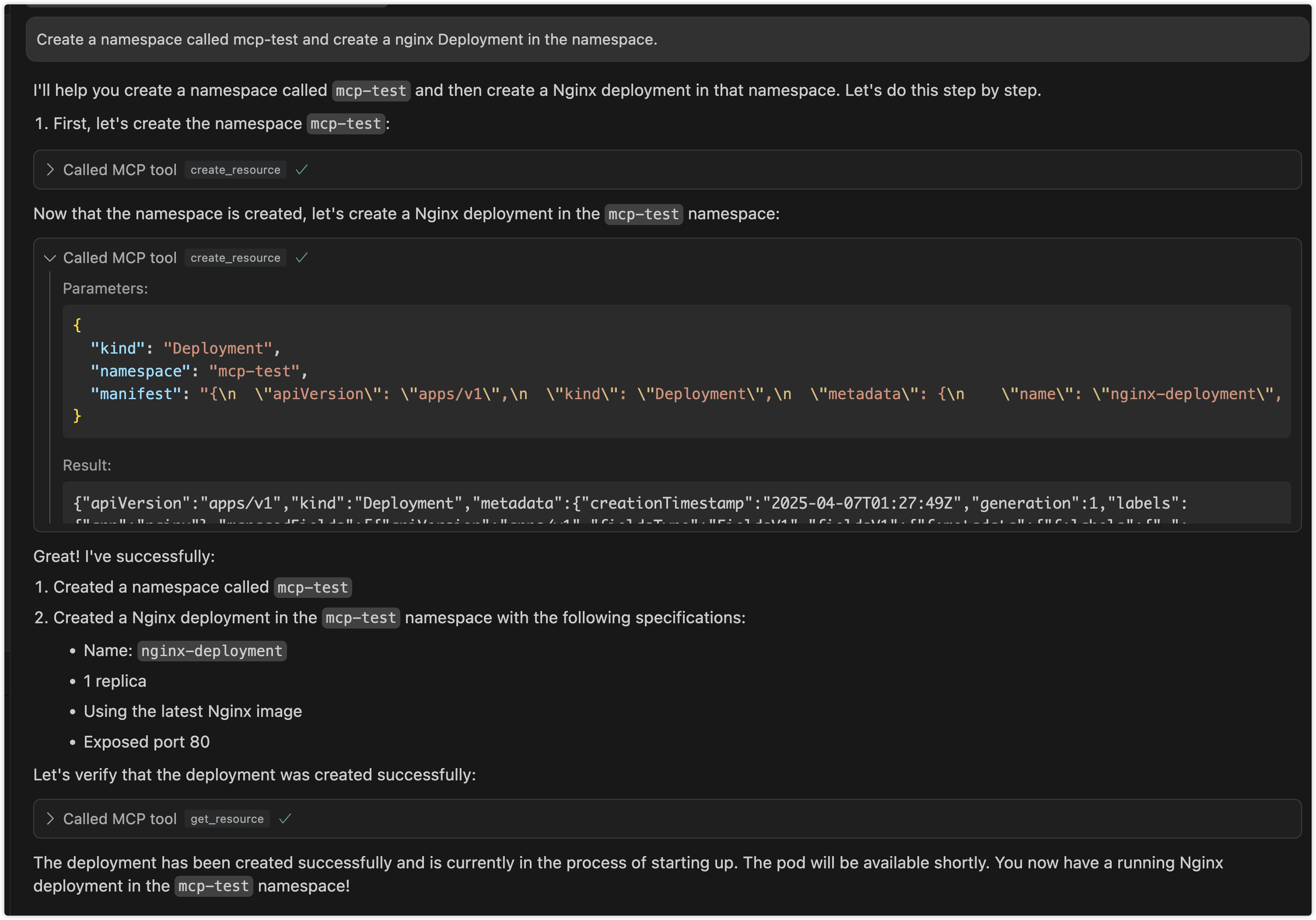
Use Cases
1. Kubernetes Resource Management via LLM
- Interactive Resource Management: Manage Kubernetes resources through natural language interaction with LLM, eliminating the need to memorize complex kubectl commands
- Batch Operations: Describe complex batch operation requirements in natural language, letting LLM translate them into specific resource operations
- Resource Status Queries: Query cluster resource status using natural language and receive easy-to-understand responses
2. Automated Operations Scenarios
- Intelligent Operations Assistant: Serve as an intelligent assistant for operators in daily cluster management tasks
- Problem Diagnosis: Assist in cluster problem diagnosis through natural language problem descriptions
- Configuration Review: Leverage LLM's understanding capabilities to help review and optimize Kubernetes resource configurations
3. Development and Testing Support
- Quick Prototype Validation: Developers can quickly create and validate resource configurations through natural language
- Environment Management: Simplify test environment resource management, quickly create, modify, and clean up test resources
- Configuration Generation: Automatically generate resource configurations that follow best practices based on requirement descriptions
4. Education and Training Scenarios
- Interactive Learning: Newcomers can learn Kubernetes concepts and operations through natural language interaction
- Best Practice Guidance: LLM provides best practice suggestions during resource operations
- Error Explanation: Provide easy-to-understand error explanations and correction suggestions when operations fail
Architecture
1. Project Overview
An stdio-based MCP server that connects to Kubernetes clusters and provides the following capabilities:
- Query Kubernetes resource types (including built-in resources and CRDs)
- CRUD operations on Kubernetes resources (with configurable write operations)
- Helm operations for release and repository management
2. Technical Stack
- Go
- mcp-go SDK
- Kubernetes client-go library
- Helm v3 client library
- Stdio for communication
3. Core Components
1. MCP Server: Uses mcp-go's mcp-k8s package to create an stdio-based MCP server
2. K8s Client: Uses client-go to connect to Kubernetes clusters
3. Helm Client: Uses Helm v3 library for Helm operations
4. Tool Implementations: Implements various MCP tools for different Kubernetes operations
4. Available Tools
Resource Type Query Tools
-get_api_resources: Get all supported API resource types in the cluster
Resource Operation Tools
-get_resource: Get detailed information about a specific resource
- list_resources: List all instances of a resource type
- create_resource: Create new resources (can be disabled)
- update_resource: Update existing resources (can be disabled)
- delete_resource: Delete resources (can be disabled)
Helm Operation Tools
-list_helm_releases: List all Helm releases in the cluster
- get_helm_release: Get detailed information about a specific Helm release
- install_helm_chart: Install a Helm chart (can be disabled)
- upgrade_helm_chart: Upgrade a Helm release (can be disabled)
- uninstall_helm_chart: Uninstall a Helm release (can be disabled)
- list_helm_repositories: List configured Helm repositories
- add_helm_repository: Add a new Helm repository (can be disabled)
- remove_helm_repository: Remove a Helm repository (can be disabled)
Usage
mcp-k8s supports three communication modes:
1. Stdio Mode (Default)
In stdio mode, mcp-k8s communicates with the client through standard input/output streams. This is the default mode and is suitable for most use cases.
```bash
Sign in to leave a review
Use Google, GitHub, or an email account so ratings stay tied to real people.
No reviews posted yet.