
Kubernetes Server
About
A Model Context Protocol (MCP) server that enables AI assistants to interact with Kubernetes clusters. It serves as a bridge between AI tools (like Claude, Cursor, and GitHub Copilot) and Kubernetes, translating natural language requests into Kubernetes operations and returning t
Details
- License
- MIT license
Explore
- Executes arbitrary kubectl and helm commands.
- Provides read tools for resources, logs, events, APIs, and CRDs.
- Offers write tools for create, apply, expose, scale, and rollout operations.
- Supports disabling kubectl, helm, write, or delete operations.
- Provides RBAC check tools (k8s_auth_can_i, k8s_auth_whoami).
- Supports multiple transports: stdio, SSE, and streamable HTTP.

Setting up with Highlight
This MCP is not yet compatible with Highlight’s one-click setup. However, you can still use it with Highlight by following these steps:
- Download and install Highlight from highlightai.com/download
- Navigate to the plugins tab and select "Add Custom Plugin"
-
Configure the plugin with the settings below
Plugin Name
Kubernetes ServerCommand (node, npx, python, etc.)Please refer to the README for specific instructions on how to obtain API keys or other required environment variables.
- Enable "Start Automatically" if you want the plugin to start when Highlight launches





From the repository
Before installing mcp-kubernetes-server, ensure you have the following:
A working Kubernetes cluster.
A kubeconfig file correctly configured to access your Kubernetes cluster (the server requires this file for interaction).
The kubectl command-line tool installed and in your system's PATH (used by the server to execute many Kubernetes commands).
The helm command-line tool installed and in your system's PATH (used by the server for Helm chart operations).
- Python >= 3.11, if you plan to install and run the server directly using
uvx(without Docker).
The mcp-kubernetes-server provides a comprehensive set of tools for interacting with Kubernetes clusters, categorized by operation type:
<details>
<summary>Command Tools</summary>
Claude Desktop / Cursor
Paste into your MCP client config file to install this server.
{
    "mcpServers": {
        "kubernetes server": {
            "kubernetes": {
                "command": "docker",
                "args": [
                    "run",
                    "-i",
                    "--rm",
                    "--mount",
                    "type=bind,src=/home/username/.kube/config,dst=/home/mcp/.kube/config",
                    "ghcr.io/feiskyer/mcp-kubernetes-server"
                ]
            }
        }
    }
}McpServers
{
    "kubernetes": {
        "command": "docker",
        "args": [
            "run",
            "-i",
            "--rm",
            "--mount",
            "type=bind,src=/home/username/.kube/config,dst=/home/mcp/.kube/config",
            "ghcr.io/feiskyer/mcp-kubernetes-server"
        ]
    }
}


The mcp-kubernetes-server is a server implementing the Model Context Protocol (MCP) to enable AI assistants (such as Claude, Cursor, and GitHub Copilot) to interact with Kubernetes clusters. It acts as a bridge, translating natural language requests from these assistants into Kubernetes operations and returning the results.
It allows AI assistants to:
- Query Kubernetes resources
- Execute kubectl commands
- Manage Kubernetes clusters through natural language interactions
- Diagnose and interpret the states of Kubernetes resources
How It Works
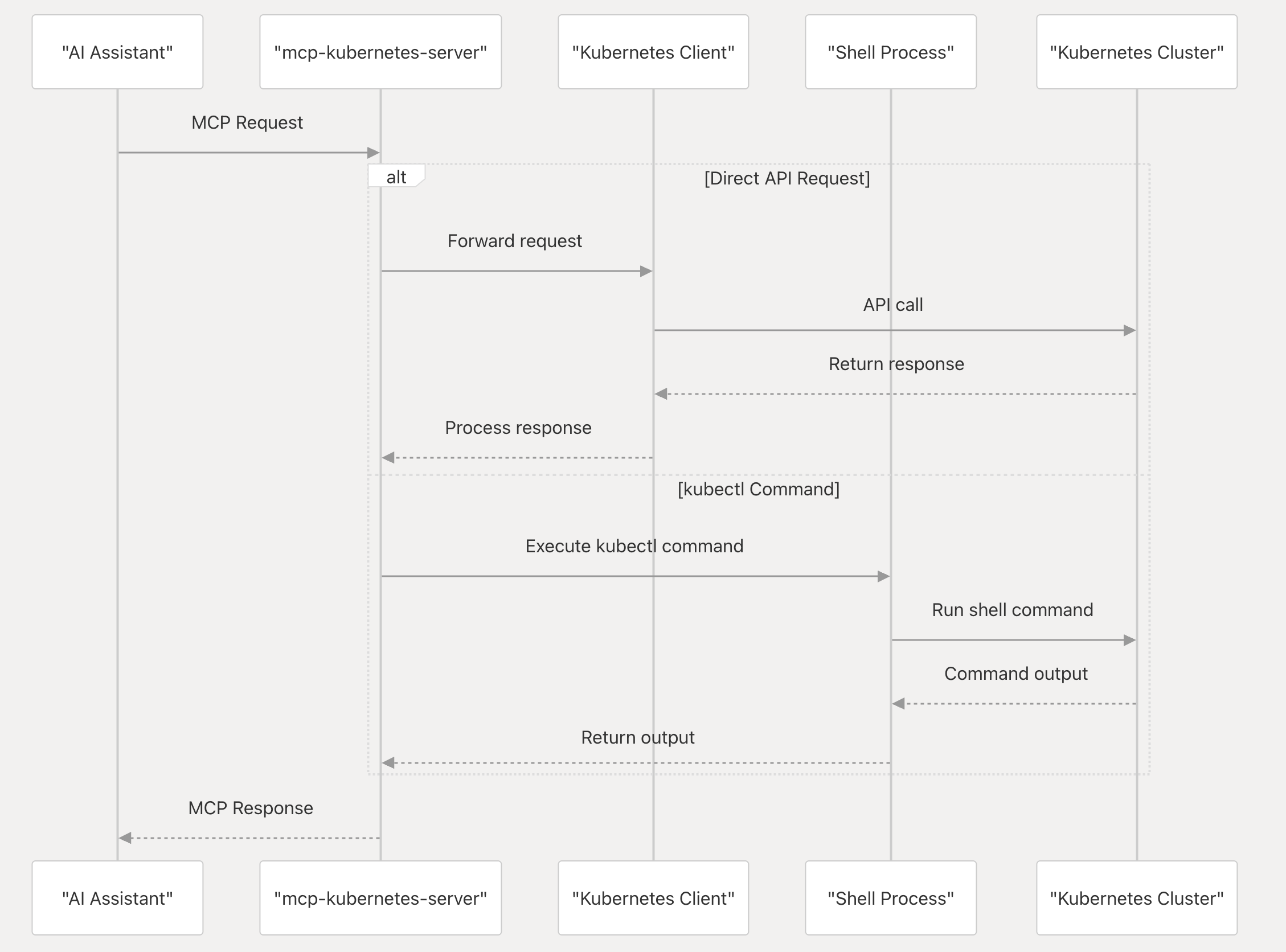
The mcp-kubernetes-server acts as an intermediary between AI assistants (that support the Model Context Protocol) and your Kubernetes cluster. It receives natural language requests from these assistants, translates them into kubectl commands or direct Kubernetes API calls, and executes them against the target cluster. The server then processes the results and returns a structured response, enabling seamless interaction with your Kubernetes environment via the AI assistant.
How To Install
Prerequisites
Before installing mcp-kubernetes-server, ensure you have the following:
A working Kubernetes cluster.
A kubeconfig file correctly configured to access your Kubernetes cluster (the server requires this file for interaction).
The kubectl command-line tool installed and in your system's PATH (used by the server to execute many Kubernetes commands).
The helm command-line tool installed and in your system's PATH (used by the server for Helm chart operations).
- Python >= 3.11, if you plan to install and run the server directly using
uvx(without Docker).
Docker
Get your kubeconfig file for your Kubernetes cluster and setup in the mcpServers (replace src path with your kubeconfig path):
{
  "mcpServers": {
    "kubernetes": {
      "command": "docker",
      "args": [
        "run",
        "-i",
        "--rm",
        "--mount", "type=bind,src=/home/username/.kube/config,dst=/home/mcp/.kube/config",
        "ghcr.io/feiskyer/mcp-kubernetes-server"
      ]
    }
  }
}
UVX
To run the server using uvx (a tool included with uv, the Python packager), first ensure uv is installed:
<details>
<summary>Install uv</summary>
Install uv if it's not installed yet and add it to your PATH, e.g. using curl:
```bash
Sign in to leave a review
Use Google, GitHub, or an email account so ratings stay tied to real people.
No reviews posted yet.



