
MCP (Multi-Context Processing) Simulation
About
MCP (Multi-Context Processing) Simulation is a Python-based system that handles and processes multiple data contexts efficiently. It features database integration for persistent storage and a modular architecture aimed at scalability and maintainability, suitable for developers…
Explore
- Multi-context data processing
- Database integration for persistent storage
- Modular architecture for easy extension
- Video demonstration available in the public folder
- Comprehensive architecture documentation

Setting up with Highlight
This MCP is not yet compatible with Highlight’s one-click setup. However, you can still use it with Highlight by following these steps:
- Download and install Highlight from highlightai.com/download
- Navigate to the plugins tab and select "Add Custom Plugin"
-
Configure the plugin with the settings below
Plugin Name
MCP (Multi-Context Processing) SimulationCommand (node, npx, python, etc.)Please refer to the README for specific instructions on how to obtain API keys or other required environment variables.
- Enable "Start Automatically" if you want the plugin to start when Highlight launches





From the repository
Clone the repository, create a Python virtual environment, and install dependencies from requirements.txt. Initialize the database with python setup_db.py, then run the application with python main.py.
Claude Desktop / Cursor
Paste into your MCP client config file to install this server.
{
    "mcpServers": {
        "mcp (multi-context processing) simulation": {
            "mcp-local": {
                "command": "python",
                "args": [
                    "-m",
                    "venv",
                    "venv"
                ]
            }
        }
    }
}McpServers
{
    "mcp-local": {
        "command": "python",
        "args": [
            "-m",
            "venv",
            "venv"
        ]
    }
}
Overview
I've developed this Multi-Context Processing (MCP) system to handle and process multiple contexts efficiently. The project simulates a robust architecture for managing complex data processing tasks with a focus on scalability and maintainability.Features
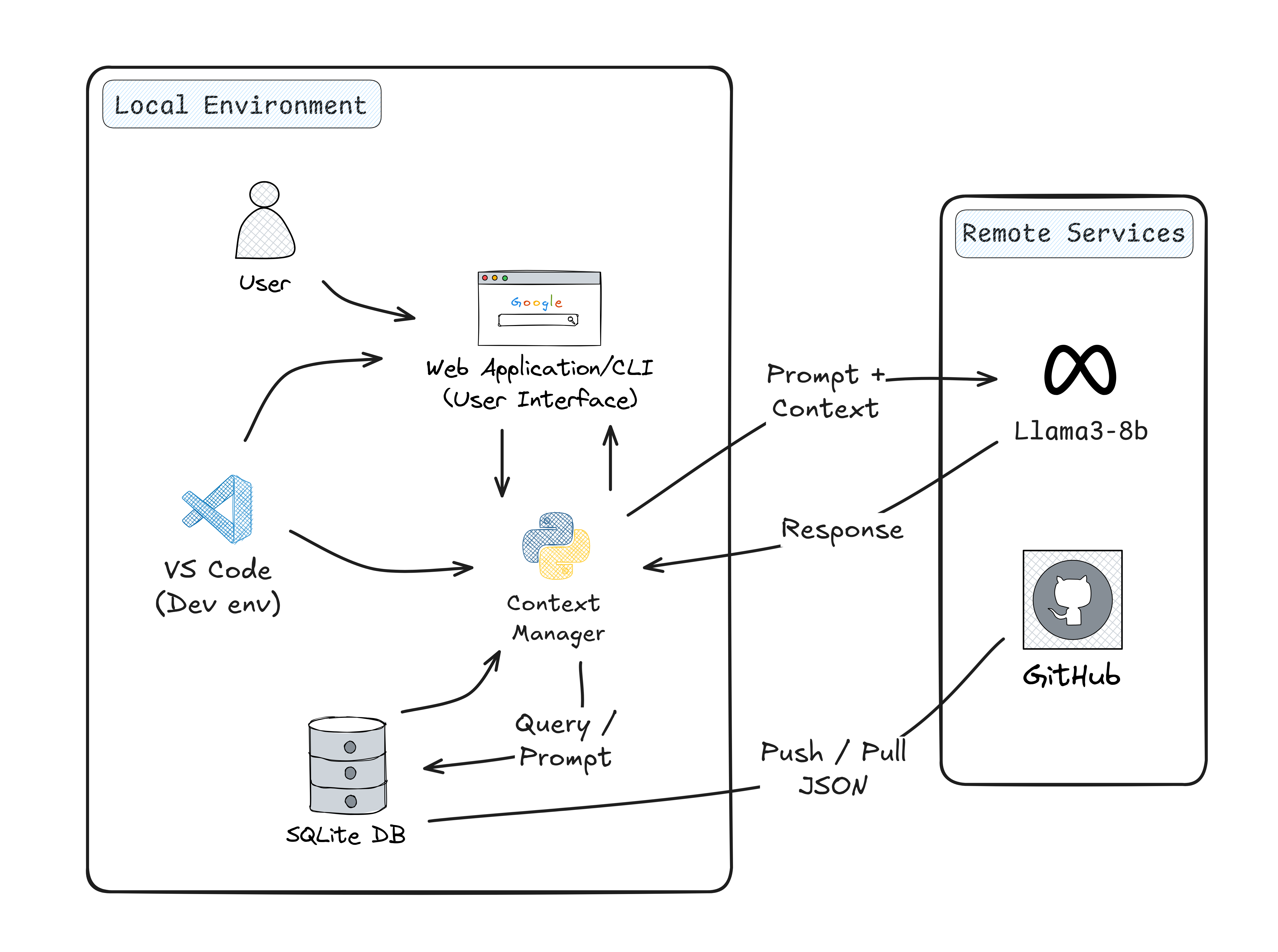
- Multi-context data processing - Database integration for persistent storage - Modular architecture for easy extension - Video demonstration available in the public folder - Comprehensive architecture documentationSystem Architecture
Getting Started
Prerequisites
- Python 3.x - Virtual environment (recommended)Installation
1. Clone the repository 2. Create and activate a virtual environment: python -m venv venv
source venv/bin/activate # On Windows: venv\Scripts\activate
pip install -r requirements.txt
python setup_db.py
Running the Application
python main.py
Documentation
- Check out the architecture diagram above for a detailed view of the system design - Watch the demo video to see the system in actionTechnical Details
The project implements a sophisticated multi-context processing system that: - Manages multiple data contexts simultaneously - Provides efficient data persistence through SQLite - Implements modular design patterns for maintainability - Offers clear separation of concerns between data, logic, and presentation layersContributing
Feel free to submit issues and enhancement requests!Sign in to leave a review
Use Google, GitHub, or an email account so ratings stay tied to real people.
No reviews posted yet.



