n8n Workflow Builder MCP Server
About
AI-powered n8n workflow automation through natural language. MCP server enabling Claude AI & Cursor IDE to create, manage, and monitor workflows via Model Context Protocol. Multi-instance support, 17 tools, comprehensive docs. Build workflows conversationally without manual JSON
Details
- License
- MIT
Explore
- AI-powered workflow creation from natural language descriptions
- Multi-instance management (dev, staging, production) from one server
- 17 comprehensive tools covering workflows, executions, tags, and credentials
- Natural language interface – no JSON editing required
- Secure by design with API key encryption and credential protection
- 38+ documentation pages with guides, tutorials, and API reference

Setting up with Highlight
This MCP is not yet compatible with Highlight’s one-click setup. However, you can still use it with Highlight by following these steps:
- Download and install Highlight from highlightai.com/download
- Navigate to the plugins tab and select "Add Custom Plugin"
-
Configure the plugin with the settings below
Plugin Name
n8n Workflow Builder MCP ServerCommand (node, npx, python, etc.)Please refer to the README for specific instructions on how to obtain API keys or other required environment variables.
- Enable "Start Automatically" if you want the plugin to start when Highlight launches





From the repository
- Node.js v14+ (v18+ recommended)
- npm v7+
- n8n instance with API access (tested with n8n v1.82.3+)
- Claude Desktop or Cursor IDE
npm install -g @kernel.salacoste/n8n-workflow-builder
npx @kernel.salacoste/n8n-workflow-builder --version
| Section | Description |
|---------|-------------|
| 🚀 Quick Start Tutorial | Build your first workflow in 5 minutes |
| 📦 Installation Guide | Detailed setup instructions |
| 🔧 Configuration | Multi-instance and environment setup |
| 🛠️ API Reference | Complete tool documentation |
| 🏗️ Multi-Instance Setup | Manage multiple n8n environments |
| 💡 Usage Patterns | Best practices and conversation patterns |
| 🐛 Troubleshooting | Common issues and solutions |
---
npm install
list_workflows
List all workflows from n8n with essential metadata only (ID, name, status, dates, node count, tags). Supports filtering by active status. Optimized for performance to prevent large data transfers.
execute_workflow
Manually execute a workflow by ID
create_workflow
Create a new workflow in n8n
get_workflow
Get a workflow by ID
update_workflow
Update an existing workflow
patch_workflow
Partially update workflow (returns guidance - PATCH not supported by n8n API). Use update_workflow for actual updates.
delete_workflow
Delete a workflow by ID
activate_workflow
Activate a workflow by ID
deactivate_workflow
Deactivate a workflow by ID
list_executions
List all executions from n8n with optional filters
get_execution
Get details of a specific execution by ID
delete_execution
Delete an execution by ID
retry_execution
Retry a failed workflow execution (creates new execution). Only works for executions with status "error".
create_tag
Create a new tag
get_tags
Get all tags
get_tag
Get a tag by ID
update_tag
Update a tag
delete_tag
Delete a tag
list_credentials
List all credentials (metadata only, sensitive data excluded for security). Returns credential ID, name, type, nodes access information, and timestamps. Actual credential data (passwords, tokens, keys) is never returned.
get_credential
Get credential by ID (returns guidance - GET not supported by n8n API for security). Credentials contain sensitive data and cannot be read through REST API.
update_credential
Update credential (returns guidance - PUT not supported by n8n API for security). Use delete + create pattern instead.
create_credential
Create a new credential for external service authentication. Supports multiple credential types (httpBasicAuth, httpHeaderAuth, OAuth2, etc.). Use get_credential_schema to understand required fields for each type. Sensitive data is automatically encrypted by n8n.
delete_credential
Delete a credential by ID. Removes the credential from n8n permanently. Workflows using this credential will need to be updated.
get_credential_schema
Get JSON schema for a specific credential type (e.g., httpBasicAuth, googleDriveOAuth2Api). Returns field definitions, types, required fields, and validation rules to help create credentials programmatically.
Complete workflow lifecycle coverage:
- 8 Workflow Tools - Create, update, delete, activate, execute
- 4 Execution Tools - Monitor, retry, analyze runs
- 5 Tag Tools - Organize and categorize workflows
- 6 Credential Tools (Epic 2) - Secure credential management
</td>
<td width="50%">
| Tool | Description | Example Use Case |
|------|-------------|------------------|
| list_workflows | List all workflows with filtering | "Show me active workflows in production" |
| get_workflow | Retrieve complete workflow details | "Get workflow 123 from staging" |
| create_workflow | Build new workflows from scratch | "Create a daily report workflow" |
| update_workflow | Modify existing workflows | "Add error handling to workflow 456" |
| delete_workflow | Remove workflows | "Delete workflow 789" |
| activate_workflow | Enable workflow execution | "Activate workflow 123" |
| deactivate_workflow | Disable workflow execution | "Deactivate workflow 456" |
| execute_workflow | Manually trigger workflow runs | "Execute workflow 789 with test data" |
| Tool | Description | Example Use Case |
|------|-------------|------------------|
| list_executions | View execution history with filters | "Show failed executions from today" |
| get_execution | Detailed execution information | "Get execution 9876 details" |
| delete_execution | Remove execution records | "Delete old test executions" |
| retry_execution | Retry failed workflow runs | "Retry execution 9876" |
| Tool | Description | Example Use Case |
|------|-------------|------------------|
| list_tags / get_tags | Retrieve all workflow tags | "Show all workflow tags" |
| get_tag | Get specific tag information | "Get tag details for 'email-automation'" |
| create_tag | Create workflow organization tags | "Create tag 'customer-workflows'" |
| update_tag | Modify tag information | "Rename tag to 'legacy-workflows'" |
| delete_tag | Remove workflow tags | "Delete tag 'deprecated'" |
| Tool | Description | Example Use Case |
|------|-------------|------------------|
| get_credential_schema | Get credential type JSON schema | "Show schema for httpBasicAuth" |
| list_credentials | Security guidance (blocked by n8n API) | "List credentials guidance" |
| get_credential | Security guidance (blocked by n8n API) | "Get credential guidance" |
| create_credential | Create credentials with schema validation | "Create Gmail OAuth2 credentials" |
| update_credential | Immutability guidance (DELETE + CREATE) | "Update credential guidance" |
| delete_credential | Permanently remove credentials | "Delete credential 123" |
---
Claude Desktop / Cursor
Paste into your MCP client config file to install this server.
{
    "mcpServers": {
        "n8n workflow builder mcp server": {
            "mcp-n8n-workflow-builder": {
                "command": "npx",
                "args": [
                    "@kernel.salacoste/n8n-workflow-builder",
                    "--version"
                ]
            }
        }
    }
}McpServers
{
    "mcp-n8n-workflow-builder": {
        "command": "npx",
        "args": [
            "@kernel.salacoste/n8n-workflow-builder",
            "--version"
        ]
    }
}
AI-Powered Workflow Automation Through Natural Language
Build, manage, and monitor n8n workflows using Claude AI and Cursor IDE via the Model Context Protocol



Features • Quick Start • Documentation • Examples • API Reference

</div>
---
🎯 What is This?
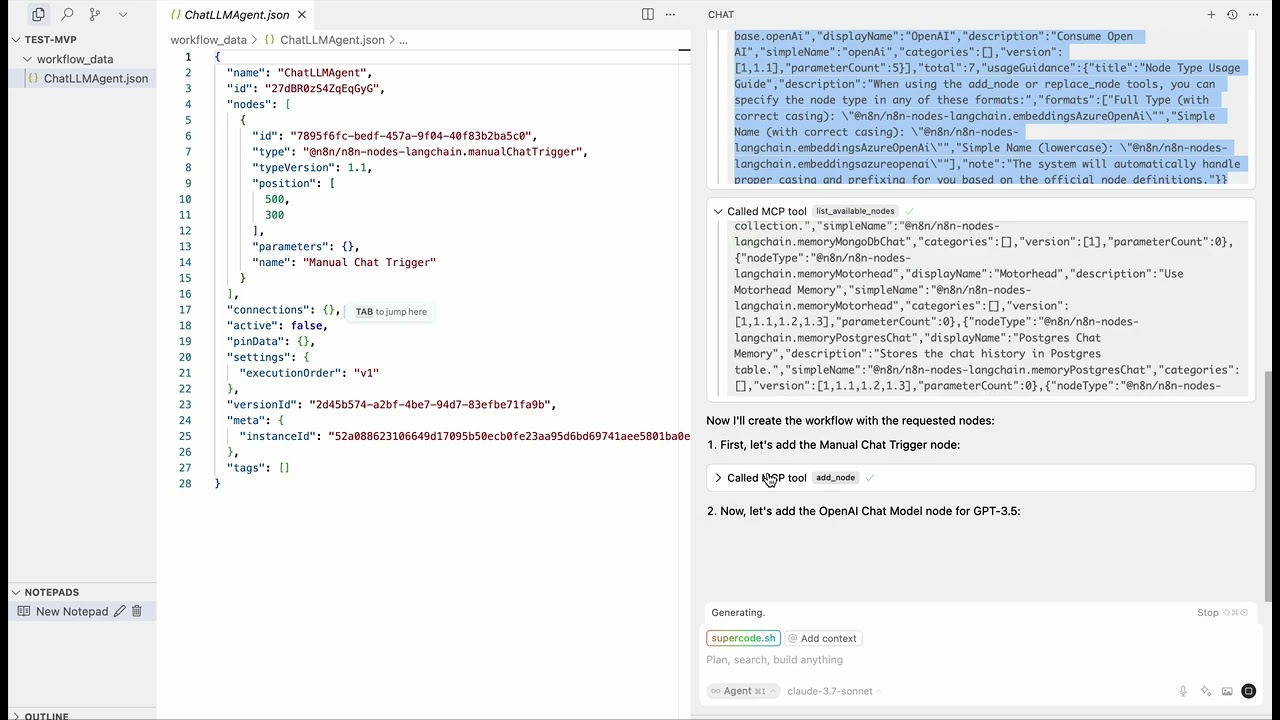
n8n Workflow Builder MCP Server transforms workflow automation by enabling you to create and manage n8n workflows through conversational AI. No more manual JSON editing or complex UI navigation—just describe what you need in natural language, and let AI build it for you.
The Problem It Solves
- ❌ Manual workflow building is time-consuming and error-prone
- ❌ Complex JSON editing requires deep technical knowledge
- ❌ Switching between IDE and n8n UI breaks your development flow
- ❌ Managing multiple n8n environments (dev, staging, prod) is tedious
The Solution
- ✅ Build workflows conversationally using Claude AI or Cursor IDE
- ✅ Natural language interface - describe workflows in plain English
- ✅ Multi-instance support - manage dev, staging, and production from one place
- ✅ 17 powerful tools - complete workflow lifecycle management
- ✅ Stay in your IDE - no context switching required
---
✨ Key Features
<table>
<tr>
<td width="50%">
🤖 AI-Powered Workflow Creation
Create complex n8n workflows by simply describing what you need. Claude AI and Cursor IDE understand your intent and generate production-ready workflows.🌍 Multi-Instance Management
Seamlessly manage multiple n8n environments (production, staging, development) from a single MCP server with intelligent instance routing.🛠️ 17 Comprehensive Tools
Complete workflow lifecycle coverage: - 8 Workflow Tools - Create, update, delete, activate, execute - 4 Execution Tools - Monitor, retry, analyze runs - 5 Tag Tools - Organize and categorize workflows - 6 Credential Tools (Epic 2) - Secure credential management</td>
<td width="50%">
💬 Natural Language Interface
No JSON editing required. Build workflows like this:> "Create a webhook workflow that validates customer emails, sends a Slack notification, and stores data in PostgreSQL"
🔒 Secure by Design
- Built-in credential protection - API key encryption - Secure multi-instance configuration - Never exposes sensitive data in logs📚 Comprehensive Documentation
- 38+ documentation pages with guides and tutorials - Interactive examples and workflow patterns - Troubleshooting guides and FAQs - API reference with complete tool documentation</td>
</tr>
</table>
---
🚀 Quick Start
Prerequisites
- Node.js v14+ (v18+ recommended)
- npm v7+
- n8n instance with API access (tested with n8n v1.82.3+)
- Claude Desktop or Cursor IDE
Installation
```bash
Sign in to leave a review
Use Google, GitHub, or an email account so ratings stay tied to real people.
No reviews posted yet.