
Notion MCP Server
About
An MCP server for the Notion API, allowing language models to interact with Notion workspaces.
Explore
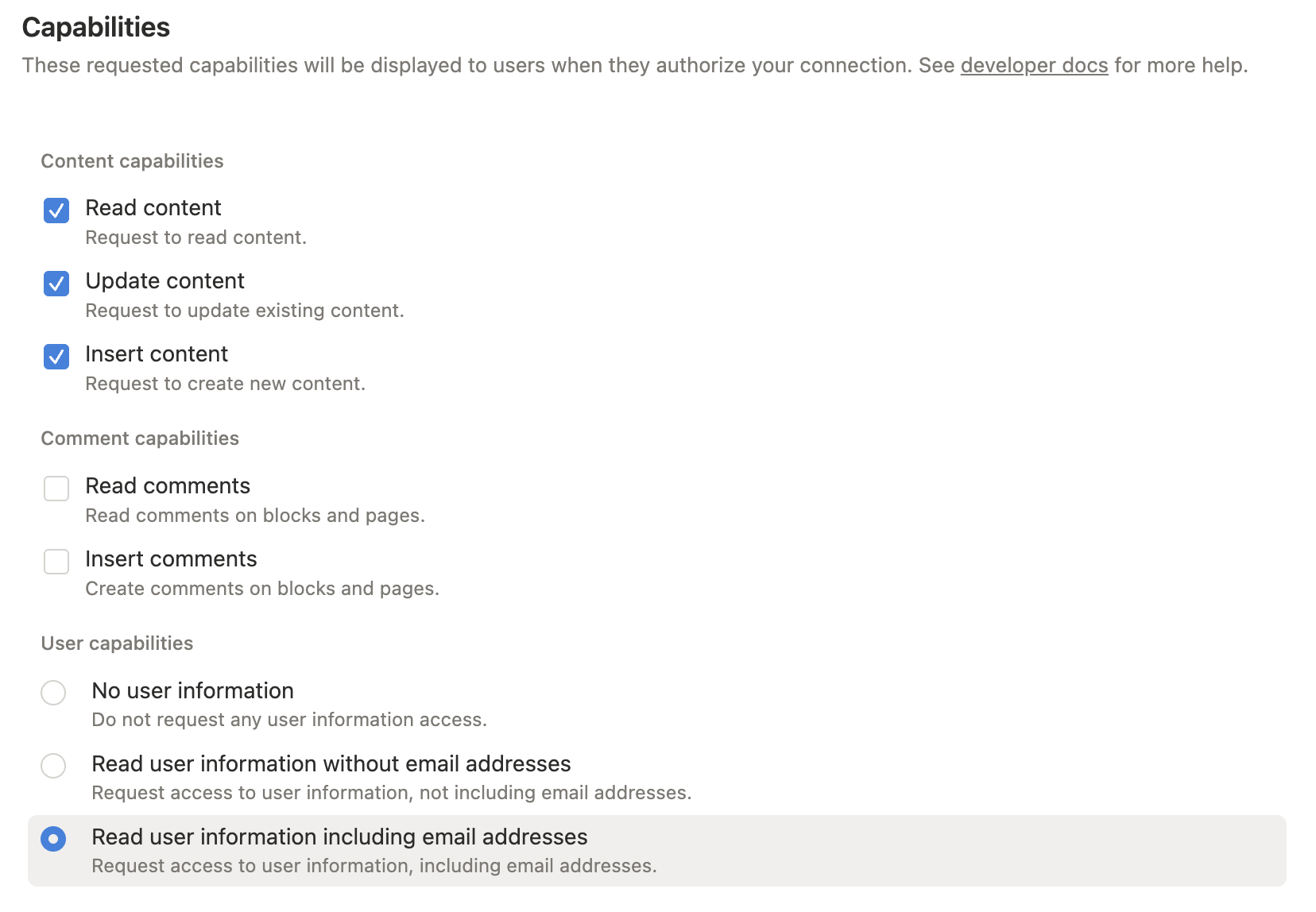
Grant only the capabilities you need:
- Read content: required for search, page reads, data source retrieval, and queries.
- Insert content: required for creating pages/items and appending blocks.
- Update content: required for updating pages, blocks, and data source schemas.
- Read comments / Insert comments: required only for comment tools.
- User information: required only when using user lookup tools.
For full functionality during setup, enable read, insert, and update content. Add comment or user capabilities only if you plan to use those tools.

Setting up with Highlight
This MCP is not yet compatible with Highlight’s one-click setup. However, you can still use it with Highlight by following these steps:
- Download and install Highlight from highlightai.com/download
- Navigate to the plugins tab and select "Add Custom Plugin"
-
Configure the plugin with the settings below
Plugin Name
Notion MCP ServerCommand (node, npx, python, etc.)Please refer to the README for specific instructions on how to obtain API keys or other required environment variables.
- Enable "Start Automatically" if you want the plugin to start when Highlight launches





From the repository
Add this server to an MCP host such as Claude Desktop:
{
"mcpServers": {
"notion": {
"command": "npx",
"args": ["-y", "@suekou/mcp-notion-server"],
"env": {
"NOTION_API_TOKEN": "your-integration-token"
}
}
}
}
Restart your MCP host after saving the configuration.
Grant only the capabilities you need:
- Read content: required for search, page reads, data source retrieval, and queries.
- Insert content: required for creating pages/items and appending blocks.
- Update content: required for updating pages, blocks, and data source schemas.
- Read comments / Insert comments: required only for comment tools.
- User information: required only when using user lookup tools.
For full functionality during setup, enable read, insert, and update content. Add comment or user capabilities only if you plan to use those tools.
For Cursor, Claude Desktop, and other MCP hosts, add this server config to your MCP settings:
{
"mcpServers": {
"notion": {
"command": "npx",
"args": ["-y", "@suekou/mcp-notion-server"],
"env": {
"NOTION_API_TOKEN": "secret_xxxxxxxxxxxxxxxxxxxxxxxxxxxxxxxxxxxxxxxxxxx"
}
}
}
}
For a locally built checkout:
{
"mcpServers": {
"notion": {
"command": "node",
"args": ["/absolute/path/to/suekou-mcp-notion-server/build/index.js"],
"env": {
"NOTION_API_TOKEN": "secret_xxxxxxxxxxxxxxxxxxxxxxxxxxxxxxxxxxxxxxxxxxx"
}
}
}
}
notion_open_data_source_app
Open an interactive Notion Data Source Explorer MCP App for schema inspection, filter building, querying, and item creation from simple values.
notion_open_page_workbench
Open an interactive Notion Page Workbench MCP App for reading page content, selecting block IDs, updating simple blocks, and appending Markdown.
notion_append_block_children
Append new children blocks to a specified parent block in Notion. Requires insert content capabilities. Use the optional 'position' object to insert at the start, end, or after a specific block.
notion_append_content
Append common Notion content without writing raw Notion block JSON. Use this for everyday page editing when the user wants to add paragraphs, headings, lists, todos, quotes, callouts, code blocks, or dividers. For unsupported block types or advanced rich text annotations, use notion_append_block_children with raw Notion block objects.
notion_append_markdown
Append a safe subset of Markdown to a Notion page or block without writing raw Notion block JSON. Supports headings (#, ##, ###), paragraphs, bullet items, numbered items, todos (- [ ] / - [x]), quotes, dividers, and fenced code blocks. Use this when the user provides Markdown-like content and wants it appended; use raw block tools for tables, images, rich text annotations, nested lists, or advanced Notion blocks.
notion_update_content
Update an existing Notion block without writing raw Notion block JSON. Use this after notion_read_page gives you a block ID and you need to replace the text or simple fields of an existing paragraph, heading, list item, todo, quote, callout, or code block. The item.type must match the block's current type; this tool will reject mismatches so the model can correct itself.
notion_update_content_batch
Update multiple existing Notion blocks without writing raw Notion block JSON. Use this after notion_read_page when the user wants several simple text edits at once. The server retrieves every target block and validates all item.type values before applying updates, so block type mistakes fail before any write is attempted.
notion_retrieve_block
Retrieve a block from Notion
notion_retrieve_block_children
Retrieve the children of a block
notion_delete_block
Delete a block in Notion
notion_update_block
Update the content of a block in Notion based on its type. The update replaces the entire value for a given field.
notion_retrieve_page
Retrieve a page from Notion
notion_read_page
Read a Notion page with compact page metadata plus block content in an AI-friendly outline or Markdown shape. Use this after notion_find when you need to understand or edit a page. It fetches child blocks with max_depth and max_blocks limits so large pages do not overwhelm the model. The outline includes stable block IDs that can be used with notion_append_content position.after_block.
notion_update_page_properties
Update properties of a page or an item in a Notion database
notion_list_all_users
List all users in the Notion workspace. **Note:** This function requires upgrading to the Notion Enterprise plan and using an Organization API key to avoid permission errors.
notion_retrieve_user
Retrieve a specific user by user_id in Notion. **Note:** This function requires upgrading to the Notion Enterprise plan and using an Organization API key to avoid permission errors.
notion_retrieve_bot_user
Retrieve the bot user associated with the current token in Notion
notion_retrieve_database
Retrieve a Notion database container and its child data_sources. Use this to discover which data_source_id should be used for query, schema, and item creation operations.
notion_create_database
Create a Notion database and its initial data source. Use this when the user wants a new database. For Notion API 2025-09-03+, put the initial schema under initial_data_source.properties.
notion_create_data_source
Add an additional Notion data source to an existing database. Do not use this to create a new database; use notion_create_database for that.
notion_query_data_source
Query a Notion data source with filters, sorts, and pagination. Use notion_retrieve_database first when you only have a database ID and need to discover its data_source_id.
notion_query_data_source_by_values
Query a Notion data source using simple schema-aware filters and sorts instead of raw Notion filter JSON. Use this after notion_inspect_data_source when the user asks for common queries like Status equals Done, Tags contains AI, Due on or before a date, Estimate greater than 3, or Done equals false. The server validates property names, option names, value types, and supported operators before calling Notion.
notion_retrieve_data_source
Retrieve metadata and property schema for a Notion data source.
notion_update_data_source
Update a Notion data source title, description, or properties.
notion_create_data_source_item
Create a new page item in a Notion data source. Use the data_source_id, not the database_id, as the parent.
notion_create_data_source_item_from_values
Create a new page item in a Notion data source using simple property values instead of raw Notion property JSON. The server retrieves the data source schema and converts common property types for you: title, rich_text, number, checkbox, select, status, multi_select, date, url, email, phone_number, relation, and people. Use notion_inspect_data_source first when you need valid property names or option values.
notion_create_comment
Create a comment in Notion. This requires the integration to have 'insert comment' capabilities. You can either specify a page parent or a discussion_id, but not both.
notion_retrieve_comments
Retrieve a list of unresolved comments from a Notion page or block. Requires the integration to have 'read comment' capabilities.
notion_find
Find Notion pages or data sources and return compact, AI-friendly candidates with stable IDs and suggested next tools. Use this before low-level retrieve/query tools when the user gives a title, partial name, or vague target. Prefer this over raw notion_search for discovery because it trims noisy API fields and highlights the IDs needed for the next action.
notion_inspect_data_source
Inspect a Notion data source schema and return a compact property summary for AI agents. Use this before creating or updating items so the model can choose valid property names, option values, and relation targets without reading the full Notion API object.
notion_search
Search pages or data sources by title in Notion
Claude Desktop / Cursor
Paste into your MCP client config file to install this server.
{
    "mcpServers": {
        "notion mcp server": {
            "notion": {
                "command": "npx",
                "args": [
                    "-y",
                    "@suekou/mcp-notion-server"
                ],
                "env": {
                    "NOTION_API_TOKEN": "your-integration-token"
                }
            }
        }
    }
}McpServers
{
"notion": {
"command": "npx",
"args": [
"-y",
"@suekou/mcp-notion-server"
],
"env": {
"NOTION_API_TOKEN": "your-integration-token"
}
}
}AI-friendly MCP server for the Notion API. It helps agents find, read, query, and update Notion workspaces while keeping responses compact enough for day-to-day AI workflows.
This server targets the Notion API 2026-03-11 and uses the current database/data source model. It exposes MCP tools, prompts, resources, structured tool results, and optional MCP Apps for interactive Notion workflows.
Highlights
- Search and target discovery with notion_find.
- Compact page reading with stable block IDs via notion_read_page.
- Data source schema inspection with notion_inspect_data_source.
- Schema-aware data source querying and item creation with simple values.
- Simple page editing tools for paragraphs, headings, lists, todos, quotes, callouts, code blocks, dividers, and safe Markdown append.
- Raw Notion API tools for advanced block, page, database, data source, comment, and user operations.
- Optional MCP Apps: Data Source Explorer and Page Workbench.
Quick Start
Add this server to an MCP host such as Claude Desktop:
{
  "mcpServers": {
    "notion": {
      "command": "npx",
      "args": ["-y", "@suekou/mcp-notion-server"],
      "env": {
        "NOTION_API_TOKEN": "your-integration-token"
      }
    }
  }
}
Restart your MCP host after saving the configuration.
Setup Guide
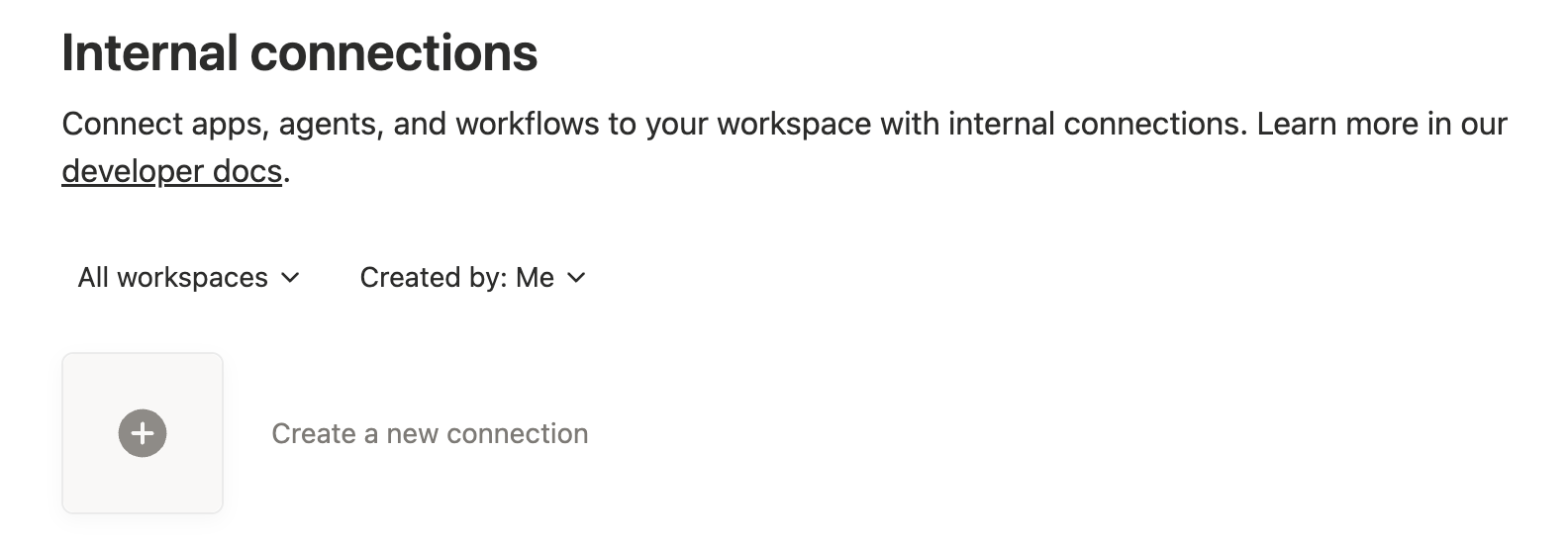
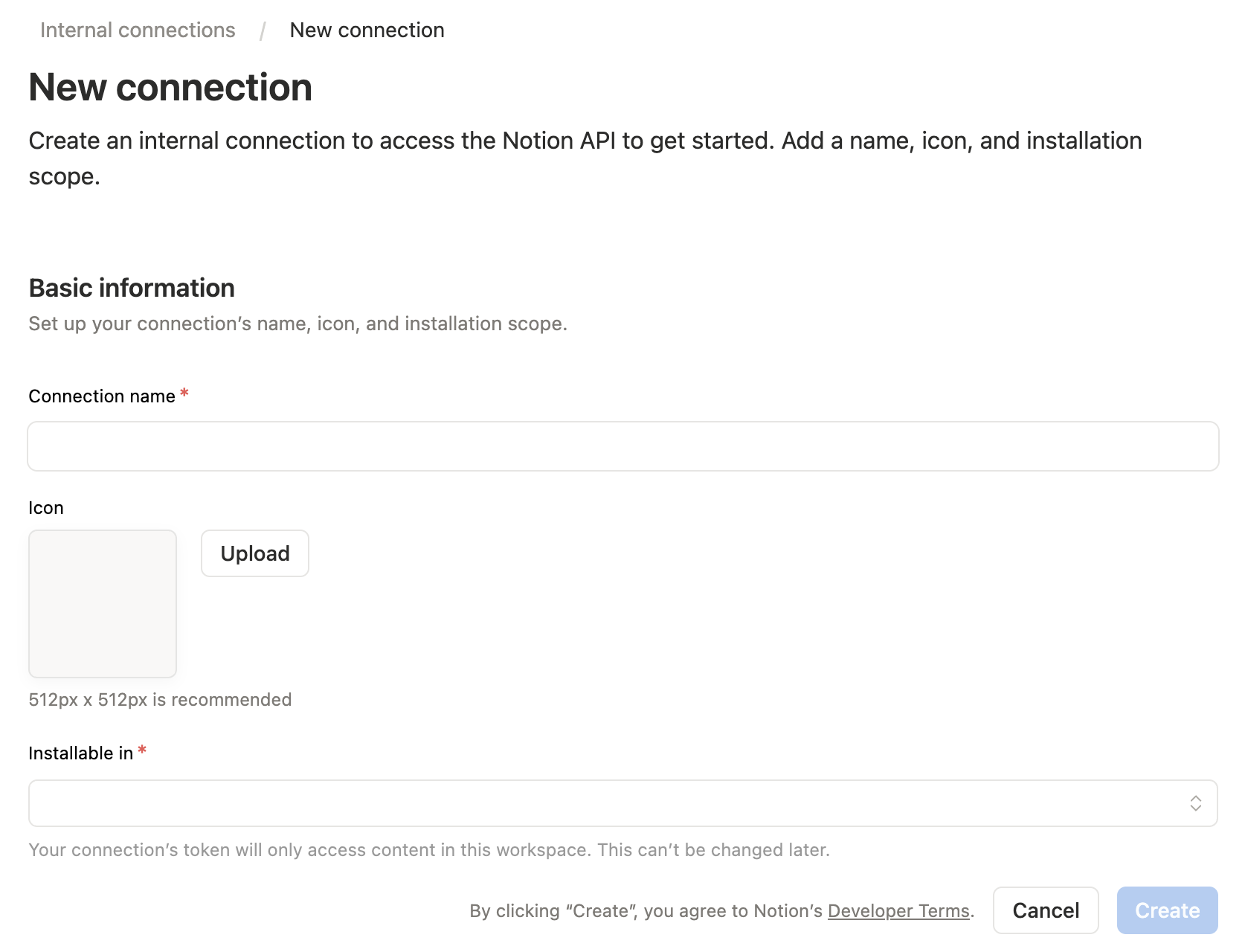
1. Create a Notion integration
Open the Notion integrations dashboard, then create a new internal integration.
2. Configure capabilities
Grant only the capabilities you need:
- Read content: required for search, page reads, data source retrieval, and queries.
- Insert content: required for creating pages/items and appending blocks.
- Update content: required for updating pages, blocks, and data source schemas.
- Read comments / Insert comments: required only for comment tools.
- User information: required only when using user lookup tools.
For full functionality during setup, enable read, insert, and update content. Add comment or user capabilities only if you plan to use those tools.
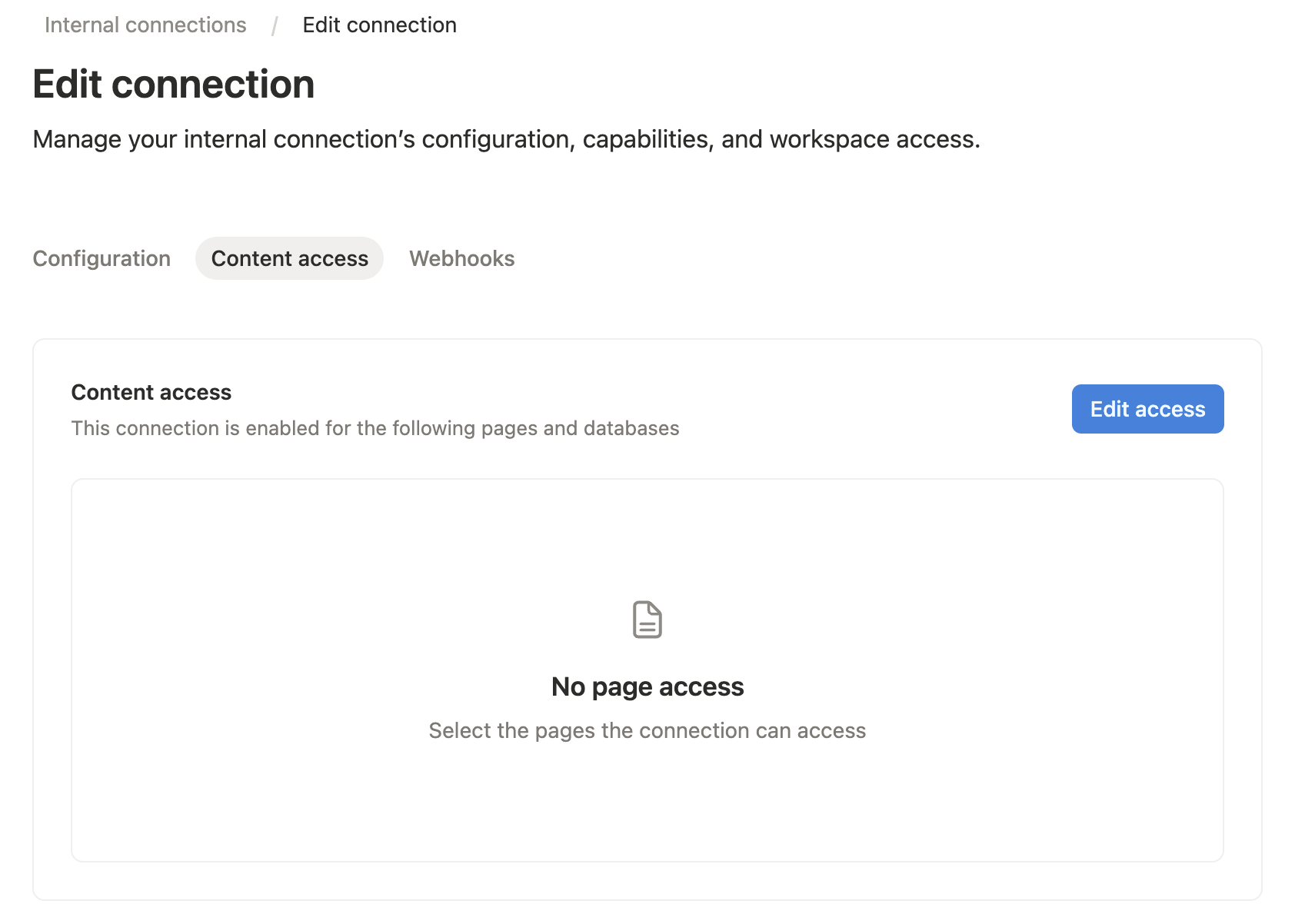
3. Grant content access
Open the Content access tab for your integration, then select the pages or databases you want the MCP server to read or edit.
You can also grant access from the target Notion page or database: open the ... menu, choose Connections, then add your integration.
Notion only lets an integration access pages and databases that have been shared with it. A connection added to a page can also access that page's children.
4. Copy the internal integration token
Copy the integration secret. This value becomes NOTION_API_TOKEN in your MCP host config.

5. Configure your MCP host
For Cursor, Claude Desktop, and other MCP hosts, add this server config to your MCP settings:
{
  "mcpServers": {
    "notion": {
      "command": "npx",
      "args": ["-y", "@suekou/mcp-notion-server"],
      "env": {
        "NOTION_API_TOKEN": "secret_xxxxxxxxxxxxxxxxxxxxxxxxxxxxxxxxxxxxxxxxxxx"
      }
    }
  }
}
For a locally built checkout:
{
  "mcpServers": {
    "notion": {
      "command": "node",
      "args": ["/absolute/path/to/suekou-mcp-notion-server/build/index.js"],
      "env": {
        "NOTION_API_TOKEN": "secret_xxxxxxxxxxxxxxxxxxxxxxxxxxxxxxxxxxxxxxxxxxx"
      }
    }
  }
}
Recommended Workflow
1. Use notion_find to locate a page or data source.
2. Use notion_read_page for page context and editable block IDs.
3. Use notion_inspect_data_source before querying or creating data source items.
4. Use notion_query_data_source_by_values and notion_create_data_source_item_from_values for common data source work.
5. Use notion_append_markdown, notion_append_content, notion_update_content, or notion_update_content_batch for normal page edits.
6. Fall back to raw JSON tools only when the simplified tools do not cover the Notion API shape you need.
For Developers
These references are mainly for development, customization, and advanced MCP workflows:
- Configuration: environment variables, command-line arguments, MCP host examples, development commands, and troubleshooting.
- Tools: complete tool reference grouped by workflow area.
- Workflows: practical read, write, data source, migration, and error-handling guidance.
- MCP Apps: interactive Data Source Explorer and Page Workbench details.
Development
This project uses Node.js 22 or newer and pnpm.
pnpm install --frozen-lockfile
pnpm run build
pnpm test
Use the MCP inspector during local development:
pnpm run inspector
License
This MCP server is licensed under the MIT License. This means you are free to use, modify, and distribute the software, subject to the terms and conditions of the MIT License. For more details, please see the LICENSE file in the project repository.
Sign in to leave a review
Use Google, GitHub, or an email account so ratings stay tied to real people.
No reviews posted yet.