MCP Server for Asana
About
# MCP Server for Asana [](https://www.npmjs.com/package/@roychri/mcp-server-asana) This Model Context Protocol server implementation of Asana allows you to talk to Asana API from MCP Client such as Anthropic's Claude Desktop Application, and…
Details
- License
- MIT
Explore
- List and search workspaces, projects, and tasks
- Create, update, and read task details
- Add comments/stories to tasks (create_task_story)
- Manage subtasks and task dependencies
- Query project statuses and section information
- Read-only mode to prevent accidental modifications
- Advanced task filtering with custom fields and sorting

Setting up with Highlight
This MCP is not yet compatible with Highlight’s one-click setup. However, you can still use it with Highlight by following these steps:
- Download and install Highlight from highlightai.com/download
- Navigate to the plugins tab and select "Add Custom Plugin"
-
Configure the plugin with the settings below
Plugin Name
MCP Server for AsanaCommand (node, npx, python, etc.)Please refer to the README for specific instructions on how to obtain API keys or other required environment variables.
- Enable "Start Automatically" if you want the plugin to start when Highlight launches





From the repository
In the AI tool of your choice (ex: Claude Desktop) ask something about asana tasks, projects, workspaces, and/or comments. Mentioning the word "asana" will increase the chance of having the LLM pick the right tool.
Example:
> How many unfinished asana tasks do we have in our Sprint 30 project?
Another example:
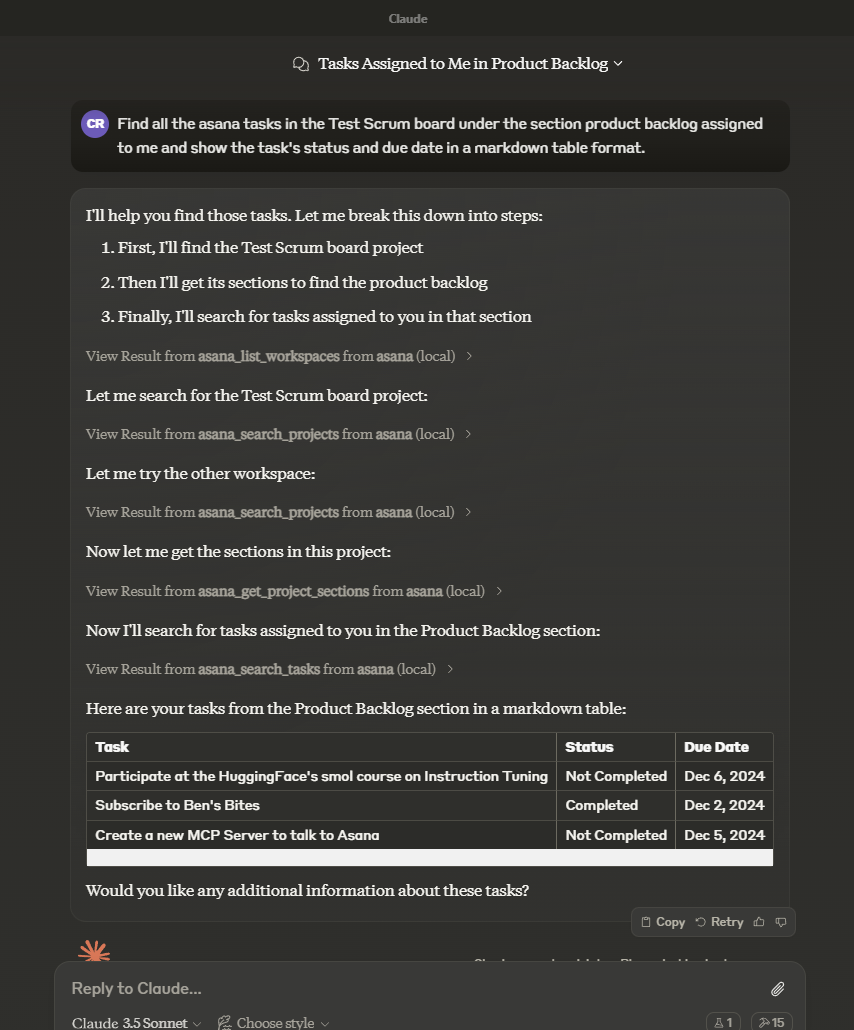
- ASANA_ACCESS_TOKEN: (Required) Your Asana access token
- READ_ONLY_MODE: (Optional) Set to 'true' to disable all write operations. In this mode:
- Tools that modify Asana data (create, update, delete) will be disabled
- The create-task prompt will be disabled
- Only read operations will be available
This is useful for testing or when you want to ensure no changes can be made to your Asana workspace.
asana_list_workspaces
List all available workspaces in Asana
asana_search_projects
Search for projects in Asana using name pattern matching
asana_get_my_tasks
Get tasks from the authenticated user's 'My Tasks' list in a workspace. Returns the user's personal task list including sections like Inbox, Today, This Week, etc.
asana_search_tasks
Search tasks in a workspace with advanced filtering options
asana_get_task
Get detailed information about a specific task
asana_create_task
Create a new task in a project
asana_get_task_stories
Get comments and stories for a specific task
asana_update_task
Update an existing task's details
asana_get_project
Get detailed information about a specific project
asana_get_project_task_counts
Get the number of tasks in a project
asana_get_project_sections
Get sections in a project
asana_get_tasks_for_project
Get all tasks in a project. Use this instead of search_tasks when you need to list tasks in a specific project. Supports pagination and optional field selection.
asana_create_project
Create a new project in a workspace or team
asana_create_task_story
Create a comment or story on a task. Either text or html_text is required.
asana_add_task_dependencies
Set dependencies for a task
asana_add_task_dependents
Set dependents for a task (tasks that depend on this task)
asana_create_subtask
Create a new subtask for an existing task
asana_get_subtasks
Get all subtasks of a given task. Returns a compact representation of each subtask.
asana_get_multiple_tasks_by_gid
Get detailed information about multiple tasks by their GIDs (maximum 25 tasks)
asana_get_project_status
Get a project status update
asana_get_project_statuses
Get all status updates for a project
asana_create_project_status
Create a new status update for a project
asana_delete_project_status
Delete a project status update
asana_set_parent_for_task
Set the parent of a task and position the subtask within the other subtasks of that parent
asana_get_tag
Get detailed information about a specific tag
asana_get_tags_for_task
Get a task's tags
asana_get_tags_for_workspace
Get tags in a workspace
asana_update_tag
Update an existing tag
asana_delete_tag
Delete a tag
asana_get_tasks_for_tag
Get tasks for a specific tag
asana_create_tag_for_workspace
Create a new tag in a workspace
asana_add_tag_to_task
Add a tag to a task
asana_remove_tag_from_task
Remove a tag from a task
asana_add_project_to_task
Add an existing task to a project. If no positioning arguments are given, the task will be added to the end of the project.
asana_remove_project_from_task
Remove a task from a project. The task will still exist in the system, but it will not be in the project anymore.
asana_delete_task
Delete a task. This permanently removes the task and cannot be undone.
asana_create_section
Create a new section in a project
asana_update_section
Update a section (rename it)
asana_delete_section
Delete a section from a project
asana_add_task_to_section
Move a task to a section within its project
asana_update_project
Update a project's details (name, description, etc.)
1. asana_list_workspaces
List all available workspaces in Asana
Optional input:
opt_fields (string): Comma-separated list of optional fields to include
Returns: List of workspaces
2. asana_search_projects
Search for projects in Asana using name pattern matching
Required input:
workspace (string): The workspace to search in
name_pattern (string): Regular expression pattern to match project names
Optional input:
archived (boolean): Only return archived projects (default: false)
opt_fields (string): Comma-separated list of optional fields to include
Returns: List of matching projects
3. asana_search_tasks
Search tasks in a workspace with advanced filtering options
Required input:
workspace (string): The workspace to search in
Optional input:
text (string): Text to search for in task names and descriptions
resource_subtype (string): Filter by task subtype (e.g. milestone)
completed (boolean): Filter for completed tasks
is_subtask (boolean): Filter for subtasks
has_attachment (boolean): Filter for tasks with attachments
is_blocked (boolean): Filter for tasks with incomplete dependencies
is_blocking (boolean): Filter for incomplete tasks with dependents
assignee, projects, sections, tags, teams, and many other advanced filters
sort_by (string): Sort by due_date, created_at, completed_at, likes, modified_at (default: modified_at)
sort_ascending (boolean): Sort in ascending order (default: false)
opt_fields (string): Comma-separated list of optional fields to include
custom_fields (object): Object containing custom field filters
Returns: List of matching tasks
4. asana_get_task
Get detailed information about a specific task
Required input:
task_id (string): The task ID to retrieve
Optional input:
opt_fields (string): Comma-separated list of optional fields to include
Returns: Detailed task information
5. asana_create_task
Create a new task in a project
Required input:
project_id (string): The project to create the task in
name (string): Name of the task
Optional input:
notes (string): Description of the task
html_notes (string): HTML-like formatted description of the task
due_on (string): Due date in YYYY-MM-DD format
assignee (string): Assignee (can be 'me' or a user ID)
followers (array of strings): Array of user IDs to add as followers
parent (string): The parent task ID to set this task under
projects (array of strings): Array of project IDs to add this task to
resource_subtype (string): The type of the task (default_task or milestone)
custom_fields (object): Object mapping custom field GID strings to their values
Returns: Created task information
6. asana_get_task_stories
Get comments and stories for a specific task
Required input:
task_id (string): The task ID to get stories for
Optional input:
opt_fields (string): Comma-separated list of optional fields to include
Returns: List of task stories/comments
7. asana_update_task
Update an existing task's details
Required input:
task_id (string): The task ID to update
Optional input:
name (string): New name for the task
notes (string): New description for the task
html_notes (string): HTML-like formatted description of the task (subset of HTML tags supported)
due_on (string): New due date in YYYY-MM-DD format
assignee (string): New assignee (can be 'me' or a user ID)
followers (array): Array of user IDs to add as followers
parent (string): The parent task ID to move this task under
completed (boolean): Mark task as completed or not
resource_subtype (string): The type of the task (default_task or milestone)
custom_fields (object): Object mapping custom field GID strings to their values
Returns: Updated task information
8. asana_get_project
Get detailed information about a specific project
Required input:
project_id (string): The project ID to retrieve
Optional input:
opt_fields (string): Comma-separated list of optional fields to include
Returns: Detailed project information
9. asana_get_project_task_counts
Get the number of tasks in a project
Required input:
project_id (string): The project ID to get task counts for
Optional input:
opt_fields (string): Comma-separated list of optional fields to include
Returns: Task count information
10. asana_get_project_sections
Get sections in a project
Required input:
project_id (string): The project ID to get sections for
Optional input:
opt_fields (string): Comma-separated list of optional fields to include
Returns: List of project sections
11. asana_create_task_story
Create a comment or story on a task
Required input:
task_id (string): The task ID to add the story to
text (string): The text content of the story/comment
Optional input:
opt_fields (string): Comma-separated list of optional fields to include
Returns: Created story information
12. asana_add_task_dependencies
Set dependencies for a task
Required input:
task_id (string): The task ID to add dependencies to
dependencies (array of strings): Array of task IDs that this task depends on
Returns: Updated task dependencies
13. asana_add_task_dependents
Set dependents for a task (tasks that depend on this task)
Required input:
task_id (string): The task ID to add dependents to
dependents (array of strings): Array of task IDs that depend on this task
Returns: Updated task dependents
14. asana_create_subtask
Create a new subtask for an existing task
Required input:
parent_task_id (string): The parent task ID to create the subtask under
name (string): Name of the subtask
Optional input:
notes (string): Description of the subtask
due_on (string): Due date in YYYY-MM-DD format
assignee (string): Assignee (can be 'me' or a user ID)
opt_fields (string): Comma-separated list of optional fields to include
Returns: Created subtask information
15. asana_get_multiple_tasks_by_gid
Get detailed information about multiple tasks by their GIDs (maximum 25 tasks)
Required input:
task_ids (array of strings or comma-separated string): Task GIDs to retrieve (max 25)
Optional input:
opt_fields (string): Comma-separated list of optional fields to include
Returns: List of detailed task information
16. asana_get_project_status
Get a project status update
Required input:
project_status_gid (string): The project status GID to retrieve
Optional input:
opt_fields (string): Comma-separated list of optional fields to include
Returns: Project status information
17. asana_get_project_statuses
Get all status updates for a project
Required input:
project_gid (string): The project GID to get statuses for
Optional input:
limit (number): Results per page (1-100)
offset (string): Pagination offset token
opt_fields (string): Comma-separated list of optional fields to include
Returns: List of project status updates
18. asana_create_project_status
Create a new status update for a project
Required input:
project_gid (string): The project GID to create the status for
text (string): The text content of the status update
Optional input:
color (string): The color of the status (green, yellow, red)
title (string): The title of the status update
html_text (string): HTML formatted text for the status update
opt_fields (string): Comma-separated list of optional fields to include
Returns: Created project status information
19. asana_delete_project_status
Delete a project status update
Required input:
project_status_gid (string): The project status GID to delete
Returns: Deletion confirmation
20. asana_set_parent_for_task
Set the parent of a task and position the subtask within the other subtasks of that parent
Required input:
task_id (string): The task ID to operate on
data (object):
parent (string): The new parent of the task, or null for no parent
Optional input:
insert_after (string): A subtask of the parent to insert the task after, or null to insert at the beginning of the list
insert_before (string): A subtask of the parent to insert the task before, or null to insert at the end of the list
opt_fields (string): Comma-separated list of optional fields to include
Returns: Updated task information
21. asana_get_tag
Get detailed information about a specific tag
Required input:
tag_gid (string): Globally unique identifier for the tag
Optional input:
opt_fields (string): Comma-separated list of optional fields to include
Returns: Detailed tag information
22. asana_get_tags_for_task
Get a task's tags
Required input:
task_gid (string): The task to operate on
Optional input:
limit (number): Results per page. The number of objects to return per page. The value must be between 1 and 100.
offset (string): Offset token. An offset to the next page returned by the API.
opt_fields (string): Comma-separated list of optional fields to include
Returns: List of tags associated with the task
23. asana_get_tasks_for_tag
Get tasks for a specific tag
Required input:
tag_gid (string): The tag GID to retrieve tasks for
Optional input:
opt_fields (string): Comma-separated list of optional fields to include
opt_pretty (boolean): Provides the response in a 'pretty' format
limit (integer): The number of objects to return per page. The value must be between 1 and 100.
offset (string): An offset to the next page returned by the API.
Returns: List of tasks for the specified tag
24. asana_get_tags_for_workspace
Get tags in a workspace
Required input:
workspace_gid (string): Globally unique identifier for the workspace or organization
Optional input:
limit (integer): Results per page. The number of objects to return per page. The value must be between 1 and 100.
offset (string): Offset token. An offset to the next page returned by the API.
opt_fields (string): Comma-separated list of optional fields to include
Returns: List of tags in the workspace
25. asana_update_tag
Update an existing tag
Required input:
tag_gid (string): Globally unique identifier for the tag
Optional input:
name (string): Name of the tag
color (string): Color of the tag. Can be one of: dark-pink, dark-green, dark-blue, dark-red, dark-teal, dark-brown, dark-orange, dark-purple, dark-warm-gray, light-pink, light-green, light-blue, light-red, light-teal, light-brown, light-orange, light-purple, light-warm-gray
notes (string): Notes about the tag
opt_fields (string): Comma-separated list of optional fields to include
Returns: Updated tag information
26. asana_delete_tag
Delete a tag
Required input:
tag_gid (string): Globally unique identifier for the tag
Returns: Deletion confirmation
27. asana_create_tag_for_workspace
Create a new tag in a workspace
Required input:
workspace_gid (string): Globally unique identifier for the workspace or organization
name (string): Name of the tag
Optional input:
color (string): Color of the tag. Can be one of: dark-pink, dark-green, dark-blue, dark-red, dark-teal, dark-brown, dark-orange, dark-purple, dark-warm-gray, light-pink, light-green, light-blue, light-red, light-teal, light-brown, light-orange, light-purple, light-warm-gray
notes (string): Notes about the tag
opt_fields (string): Comma-separated list of optional fields to include
Returns: Created tag information
28. asana_add_tag_to_task
Add a tag to a task
Required input:
task_gid (string): The task GID to add the tag to
tag_gid (string): The tag GID to add to the task
Returns: Success response
29. asana_remove_tag_from_task
Remove a tag from a task
Required input:
task_gid (string): The task GID to remove the tag from
tag_gid (string): The tag GID to remove from the task
Returns: Success response
30. asana_add_project_to_task
Add an existing task to a project
Required input:
task_id (string): The task ID to add to the project
project_id (string): The project ID to add the task to
Optional input:
section (string): The section ID to add the task to within the project
insert_after (string): A task ID to insert this task after. At most one of insert_before, insert_after, or section should be specified.
insert_before (string): A task ID to insert this task before. At most one of insert_before, insert_after, or section should be specified.
Returns: Success message confirming the task was added to the project
Notes: If no positioning arguments are given, the task will be added to the end of the project
31. asana_remove_project_from_task
Remove a task from a project
Required input:
task_id (string): The task ID to remove from the project
project_id (string): The project ID to remove the task from
Returns: Success message confirming the task was removed from the project
Notes: The task will still exist in the system, but it will not be in the project anymore
32. asana_delete_task
Delete a task permanently
Required input:
task_id (string): The task ID to delete
Returns: Success message confirming the task was deleted
Notes: This action cannot be undone. The task will be permanently removed.
33. asana_create_project
Create a new project in a workspace or team
Required input:
workspace (string): The workspace GID to create the project in
name (string): Name of the project
Optional input:
team (string): The team GID (required for organization workspaces)
notes (string): Description or notes for the project
color (string): Color of the project (e.g., dark-pink, dark-green, light-blue)
privacy_setting (string): Privacy setting (public_to_workspace, private_to_team, private)
default_view (string): Default view (list, board, calendar, timeline)
opt_fields (string): Comma-separated list of optional fields to include
Returns: The created project object
34. asana_update_project
Update a project's details (name, description, etc.)
Required input:
project_id (string): The project GID to update
Optional input:
name (string): New name for the project
notes (string): New plain text description for the project
html_notes (string): New HTML formatted description (must be valid Asana XML)
color (string): Color of the project (e.g., dark-pink, dark-green, light-blue)
privacy_setting (string): Privacy setting (public_to_workspace, private_to_team, private)
opt_fields (string): Comma-separated list of optional fields to include
Returns: Updated project information
35. asana_create_section
Create a new section in a project
Required input:
project_id (string): The project GID to create the section in
name (string): Name of the new section
Optional input:
opt_fields (string): Comma-separated list of optional fields to include
Returns: Created section information
36. asana_update_section
Update a section (rename it)
Required input:
section_id (string): The section GID to update
name (string): New name for the section
Optional input:
opt_fields (string): Comma-separated list of optional fields to include
Returns: Updated section information
37. asana_delete_section
Delete a section from a project
Required input:
section_id (string): The section GID to delete
Returns: Deletion confirmation
38. asana_add_task_to_section
Move a task to a section within its project
Required input:
section_id (string): The section GID to add the task to
task_id (string): The task GID to move
Optional input:
insert_before (string): A task GID to insert the task before
insert_after (string): A task GID to insert the task after
Returns: Success confirmation
39. asana_get_subtasks
Get all subtasks of a given task. Returns a compact representation of each subtask.
Required input:
task_gid (string): The GID of the parent task
Optional input:
opt_fields (string): Comma-separated list of optional fields to include (e.g. 'name,completed,assignee,due_on')
Returns: Array of subtask objects
40. asana_get_tasks_for_project
Get all tasks in a project. Use this instead of search_tasks when you need to list tasks in a specific project. Works on free Asana plans (unlike search_tasks which requires premium). Supports pagination and optional field selection.
Required input:
project_id (string): The project GID to get tasks for
Optional input:
opt_fields (string): Comma-separated list of optional fields to include
limit (number): Results per page (1-100)
offset (string): Pagination offset token from a previous response
Returns: Array of task objects
41. asana_get_my_tasks
Get tasks from the authenticated user's 'My Tasks' list in a workspace
Required input:
workspace (string): The workspace GID to get My Tasks from
Optional input:
opt_fields (string): Comma-separated list of optional fields to include
completed_since (string): Only return tasks completed since this time (ISO 8601). Use 'now' to only return incomplete tasks.
Returns: List of tasks from the user's My Tasks list
Claude Desktop / Cursor
Paste into your MCP client config file to install this server.
{
    "mcpServers": {
        "mcp server for asana": {
            "asana": {
                "command": "npx",
                "args": [
                    "-y",
                    "@roychri/mcp-server-asana"
                ],
                "env": {
                    "ASANA_ACCESS_TOKEN": "your-asana-access-token"
                }
            }
        }
    }
}McpServers
{
    "asana": {
        "command": "npx",
        "args": [
            "-y",
            "@roychri/mcp-server-asana"
        ],
        "env": {
            "ASANA_ACCESS_TOKEN": "your-asana-access-token"
        }
    }
}
This Model Context Protocol server implementation of Asana allows you
to talk to Asana API from MCP Client such as Anthropic's Claude
Desktop Application, and many more.
More details on MCP here:
- https://www.anthropic.com/news/model-context-protocol
- https://modelcontextprotocol.io/introduction
- https://github.com/modelcontextprotocol
<a href="https://glama.ai/mcp/servers/ln1qzdhwmc"></a>
Environment Variables
- ASANA_ACCESS_TOKEN: (Required) Your Asana access token
- READ_ONLY_MODE: (Optional) Set to 'true' to disable all write operations. In this mode:
- Tools that modify Asana data (create, update, delete) will be disabled
- The create-task prompt will be disabled
- Only read operations will be available
This is useful for testing or when you want to ensure no changes can be made to your Asana workspace.
Usage
In the AI tool of your choice (ex: Claude Desktop) ask something about asana tasks, projects, workspaces, and/or comments. Mentioning the word "asana" will increase the chance of having the LLM pick the right tool.
Example:
> How many unfinished asana tasks do we have in our Sprint 30 project?
Another example:
Tools
1. asana_list_workspaces
List all available workspaces in Asana
Optional input:
opt_fields (string): Comma-separated list of optional fields to include
Returns: List of workspaces
2. asana_search_projects
Search for projects in Asana using name pattern matching
Required input:
workspace (string): The workspace to search in
name_pattern (string): Regular expression pattern to match project names
Optional input:
archived (boolean): Only return archived projects (default: false)
opt_fields (string): Comma-separated list of optional fields to include
Returns: List of matching projects
3. asana_search_tasks
Search tasks in a workspace with advanced filtering options
Required input:
workspace (string): The workspace to search in
Optional input:
text (string): Text to search for in task names and descriptions
resource_subtype (string): Filter by task subtype (e.g. milestone)
completed (boolean): Filter for completed tasks
is_subtask (boolean): Filter for subtasks
has_attachment (boolean): Filter for tasks with attachments
is_blocked (boolean): Filter for tasks with incomplete dependencies
is_blocking (boolean): Filter for incomplete tasks with dependents
assignee, projects, sections, tags, teams, and many other advanced filters
sort_by (string): Sort by due_date, created_at, completed_at, likes, modified_at (default: modified_at)
sort_ascending (boolean): Sort in ascending order (default: false)
opt_fields (string): Comma-separated list of optional fields to include
custom_fields (object): Object containing custom field filters
Returns: List of matching tasks
4. asana_get_task
Get detailed information about a specific task
Required input:
task_id (string): The task ID to retrieve
Optional input:
opt_fields (string): Comma-separated list of optional fields to include
Returns: Detailed task information
5. asana_create_task
Create a new task in a project
Required input:
project_id (string): The project to create the task in
name (string): Name of the task
Optional input:
notes (string): Description of the task
html_notes (string): HTML-like formatted description of the task
due_on (string): Due date in YYYY-MM-DD format
assignee (string): Assignee (can be 'me' or a user ID)
followers (array of strings): Array of user IDs to add as followers
parent (string): The parent task ID to set this task under
projects (array of strings): Array of project IDs to add this task to
resource_subtype (string): The type of the task (default_task or milestone)
custom_fields (object): Object mapping custom field GID strings to their values
Returns: Created task information
6. asana_get_task_stories
Get comments and stories for a specific task
Required input:
task_id (string): The task ID to get stories for
Optional input:
opt_fields (string): Comma-separated list of optional fields to include
Returns: List of task stories/comments
7. asana_update_task
Update an existing task's details
Required input:
task_id (string): The task ID to update
Optional input:
name (string): New name for the task
notes (string): New description for the task
html_notes (string): HTML-like formatted description of the task (subset of HTML tags supported)
due_on (string): New due date in YYYY-MM-DD format
assignee (string): New assignee (can be 'me' or a user ID)
followers (array): Array of user IDs to add as followers
parent (string): The parent task ID to move this task under
completed (boolean): Mark task as completed or not
resource_subtype (string): The type of the task (default_task or milestone)
custom_fields (object): Object mapping custom field GID strings to their values
Returns: Updated task information
8. asana_get_project
Get detailed information about a specific project
Required input:
project_id (string): The project ID to retrieve
Optional input:
opt_fields (string): Comma-separated list of optional fields to include
Returns: Detailed project information
9. asana_get_project_task_counts
Get the number of tasks in a project
Required input:
project_id (string): The project ID to get task counts for
Optional input:
opt_fields (string): Comma-separated list of optional fields to include
Returns: Task count information
10. asana_get_project_sections
Get sections in a project
Required input:
project_id (string): The project ID to get sections for
Optional input:
opt_fields (string): Comma-separated list of optional fields to include
Returns: List of project sections
11. asana_create_task_story
Create a comment or story on a task
Required input:
task_id (string): The task ID to add the story to
text (string): The text content of the story/comment
Optional input:
opt_fields (string): Comma-separated list of optional fields to include
Returns: Created story information
12. asana_add_task_dependencies
Set dependencies for a task
Required input:
task_id (string): The task ID to add dependencies to
dependencies (array of strings): Array of task IDs that this task depends on
Returns: Updated task dependencies
13. asana_add_task_dependents
Set dependents for a task (tasks that depend on this task)
Required input:
task_id (string): The task ID to add dependents to
dependents (array of strings): Array of task IDs that depend on this task
Returns: Updated task dependents
14. asana_create_subtask
Create a new subtask for an existing task
Required input:
parent_task_id (string): The parent task ID to create the subtask under
name (string): Name of the subtask
Optional input:
notes (string): Description of the subtask
due_on (string): Due date in YYYY-MM-DD format
assignee (string): Assignee (can be 'me' or a user ID)
opt_fields (string): Comma-separated list of optional fields to include
Returns: Created subtask information
15. asana_get_multiple_tasks_by_gid
Get detailed information about multiple tasks by their GIDs (maximum 25 tasks)
Required input:
task_ids (array of strings or comma-separated string): Task GIDs to retrieve (max 25)
Optional input:
opt_fields (string): Comma-separated list of optional fields to include
Returns: List of detailed task information
16. asana_get_project_status
Get a project status update
Required input:
project_status_gid (string): The project status GID to retrieve
Optional input:
opt_fields (string): Comma-separated list of optional fields to include
Returns: Project status information
17. asana_get_project_statuses
Get all status updates for a project
Required input:
project_gid (string): The project GID to get statuses for
Optional input:
limit (number): Results per page (1-100)
offset (string): Pagination offset token
opt_fields (string): Comma-separated list of optional fields to include
Returns: List of project status updates
18. asana_create_project_status
Create a new status update for a project
Required input:
project_gid (string): The project GID to create the status for
text (string): The text content of the status update
Optional input:
color (string): The color of the status (green, yellow, red)
title (string): The title of the status update
html_text (string): HTML formatted text for the status update
opt_fields (string): Comma-separated list of optional fields to include
Returns: Created project status information
19. asana_delete_project_status
Delete a project status update
Required input:
project_status_gid (string): The project status GID to delete
Returns: Deletion confirmation
20. asana_set_parent_for_task
Set the parent of a task and position the subtask within the other subtasks of that parent
Required input:
task_id (string): The task ID to operate on
data (object):
parent (string): The new parent of the task, or null for no parent
Optional input:
insert_after (string): A subtask of the parent to insert the task after, or null to insert at the beginning of the list
insert_before (string): A subtask of the parent to insert the task before, or null to insert at the end of the list
opt_fields (string): Comma-separated list of optional fields to include
Returns: Updated task information
21. asana_get_tag
Get detailed information about a specific tag
Required input:
tag_gid (string): Globally unique identifier for the tag
Optional input:
opt_fields (string): Comma-separated list of optional fields to include
Returns: Detailed tag information
22. asana_get_tags_for_task
Get a task's tags
Required input:
task_gid (string): The task to operate on
Optional input:
limit (number): Results per page. The number of objects to return per page. The value must be between 1 and 100.
offset (string): Offset token. An offset to the next page returned by the API.
opt_fields (string): Comma-separated list of optional fields to include
Returns: List of tags associated with the task
23. asana_get_tasks_for_tag
Get tasks for a specific tag
Required input:
tag_gid (string): The tag GID to retrieve tasks for
Optional input:
opt_fields (string): Comma-separated list of optional fields to include
opt_pretty (boolean): Provides the response in a 'pretty' format
limit (integer): The number of objects to return per page. The value must be between 1 and 100.
offset (string): An offset to the next page returned by the API.
Returns: List of tasks for the specified tag
24. asana_get_tags_for_workspace
Get tags in a workspace
Required input:
workspace_gid (string): Globally unique identifier for the workspace or organization
Optional input:
limit (integer): Results per page. The number of objects to return per page. The value must be between 1 and 100.
offset (string): Offset token. An offset to the next page returned by the API.
opt_fields (string): Comma-separated list of optional fields to include
Returns: List of tags in the workspace
25. asana_update_tag
Update an existing tag
Required input:
tag_gid (string): Globally unique identifier for the tag
Optional input:
name (string): Name of the tag
color (string): Color of the tag. Can be one of: dark-pink, dark-green, dark-blue, dark-red, dark-teal, dark-brown, dark-orange, dark-purple, dark-warm-gray, light-pink, light-green, light-blue, light-red, light-teal, light-brown, light-orange, light-purple, light-warm-gray
notes (string): Notes about the tag
opt_fields (string): Comma-separated list of optional fields to include
Returns: Updated tag information
26. asana_delete_tag
Delete a tag
Required input:
tag_gid (string): Globally unique identifier for the tag
Returns: Deletion confirmation
27. asana_create_tag_for_workspace
Create a new tag in a workspace
Required input:
workspace_gid (string): Globally unique identifier for the workspace or organization
name (string): Name of the tag
Optional input:
color (string): Color of the tag. Can be one of: dark-pink, dark-green, dark-blue, dark-red, dark-teal, dark-brown, dark-orange, dark-purple, dark-warm-gray, light-pink, light-green, light-blue, light-red, light-teal, light-brown, light-orange, light-purple, light-warm-gray
notes (string): Notes about the tag
opt_fields (string): Comma-separated list of optional fields to include
Returns: Created tag information
28. asana_add_tag_to_task
Add a tag to a task
Required input:
task_gid (string): The task GID to add the tag to
tag_gid (string): The tag GID to add to the task
Returns: Success response
29. asana_remove_tag_from_task
Remove a tag from a task
Required input:
task_gid (string): The task GID to remove the tag from
tag_gid (string): The tag GID to remove from the task
Returns: Success response
30. asana_add_project_to_task
Add an existing task to a project
Required input:
task_id (string): The task ID to add to the project
project_id (string): The project ID to add the task to
Optional input:
section (string): The section ID to add the task to within the project
insert_after (string): A task ID to insert this task after. At most one of insert_before, insert_after, or section should be specified.
insert_before (string): A task ID to insert this task before. At most one of insert_before, insert_after, or section should be specified.
Returns: Success message confirming the task was added to the project
Notes: If no positioning arguments are given, the task will be added to the end of the project
31. asana_remove_project_from_task
Remove a task from a project
Required input:
task_id (string): The task ID to remove from the project
project_id (string): The project ID to remove the task from
Returns: Success message confirming the task was removed from the project
Notes: The task will still exist in the system, but it will not be in the project anymore
32. asana_delete_task
Delete a task permanently
Required input:
task_id (string): The task ID to delete
Returns: Success message confirming the task was deleted
Notes: This action cannot be undone. The task will be permanently removed.
33. asana_create_project
Create a new project in a workspace or team
Required input:
workspace (string): The workspace GID to create the project in
name (string): Name of the project
Optional input:
team (string): The team GID (required for organization workspaces)
notes (string): Description or notes for the project
color (string): Color of the project (e.g., dark-pink, dark-green, light-blue)
privacy_setting (string): Privacy setting (public_to_workspace, private_to_team, private)
default_view (string): Default view (list, board, calendar, timeline)
opt_fields (string): Comma-separated list of optional fields to include
Returns: The created project object
34. asana_update_project
Update a project's details (name, description, etc.)
Required input:
project_id (string): The project GID to update
Optional input:
name (string): New name for the project
notes (string): New plain text description for the project
html_notes (string): New HTML formatted description (must be valid Asana XML)
color (string): Color of the project (e.g., dark-pink, dark-green, light-blue)
privacy_setting (string): Privacy setting (public_to_workspace, private_to_team, private)
opt_fields (string): Comma-separated list of optional fields to include
Returns: Updated project information
35. asana_create_section
Create a new section in a project
Required input:
project_id (string): The project GID to create the section in
name (string): Name of the new section
Optional input:
opt_fields (string): Comma-separated list of optional fields to include
Returns: Created section information
36. asana_update_section
Update a section (rename it)
Required input:
section_id (string): The section GID to update
name (string): New name for the section
Optional input:
opt_fields (string): Comma-separated list of optional fields to include
Returns: Updated section information
37. asana_delete_section
Delete a section from a project
Required input:
section_id (string): The section GID to delete
Returns: Deletion confirmation
38. asana_add_task_to_section
Move a task to a section within its project
Required input:
section_id (string): The section GID to add the task to
task_id (string): The task GID to move
Optional input:
insert_before (string): A task GID to insert the task before
insert_after (string): A task GID to insert the task after
Returns: Success confirmation
39. asana_get_subtasks
Get all subtasks of a given task. Returns a compact representation of each subtask.
Required input:
task_gid (string): The GID of the parent task
Optional input:
opt_fields (string): Comma-separated list of optional fields to include (e.g. 'name,completed,assignee,due_on')
Returns: Array of subtask objects
40. asana_get_tasks_for_project
Get all tasks in a project. Use this instead of search_tasks when you need to list tasks in a specific project. Works on free Asana plans (unlike search_tasks which requires premium). Supports pagination and optional field selection.
Required input:
project_id (string): The project GID to get tasks for
Optional input:
opt_fields (string): Comma-separated list of optional fields to include
limit (number): Results per page (1-100)
offset (string): Pagination offset token from a previous response
Returns: Array of task objects
41. asana_get_my_tasks
Get tasks from the authenticated user's 'My Tasks' list in a workspace
Required input:
workspace (string): The workspace GID to get My Tasks from
Optional input:
opt_fields (string): Comma-separated list of optional fields to include
completed_since (string): Only return tasks completed since this time (ISO 8601). Use 'now' to only return incomplete tasks.
Returns: List of tasks from the user's My Tasks list
Prompts
1. task-summary
Get a summary and status update for a task based on its notes, custom fields and comments
Required input:
task_id (string): The task ID to get summary for
Returns: A detailed prompt with instructions for generating a task summary
2. task-completeness
Analyze if a task description contains all necessary details for completion
Required input:
task_id (string): The task ID or URL to analyze
Returns: A detailed prompt with instructions for analyzing task completeness
3. create-task
Create a new task with specified details
Required input:
project_name (string): The name of the Asana project where the task should be created
title (string): The title of the task
Optional input:
notes (string): Notes or description for the task
due_date (string): Due date for the task (YYYY-MM-DD format)
Returns: A detailed prompt with instructions for creating a comprehensive task
Resources
1. Workspaces - asana://workspace/{workspace_gid}
Representation of Asana workspaces as resources
Each workspace is exposed as a separate resource
URI Format: asana://workspace/{workspace_gid}
Returns: JSON object with workspace details including:
name: Workspace name (string)
id: Workspace global ID (string)
type: Resource type (string)
is_organization: Whether the workspace is an organization (boolean)
email_domains: List of email domains associated with the workspace (string[])
Mime Type: application/json
2. Projects - asana://project/{project_gid}
Template resource for retrieving project details by GID
URI Format: asana://project/{project_gid}
Returns: JSON object with project details including:
name: Project name (string)
id: Project global ID (string)
type: Resource type (string)
archived: Whether the project is archived (boolean)
public: Whether the project is public (boolean)
notes: Project description/notes (string)
color: Project color (string)
default_view: Default view type (string)
due_date, due_on, start_on: Project date information (string)
workspace: Object containing workspace information
team: Object containing team information
sections: Array of section objects in the project
custom_fields: Array of custom field definitions for the project
Mime Type: application/json
Setup
1. Create an Asana account:
- Visit the Asana.
- Click "Sign up".
2. Retrieve the Asana Access Token:
- You can generate a personal access token from the Asana developer console.
- https://app.asana.com/0/my-apps
- More details here: https://developers.asana.com/docs/personal-access-token
3. Installation Options:
### For Claude Desktop:
Add the following to your claude_desktop_config.json:
   {
     "mcpServers": {
       "asana": {
         "command": "npx",
         "args": ["-y", "@roychri/mcp-server-asana"],
         "env": {
           "ASANA_ACCESS_TOKEN": "your-asana-access-token"
         }
       }
     }
   }
claude mcp add asana -e ASANA_ACCESS_TOKEN=<TOKEN> -- npx -y @roychri/mcp-server-asana
<TOKEN> with your Asana access token.
### For Codex CLI:
Add the following to your ~/.codex/config.toml:
   [mcp_servers.asana]
   command = "npx"
   args = [
     "-y", "@roychri/mcp-server-asana"
   ]
   env = {ASANA_ACCESS_TOKEN= "<TOKEN>"}
Replace <TOKEN> with your Asana access token.
If you want to install the beta version (not yet released), you can use:
@roychri/mcp-server-asana@beta
You can find the current beta release, if any, with either:
1. https://www.npmjs.com/package/@roychri/mcp-server-asana?activeTab=versions
2. npm dist-tag ls @roychri/mcp-server-asana
Troubleshooting
If you encounter permission errors:
1. Ensure the asana plan you have allows API access
2. Confirm the access token and configuration are correctly set in claude_desktop_config.json.
Contributing
Clone this repo and start hacking.
Test it locally with the MCP Inspector
If you want to test your changes, you can use the MCP Inspector like this:
npm run inspector
This will expose the client to port 5173 and server to port 3000.
If those ports are already used by something else, you can use:
CLIENT_PORT=5009 SERVER_PORT=3009 npm run inspector
License
This MCP server is licensed under the MIT License. This means you are free to use, modify, and distribute the software, subject to the terms and conditions of the MIT License. For more details, please see the LICENSE file in the project repository.
Sign in to leave a review
Use Google, GitHub, or an email account so ratings stay tied to real people.
No reviews posted yet.