
Weather MCP Server
About
# Weather MCP Server [中文文档](./README_CN.md) | English A simple weather information service built with Model Context Protocol (MCP). ## Overview Weather MCP Server provides weather information for cities around the world through a simple API interface. It uses the Model Context Protocol (MCP) to communicate with…
Details
- License
- MIT
Explore
- Get current weather conditions by city name
- Returns temperature, weather description, humidity, and wind speed
- Fallback to generated data if external API is unavailable
- Simple and lightweight implementation

Setting up with Highlight
This MCP is not yet compatible with Highlight’s one-click setup. However, you can still use it with Highlight by following these steps:
- Download and install Highlight from highlightai.com/download
- Navigate to the plugins tab and select "Add Custom Plugin"
-
Configure the plugin with the settings below
Plugin Name
Weather MCP ServerCommand (node, npx, python, etc.)Please refer to the README for specific instructions on how to obtain API keys or other required environment variables.
- Enable "Start Automatically" if you want the plugin to start when Highlight launches





From the repository
1. Clone the repository
git clone https://github.com/Annihilater/mcp-server-get-weather
2. Install dependencies:
npm install
3. Build the project:
npm run build
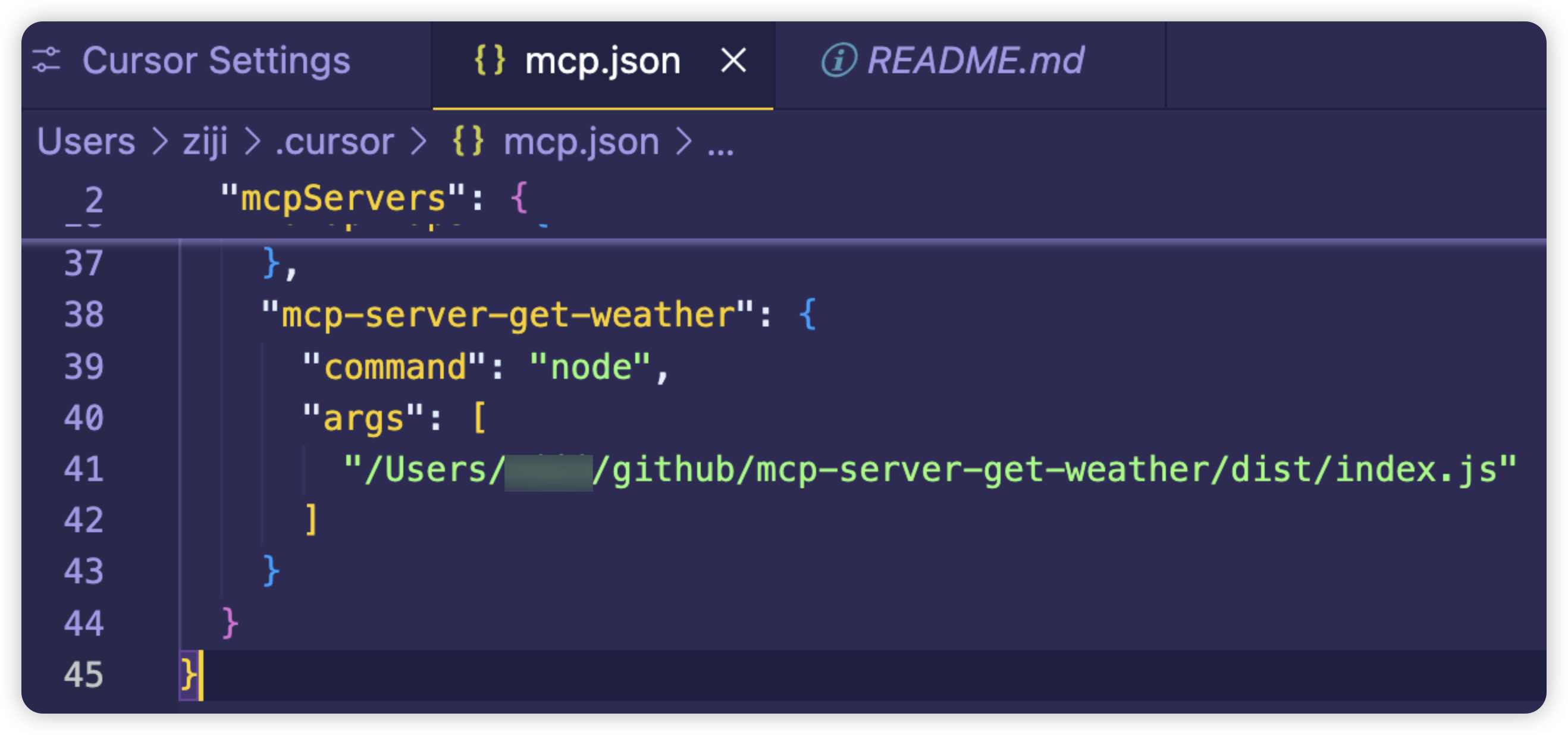
要在Cursor中使用此天气服务,需要在~/.cursor/mcp.json文件中添加以下配置:
"mcp-server-get-weather": {
"command": "node",
"args": [
"<path-to-your-project>/dist/index.js"
]
}
将<path-to-your-project>替换为实际项目路径。配置完成后,可以通过MCP工具调用mcp_mcp_server_get_weather_get_weather函数来获取天气信息。
Claude Desktop / Cursor
Paste into your MCP client config file to install this server.
{
    "mcpServers": {
        "weather mcp server": {
            "mcp-server-get-weather": {
                "command": "npx",
                "args": [
                    "@modelcontextprotocol/inspector",
                    "node",
                    "dist/index.js"
                ]
            }
        }
    }
}McpServers
{
"mcp-server-get-weather": {
"command": "npx",
"args": [
"@modelcontextprotocol/inspector",
"node",
"dist/index.js"
]
}
}中文文档 | English
A simple weather information service built with Model Context Protocol (MCP).
Overview
Weather MCP Server provides weather information for cities around the world through a simple API interface. It uses the Model Context Protocol (MCP) to communicate with clients, allowing easy integration with AI assistants and other MCP-compatible applications.
Features
- Get current weather conditions by city name
- Returns temperature, weather description, humidity, and wind speed
- Fallback to generated data if external API is unavailable
- Simple and lightweight implementation
Tech Stack
- TypeScript
- Node.js
- MCP SDK (@modelcontextprotocol/sdk)
- Zod for validation
Installation
1. Clone the repository
git clone https://github.com/Annihilater/mcp-server-get-weather
2. Install dependencies:
npm install
3. Build the project:
npm run build
Usage
Start the server:
npx @modelcontextprotocol/inspector node dist/index.js
MCP Configuration
要在Cursor中使用此天气服务,需要在~/.cursor/mcp.json文件中添加以下配置:
"mcp-server-get-weather": {
  "command": "node",
  "args": [
    "<path-to-your-project>/dist/index.js"
  ]
}
将<path-to-your-project>替换为实际项目路径。配置完成后,可以通过MCP工具调用mcp_mcp_server_get_weather_get_weather函数来获取天气信息。
Example
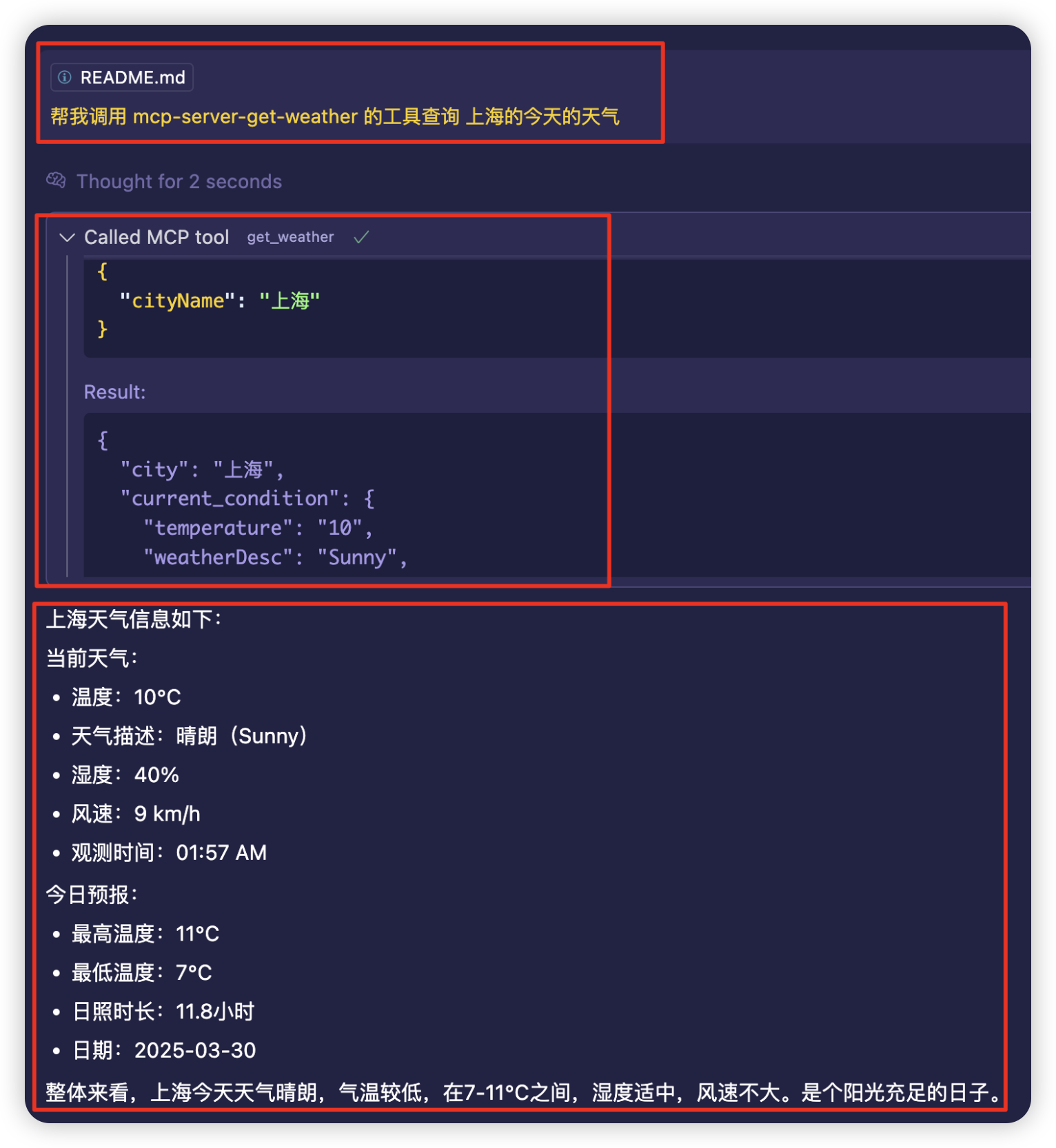
API Reference
get_weather
Gets weather information for a specified city.
Parameters
| Name | Type | Description |
|------|------|-------------|
| cityName | string | The name of the city to get weather for |
Response
Returns a JSON object with the following structure:
{
  "city": "London",
  "current_condition": {
    "temperature": "15",
    "weatherDesc": "Partly cloudy",
    "humidity": "71",
    "windSpeed": "11",
    "observation_time": "06:53 PM"
  },
  "forecast": {
    "maxTemp": "16",
    "minTemp": "9",
    "sunHour": "7.4",
    "date": "2023-04-12"
  }
}
Development
Available Scripts
- npm run build - Builds the project and makes the entry point executable
- npm run watch - Watches for changes and rebuilds automatically
- npx @modelcontextprotocol/inspector node dist/index.js - Starts the server
Project Structure
- src/index.ts - Entry point, sets up the MCP server with stdio transport
- src/server.ts - Server implementation, defines the weather tool
License
MIT
Sign in to leave a review
Use Google, GitHub, or an email account so ratings stay tied to real people.
No reviews posted yet.



