
Hostsmith
About
Deploy static sites on Hostsmith - give it a file, get a live HTTPS URL. EU/US residency.
Details
- Transport
- SSE
Explore
- Deploy files to a live URL in seconds
- No repository or build configuration required
- Supports custom domains and private sites
- Choose EU or US data residency
- MCP-native with OAuth 2.0 authentication
- Provides tools for site and domain management

Setting up with Highlight
This MCP is not yet compatible with Highlight’s one-click setup. However, you can still use it with Highlight by following these steps:
- Download and install Highlight from highlightai.com/download
- Navigate to the plugins tab and select "Add Custom Plugin"
-
Configure the plugin with the settings below
Plugin Name
HostsmithCommand (node, npx, python, etc.)Please refer to the README for specific instructions on how to obtain API keys or other required environment variables.
- Enable "Start Automatically" if you want the plugin to start when Highlight launches





From the repository
Authentication is via OAuth 2.0. Static access tokens are not supported.

Click the badge to add the remote Hostsmith server (https://mcp.hostsmith.net/mcp) to Cursor. The first tool call triggers OAuth in your browser.
| Variable | Default | Description |
| ---------------------- | ------------------------ | --------------------------------------------------------------------------------------------------------------------------------------------------------------------------------------------------------------------------------------------------------------------------------------------------------------------------------- |
| HOSTSMITH_URL | https://hostsmith.net | Hostsmith app URL (OAuth endpoints). |
| HOSTSMITH_API_DOMAIN | - | Override the upstream API domain across both partitions. The server prepends us.api. and eu.api. to the value you set. Example: HOSTSMITH_API_DOMAIN=staging.example.com routes calls to https://us.api.staging.example.com and https://eu.api.staging.example.com. Use this to point at a staging or proxied API host. |
| HOSTSMITH_BASE_URL | - | Override the API base URL with a single fixed value, bypassing partition selection entirely. |
| PORT | 3100 | HTTP server port. |
| MCP_BASE_URL | http://localhost:$PORT | Public URL of the MCP server, used in OAuth metadata. |
list_sites
List Hostsmith sites in the user's account. Returns each site's `siteId`, `subdomain`, `domain`, and current status - feed `siteId` into `get_site`, `deploy_files`, `deploy_create_upload`, or `delete_site`. This is the source of truth for "does the user already have a site at FQDN X" - call it before any create/deploy/delete to resolve the user's site reference. By default queries all data partitions and merges the results; pass `partition: "us"` or `"eu"` to limit the query.
list_domains
List domains the user can host sites under. Returns shared hosting domains (e.g. `hostsmith.link`, available to everyone) and custom domains owned by the user's organization. Use this to pick a `domain` value before calling `create_site`. By default queries all partitions and merges; pass `partition` or `shared` to narrow.
get_account
Get the user's account: organization details (`orgId`, `orgName`), the calling user's home partition under `user.homePartition`, current subscription plan with its limits (max sites, max domains, storage, bandwidth), and current usage counts. Use to check how much headroom the user has before creating new sites or to confirm plan-tier features. Usage is summed across all partitions.
get_site
Get full details of a specific Hostsmith site by ID, including its public URL (`https://<subdomain>.<domain>`), current deployment status, and configuration. Use after `list_sites` to inspect a single site, or after `deploy_files` / `deploy_finalize` to confirm the site is live and grab the URL to share with the user. Defaults to the user's home partition; pass `partition` explicitly when the site lives in a different one (visible in `list_sites` output).
create_site
Create a new Hostsmith site and return its `siteId`, full URL, and configuration. Use when the user wants to publish or host new content and no suitable site already exists. After creation, deploy content with `deploy_files` (small inline text) or `deploy_create_upload` + `deploy_finalize` (binaries / files > ~1 MB, uploaded directly to S3). The site-resolution and confirmation flow is described in the global server instructions; the rules below are specific to this tool's parameters. `domain` MUST be one of the domains returned by `list_domains` for this user - never invent or assume one. The selected domain must be in `active` status; if it isn't, surface the problem to the user instead of attempting creation. `partition` passed to this tool MUST match the partition of the selected domain. Subdomain selection must respect the domain's capabilities from `list_domains`. To serve the bare apex, pass `subdomain: "www"` - only valid when the domain has `enableApexDomain: true` (typically custom domains the user owns). For any other subdomain, the domain must have `enableSubdomains: true`; shared hosting domains (e.g. `*.hostsmith.link`) and most custom domains have `enableApexDomain: false`, so a non-apex subdomain is required there. If the chosen domain doesn't support the kind of site the user asked for (apex vs subdomain), surface the conflict rather than silently picking something else.
delete_site
Permanently delete a Hostsmith site and all of its deployed files. **Destructive - only call after explicit user confirmation.** The site URL becomes unreachable immediately and the content cannot be recovered. The user must pass `confirm: true` for the deletion to proceed; otherwise the call returns an error explaining the safeguard.
deploy_files
Publish in-memory file contents to a Hostsmith site without writing to disk. Use when you have just generated content (an HTML page, a report, JSON data) and the user wants it live. Returns the deployment version and status; call `get_site` afterwards if you need the public URL to share. The site must already exist - call `create_site` first if you do not have a `siteId`. Deploying to a site that already has content overwrites it - confirm overwrite with the user first. **Anti-pattern:** do not use this tool to ship binaries (images, PDFs, video, fonts, zips) by base64-embedding or data-URI inlining them into HTML/CSS/JSON. Binaries belong on `deploy_create_upload`. If that path is blocked by sandbox/network, escalate to the user (ask them to enable egress, or offer manual upload of the presigned URL) - never reach for this tool as a workaround. Inlining bloats pages, breaks browser caching, and reships the bytes on every deploy.
deploy_create_upload
Start a direct-to-S3 upload for binary or large files. Use this instead of `deploy_files` for binaries (PDF, image, video, zip) or any file > ~1 MB. The MCP server has no access to the user's filesystem and `deploy_files` ships content inline through Lambda (capped at ~6 MB JSON-RPC payloads); this tool returns presigned S3 PUT URLs so the file bytes flow directly from your environment to S3, never through the MCP server. **Bundle into a zip first when:** the upload contains more than 3 files OR any file is larger than ~1 MB. The fileWorker auto-extracts a single-zip upload after promotion, so subdirectories are preserved end-to-end and you avoid one PUT round-trip per file. Skip zipping only for the trivial single-small-file case (e.g. one HTML). Bash bundle-and-deploy template (the agent should adapt fileNames and the cleanup prompt): TMP=$(mktemp -d) zip -r "$TMP/site.zip" index.html styles.css img/ # add every file/dir to deploy SIZE=$(stat -c%s "$TMP/site.zip" 2>/dev/null || stat -f%z "$TMP/site.zip") # 1. call deploy_create_upload with { siteId, files: [{ fileName: "site.zip", fileSize: $SIZE }] } # 2. PUT $TMP/site.zip to the returned URL(s) per the protocol below, capturing ETag # 3. call deploy_finalize with { siteId, versionId, completions: [...] } # 4. ASK THE USER: "Deploy succeeded. Remove temp folder $TMP? [y/N]" # Only run `rm -rf "$TMP"` after explicit confirmation; otherwise leave it for them to inspect. Three-step protocol: 1. Call this tool with `{ siteId, files: [{ fileName, fileSize }] }`. Receive `{ versionId, files: { [fileName]: { uploadId, key, partUploadUrls: [{ part, url }], partSize, expiresAt } } }`. 2. For each file, slice the bytes into chunks of `partSize` and PUT each chunk to its `partUploadUrls[i].url`. **Capture the `ETag` response header from every PUT** - you will need it for finalize. Single-part (small file, one URL): `curl -D - -X PUT --data-binary @file.pdf "$URL"`, then grep the response headers for `ETag`. Multi-part with `dd` (no temp files; reads each chunk in place): count=$(jq ".files[\"large.zip\"].partUploadUrls | length" envelope.json) for i in $(seq 0 $((count-1))); do url=$(jq -r ".files[\"large.zip\"].partUploadUrls[$i].url" envelope.json) etag=$(dd if=large.zip bs=5M skip=$i count=1 status=none \ | curl -sS -D - -X PUT --data-binary @- "$url" \ | awk -F': ' 'tolower($1)=="etag"{print $2}' | tr -d '\r') echo "{ \"PartNumber\": $((i+1)), \"ETag\": $etag }" >> parts.json done Multi-part in Python - **prefer this over dd for files > ~50 MB** (parallel PUTs, no temp files, cleaner error handling): import json, requests from concurrent.futures import ThreadPoolExecutor env = json.load(open("envelope.json")) info = env["files"]["large.zip"] part_size = info["partSize"] def upload_part(p): with open("large.zip", "rb") as f: # own handle per thread f.seek((p["part"] - 1) * part_size) r = requests.put(p["url"], data=f.read(part_size)) r.raise_for_status() return {"PartNumber": p["part"], "ETag": r.headers["ETag"]} with ThreadPoolExecutor(max_workers=5) as ex: # cap concurrency at 5 parts = list(ex.map(upload_part, info["partUploadUrls"])) 3. Call `deploy_finalize` with `{ siteId, versionId, completions: [{ uploadId, key, parts: [{ ETag, PartNumber }] }] }` for every multi-part file. Single-part uploads (`uploadId` is empty in the start response) need no completion entry. The site must already exist - call `create_site` first if you do not have a `siteId`. Deploying overwrites existing content; confirm overwrite with the user first. **Anti-patterns - never do these to bypass a blocked or unavailable upload path:** - Do NOT base64-embed, data-URI, or otherwise inline binary content (images, PDFs, video, fonts, zips) into HTML/CSS/JSON or any other deployed…
deploy_finalize
Commit a deploy started with `deploy_create_upload`. Pass the `versionId` from the start response and a `completions` array containing the agent-collected ETags for each multi-part file (single-part uploads - those whose start response had an empty `uploadId` - do not need a completion entry). Returns the live site URL on success. The site must belong to the authenticated user; bearer-token auth is re-validated server-side, so holding presigned URLs alone does not let an unrelated caller finalize.
| Tool | Description |
| ---------------------- | ------------------------------------------------------------ |
| list_sites | List all sites in your account for a given data partition |
| get_site | Get details of a specific site |
| create_site | Create a new site |
| delete_site | Delete a site |
| list_domains | List available domains (shared and custom) |
| get_account | Get account info, subscription plan, and usage |
| deploy_files | Deploy inline file contents to a site |
| deploy_create_upload | Start a direct-to-S3 upload for binaries / large files |
| deploy_finalize | Commit a deploy started with deploy_create_upload |
Claude Desktop / Cursor
Paste into your MCP client config file to install this server.
{
    "mcpServers": {
        "hostsmith": {
            "hostsmith": {
                "command": "npx",
                "args": [
                    "-y",
                    "@hostsmith/mcp-server"
                ]
            }
        }
    }
}McpServers
{
    "hostsmith": {
        "command": "npx",
        "args": [
            "-y",
            "@hostsmith/mcp-server"
        ]
    }
}




Official Model Context Protocol server for the Hostsmith hosting platform.
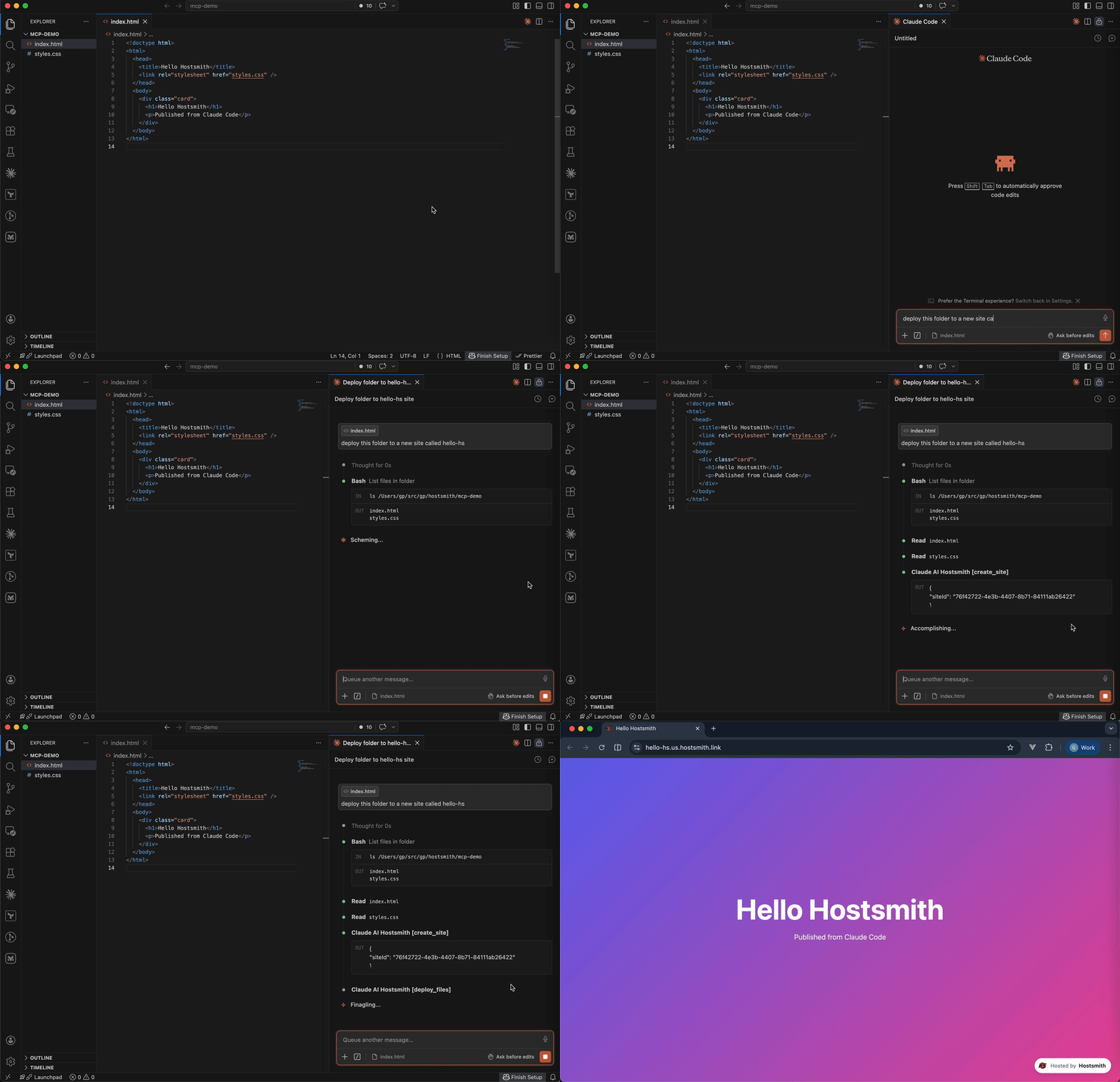
Static hosting for agents - give it a file, get a live URL. Claude Code shipping an HTML report. Cursor previewing a generated demo. Claude Desktop publishing a one-pager. One MCP call → public HTTPS URL in seconds. No repo, no CI, no build step. Custom domains, private sites, EU or US data residency.
Why Hostsmith
- Artifact-first. No repo, no build config - drop a file (or have the agent generate one), get a URL.
- Built for agents. MCP-native, OAuth-scoped, structured tool descriptions agents can chain.
- EU or US data residency. Pick where the user's data lives, architecturally - not via a checkbox.
Tools
| Tool | Description |
| ---------------------- | ------------------------------------------------------------ |
| list_sites | List all sites in your account for a given data partition |
| get_site | Get details of a specific site |
| create_site | Create a new site |
| delete_site | Delete a site |
| list_domains | List available domains (shared and custom) |
| get_account | Get account info, subscription plan, and usage |
| deploy_files | Deploy inline file contents to a site |
| deploy_create_upload | Start a direct-to-S3 upload for binaries / large files |
| deploy_finalize | Commit a deploy started with deploy_create_upload |
Usage
Authentication is via OAuth 2.0. Static access tokens are not supported.
Claude Desktop
Open Settings → Connectors → Add custom connector and enter:
https://mcp.hostsmith.net/mcp
Claude Desktop runs the OAuth flow in your browser to authorize the connector against your Hostsmith account.
Stdio (Claude Code, Cursor, Cline, Windsurf, Zed)
Add this entry to your MCP client's config:
{
  "mcpServers": {
    "hostsmith": {
      "command": "npx",
      "args": ["-y", "@hostsmith/mcp-server"]
    }
  }
}
The first tool call triggers an OAuth flow in your browser to authorize the server against your Hostsmith account.
Remote URL (other clients)
Any MCP client that supports remote Streamable HTTP transport can point directly at the hosted server:
{
  "mcpServers": {
    "hostsmith": {
      "url": "https://mcp.hostsmith.net/mcp"
    }
  }
}
The client handles the OAuth flow automatically - you'll be redirected to Hostsmith to authorize access.
Cursor (one-click install)
Click the badge to add the remote Hostsmith server (https://mcp.hostsmith.net/mcp) to Cursor. The first tool call triggers OAuth in your browser.
Local HTTP (self-hosted)
Run the server in HTTP mode and have your MCP client perform OAuth against it:
npx @hostsmith/mcp-server http
{
  "mcpServers": {
    "hostsmith": {
      "url": "http://localhost:3100/mcp"
    }
  }
}
Environment variables
| Variable | Default | Description |
| ---------------------- | ------------------------ | --------------------------------------------------------------------------------------------------------------------------------------------------------------------------------------------------------------------------------------------------------------------------------------------------------------------------------- |
| HOSTSMITH_URL | https://hostsmith.net | Hostsmith app URL (OAuth endpoints). |
| HOSTSMITH_API_DOMAIN | - | Override the upstream API domain across both partitions. The server prepends us.api. and eu.api. to the value you set. Example: HOSTSMITH_API_DOMAIN=staging.example.com routes calls to https://us.api.staging.example.com and https://eu.api.staging.example.com. Use this to point at a staging or proxied API host. |
| HOSTSMITH_BASE_URL | - | Override the API base URL with a single fixed value, bypassing partition selection entirely. |
| PORT | 3100 | HTTP server port. |
| MCP_BASE_URL | http://localhost:$PORT | Public URL of the MCP server, used in OAuth metadata. |
Troubleshooting
- Tool calls return 401: the OAuth session expired. Reconnect from your MCP client to re-authorize.
- OAuth redirect loops: confirm MCP_BASE_URL matches the URL your MCP client uses to reach the server.
- Wrong partition: tool calls accept an explicit partition arg; if you omit it, the partition is inferred from your access token.
- Inspect the install: npx @modelcontextprotocol/inspector npx -y @hostsmith/mcp-server http to browse tools interactively.
Documentation
Deeper material lives at hostsmith.net/docs/mcp.
Contributing
See CONTRIBUTING.md (including the Releases section for the version-stamping flow). Security issues: see SECURITY.md.
License
Sign in to leave a review
Use Google, GitHub, or an email account so ratings stay tied to real people.
No reviews posted yet.



