Vapi MCP Server
About
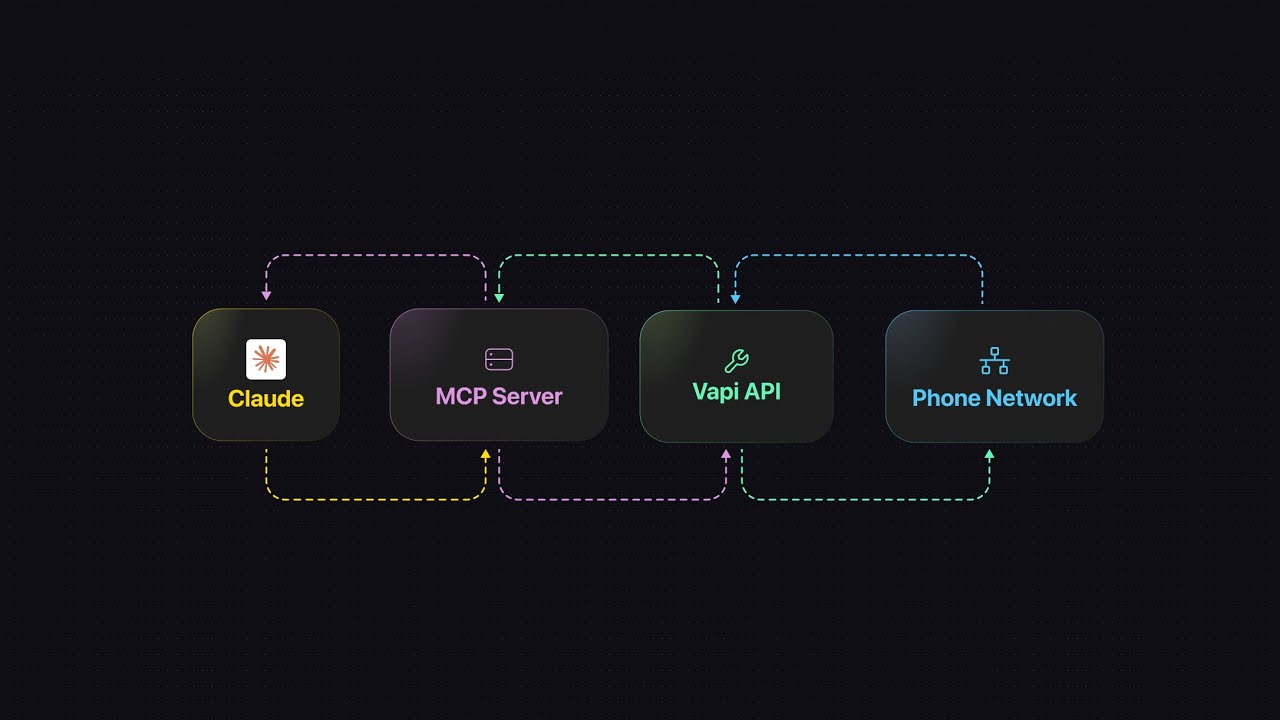
A server for integrating with Vapi's voice AI APIs using function calls.
Details
- License
- MIT
Explore
- Full CRUD for assistants, calls, and phone numbers
- Outbound calling (immediate or scheduled)
- Custom tool creation for API integration
- Dynamic variable substitution in assistant prompts
- OAuth login and logout for authentication
- Remote MCP server via Streamable HTTP or SSE

Setting up with Highlight
This MCP is not yet compatible with Highlight’s one-click setup. However, you can still use it with Highlight by following these steps:
- Download and install Highlight from highlightai.com/download
- Navigate to the plugins tab and select "Add Custom Plugin"
-
Configure the plugin with the settings below
Plugin Name
Vapi MCP ServerCommand (node, npx, python, etc.)Please refer to the README for specific instructions on how to obtain API keys or other required environment variables.
- Enable "Start Automatically" if you want the plugin to start when Highlight launches





From the repository
The easiest way to get started. No API key needed - authenticate via browser on first use.
The Vapi skill helps Claude guide you through building voice assistants:
mkdir -p ~/.claude/skills/vapi
curl -o ~/.claude/skills/vapi/SKILL.md https://raw.githubusercontent.com/VapiAI/mcp-server/main/skill/SKILL.md
Connect to Vapi's hosted MCP server:
{
"mcpServers": {
"vapi": {
"command": "npx",
"args": [
"mcp-remote",
"https://mcp.vapi.ai/mcp",
"--header",
"Authorization: Bearer ${VAPI_TOKEN}"
],
"env": {
"VAPI_TOKEN": "<your_vapi_token>"
}
}
}
}
---
| Tool | Description |
|------|-------------|
| vapi_login | Start OAuth flow |
| vapi_logout | Log out and clear credentials |
---
npm install
{
"mcpServers": {
"vapi-local": {
"command": "node",
"args": ["<path>/dist/index.js"],
"env": {
"VAPI_TOKEN": "<your_vapi_token>"
}
}
}
}
vapi_list_tools
List custom tools
vapi_get_tool
Get tool details
vapi_create_tool
Create tool for API integration
vapi_update_tool
Update tool
vapi_delete_tool
Delete tool
| Tool | Description |
|------|-------------|
| vapi_list_tools | List custom tools |
| vapi_get_tool | Get tool details |
| vapi_create_tool | Create tool for API integration |
| vapi_update_tool | Update tool |
| vapi_delete_tool | Delete tool |
Claude Desktop / Cursor
Paste into your MCP client config file to install this server.
{
    "mcpServers": {
        "vapi mcp server": {
            "vapi": {
                "command": "npx",
                "args": [
                    "-y",
                    "@vapi-ai/mcp-server"
                ]
            }
        }
    }
}McpServers
{
"vapi": {
"command": "npx",
"args": [
"-y",
"@vapi-ai/mcp-server"
]
}
}Build AI voice assistants and phone agents with Vapi using the Model Context Protocol.
<a href="https://glama.ai/mcp/servers/@VapiAI/mcp-server">
</a>
Claude Code Setup (Recommended)
The easiest way to get started. No API key needed - authenticate via browser on first use.
1. Add MCP Server
claude mcp add vapi -- npx -y @vapi-ai/mcp-server
2. Install Skill (Optional)
The Vapi skill helps Claude guide you through building voice assistants:
mkdir -p ~/.claude/skills/vapi
curl -o ~/.claude/skills/vapi/SKILL.md https://raw.githubusercontent.com/VapiAI/mcp-server/main/skill/SKILL.md
3. Restart Claude Code
After restarting, use /vapi or ask Claude to help build a voice assistant. On first use, you'll be prompted to sign in via browser - no API key copy-paste needed.
---
Claude Desktop Setup
With OAuth (No API Key)
{
"mcpServers": {
"vapi": {
"command": "npx",
"args": ["-y", "@vapi-ai/mcp-server"]
}
}
}
With API Key
If you prefer to use an API key directly, get one from the Vapi dashboard:
{
"mcpServers": {
"vapi": {
"command": "npx",
"args": ["-y", "@vapi-ai/mcp-server"],
"env": {
"VAPI_TOKEN": "<your_vapi_token>"
}
}
}
}
Remote Configuration
Connect to Vapi's hosted MCP server:
{
  "mcpServers": {
    "vapi": {
      "command": "npx",
      "args": [
        "mcp-remote",
        "https://mcp.vapi.ai/mcp",
        "--header",
        "Authorization: Bearer ${VAPI_TOKEN}"
      ],
      "env": {
        "VAPI_TOKEN": "<your_vapi_token>"
      }
    }
  }
}
---
Example Usage
Create a Voice Assistant
Ask Claude:
I want to build a voice assistant that can schedule appointments
Make an Outbound Call
Call +1234567890 using my appointment reminder assistant with these details:
- Customer name: Sarah Johnson
- Appointment date: March 25th
- Appointment time: 2:30 PM
Schedule a Future Call
Schedule a call with my support assistant for next Tuesday at 3:00 PM to +1555123456
---
Using Variable Values in Assistant Prompts
The create_call action supports passing dynamic variables through assistantOverrides.variableValues. Use double curly braces in your assistant's prompts: {{variableName}}.
Example Prompt with Variables
Hello {{customerName}}, this is a reminder about your appointment on {{appointmentDate}} at {{appointmentTime}} with {{doctorName}}.
Default Variables
These are automatically available (no need to pass):
- {{now}} - Current date and time (UTC)
- {{date}} - Current date (UTC)
- {{time}} - Current time (UTC)
- {{month}} - Current month (UTC)
- {{day}} - Current day of month (UTC)
- {{year}} - Current year (UTC)
- {{customer.number}} - Customer's phone number
See Vapi documentation for advanced date/time formatting.
---
Remote MCP Server
Connect to Vapi's hosted MCP server from any MCP client:
Streamable HTTP (Recommended)
- URL: https://mcp.vapi.ai/mcp
- Header: Authorization: Bearer your_vapi_api_key_here
SSE (Deprecated)
- URL: https://mcp.vapi.ai/sse
- Header: Authorization: Bearer your_vapi_api_key_here
---
Available Tools
Assistants
| Tool | Description | |------|-------------| |vapi_list_assistants | List all assistants |
| vapi_get_assistant | Get assistant by ID |
| vapi_create_assistant | Create new assistant |
| vapi_update_assistant | Update assistant |
| vapi_delete_assistant | Delete assistant |
Calls
| Tool | Description | |------|-------------| |vapi_list_calls | List call history |
| vapi_get_call | Get call details |
| vapi_create_call | Start outbound call (immediate or scheduled) |
Phone Numbers
| Tool | Description | |------|-------------| |vapi_list_phone_numbers | List phone numbers |
| vapi_get_phone_number | Get phone number details |
| vapi_buy_phone_number | Purchase new number |
| vapi_update_phone_number | Update number settings |
| vapi_delete_phone_number | Release number |
Tools (Function Calling)
| Tool | Description | |------|-------------| |vapi_list_tools | List custom tools |
| vapi_get_tool | Get tool details |
| vapi_create_tool | Create tool for API integration |
| vapi_update_tool | Update tool |
| vapi_delete_tool | Delete tool |
Authentication
| Tool | Description | |------|-------------| |vapi_login | Start OAuth flow |
| vapi_logout | Log out and clear credentials |
---
Development
```bash
Sign in to leave a review
Use Google, GitHub, or an email account so ratings stay tied to real people.
No reviews posted yet.