
🌦️ Weather MCP Server
About
It is an MCP-based weather information server that retrieves real-time meteorological data via the QWeather API. It provides detailed weather information including temperature, humidity, wind speed, and precipitation.
Details
- License
- MIT
Explore
- Get real-time weather for specified cities
- Integrates with QWeather API
- Provides temperature, humidity, wind speed, precipitation

Setting up with Highlight
This MCP is not yet compatible with Highlight’s one-click setup. However, you can still use it with Highlight by following these steps:
- Download and install Highlight from highlightai.com/download
- Navigate to the plugins tab and select "Add Custom Plugin"
-
Configure the plugin with the settings below
Plugin Name
🌦️ Weather MCP ServerCommand (node, npx, python, etc.)Please refer to the README for specific instructions on how to obtain API keys or other required environment variables.
- Enable "Start Automatically" if you want the plugin to start when Highlight launches





From the repository
Deploy via Docker using the image bellababy/mcp-server-weather-python:1.0.0 and set the WEATHER_API_KEY environment variable with your QWeather API key. Run the container exposed on port 8000, then configure the server in CherryStudio with address http://your-server-ip:8000 using SSE mode.
Claude Desktop / Cursor
Paste into your MCP client config file to install this server.
{
    "mcpServers": {
        "\ud83c\udf26\ufe0f weather mcp server": {
            "mcp-server-weather-python": {
                "command": "docker",
                "args": [
                    "pull",
                    "bellababy/mcp-server-weather-python:1.0.0"
                ]
            }
        }
    }
}McpServers
{
    "mcp-server-weather-python": {
        "command": "docker",
        "args": [
            "pull",
            "bellababy/mcp-server-weather-python:1.0.0"
        ]
    }
}
📖 项目简介
这是一个基于 MCP 协议开发的天气信息服务端,通过和风天气 API 实时获取气象数据。🚀 主要功能
- 🌍 获取指定城市的实时天气信息。 - ☁️ 支持通过和风天气API获取天气数据。 - 📊 提供详细的天气信息,包括温度、湿度、风速、降水量等。📋 环境要求
- Python 3.13.2 - Docker (可选,如果使用Docker部署) - 和风天气API密钥🔧 安装步骤
🐳 通过Docker运行
1. 构建Docker镜像
docker pull bellababy/mcp-server-weather-python:1.0.0
2. 运行Docker容器
docker run -d -p 8000:8000 -e WEATHER_API_KEY=你的API密钥 bellababy/mcp-server-weather-python:1.0.0
环境变量
| 变量名 | 说明 | 必填 | |--------|------|------| | WEATHER_API_KEY | 和风天气API密钥 | 是 |🍒 在CherryStudio中使用
1. 配置MCP服务器
在CherryStudio中,打开设置页面,找到"MCP服务器"选项卡。
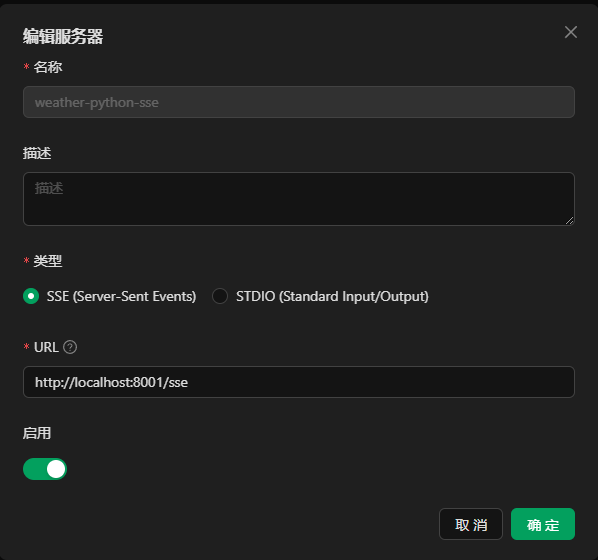
填写以下信息:
- 服务器地址: http://你的服务器IP:8000
- 选择SSE模式
点击"确定"完成配置。
2. 在对话中询问天气
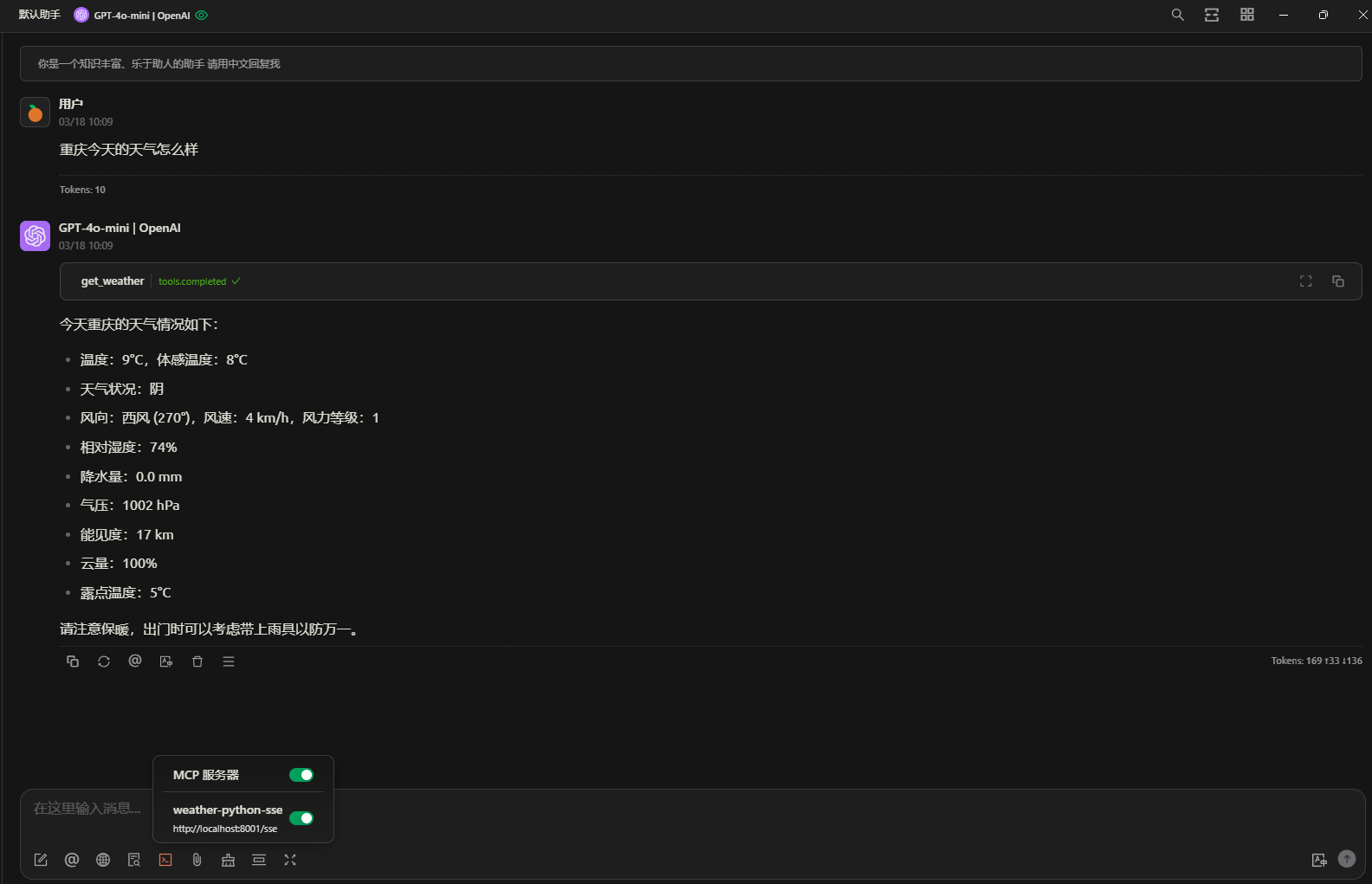
📄 许可证
本项目采用 MIT 许可证。详情请见 LICENSE 文件。🙏 致谢
- 和风天气 - 提供天气数据APISign in to leave a review
Use Google, GitHub, or an email account so ratings stay tied to real people.
No reviews posted yet.



