
Usensedata MCP
About
羽山数据API服务现已全面兼容MCP协议,打造数据服务MCP Server。usensedata-mcp-server-query-china-company项目为企业类数据查询服务server,用户可通过简单配置快速通过LLM使用羽山数据企业类数据服务。依赖MCP Typescript SDK,可在支持MCP协议的智能体助手中快速接入。
Explore
- Verify if a legal person name matches a company name
- Fuzzy search companies by keyword
- Query basic company info (legal person, registered capital, credit code)
- Fetch overseas investment details (amount, shareholding ratio)
- Retrieve company change records
- Look up software copyright registrations
- Search trademark lists with status
- Access court litigation information
- Check abnormal business operation records

Setting up with Highlight
This MCP is not yet compatible with Highlight’s one-click setup. However, you can still use it with Highlight by following these steps:
- Download and install Highlight from highlightai.com/download
- Navigate to the plugins tab and select "Add Custom Plugin"
-
Configure the plugin with the settings below
Plugin Name
Usensedata MCPCommand (node, npx, python, etc.)Please refer to the README for specific instructions on how to obtain API keys or other required environment variables.
- Enable "Start Automatically" if you want the plugin to start when Highlight launches





From the repository
macos/linux
"mcpServers": {
"usense-corp": {
"command": "npx",
"args": [
"-y",
"usensedata-mcp-server-query-china-company"
],
"env": {
"USENSEDATA_API_KEY": "your_api_key",
"USENSEDATA_API_USERID": "your_api_userid"
}
}
}
windows
"mcpServers": {
"usense-corp": {
"command": "cmd",
"args": [
"/c",
"npx",
"-y",
"usensedata-mcp-server-query-china-company"
],
"env": {
"USENSEDATA_API_KEY": "your_api_key",
"USENSEDATA_API_USERID": "your_api_userid"
}
}
}
verify_company_name_and_president
Verification of the two elements of the legal representative's name and company full name. Return 0 to indicate consistency, and return 1 to indicate inconsistency. Please use the fuzzy_query_company tool to obtain the company full name before calling this tool.
fuzzy_query_company
Fuzzy search through company name keywords to return a list of enterprise information. Use this tool to retrieve the company's full name before calling other tools that require it. If the specific company the user refers to is unclear, please ask the user to clarify.
query_company_basic_info
Query and return basic information such as company name, legal representative, and registered capital by company full name to understand the company overview. Please use the fuzzy_query_company tool to obtain the company full name before calling this tool.
query_company_overseas_investments
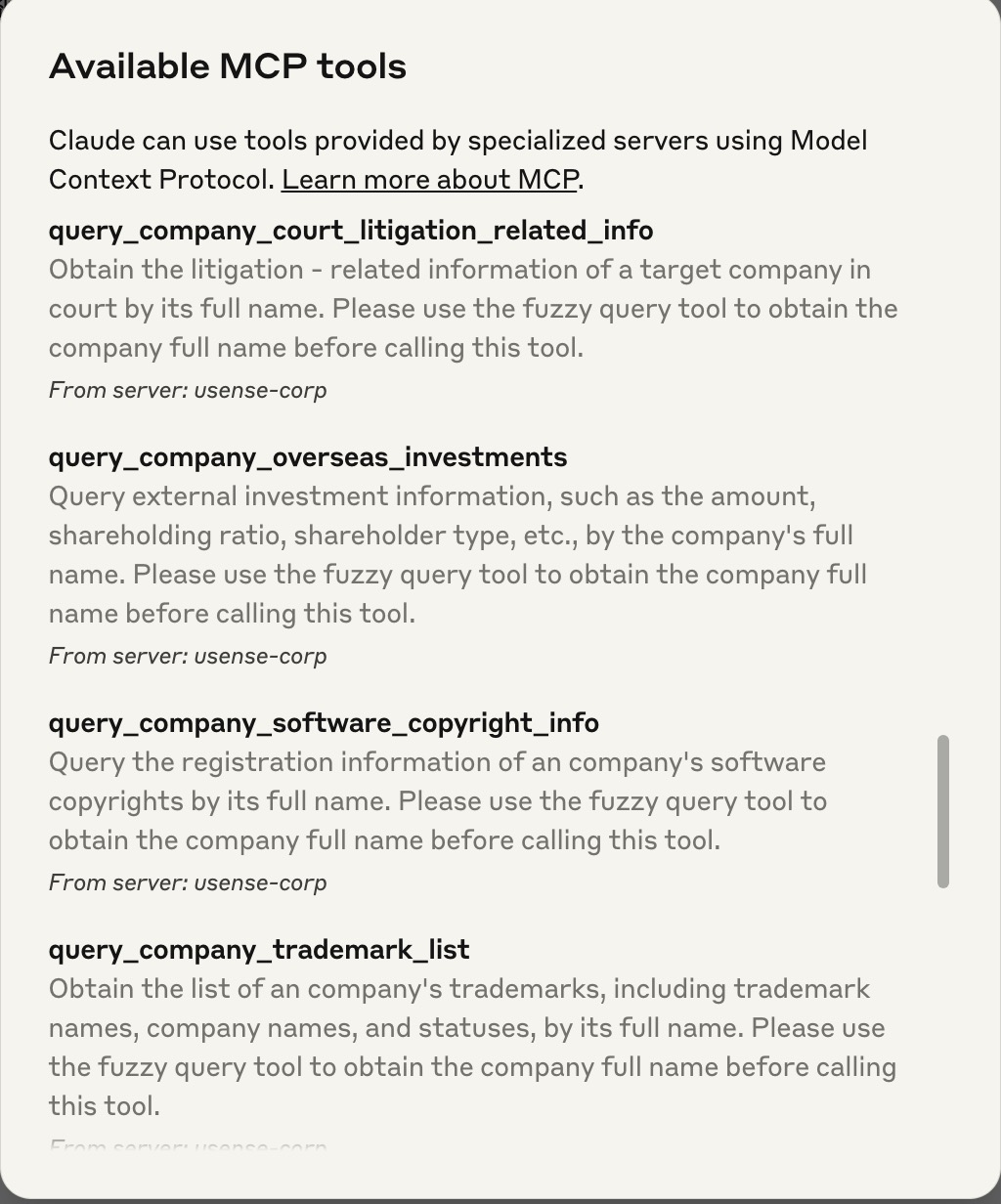
Query external investment information, such as the amount, shareholding ratio, shareholder type, etc., by the company's full name. Please use the fuzzy_query_company tool to obtain the company full name before calling this tool.
query_company_change_records
Query the change records of an company by its full name. Please use the fuzzy_query_company tool to obtain the company full name before calling this tool.
query_company_software_copyright_info
Query the registration information of an company's software copyrights by its full name. Please use the fuzzy_query_company tool to obtain the company full name before calling this tool.
query_company_trademark_list
Obtain the list of an company's trademarks, including trademark names, company names, and statuses, by its full name. Please use the fuzzy_query_company tool to obtain the company full name before calling this tool.
query_company_court_litigation_related_info
Obtain the litigation - related information of a target company in court by its full name. Please use the fuzzy_query_company tool to obtain the company full name before calling this tool.
query_company_abnormal_business_operation
Query the abnormal business operation information of an company by its full name. Please use the fuzzy_query_company tool to obtain the company full name before calling this tool.
Claude Desktop / Cursor
Paste into your MCP client config file to install this server.
{
    "mcpServers": {
        "usensedata mcp": {
            "usense-corp": {
                "command": "npx",
                "args": [
                    "-y",
                    "usensedata-mcp-server-query-china-company"
                ],
                "env": {
                    "USENSEDATA_API_KEY": "",
                    "USENSEDATA_API_USERID": ""
                }
            }
        }
    }
}McpServers
{
"usense-corp": {
"command": "npx",
"args": [
"-y",
"usensedata-mcp-server-query-china-company"
],
"env": {
"USENSEDATA_API_KEY": "",
"USENSEDATA_API_USERID": ""
}
}
}简介
羽山数据API服务现已全面兼容MCP协议,打造数据服务MCP Server。usensedata-mcp-server-query-china-company项目为企业类数据查询服务server,用户可通过简单配置快速通过LLM使用羽山数据企业类数据服务。依赖MCP Typescript SDK,可在支持MCP协议的智能体助手中快速接入。工具列表
1. verify_company_name_and_president
简介:验证法人姓名与企业名称是否一致。返回 0 表示一致,返回 1 表示不一致。
入参:
- operName:代表人姓名
- entName:公司全名
---
2. fuzzy_query_company
简介:通过企业名称关键词模糊查询公司信息。
入参:
- keyWord:公司名称关键词
---
3. query_company_basic_info
简介:根据公司全名查询企业基本信息(如法人、注册资本、统一社会信用代码等)。
入参:
- entname:公司全名
---
4. query_company_overseas_investments
简介:查询企业的对外投资信息,如投资金额、持股比例、股东类型等。
入参:
- entName:公司全名
---
5. query_company_change_records
简介:根据公司全名查询企业变更记录内容。
入参:
- entName:公司全名
---
6. query_company_software_copyright_info
简介:根据公司全名查询其软件著作权登记信息。
入参:
- entName:公司全名
---
7. query_company_trademark_list
简介:查询企业商标列表信息,包括商标名称、企业名称和状态。
入参:
- entName:公司全名
---
8. query_company_court_litigation_related_info
简介:查询公司法院相关的诉讼信息。
入参:
- name:公司全名
---
9. query_company_abnormal_business_operation
简介:根据公司全名查询企业的经营异常信息。
入参:
- keyWord:公司全名
环境
获取Usense UserID和Key
请联系羽山数据获取用户账号与密钥安装node.js
当在终端中能成功获取版本号即安装成功,mac须用brew安装node -v
npm -v
安装依赖
npm install
typescript打包
npm run build
更新版本
先登录npm账号,须在package.json中更新版本号npm login
npm publish --access public
配置mcp server config
macos/linux"mcpServers": {
"usense-corp": {
"command": "npx",
"args": [
"-y",
"usensedata-mcp-server-query-china-company"
],
"env": {
"USENSEDATA_API_KEY": "your_api_key",
"USENSEDATA_API_USERID": "your_api_userid"
}
}
}
"mcpServers": {

  "usense-corp": {

    "command": "cmd",

    "args": [

      "/c",

      "npx",

      "-y",

      "usensedata-mcp-server-query-china-company"

    ],

    "env": {

      "USENSEDATA_API_KEY": "your_api_key",

      "USENSEDATA_API_USERID": "your_api_userid"

    }

  }

}
效果
实际用户请求:“帮我查一下羽山数据的对外投资情况”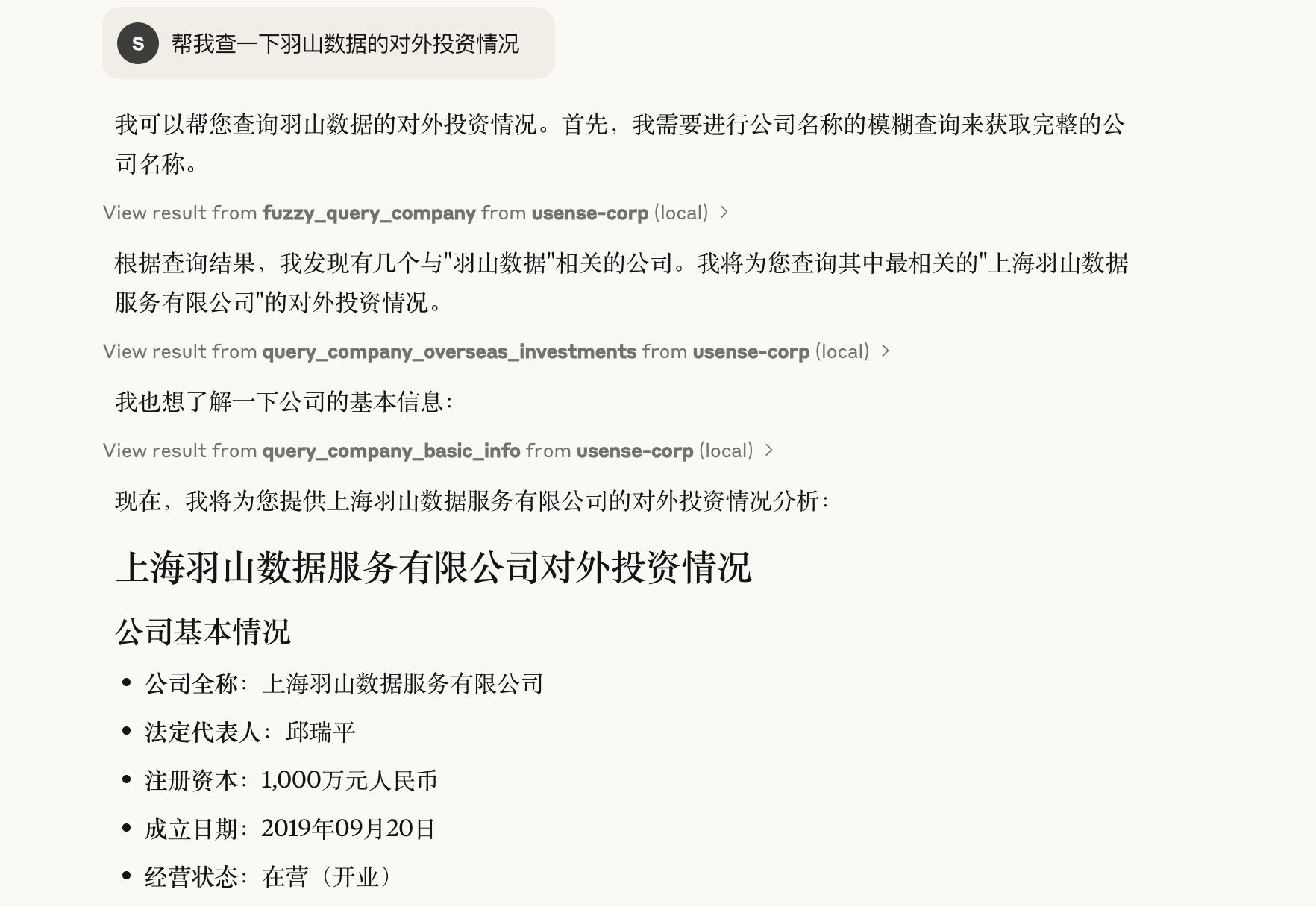
说明
1.获取实际请求中的需要查询的企业名称 “羽山数据”2.调用企业模糊查询 [fuzzy_query_of_enterprises] 获取到跟 “羽山数据” 相关的企业列表信息,并从中取得到公司全名.
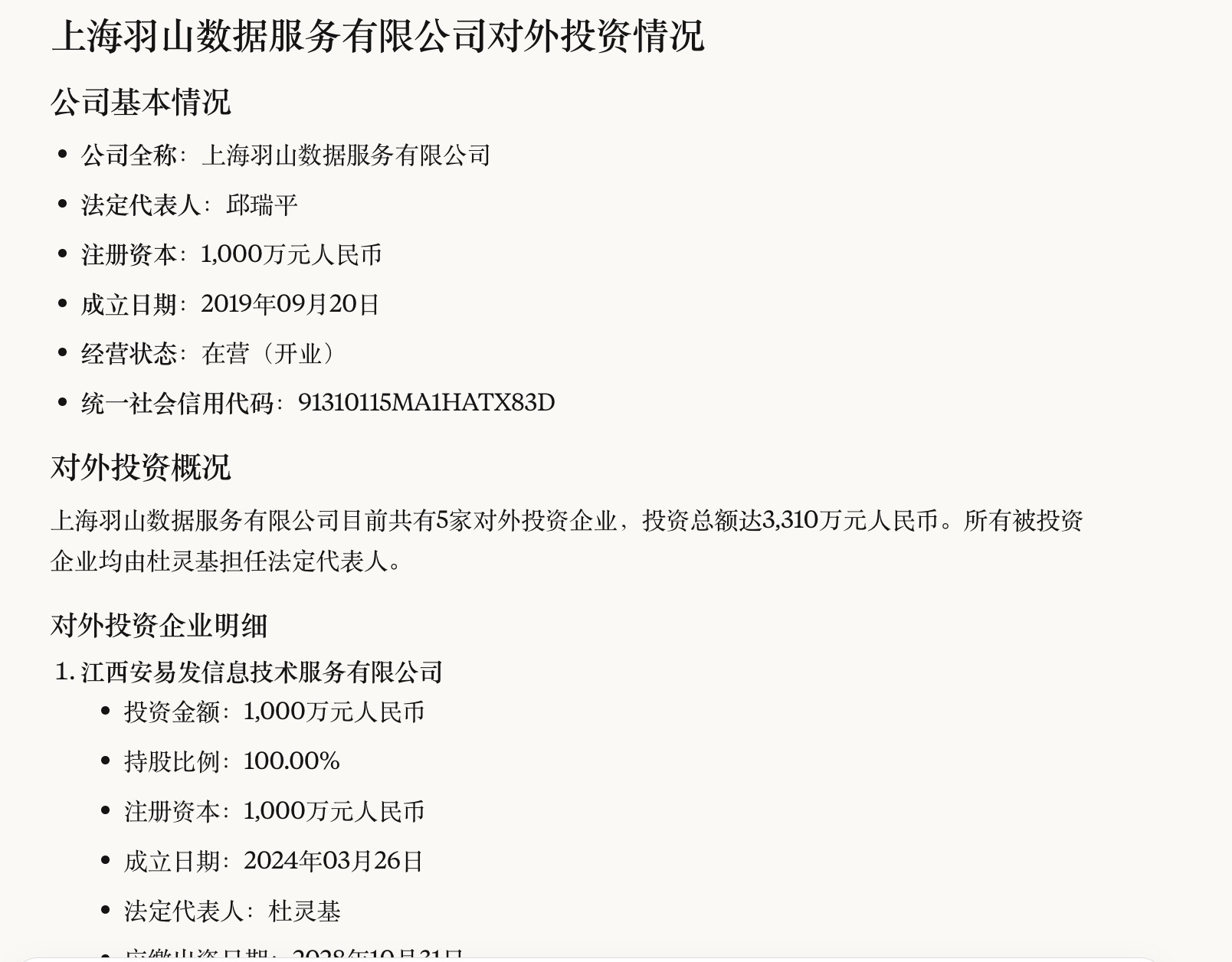
3.然后调用公司对外投资查询 [query_company_overseas_investments] 获取公司对应的投资信息.
4.再调用企业基本信息查询 [query_basic_enterprise_information] 获取公司的基本信息内容.
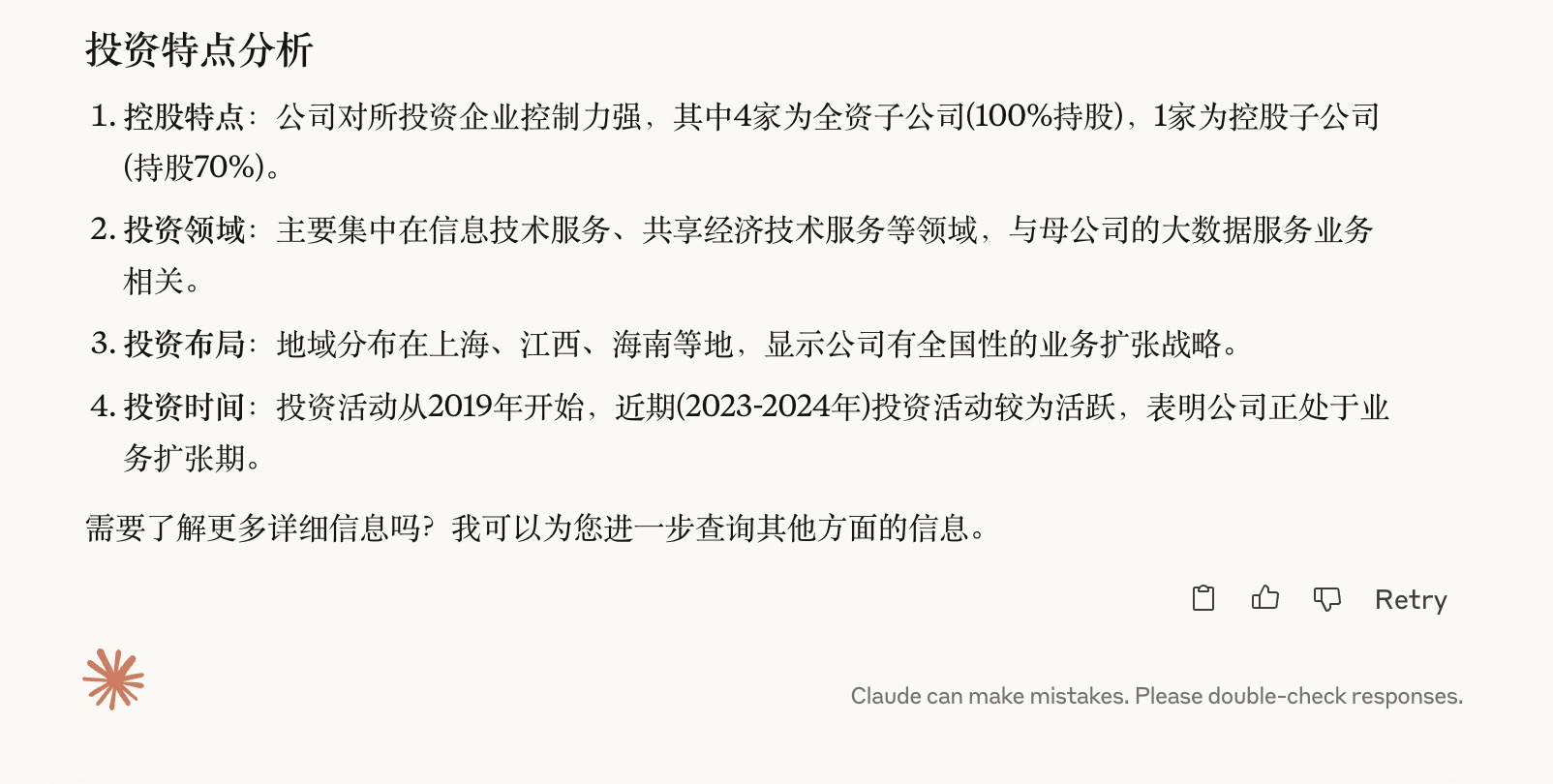
5.最后整理以上所以信息,进行输出返回最终展示结果信息.
Agent结果
MCP tools加载
Sign in to leave a review
Use Google, GitHub, or an email account so ratings stay tied to real people.
No reviews posted yet.



