
MCP Kubernetes Server
About
[](https://www.python.org/downloads/)   …
Details
- License
- MIT
Explore
- Cluster Information: Get detailed information about Kubernetes resources (pods, deployments, services, etc.)
- Cluster Operations: Perform operations on Kubernetes resources (create, update, delete, scale, etc.)
- Monitoring: Monitor the status of Kubernetes clusters and resources
- Analysis: Analyze Kubernetes resources and provide recommendations
- Prompts: Includes prompts for common Kubernetes analysis tasks

Setting up with Highlight
This MCP is not yet compatible with Highlight’s one-click setup. However, you can still use it with Highlight by following these steps:
- Download and install Highlight from highlightai.com/download
- Navigate to the plugins tab and select "Add Custom Plugin"
-
Configure the plugin with the settings below
Plugin Name
MCP Kubernetes ServerCommand (node, npx, python, etc.)Please refer to the README for specific instructions on how to obtain API keys or other required environment variables.
- Enable "Start Automatically" if you want the plugin to start when Highlight launches





From the repository
The server can be configured using a YAML configuration file, environment variables, or command-line arguments.
mcp-k8s-server --config /path/to/config.yaml
apiVersion: apps/v1
kind: Deployment
metadata:
name: mcp-k8s-server
When running inside a Kubernetes cluster, the server automatically uses the in-cluster configuration. This relies on the following:
1. Environment variables:
- KUBERNETES_SERVICE_HOST: Set by Kubernetes to the IP address of the Kubernetes API server
- KUBERNETES_SERVICE_PORT: Set by Kubernetes to the port of the Kubernetes API server
2. Service account token and certificate:
- /var/run/secrets/kubernetes.io/serviceaccount/token: Service account token
- /var/run/secrets/kubernetes.io/serviceaccount/ca.crt: CA certificate
These are automatically set by Kubernetes when running in a pod. If you're running the server outside a Kubernetes cluster but want to test the in-cluster configuration, you would need to manually set these environment variables and create the token and certificate files.
When running outside a cluster, the server falls back to using the kubeconfig file.
If you want to test the in-cluster configuration locally (outside a Kubernetes cluster), you can manually set up the required environment variables and files:
1. Set the environment variables:
export KUBERNETES_SERVICE_HOST=<kubernetes-api-server-ip>
export KUBERNETES_SERVICE_PORT=<kubernetes-api-server-port>
You can get these values by running:
kubectl cluster-info
2. Create the service account token and certificate directories:
mkdir -p /var/run/secrets/kubernetes.io/serviceaccount/
3. Copy your Kubernetes certificate and create a token:
server:
name: mcp-k8s-server
transport: both # stdio, sse, or both
port: 8000
host: 0.0.0.0
kubernetes:
config_path: ~/.kube/config
context: default
namespace: default
The server provides the following MCP tools:
Claude Desktop / Cursor
Paste into your MCP client config file to install this server.
{
    "mcpServers": {
        "mcp kubernetes server": {
            "mcp_k8s_server": {
                "command": "docker",
                "args": [
                    "build",
                    "-t",
                    "mcp-k8s-server",
                    "."
                ]
            }
        }
    }
}McpServers
{
    "mcp_k8s_server": {
        "command": "docker",
        "args": [
            "build",
            "-t",
            "mcp-k8s-server",
            "."
        ]
    }
}
A Kubernetes management MCP (Model Context Protocol) server that provides interfaces for getting information about Kubernetes clusters, performing operations, monitoring status, and analyzing resources.
Features
- Cluster Information: Get detailed information about Kubernetes resources (pods, deployments, services, etc.)
- Cluster Operations: Perform operations on Kubernetes resources (create, update, delete, scale, etc.)
- Monitoring: Monitor the status of Kubernetes clusters and resources
- Analysis: Analyze Kubernetes resources and provide recommendations
- Prompts: Includes prompts for common Kubernetes analysis tasks
Examples
Ex.1
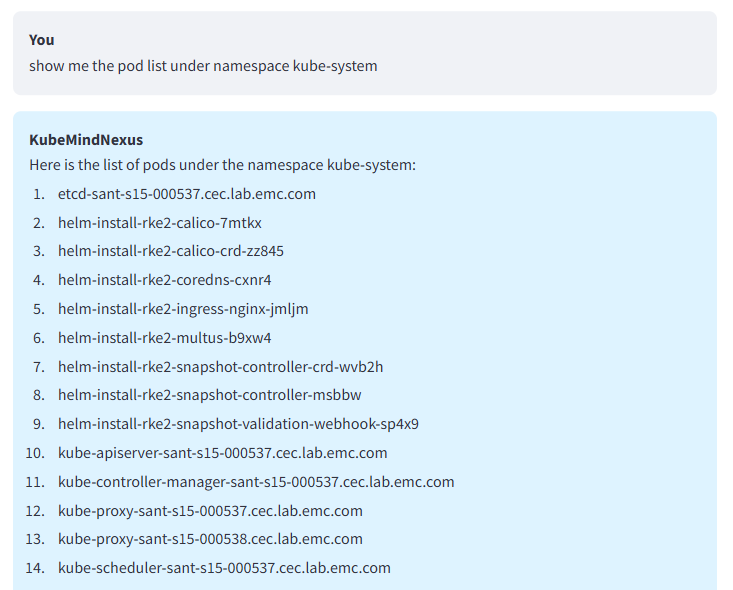
Ex.2
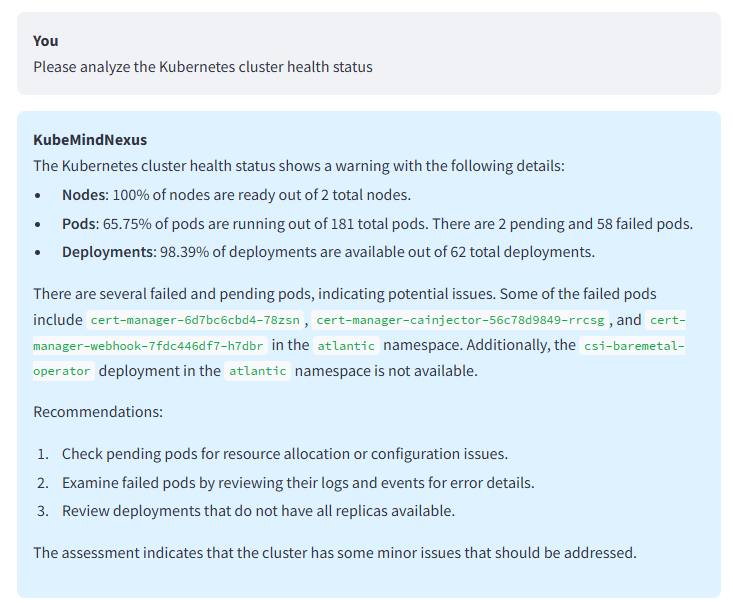
Ex.3
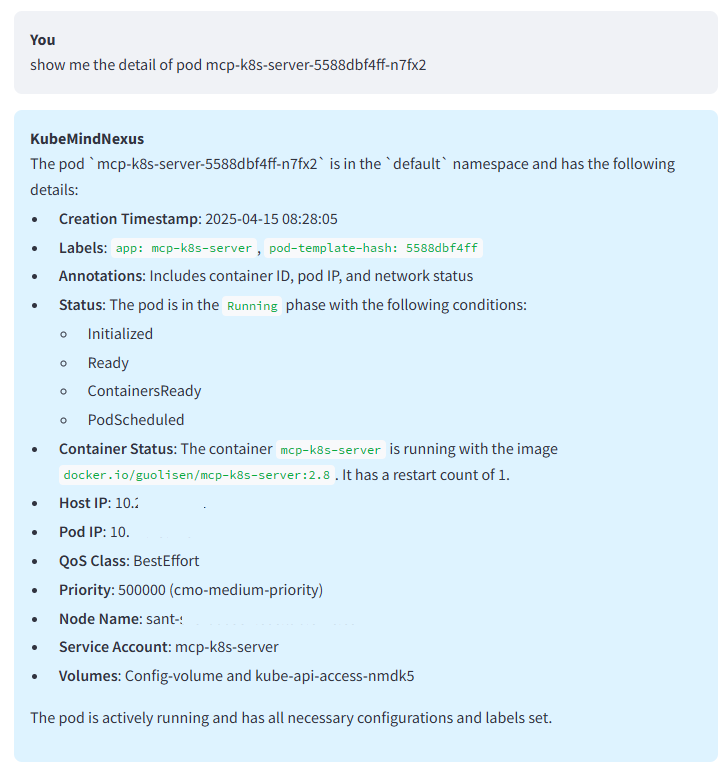
Installation
From Source
git clone https://github.com/yourusername/mcp-k8s-server.git
cd mcp-k8s-server
pip install -e .
Using pip
pip install mcp-k8s-server
Usage
Running Directly
```bash
Sign in to leave a review
Use Google, GitHub, or an email account so ratings stay tied to real people.
No reviews posted yet.



