
MCPHub: The Unified Hub for Model Context Protocol (MCP) Servers
About
A unified hub for centrally managing and dynamically orchestrating multiple MCP servers/APIs into separate endpoints with flexible routing strategies.
Explore
- Centralized Management - Monitor and control all MCP servers from a unified dashboard
- Flexible Routing - Access all servers, specific groups, or individual servers via HTTP/SSE
- Granular Group Visibility - Control Tool, Prompt, and Resource visibility independently for each server inside a group
- Smart Routing - AI-powered tool discovery using vector semantic search (Learn more)
- MCP Apps Proxy - Transparently forward interactive MCP Apps on single-server routes (Learn more)
- Tool Result Compression - Transparently reduce large text tool outputs before they reach clients
- Hot-Swappable Config - Add, remove, or update servers without downtime
- OAuth 2.0 Support - Both client and server modes for secure authentication (Learn more)
- Social Login - Seamless GitHub and Google login support with Better Auth integration (requires Database Mode)
- Database Mode - Store configuration in PostgreSQL for production environments (Learn more)
- Docker-Ready - Deploy instantly with containerized setup

Setting up with Highlight
This MCP is not yet compatible with Highlight’s one-click setup. However, you can still use it with Highlight by following these steps:
- Download and install Highlight from highlightai.com/download
- Navigate to the plugins tab and select "Add Custom Plugin"
-
Configure the plugin with the settings below
Plugin Name
MCPHub: The Unified Hub for Model Context Protocol (MCP) ServersCommand (node, npx, python, etc.)Please refer to the README for specific instructions on how to obtain API keys or other required environment variables.
- Enable "Start Automatically" if you want the plugin to start when Highlight launches





From the repository
Create a mcp_settings.json file:
{
"mcpServers": {
"time": {
"command": "npx",
"args": ["-y", "time-mcp"]
},
"fetch": {
"command": "uvx",
"args": ["mcp-server-fetch"]
}
}
}
📖 See Configuration Guide for full options including OAuth, environment variables, and more.
docker run -p 3000:3000 -v ./mcp_settings.json:/app/mcp_settings.json -v ./data:/app/data samanhappy/mcphub
docker run -p 3000:3000 -e ADMIN_PASSWORD=your-secure-password samanhappy/mcphub
> Tip: Change the admin password after first login for security.
> Headless mode: Set DISABLE_WEB=true to skip serving the bundled dashboard UI and run MCPHub with only the backend/API and MCP endpoints. This is useful when you want to manage servers directly from mcp_settings.json.
Claude Desktop / Cursor
Paste into your MCP client config file to install this server.
{
    "mcpServers": {
        "mcphub: the unified hub for model context protocol (mcp) servers": {
            "mcphub": {
                "command": "docker",
                "args": [
                    "run",
                    "-p",
                    "3000:3000",
                    "-v",
                    "./mcp_settings.json:/app/mcp_settings.json",
                    "-v",
                    "./data:/app/data",
                    "samanhappy/mcphub"
                ]
            }
        }
    }
}McpServers
{
"mcphub": {
"command": "docker",
"args": [
"run",
"-p",
"3000:3000",
"-v",
"./mcp_settings.json:/app/mcp_settings.json",
"-v",
"./data:/app/data",
"samanhappy/mcphub"
]
}
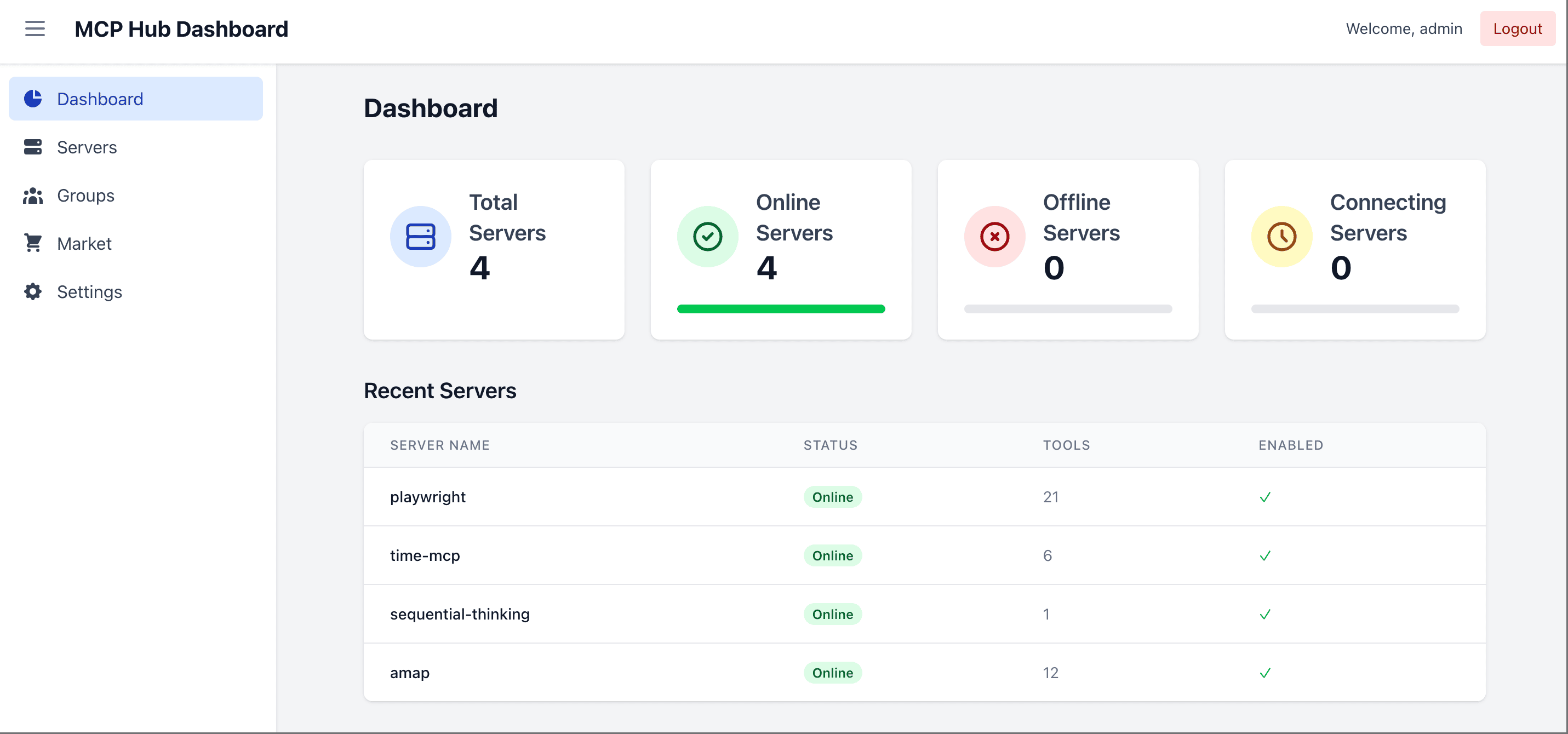
}MCPHub makes it easy to manage and scale multiple MCP (Model Context Protocol) servers by organizing them into flexible Streamable HTTP (SSE) endpoints—supporting access to all servers, individual servers, or logical server groups.
🌐 Live Demo & Docs
- Documentation: docs.mcphub.app
- Demo Environment: demo.mcphub.app
🚀 Features
- Centralized Management - Monitor and control all MCP servers from a unified dashboard
- Flexible Routing - Access all servers, specific groups, or individual servers via HTTP/SSE
- Granular Group Visibility - Control Tool, Prompt, and Resource visibility independently for each server inside a group
- Smart Routing - AI-powered tool discovery using vector semantic search (Learn more)
- MCP Apps Proxy - Transparently forward interactive MCP Apps on single-server routes (Learn more)
- Tool Result Compression - Transparently reduce large text tool outputs before they reach clients
- Hot-Swappable Config - Add, remove, or update servers without downtime
- OAuth 2.0 Support - Both client and server modes for secure authentication (Learn more)
- Social Login - Seamless GitHub and Google login support with Better Auth integration (requires Database Mode)
- Database Mode - Store configuration in PostgreSQL for production environments (Learn more)
- Docker-Ready - Deploy instantly with containerized setup
🔧 Quick Start
Configuration
Create a mcp_settings.json file:
{
  "mcpServers": {
    "time": {
      "command": "npx",
      "args": ["-y", "time-mcp"]
    },
    "fetch": {
      "command": "uvx",
      "args": ["mcp-server-fetch"]
    }
  }
}
📖 See Configuration Guide for full options including OAuth, environment variables, and more.
Docker Deployment
```bash
Sign in to leave a review
Use Google, GitHub, or an email account so ratings stay tied to real people.
No reviews posted yet.





