
Azure DevOps
About
Interact with Azure DevOps for managing projects, pipelines, and repositories.
Details
- License
- MIT
Explore
- List all accessible Azure DevOps projects
- List and search repositories in a project
- Retrieve commit details and history
- Search code across repositories
- Create, read, update, and link work items
- List available boards and pipelines
- Trigger pipeline executions
- Manage pull requests (list, create, update, get)
- Access and manage wiki pages
Install the tool globally: dotnet tool install --global mcpserver.azuredevops.stdio. Configure environment variables (AZURE_DEVOPS_ORG_URL, AZURE_DEVOPS_AUTH_METHOD, AZURE_DEVOPS_PAT, AZURE_DEVOPS_DEFAULT_PROJECT) and then use the command mcpserver.azuredevops.stdio as the MCP server command in clients like Claude Desktop or Semantic Kernel.
GetProjects
List all accessible projects
GetRepositories
List all repositories in a project
GetProject
Get details of a specific project
GetRepository
Get repository details
SearchCode
Search for code across repositories in a project
GetCommit
Retrieve a particular commit details
GetCommits
Retrieve git commits
get_work_item
Retrieve a work item by ID
create_work_item
Create a new work item
update_work_item
Update an existing work item
list_work_items
List work items in a project
manage_work_item_link
Add, remove, or update links between work items
- GetProjects: List all accessible projects
- GetRepositories: List all repositories in a project
- GetProject: Get details of a specific project
- GetRepository: Get repository details
- SearchCode: Search for code across repositories in a project
- GetCommit: Retrieve a particular commit details
- GetCommits: Retrieve git commits
- get_work_item: Retrieve a work item by ID
- create_work_item: Create a new work item
- update_work_item: Update an existing work item
- list_work_items: List work items in a project
- manage_work_item_link: Add, remove, or update links between work items
 mcpserver.azuredevops
A Stdio MCP server as dotnet tool to access Azure DevOps.
📦 NuGet

dnx
`` cmd
dnx mcpserver.azuredevops.stdio --yes
dotnet tool
Installation
cmd
dotnet tool install --global mcpserver.azuredevops.stdio
<br>
🛠️ Supported Tools
Core Navigation Tools
- GetProjects: List all accessible projects
- GetRepositories: List all repositories in a project
Project Tools
- GetProject: Get details of a specific project
Repository Tools
- GetRepository: Get repository details
Search Tools
- SearchCode: Search for code across repositories in a project
GetCommit Tools
- GetCommit: Retrieve a particular commit details
- GetCommits: Retrieve git commits
🚧 Work Item Tools 🚧
- get_work_item: Retrieve a work item by ID
- create_work_item: Create a new work item
- update_work_item: Update an existing work item
- list_work_items: List work items in a project
- manage_work_item_link: Add, remove, or update links between work items
🚧 Boards 🚧
- get_boards: Get available boards in the project
🚧 Pipelines 🚧
- list_pipelines: List all pipelines in the project
- trigger_pipeline: Execute a pipeline
🚧 Pull Requests 🚧
- list_pull_requests: List pull requests
- create_pull_request: Create a new pull request
- update_pull_request: Update a pull request
- get_pull_request: Get pull request details
🚧 Wiki 🚧
- get_wikis: List all wikis in the project
- get_wiki_page: Get a wiki page
- create_wiki: Create a new wiki
- update_wiki_page: Create or update a wiki page
<br>
💡 LLM Examples
Semantic Kernel
This MCP Server can be used in ModelContextProtocol-SemanticKernel.
Question
raw
Get 5 commits from the repository '. . .'
Answer
raw
Here are the 3 most recent commits from the '. . .' repository:
1. Commit ID: . . .
- Author: Stef Heyenrath
- Date: 2021-12-17
- Comment: Merged PR 378: Updated mindmap-certifications.json
2. Commit ID: . . .
- Author: Stef Heyenrath
- Date: 2021-12-17
- Comment: Merge pull request 378 from stef-update-az104 into master
3. Commit ID: . . .
- Author: Stef Heyenrath
- Date: 2021-12-17
- Comment: 103
If you need more details about any specific commit, feel free to ask!
Claude Desktop
This MCP Server can also be used in Claude Desktop.
Config
json
{
"mcpServers": {
"azureDevOpsDotNet": {
"command": "mcpserver.azuredevops.stdio",
"args": [ ],
"env": {
"AZURE_DEVOPS_ORG_URL": "https://dev.azure.com/. . .",
"AZURE_DEVOPS_AUTH_METHOD": "pat",
"AZURE_DEVOPS_PAT": ". . .",
"AZURE_DEVOPS_DEFAULT_PROJECT": "AzureExampleProjects"
}
}
}
}
``
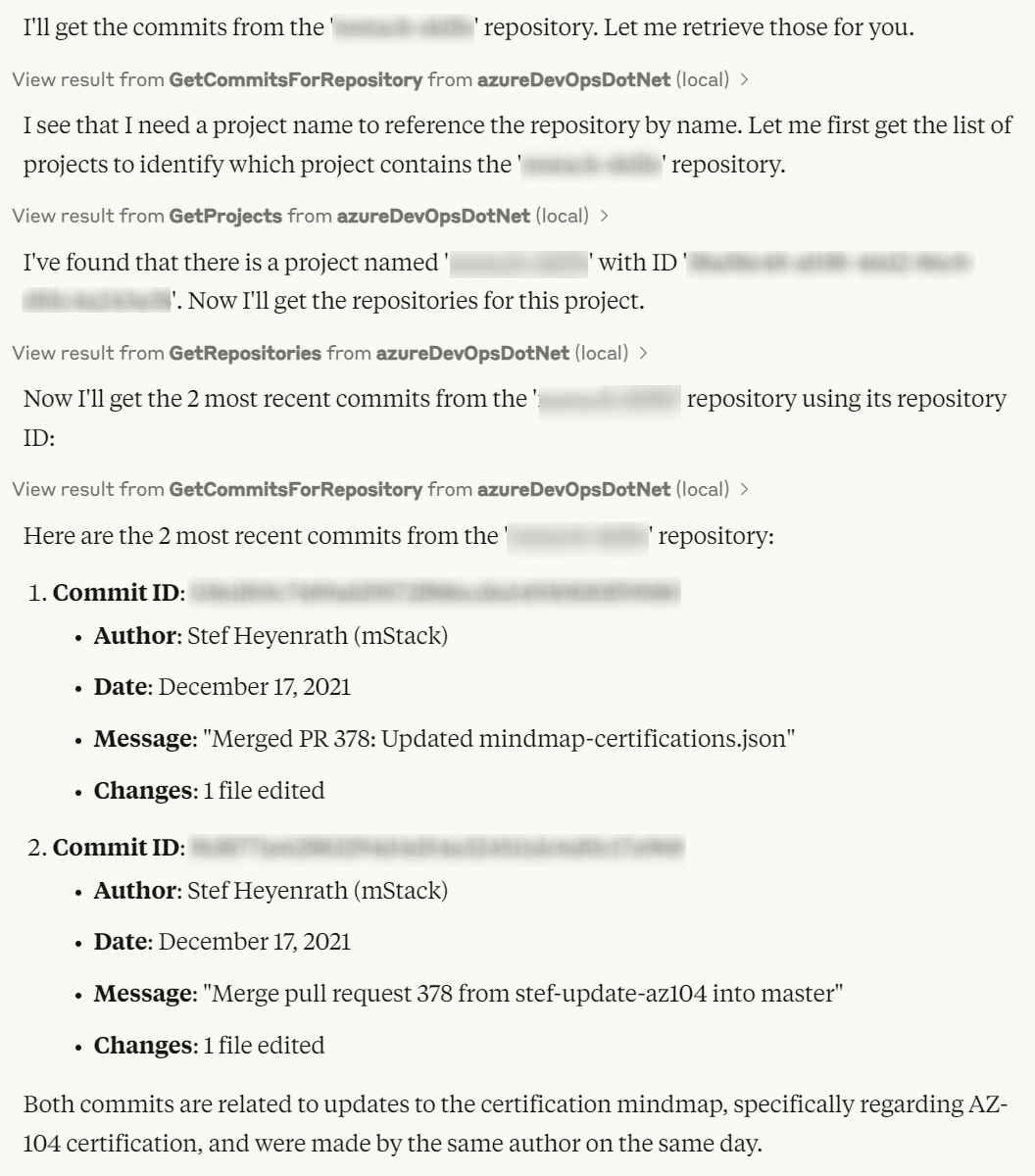
Question
Get 2 commits from the azure devops repository '. . .'.Answer
<br>
📖 Links
- https://github.com/Tiberriver256/mcp-server-azure-devops - https://github.com/stefanskiasan/azure-devops-mcp-serverCertified
- This MCP is certified by MCP Review (Proof of ownership)Sponsors
Entity Framework Extensions and Dapper Plus are major sponsors and proud to contribute to the development of mcpserver.azuredevops.stdio.


Sign in to leave a review
Use Google, GitHub, or an email account so ratings stay tied to real people.
No reviews posted yet.



