Medical Mcps

by pascalwhoop

168 downloads
Not rated
GitHub

Description

# Biological APIs MCP Server MCP server that integrates multiple biological and medical databases for research purposes. ## Quick Start ### Connect to Production Server The easiest way to use this MCP server is to connect to the production deployment. All APIs are available…

About

# Biological APIs MCP Server MCP server that integrates multiple biological and medical databases for research purposes. ## Quick Start ### Connect to Production Server The easiest way to use this MCP server is to connect to the production deployment. All APIs are available through a **unified endpoint** that gives…

Details

Author
pascalwhoop
Downloads
168
Categories
Other

- Unified endpoint to access all 14 APIs in one connection
- Individual API endpoints for selective tool access
- Supports local deployment via Docker Compose or Python/uv
- HTTP caching with 30-day default TTL (hishel, per-API SQLite files)
- Optional Sentry integration for error tracking and performance monitoring
- Uses Streamable HTTP transport per MCP specification

Setting up with Highlight

This MCP is not yet compatible with Highlight’s one-click setup. However, you can still use it with Highlight by following these steps:

  1. Download and install Highlight from highlightai.com/download
  2. Navigate to the plugins tab and select "Add Custom Plugin"
  3. Configure the plugin with the settings below
    Plugin Name Medical Mcps
    Command (node, npx, python, etc.)

    Please refer to the README for specific instructions on how to obtain API keys or other required environment variables.

  4. Enable "Start Automatically" if you want the plugin to start when Highlight launches

From the repository

Configure it in an MCP client (e.g., Cursor) by adding the production URL https://medical-mcps-production.up.railway.app/tools/unified/mcp to your .cursor/mcp.json. Once connected, you can call any of the 100+ tools, such as mygene_get_gene for gene information. For local development, use Docker Compose or run the server directly with uv run mcp-server.

Claude Desktop / Cursor

Paste into your MCP client config file to install this server.

{
    "mcpServers": {
        "medical mcps": {
            "medical-mcps-api": {
                "type": "http",
                "url": "https://medical-mcps-production.up.railway.app/tools/unified/mcp"
            }
        }
    }
}

McpServers

{
    "medical-mcps-api": {
        "type": "http",
        "url": "https://medical-mcps-production.up.railway.app/tools/unified/mcp"
    }
}
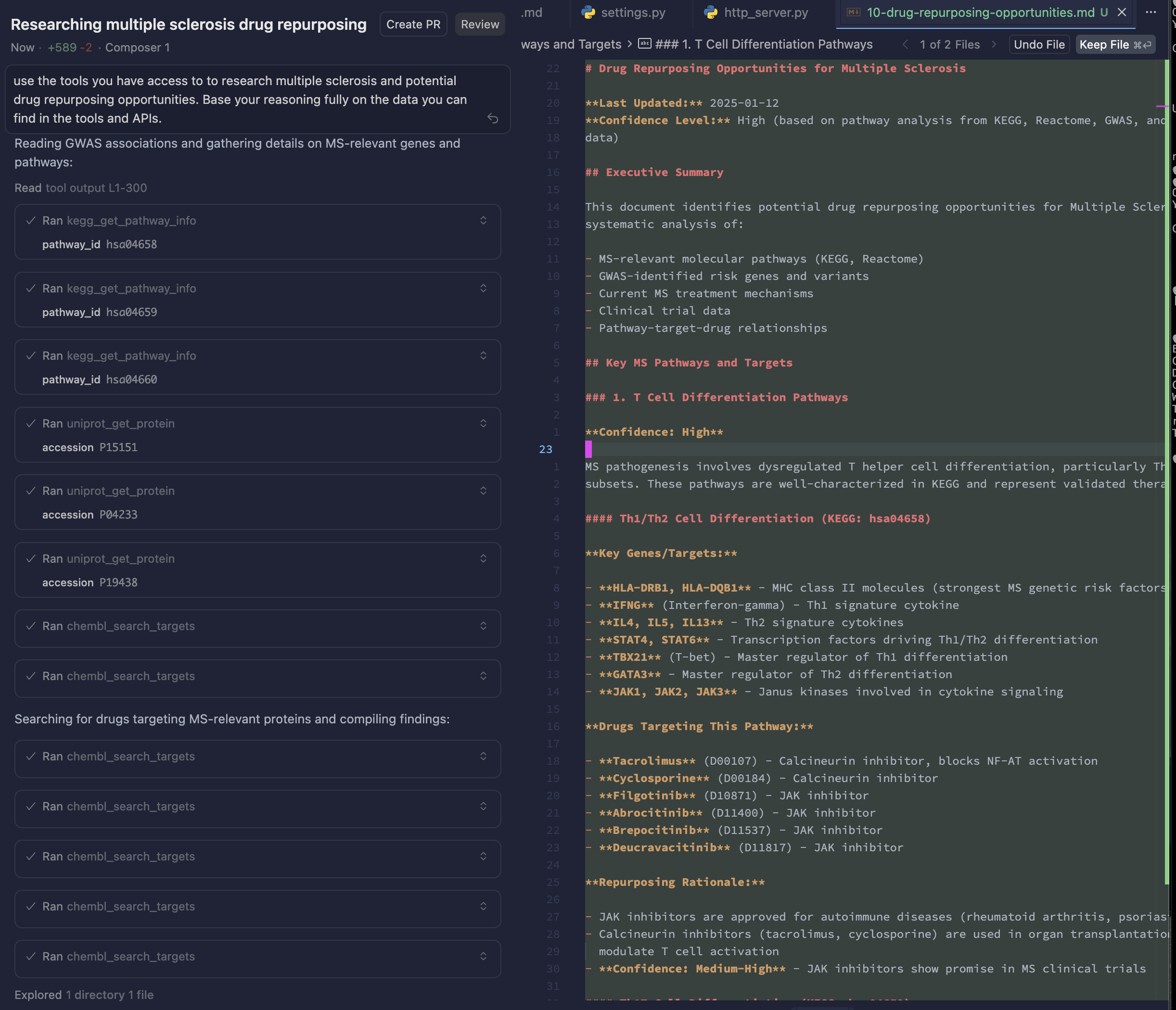
# Biological APIs MCP Server MCP server that integrates multiple biological and medical databases for research purposes. ## Quick Start ### Connect to Production Server The easiest way to use this MCP server is to connect to the production deployment. All APIs are available through a **unified endpoint** that gives you access to all tools in one place. **Production URL:** `https://medical-mcps-production.up.railway.app/tools/unified/mcp` ### Configure in Cursor (or other MCP client) Add this to your `.cursor/mcp.json` (or equivalent MCP client configuration): ```json { "mcpServers": { "medical-apis": { "url": "https://medical-mcps-production.up.railway.app/tools/unified/mcp" } } } ``` ### What You Get Once connected, you'll have access to **100+ tools** across 14 biological and medical APIs: - **Pathways**: Reactome, KEGG, Pathway Commons - **Genes & Proteins**: UniProt, MyGene.info, Node Normalization - **Variants**: MyVariant.info, GWAS Catalog - **Diseases**: OMIM, MyDisease.info - **Drugs**: ChEMBL, MyChem.info, OpenFDA - **Literature**: PubMed/PubTator3 - **Trials**: ClinicalTrials.gov, NCI Clinical Trials - **Drug Repurposing Playbooks**: Structured strategies for navigating biomedical data trails ### Example: Search for a Gene ```json { "jsonrpc": "2.0", "method": "tools/call", "params": { "name": "mygene_get_gene", "arguments": { "gene_id_or_symbol": "TP53" } } } ``` ### Individual API Endpoints If you prefer to use individual APIs separately, each API has its own endpoint: - `/tools/reactome/mcp` - Reactome only - `/tools/pubmed/mcp` - PubMed only - `/tools/chembl/mcp` - ChEMBL only - ... (see [Available Endpoints](#available-endpoints) for full list) ### Local Development To run your own instance locally, you can either: - Use Docker Compose (recommended for quick setup) - see [Docker Compose Setup](#docker-compose-setup) - Run directly with Python/uv - see [Running the Server](#running-the-server) below ## APIs Integrated ### ✅ Implemented APIs - **Reactome API** - Pathway information, gene/protein queries, disease associations - **KEGG API** - Pathway maps, gene annotations, disease and drug information - **UniProt API** - Protein sequences, functional annotations, disease associations - **OMIM API** - Genetic disease information, gene-disease associations (requires API key) - **GWAS Catalog API** - Genetic associations, variant information, study metadata - **Pathway Commons API** - Integrated pathway data, pathway interactions, gene/protein networks - **Node Normalization API** - CURIE normalization, identifier mapping across databases - **ChEMBL API** - Drug-target interactions, bioactivity data, mechanisms of action, drug indications - **ClinicalTrials.gov API** - Clinical trial search, study metadata, trial status - **PubMed/PubTator3 API** - Biomedical literature search, article retrieval, preprint search - **OpenFDA API** - FDA adverse event reports, drug labels, device events, drug approvals - **MyVariant.info API** - Genetic variant annotations, population frequencies, clinical significance - **BioThings Suite APIs** - MyGene.info (gene annotations), MyDisease.info (disease information), MyChem.info (drug/chemical data) - **NCI Clinical Trials API** - Cancer clinical trial search and metadata (requires API key) - **Drug Repurposing Playbooks** - Structured strategies for drug repurposing discovery (see [PLAYBOOKS.md](./docs/PLAYBOOKS.md)) ![](./agent-usage.png) ## Installation ### Option 1: Docker Compose (Recommended) The easiest way to run both the MCP backend and SearXNG search engine: ```bash # Start all services with auto-rebuild make docker-watch # Or start in background make docker-up # View logs make docker-logs # Stop services make docker-down ``` Services will be available at: - **MCP Backend**: http://localhost:8000 - **SearXNG**: http://localhost:8888 ### Option 2: Local Python Installation ```bash # Install dependencies using uv cd /path/to/medical-mcps uv sync ``` ## Running the Server The server uses **Streamable HTTP** transport (per [MCP specification](https://modelcontextprotocol.io/specification/2025-03-26/basic/transports#streamable-http)) for remote hosting over HTTP. After running `uv sync`, you can run the server: ### Using Makefile (Recommended for Development) ```bash # Start server with uvicorn and livereload (auto-reload on code changes) make server ``` ### Using uv directly ```bash # Run HTTP server uv run mcp-server # Or with custom host/port MCP_HOST=0.0.0.0 MCP_PORT=8000 uv run mcp-server ``` ### Using uvicorn directly ```bash # Run with uvicorn and livereload uv run uvicorn medical_mcps.http_server:app --reload --host 0.0.0.0 --port 8000 ``` The HTTP server will be available at `http://localhost:8000` (or your configured host/port). The server uses the MCP SDK's Streamable HTTP transport mounted as an ASGI app on FastAPI. The MCP endpoint is available at `/mcp` and supports both POST (for sending JSON-RPC messages) and GET (for optional SSE streams). ## Connecting to Production The MCP servers are deployed and available at: **Production Base URL:** `https://medical-mcps-production.up.railway.app` ### Unified Endpoint (Recommended) **Use the unified endpoint to access all APIs in one place:** ```json { "url": "https://medical-mcps-production.up.railway.app/tools/unified/mcp" } ``` This gives you access to all 100+ tools from all APIs through a single connection. ### Individual API Endpoints If you prefer to use individual APIs separately, each API has its own endpoint: **Production:** ```json { "url": "https://medical-mcps-production.up.railway.app/tools/reactome/mcp" } ``` **Local Development:** ```json { "url": "http://localhost:8000/tools/reactome/mcp" } ``` ### Available Endpoints All endpoints are available at both production and local URLs: - `/tools/unified/mcp` - Unified server (all APIs combined) - `/tools/reactome/mcp` - Reactome API - `/tools/kegg/mcp` - KEGG API - `/tools/uniprot/mcp` - UniProt API - `/tools/omim/mcp` - OMIM API (requires API key) - `/tools/gwas/mcp` - GWAS Catalog API - `/tools/pathwaycommons/mcp` - Pathway Commons API - `/tools/nodenorm/mcp` - Node Normalization API - `/tools/chembl/mcp` - ChEMBL API - `/tools/ctg/mcp` - ClinicalTrials.gov API - `/tools/pubmed/mcp` - PubMed/PubTator3 API - `/tools/openfda/mcp` - OpenFDA API - `/tools/myvariant/mcp` - MyVariant.info API - `/tools/biothings/mcp` - BioThings Suite APIs (MyGene, MyDisease, MyChem) - `/tools/nci/mcp` - NCI Clinical Trials API (requires API key) - `/tools/playbooks/mcp` - Drug Repurposing Playbooks ### Example: Configuring Multiple APIs in Cursor **Option 1: Use Unified Endpoint (Recommended)** Access all APIs through one connection: ```json { "mcpServers": { "medical-apis": { "url": "https://medical-mcps-production.up.railway.app/tools/unified/mcp" } } } ``` **Option 2: Use Individual Endpoints** If you prefer separate connections for each API: ```json { "mcpServers": { "reactome": { "url": "https://medical-mcps-production.up.railway.app/tools/reactome/mcp" }, "chembl": { "url": "https://medical-mcps-production.up.railway.app/tools/chembl/mcp" }, "pubmed": { "url": "https://medical-mcps-production.up.railway.app/tools/pubmed/mcp" } } } ``` ### Testing the Connection You can test if the production server is accessible by making a simple HTTP request: ```bash # Test unified endpoint (recommended) curl https://medical-mcps-production.up.railway.app/tools/unified/mcp \ -X POST \ -H "Content-Type: application/json" \ -d '{"jsonrpc": "2.0", "method": "initialize", "params": {}, "id": 1}' # Or test individual API endpoint curl https://medical-mcps-production.up.railway.app/tools/reactome/mcp \ -X POST \ -H "Content-Type: application/json" \ -d '{"jsonrpc": "2.0", "method": "initialize", "params": {}, "id": 1}' ``` A successful response indicates the server is running and accessible. ## HTTP Caching All API clients use **hishel** (RFC 9111 compliant HTTP caching) to transparently cache responses to disk. This reduces redundant API calls and improves performance. ### Cache Configuration - **Cache Location**: `~/.cache/medical-mcps/api_cache/` - **Cache Duration**: 30 days (default TTL) - **Cache Refresh**: TTL is reset when accessing cached entries (`refresh_ttl_on_access=True`) - **Per-API Cache Files**: Each API has its own SQLite cache file (e.g., `reactome.db`, `kegg.db`) ### Cache Behavior - **Automatic**: Caching is enabled by default for all HTTP-based APIs - **Transparent**: Responses are cached automatically based on URL, parameters, and headers - **RFC 9111 Compliant**: Respects HTTP caching semantics and Cache-Control headers - **Cache Visibility**: Logs show "(from cache)" when serving cached responses ### Disabling Caching To disable caching for a specific client, pass `enable_cache=False` when initializing: ```python client = ReactomeClient(enable_cache=False) ``` ### Clearing Cache To clear the cache, delete the cache directory: ```bash rm -rf ~/.cache/medical-mcps/api_cache/ ``` Or delete individual API cache files: ```bash rm ~/.cache/medical-mcps/api_cache/reactome.db ``` ### Supported APIs All HTTP-based APIs support caching: - Reactome (httpx) - KEGG (httpx) - UniProt (httpx) - OMIM (httpx) - GWAS Catalog (httpx) - Pathway Commons (httpx) - ClinicalTrials.gov (requests) - PubMed (httpx) - OpenFDA (httpx) - MyVariant.info (httpx) - BioThings Suite (httpx) - NCI Clinical Trials (httpx) **Note**: ChEMBL uses a library client (not HTTP), so caching is handled at the library level. ## Monitoring with Sentry The server includes optional [Sentry](https://sentry.io) integration for error tracking and performance monitoring. Sentry automatically instruments MCP tool executions, prompt requests, and resource access. ### Setup 1. Get your Sentry DSN from [sentry.io](https://sentry.io) 2. Set the `SENTRY_DSN` environment variable: ```bash export SENTRY_DSN="https://your-dsn@sentry.io/project-id" ``` ### Configuration Sentry can be configured via environment variables: - `SENTRY_DSN` - Your Sentry DSN (required to enable Sentry) - `SENTRY_TRACES_SAMPLE_RATE` - Sample rate for performance traces (default: `1.0` = 100%) - `SENTRY_SEND_DEFAULT_PII` - Include tool inputs/outputs in Sentry (default: `true`) - `SENTRY_ENABLE_LOGS` - Enable sending logs to Sentry (default: `true`) - `SENTRY_PROFILE_SESSION_SAMPLE_RATE` - Sample rate for profiling sessions (default: `1.0` = 100%) - `SENTRY_PROFILE_LIFECYCLE` - Profiler lifecycle mode (default: `trace` - auto-run when transaction active) - `ENVIRONMENT` - Environment name (default: `local`) **Performance Monitoring:** - **Tracing**: Captures 100% of transactions by default (`traces_sample_rate=1.0`) - **Profiling**: Profiles 100% of sessions by default (`profile_session_sample_rate=1.0`) - **Logs**: Enabled by default (`enable_logs=True`) ### What Gets Tracked Sentry automatically collects: **MCP Integration:** - **Tool executions**: Tool name, arguments, results, and execution errors - **Prompt requests**: Prompt name, arguments, and content - **Resource access**: Resource URI and access patterns - **Request context**: Request IDs, session IDs, and transport types - **Execution spans**: Timing information for all handler invocations **Starlette Integration:** - **HTTP requests**: Method, URL, headers, form data, JSON payloads - **Errors**: All exceptions leading to Internal Server Error (5xx status codes) - **Performance**: Request timing and transaction data - **Request data**: Attached to all events (excludes PII unless `send_default_pii=True`) **HTTPX Integration:** - **Outgoing HTTP requests**: All HTTP requests made by API clients (Reactome, KEGG, UniProt, etc.) - **Request spans**: Creates spans for each outgoing HTTP request - **Trace propagation**: Ensures traces are properly propagated to downstream services **Asyncio Integration:** - **Async operations**: Tracks async context and operations - **Async errors**: Captures errors in async functions and tasks ### Privacy By default, Sentry does **not** include tool inputs/outputs or prompt content (considered PII). To include this data, set `SENTRY_SEND_DEFAULT_PII=true`. See the [Sentry MCP integration documentation](https://docs.sentry.io/platforms/python/integrations/mcp/) for more details. ## API Key Handling **Important:** The MCP server is a **stateless proxy**. It does NOT store API keys. ### APIs Requiring Client-Provided API Keys For APIs that require authentication (currently **OMIM**), the MCP client must provide the API key as a parameter with each tool call: ```json { "jsonrpc": "2.0", "method": "tools/call", "params": { "name": "get_entry", "arguments": { "mim_number": "104300", "api_key": "your-omim-api-key-here" } } } ``` **APIs requiring API keys:** - **OMIM** - All tools require `api_key` parameter (get from https://omim.org/api) - **NCI Clinical Trials** - Optional `api_key` parameter (get from https://clinicaltrialsapi.cancer.gov/) - **OpenFDA** - Optional `api_key` parameter for higher rate limits (get from https://open.fda.gov/apis/) **APIs not requiring API keys:** - Reactome, KEGG, UniProt, GWAS Catalog, Pathway Commons, Node Normalization, ChEMBL, ClinicalTrials.gov, PubMed, MyVariant.info, BioThings Suite (MyGene, MyDisease, MyChem) ### Pattern for Future APIs If a new API requires authentication, follow this pattern: 1. Add `api_key: str` as a **required parameter** to all tools 2. Validate API key presence before making API calls 3. Return clear error message if key is missing: `"Error: API key is required. Get your API key from <url>"` 4. Create client instance per-request with provided key: `client = APIClient(api_key=api_key)` 5. **DO NOT** store API keys in server settings or environment variables Example: ```python @api_mcp.tool() async def some_tool(param: str, api_key: str) -> str: """Tool description. Args: param: Required parameter api_key: API key (REQUIRED - get from https://api-provider.com) """ if not api_key: return "Error: API key is required. Get your API key from https://api-provider.com" try: client = APIClient(api_key=api_key) return await client.some_method(param) except Exception as e: return f"Error calling API: {str(e)}" ``` ## Available Tools All tools are prefixed with the API name (e.g., `reactome_*`) to make it clear which API is being used. ### Reactome Tools - `reactome_get_pathway` - Get detailed pathway information - `reactome_query_pathways` - Query pathways by keyword or gene/protein name - `reactome_get_pathway_participants` - Get all participants in a pathway - `reactome_get_disease_pathways` - Get pathways associated with a disease ### KEGG Tools - `kegg_get_pathway_info` - Get pathway information by pathway ID - `kegg_list_pathways` - List pathways (optionally filtered by organism) - `kegg_find_pathways` - Find pathways matching a query keyword - `kegg_get_gene` - Get gene information by gene ID - `kegg_find_genes` - Find genes matching a query keyword - `kegg_get_disease` - Get disease information by disease ID - `kegg_find_diseases` - Find diseases matching a query keyword - `kegg_link_pathway_genes` - Get genes linked to a pathway ### UniProt Tools - `uniprot_get_protein` - Get protein information by accession - `uniprot_search_proteins` - Search proteins in UniProtKB - `uniprot_get_protein_sequence` - Get protein sequence in FASTA format - `uniprot_get_disease_associations` - Get disease associations for a protein - `uniprot_map_ids` - Map identifiers between databases ### OMIM Tools - `omim_get_entry` - Get entry information by MIM number - `omim_search_entries` - Search entries in OMIM - `omim_get_gene` - Get gene information by gene symbol - `omim_search_genes` - Search genes in OMIM - `omim_get_phenotype` - Get phenotype information by MIM number - `omim_search_phenotypes` - Search phenotypes in OMIM **Note:** All OMIM tools require an `api_key` parameter. Get your API key from https://omim.org/api ### GWAS Catalog Tools - `gwas_get_association` - Get association information by association ID - `gwas_search_associations` - Search for associations with various filters - `gwas_get_variant` - Get SNP information by rsId - `gwas_search_variants` - Search for SNPs/variants by rsId - `gwas_get_study` - Get study information by study ID - `gwas_search_studies` - Search for studies with various filters - `gwas_get_trait` - Get trait information by trait ID - `gwas_search_traits` - Search for traits ### Pathway Commons Tools - `pathwaycommons_search` - Search for pathways, proteins, or other biological entities - `pathwaycommons_get_pathway_by_uri` - Get pathway information by URI - `pathwaycommons_top_pathways` - Get top-level pathways (optionally filtered by gene or datasource) - `pathwaycommons_graph` - Get pathway graph/network (neighborhood, paths, etc.) - `pathwaycommons_traverse` - Traverse pathway data using graph path expressions ### Node Normalization Tools - `nodenorm_get_semantic_types` - Get all supported BioLink semantic types - `nodenorm_get_curie_prefixes` - Get all supported CURIE prefixes - `nodenorm_get_normalized_nodes` - Normalize one or more CURIEs to get equivalent identifiers - `nodenorm_get_allowed_conflations` - Get available conflation types ### ChEMBL Tools - `chembl_get_molecule` - Get molecule (drug/compound) information by ChEMBL ID - `chembl_search_molecules` - Search molecules by name or synonym - `chembl_get_target` - Get target (protein) information by ChEMBL ID - `chembl_search_targets` - Search targets by name or synonym - `chembl_get_activities` - Get bioactivity data (filter by target or molecule) - `chembl_get_mechanism` - Get mechanism of action for a molecule - `chembl_find_drugs_by_target` - Find all drugs targeting a specific protein - `chembl_find_drugs_by_indication` - Find all drugs for a disease/indication - `chembl_get_drug_indications` - Get all indications for a specific drug ### ClinicalTrials.gov Tools - `ctg_search_studies` - Search clinical trials with various filters - `ctg_get_study` - Get single study by NCT ID - `ctg_search_by_condition` - Search trials by condition/disease - `ctg_search_by_intervention` - Search trials by intervention/treatment - `ctg_get_study_metadata` - Get data model metadata (available fields) ### PubMed/PubTator3 Tools - `pubmed_search_articles` - Search biomedical articles from PubMed/PubTator3 by genes, diseases, chemicals, keywords, or variants - `pubmed_get_article` - Get detailed article information by PMID or DOI (supports full text retrieval) - `pubmed_search_preprints` - Search preprint articles from bioRxiv/medRxiv via Europe PMC ### OpenFDA Tools - `openfda_search_adverse_events` - Search FDA adverse event reports (FAERS) by drug, reaction, or seriousness - `openfda_get_adverse_event` - Get detailed adverse event report by safety report ID - `openfda_search_drug_labels` - Search FDA drug product labels (SPL) by drug name, indication, or section - `openfda_get_drug_label` - Get full drug label by set ID (with optional section filtering) - `openfda_search_device_events` - Search FDA device adverse event reports (MAUDE) by device, manufacturer, or problem **Note:** OpenFDA tools support optional `api_key` parameter for higher rate limits. Get your API key from https://open.fda.gov/apis/ ### MyVariant.info Tools - `myvariant_search_variants` - Search genetic variants by gene, HGVS notation, rsID, clinical significance, frequency, or CADD score - `myvariant_get_variant` - Get comprehensive variant details by variant ID (HGVS, rsID, or MyVariant ID) ### BioThings Suite Tools - `mygene_get_gene` - Get gene information from MyGene.info by ID or symbol - `mydisease_get_disease` - Get disease information from MyDisease.info by ID or name - `mychem_get_drug` - Get drug/chemical information from MyChem.info by ID or name ### NCI Clinical Trials Tools - `nci_search_trials` - Search NCI clinical trials for cancer research by condition, intervention, phase, or status - `nci_get_trial` - Get NCI trial details by trial ID **Note:** NCI tools support optional `api_key` parameter. Get your API key from https://clinicaltrialsapi.cancer.gov/ ## Development The server is structured as: ``` medical_mcps/ ├── __init__.py ├── http_server.py # HTTP MCP server (Starlette) ├── med_mcp_server.py # Unified MCP server and tool decorator ├── settings.py # Server configuration ├── sentry_config.py # Sentry error tracking configuration ├── api_clients/ # API client implementations │ ├── __init__.py │ ├── base_client.py │ ├── reactome_client.py │ ├── kegg_client.py │ ├── uniprot_client.py │ ├── omim_client.py │ ├── gwas_client.py │ ├── pathwaycommons_client.py │ ├── nodenorm_client.py │ ├── chembl_client.py │ ├── ctg_client.py │ ├── pubmed_client.py │ ├── openfda_client.py │ ├── myvariant_client.py │ ├── mygene_client.py │ ├── mydisease_client.py │ ├── mychem_client.py │ └── nci_client.py └── servers/ # Individual MCP servers per API ├── __init__.py ├── reactome_server.py ├── kegg_server.py ├── uniprot_server.py ├── omim_server.py ├── gwas_server.py ├── pathwaycommons_server.py ├── nodenorm_server.py ├── chembl_server.py ├── ctg_server.py ├── pubmed_server.py ├── openfda_server.py ├── myvariant_server.py ├── biothings_server.py └── nci_server.py ``` To add a new API: 1. Create a new client in `api_clients/` (e.g., `newapi_client.py`) 2. Create a new server in `servers/` (e.g., `newapi_server.py`) 3. Use the `@medmcps_tool` decorator from `med_mcp_server` to register tools with both the individual server and unified server 4. Register the server in `http_server.py` (import, mount, and lifespan) 5. Follow the naming convention: `{api_name}_{tool_name}` for tools Example: ```python from ..med_mcp_server import unified_mcp, tool as medmcps_tool @medmcps_tool(name="newapi_tool_name", servers=[newapi_mcp, unified_mcp]) async def tool_function(...): ... ``` ## Testing Test the server by connecting an MCP client and calling the tools. Each tool response includes the API source in the output.
No reviews yet — be the first

Sign in to leave a review

Use Google, GitHub, or an email account so ratings stay tied to real people.

Email sign in

No reviews posted yet.