
Starknet MCP Server
About
Facilitates interaction with Starknet blockchain via MCP by exposing various RPC methods, allowing users to query chain states, transaction details, and block information using natural language queries.
Details
- Repository
- milancermak/starknet-mcp
- License
- MIT
Explore

Setting up with Highlight
This MCP is not yet compatible with Highlight’s one-click setup. However, you can still use it with Highlight by following these steps:
- Download and install Highlight from highlightai.com/download
- Navigate to the plugins tab and select "Add Custom Plugin"
-
Configure the plugin with the settings below
Plugin Name
Starknet MCP ServerCommand (node, npx, python, etc.)bunArguments-
Argument 1
/PATH/TO/THIS/REPO/starknet-mcp/index.ts
Environment-
STARKNET_RPC_URL
https://starknet-mainnet.public.blastapi.io/rpc/v0_7
Please refer to the README for specific instructions on how to obtain API keys or other required environment variables.
-
Argument 1
- Enable "Start Automatically" if you want the plugin to start when Highlight launches





From the repository
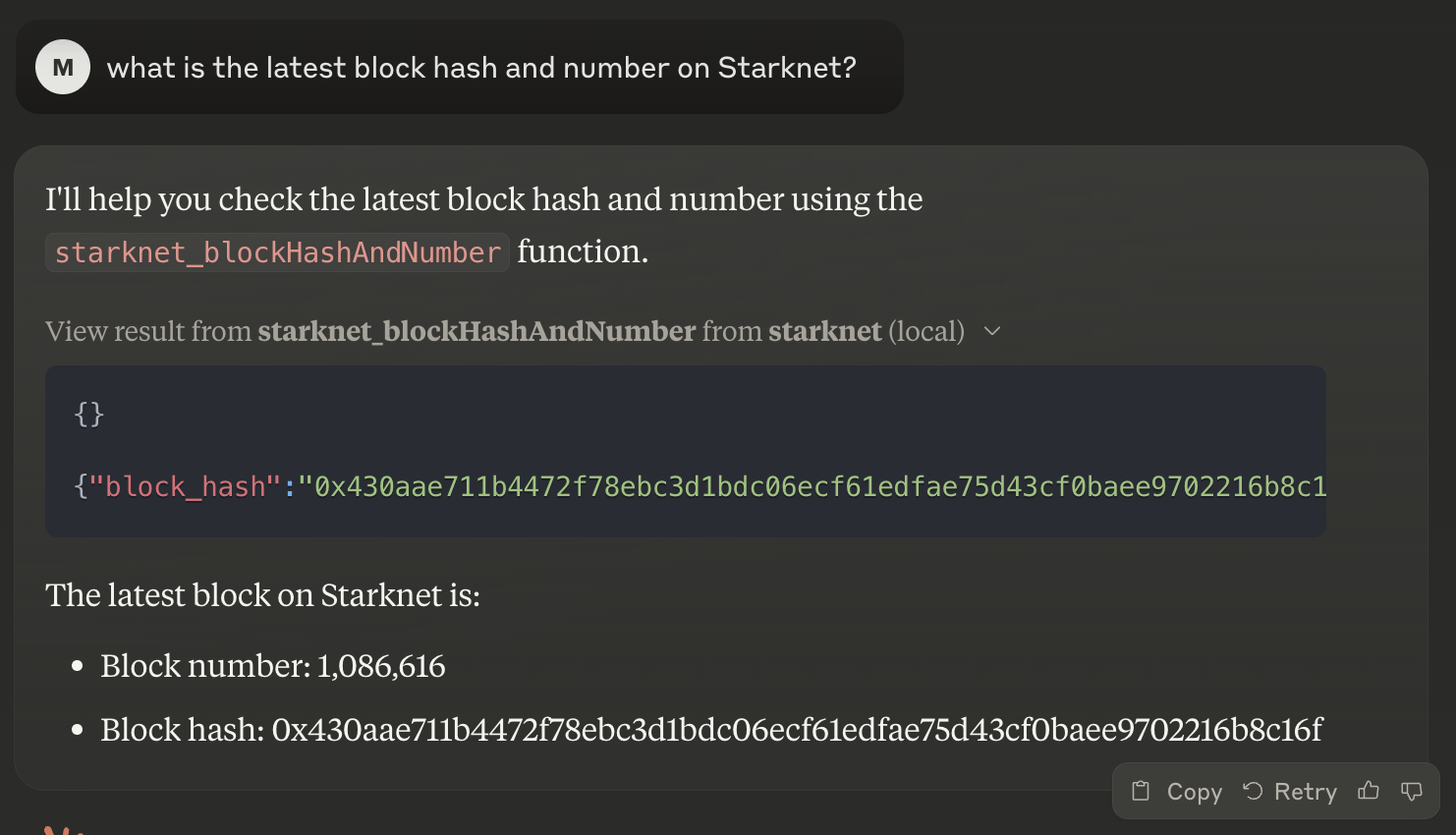
After correctly configuring Claude Desktop, it will have access to all the available methods. You can start asking Claude questions about the state of the chain, e.g. "What is the latest block hash and number on Starknet?". If Claude determines it has to use an MCP method to answer your question, it will ask you for permissions:
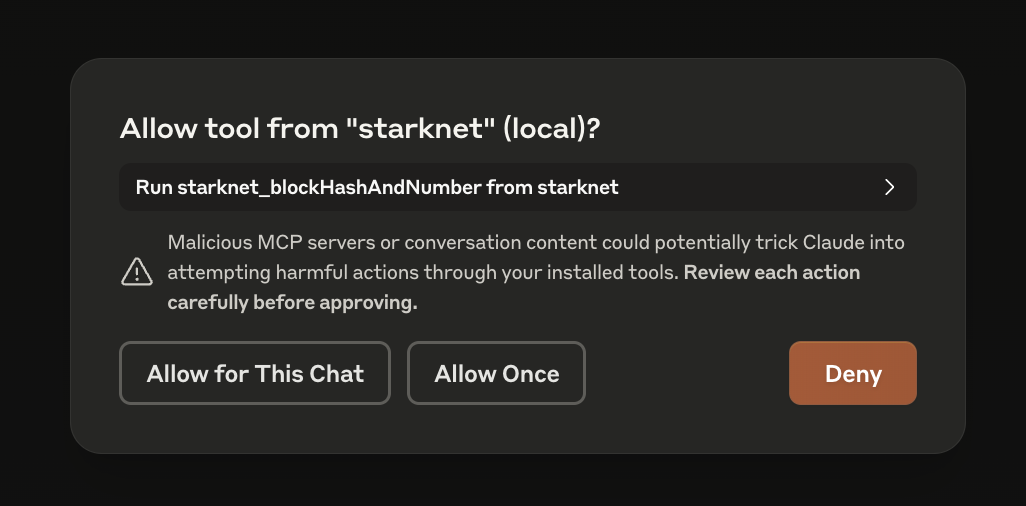
You'll see the used method, its input and output inline in the chat.
starknet_getBlockWithTxHashes
Retrieve the block with transaction hashes.
starknet_getBlockWithTxs
Retrieve the block with transactions.
starknet_getBlockWithReceipts
Retrieve the block with transaction receipts.
starknet_getStateUpdate
Retrieve the state update for the blockchain.
starknet_getStorageAt
Retrieve the storage value at a specific address.
starknet_getTransactionStatus
Get the status of a transaction by its hash.
starknet_getTransactionByHash
Retrieve a transaction by its hash.
starknet_getTransactionByBlockIdAndIndex
Retrieve a transaction from a block by its block ID and index.
starknet_getTransactionReceipt
Retrieve the receipt for a specific transaction.
starknet_getClass
Retrieve the class of a specific contract.
starknet_getClassHashAt
Retrieve the class hash at a specific address.
starknet_getClassAt
Retrieve the class at a specific address.
starknet_getBlockTransactionCount
Retrieve the number of transactions in a specific block.
starknet_call
Call a contract method without creating a transaction.
starknet_getEvents
Retrieve events from the blockchain.
starknet_getNonce
Retrieve the nonce for a specific address.
starknet_blockNumber
Retrieve the current block number.
starknet_blockHashAndNumber
Retrieve the current block's hash and number.
starknet_chainId
Retrieve the current chain ID.
starknet_syncing
Check if the node is syncing.
starknet_specVersion
Retrieve the current specification version.
Claude Desktop / Cursor
Paste into your MCP client config file to install this server.
{
    "mcpServers": {
        "starknet mcp server": {
            "env": {
                "STARKNET_RPC_URL": "https://starknet-mainnet.public.blastapi.io/rpc/v0_7"
            },
            "args": [
                "/PATH/TO/THIS/REPO/starknet-mcp/index.ts"
            ],
            "command": "bun"
        }
    }
}Linux
{
    "env": {
        "STARKNET_RPC_URL": "https://starknet-mainnet.public.blastapi.io/rpc/v0_7"
    },
    "args": [
        "/PATH/TO/THIS/REPO/starknet-mcp/index.ts"
    ],
    "command": "bun"
}
Macos
{
    "env": {
        "STARKNET_RPC_URL": "https://starknet-mainnet.public.blastapi.io/rpc/v0_7"
    },
    "args": [
        "/PATH/TO/THIS/REPO/starknet-mcp/index.ts"
    ],
    "command": "bun"
}
Windows
{
    "env": {
        "STARKNET_RPC_URL": "https://starknet-mainnet.public.blastapi.io/rpc/v0_7"
    },
    "args": [
        "/PATH/TO/THIS/REPO/starknet-mcp/index.ts"
    ],
    "command": "bun"
}
MCPserver for Starknet. Makes the following Starknet RPC method available through MCP:
starknet_getBlockWithTxHashes starknet_getBlockWithTxs starknet_getBlockWithReceipts starknet_getStateUpdate starknet_getStorageAt starknet_getTransactionStatus starknet_getTransactionByHash starknet_getTransactionByBlockIdAndIndex starknet_getTransactionReceipt starknet_getClass starknet_getClassHashAt starknet_getClassAt starknet_getBlockTransactionCount starknet_call starknet_getEvents starknet_getNonce starknet_blockNumber starknet_blockHashAndNumber starknet_chainId starknet_syncing starknet_specVersion
InstallBun. Clone this repo. Install the dependencies withbun install. Update Claude's MCP config - seeinstructionsfor your particular OS. You'll want something like this in theclaude_desktop_config.jsonfile:
{ "mcpServers": { "starknet": { "command": "bun", "args": ["/PATH/TO/THIS/REPO/starknet-mcp/index.ts"], "env": { "STARKNET_RPC_URL": "https://starknet-mainnet.public.blastapi.io/rpc/v0_7" } } } }
After correctly configuring Claude Desktop, it will have access to all the available methods. You can start asking Claude questions about the state of the chain, e.g. "What is the latest block hash and number on Starknet?". If Claude determines it has to use an MCP method to answer your question, it will ask you for permissions:
You'll see the used method, its input and output inline in the chat.
Methodsstarknet_estimateFeeandstarknet_estimateMessageFeeare not yet supported.
Claude doesn't 100% follow the tool inputSchema. It prefers sending strings over anything else. Some of this is prevented in the code, but if you encounter any error, please open an issue.
This is a web browser that enables your coding agent, such as Claude Code, to visit websites on your behalf and assist you in identifying bugs or creating UI test cases.
Read/write to over 2k blockchains, enabling data querying, contract analysis/deployment, and transaction execution, powered by Thirdweb.
A comprehensive toolkit for Ethereum blockchain analysis directly within Claude AI.
An MCP server for Solana development providing basic RPC methods and helpful prompts.
An MCP server for interacting with the Tatara blockchain ecosystem. Requires configuration for the Tatara RPC endpoint and a wallet private key.
MCP server for Klever blockchain smart contract development, on-chain data exploration, and VM interaction. Public remote server available at https://mcp.klever.org/mcp.
Server-side EVM wallet for Ai agents. Send transactions, manage tokens, and interact with smart contracts across multiple chains.
Interact with Aptos documentation and create full-stack Aptos blockchain applications.
A MCP server for interacting with Aptos NPM packages.
A server for blockchain interactions, offering Ethereum vanity address generation, 4byte lookup, ABI encoding, and multi-chain RPC calls.
Interact with the CW-Social smart contract on Cosmos-based blockchains.
Sign in to leave a review
Use Google, GitHub, or an email account so ratings stay tied to real people.
No reviews posted yet.



