
Miro MCP Server
About
Miro MCP Server is an implementation of the Model Context Protocol (MCP) that integrates with Miro’s REST API. It enables AI systems to collaborate with users directly on Miro boards by interacting with board widgets, allowing them to build visual diagrams and perform real-time…
Explore
- Integrates with Miro REST API
- Retrieve board widgets via getWidgets
- Create sticky notes with customizable text, position, and color
- Create connectors (lines) between two widgets
- Real-time AI collaboration on Miro boards
- Simple configuration with Claude Desktop
You can either download a precompiled JAR file from the Releases page or build the project yourself.
Here’s a sample prompt you can use to instruct Claude or another LLM agent to interact with Miro board:
I want you to create a simple diagram on a Miro board.
Please follow the next steps:
1 - Create a sticky note with some text.
2 - Create the second sticky with a different text.
3 - Now create a line between the two sticky notes using the id's of previously created stickers.
---
Feel free to contribute or report issues on the Issues page.
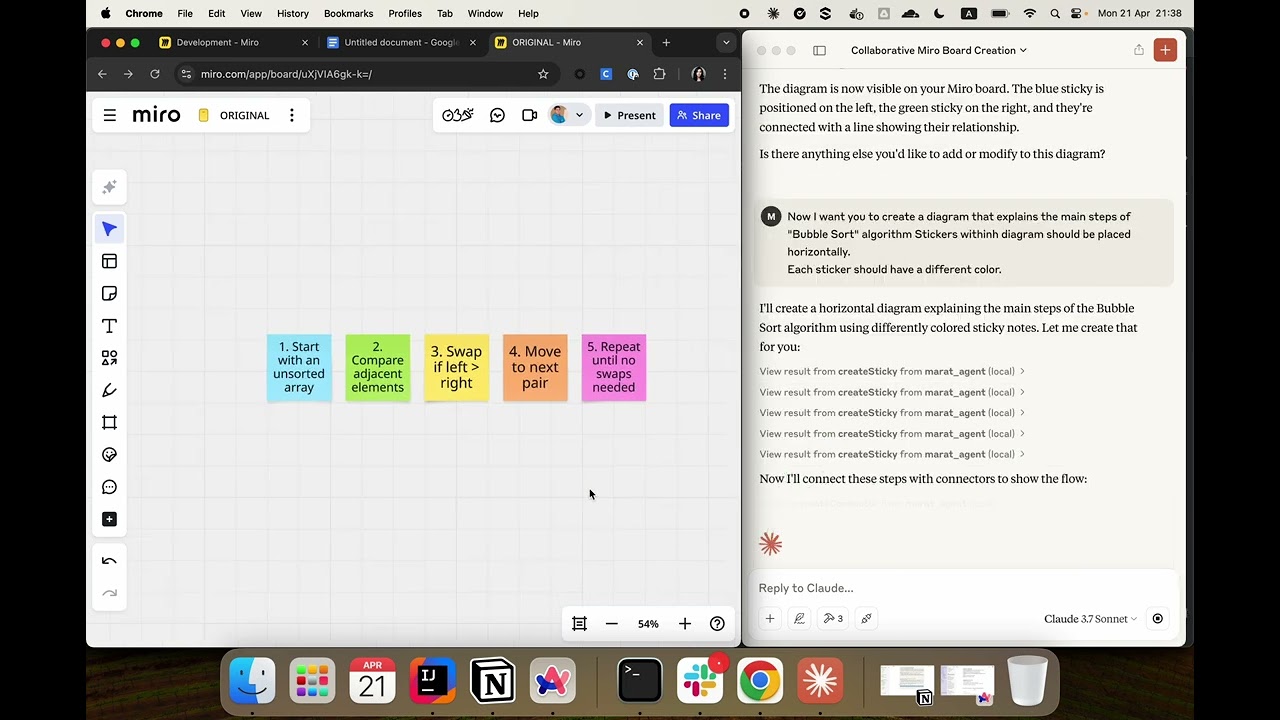
Overview
Miro MCP Server is an implementation of the Model Context Protocol (MCP) that integrates with Miro's REST API. It enables AI systems to collaborate with users directly on Miro boards by interacting with board widgets. This server provides tools that AI models can use to build visual diagrams and perform real-time collaboration.
Use Cases
- Board Collaboration: Automating collaboration on Miro boards.
- Data Analysis: Analyze the current state of a Miro board and extract useful information from visual layouts.
- AI-Powered Tools: Use large language models to assist with structured diagram creation, brainstorming, and visual task planning using the MCP protocol.
Installation
You can either download a precompiled JAR file from the Releases page or build the project yourself.
Option 1: Use prebuilt JAR
1. Download the latest release from the Releases page.
2. Place the .jar file in a desired location.
Option 2: Build from source
git clone https://github.com/MaratMingazov/miro-mcp-server.git
cd miro-mcp-server
./gradlew build
The resulting .jar file will be located in build/libs/miro-mcp-server-1.0.jar.
Connecting the MCP Server
If you are using the Claude Desktop app with MacOS or Linux, you can find the configuration file at:
~/Library/Application\ Support/Claude/claude_desktop_config.json
{
  "mcpServers": {
    "miro-mcp-server": {
      "command": "java",
      "args": [
        "-jar",
        "/path/to/miro-mcp-server-1.0.jar",
        "--token=miroToken"
      ]
    }
  }
}
Replace /path/to/miro-mcp-server-1.0.jar with the actual path to your .jar file and replace miroToken with your personal access token from Miro.
You can generate a personal access token by following this guide.
Tools
Items
- getWidgets - Get the widgets on a miro board
- boardKey: Miro board key to get widgets
Sticky Notes
- createSticky - Create a sticky note widget (sticker) on a miro board
- boardKey: Miro board key to get widgets
- stickyNoteText: The text to be displayed on the sticker
- x: Sticker position x coordinate
- y: Sticker position y coordinate
- width: Sticker width
- fillColor: Sticker fill color
Connectors
- createConnector - Create a connector (line) widget between 2 specified widgets
- boardKey: Miro board key to get widgets
- firstWidgetId: First widget id for connector
- secondWidgetId: Second widget id for connector
- connectorText: The text to be displayed on connector
Example Usage
Here’s a sample prompt you can use to instruct Claude or another LLM agent to interact with Miro board:
I want you to create a simple diagram on a Miro board.
Please follow the next steps:
1 - Create a sticky note with some text.
2 - Create the second sticky with a different text.
3 - Now create a line between the two sticky notes using the id's of previously created stickers.
---
Feel free to contribute or report issues on the Issues page.
Sign in to leave a review
Use Google, GitHub, or an email account so ratings stay tied to real people.
No reviews posted yet.



