
User Feedback
About
Simple MCP Server to enable a human-in-the-loop workflow in tools like Cline and Cursor.
Details
- License
- MIT
Explore
- Human‑in‑the‑loop feedback for AI coding assistants.
- Works with Cline, Cursor, and other MCP‑compatible tools.
- Configurable command execution via .user-feedback.json.
- Simple installation using uv and a cloned repository.
- Provides a single user_feedback tool with project directory and summary arguments.
- Web UI for testing during development (via uv run fastmcp dev server.py).

Setting up with Highlight
This MCP is not yet compatible with Highlight’s one-click setup. However, you can still use it with Highlight by following these steps:
- Download and install Highlight from highlightai.com/download
- Navigate to the plugins tab and select "Add Custom Plugin"
-
Configure the plugin with the settings below
Plugin Name
User FeedbackCommand (node, npx, python, etc.)Please refer to the README for specific instructions on how to obtain API keys or other required environment variables.
- Enable "Start Automatically" if you want the plugin to start when Highlight launches





From the repository
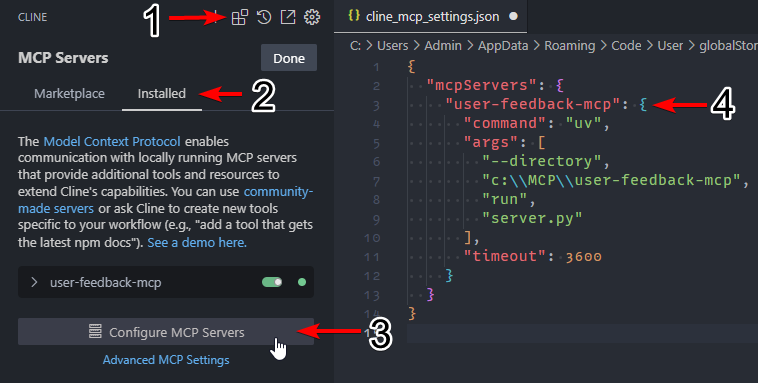
To install the MCP server in Cline, follow these steps (see screenshot):
1. Install uv globally:
- Windows: pip install uv
- Linux/Mac: curl -LsSf https://astral.sh/uv/install.sh | sh
2. Clone this repository, for this example C:\MCP\user-feedback-mcp.
3. Navigate to the Cline _MCP Servers_ configuration (see screenshot).
4. Click on the _Installed_ tab.
5. Click on _Configure MCP Servers_, which will open cline_mcp_settings.json.
6. Add the user-feedback-mcp server:
``json``
{
"mcpServers": {
"github.com/mrexodia/user-feedback-mcp": {
"command": "uv",
"args": [
"--directory",
"c:\\MCP\\user-feedback-mcp",
"run",
"server.py"
],
"timeout": 600,
"autoApprove": [
"user_feedback"
]
}
}
}
``
<use_mcp_tool>
<server_name>github.com/mrexodia/user-feedback-mcp</server_name>
<tool_name>user_feedback</tool_name>
<arguments>
{
"project_directory": "C:/MCP/user-feedback-mcp",
"summary": "I've implemented the changes you requested."
}
</arguments>
</use_mcp_tool>
Claude Desktop / Cursor
Paste into your MCP client config file to install this server.
{
    "mcpServers": {
        "user feedback": {
            "github.com/mrexodia/user-feedback-mcp": {
                "command": "uv",
                "args": [
                    "--directory",
                    "c:\\MCP\\user-feedback-mcp",
                    "run",
                    "server.py"
                ],
                "timeout": 3600
            }
        }
    }
}McpServers
{
"github.com/mrexodia/user-feedback-mcp": {
"command": "uv",
"args": [
"--directory",
"c:\\MCP\\user-feedback-mcp",
"run",
"server.py"
],
"timeout": 3600
}
}
Prompt Engineering
For the best results, add the following to your custom prompt: > Before completing the task, use the user_feedback MCP tool to ask the user for feedback. This will ensure Cline uses this MCP server to request user feedback before marking the task as completed..user-feedback.json
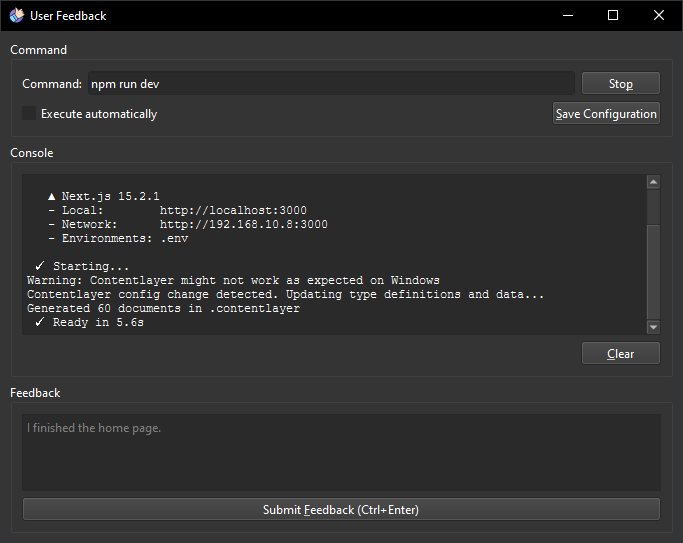
Hitting _Save Configuration_ creates a .user-feedback.json file in your project directory that looks like this:
``json
{
"command": "npm run dev",
"execute_automatically": false
}
`
This configuration will be loaded on startup and if execute_automatically is enabled your command will be instantly executed (you will not have to click _Run_ manually). For multi-step commands you should use something like Task.
Installation (Cline)
To install the MCP server in Cline, follow these steps (see screenshot):
1. Install uv globally:
- Windows: pip install uv
- Linux/Mac: curl -LsSf https://astral.sh/uv/install.sh | sh
2. Clone this repository, for this example C:\MCP\user-feedback-mcp.
3. Navigate to the Cline _MCP Servers_ configuration (see screenshot).
4. Click on the _Installed_ tab.
5. Click on _Configure MCP Servers_, which will open cline_mcp_settings.json.
6. Add the user-feedback-mcp server:
`json
{
"mcpServers": {
"github.com/mrexodia/user-feedback-mcp": {
"command": "uv",
"args": [
"--directory",
"c:\\MCP\\user-feedback-mcp",
"run",
"server.py"
],
"timeout": 600,
"autoApprove": [
"user_feedback"
]
}
}
}
`
Development
`sh
uv run fastmcp dev server.py
`
This will open a web interface at http://localhost:5173 and allow you to interact with the MCP tools for testing.
Available tools
`
<use_mcp_tool>

<server_name>github.com/mrexodia/user-feedback-mcp</server_name>

<tool_name>user_feedback</tool_name>

<arguments>

{

  "project_directory": "C:/MCP/user-feedback-mcp",

  "summary": "I've implemented the changes you requested."

}

</arguments>

</use_mcp_tool>
``Sign in to leave a review
Use Google, GitHub, or an email account so ratings stay tied to real people.
No reviews posted yet.