
mult-fetch-mcp-server
About
A versatile MCP-compliant web content fetching tool that supports multiple modes (browser/node), formats (HTML/JSON/Markdown/Text), and intelligent proxy detection, with bilingual interface (English/Chinese).
Details
- License
- MIT
Explore
- Implementation based on the official MCP SDK
- Support for Standard Input/Output (Stdio) transport
- Multiple web scraping methods (HTML, JSON, text, Markdown, plain text conversion)
- Intelligent mode switching: automatic switching between standard requests and browser mode
- Content size management: automatically splits large content into manageable chunks to solve AI model context size limitations
- Chunked content retrieval: ability to request specific chunks of large content while maintaining context continuity
- Detailed debug logging to stderr
- Bilingual internationalization (English and Chinese)
- Modular design for easy maintenance and extension
- Intelligent Content Extraction: Based on Mozilla's Readability library, capable of extracting meaningful content from web pages while filtering out advertisements and navigation elements
- Metadata Support: Ability to extract webpage metadata such as title, author, publication date, and site information
- Smart Content Detection: Automatically detects if a page contains meaningful content, filtering out login pages, error pages, and other pages without substantial content
- Browser Automation Enhancements: Support for page scrolling, cookie management, selector waiting, and other advanced browser interactions

Setting up with Highlight
This MCP is not yet compatible with Highlight’s one-click setup. However, you can still use it with Highlight by following these steps:
- Download and install Highlight from highlightai.com/download
- Navigate to the plugins tab and select "Add Custom Plugin"
-
Configure the plugin with the settings below
Plugin Name
mult-fetch-mcp-serverCommand (node, npx, python, etc.)Please refer to the README for specific instructions on how to obtain API keys or other required environment variables.
- Enable "Start Automatically" if you want the plugin to start when Highlight launches





From the repository
After configuration, restart Claude desktop, and you can use the following tools in your conversation:
- fetch_html: Get HTML content of a webpage
- fetch_json: Get JSON data
- fetch_txt: Get plain text content
- fetch_markdown: Get Markdown formatted content
- fetch_plaintext: Get plain text content converted from HTML (strips HTML tags)
To install Mult Fetch MCP Server for Claude Desktop automatically via Smithery:
npx -y @smithery/cli install @lmcc-dev/mult-fetch-mcp-server --client claude
pnpm install
pnpm add -g @lmcc-dev/mult-fetch-mcp-server
Or run directly with npx (no installation required):
npx @lmcc-dev/mult-fetch-mcp-server
- MacOS: ~/Library/Application Support/Claude/claude_desktop_config.json
- Windows: %APPDATA%/Claude/claude_desktop_config.json
Below is an example of using this tool in Claude desktop client:
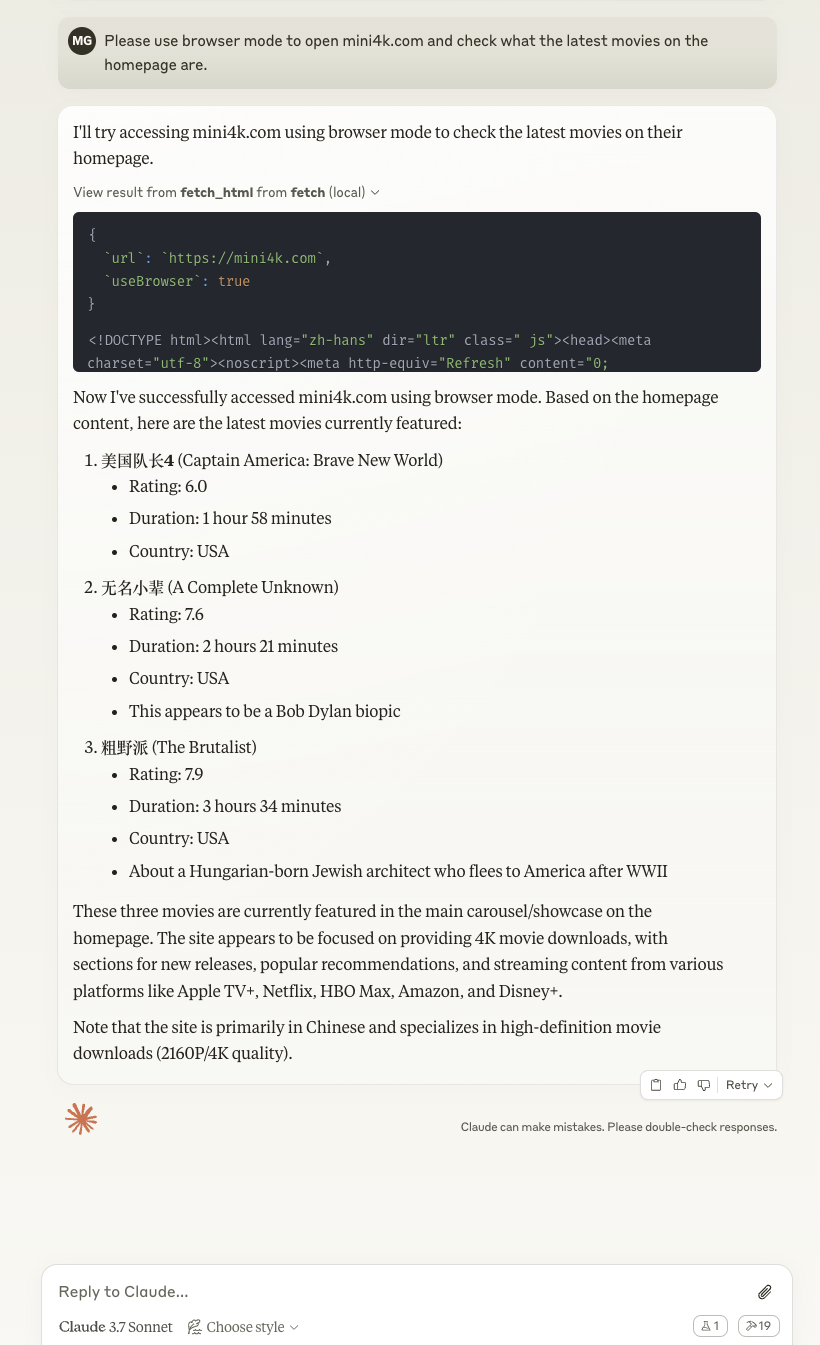
The image shows how Claude can use the fetch tools to retrieve web content and process it according to your instructions.
@lmcc-dev/mult-fetch-mcp-server
Set the MCP_LANG environment variable to control the language:
The tool will automatically detect and use proxy settings from standard environment variables:
export HTTP_PROXY=http://your-proxy-server:port
export HTTPS_PROXY=http://your-proxy-server:port
// Example: List available resources
const resourcesResult = await client.listResources({});
console.log('Available resources:', resourcesResult);
// Note: Currently this will return empty lists for resources and resourceTemplates
1. Use prompts/list to get a list of available prompt templates
2. Use prompts/get to get specific prompt template content
// Example: List available prompt templates
const promptsResult = await client.listPrompts({});
console.log('Available prompts:', promptsResult);
// Example: Get website content prompt
const fetchPrompt = await client.getPrompt({
name: "fetch-website",
arguments: {
url: "https://example.com",
format: "html",
useBrowser: "false"
}
});
console.log('Fetch website prompt:', fetchPrompt);
// Example: Debug website fetching issues
const debugPrompt = await client.getPrompt({
name: "debug-fetch",
arguments: {
url: "https://example.com",
error: "Connection timeout"
}
});
console.log('Debug fetch prompt:', debugPrompt);
fetch_html
Get HTML content of a webpage
fetch_json
Get JSON data
fetch_txt
Get plain text content
fetch_markdown
Get Markdown formatted content
fetch_plaintext
Get plain text content converted from HTML (strips HTML tags)
> Note: The following client.js functionality is provided for demonstration and testing purposes only. When used with Claude or other AI assistants, the MCP server is driven by the AI, which manages the chunking process automatically.
- fetch_html: Get HTML content of a webpage
- fetch_json: Get JSON data
- fetch_txt: Get plain text content
- fetch_markdown: Get Markdown formatted content
- fetch_plaintext: Get plain text content converted from HTML (strips HTML tags)
Claude Desktop / Cursor
Paste into your MCP client config file to install this server.
{
    "mcpServers": {
        "mult-fetch-mcp-server": {
            "mult-fetch-mcp-server": {
                "command": "npx",
                "args": [
                    "-y",
                    "@smithery/cli",
                    "install",
                    "@lmcc-dev/mult-fetch-mcp-server",
                    "--client",
                    "claude"
                ]
            }
        }
    }
}McpServers
{
    "mult-fetch-mcp-server": {
        "command": "npx",
        "args": [
            "-y",
            "@smithery/cli",
            "install",
            "@lmcc-dev/mult-fetch-mcp-server",
            "--client",
            "claude"
        ]
    }
}









<!-- Future badges to consider:
-->
This project implements an MCP-compliant client and server for communication between AI assistants and external tools.
Project Structure
fetch-mcp/
├── src/                         # Source code directory
│   ├── lib/                     # Library files
│   │   ├── fetchers/            # Web fetching implementation
│   │   │   ├── browser/         # Browser-based fetching
│   │   │   │   ├── BrowserFetcher.ts      # Browser fetcher implementation
│   │   │   │   ├── BrowserInstance.ts     # Browser instance management
│   │   │   │   └── PageOperations.ts      # Page interaction operations
│   │   │   ├── node/            # Node.js-based fetching
│   │   │   └── common/          # Shared fetching utilities
│   │   ├── utils/               # Utility modules
│   │   │   ├── ChunkManager.ts        # Content chunking
│   │   │   ├── ContentProcessor.ts    # HTML to text conversion
│   │   │   ├── ContentExtractor.ts    # Intelligent content extraction
│   │   │   ├── ContentSizeManager.ts  # Content size limiting
│   │   │   └── ErrorHandler.ts        # Error handling
│   │   ├── server/              # Server-related modules
│   │   │   ├── index.ts         # Server entry
│   │   │   ├── browser.ts       # Browser management
│   │   │   ├── fetcher.ts       # Web fetching logic
│   │   │   ├── tools.ts         # Tool registration and handling
│   │   │   ├── resources.ts     # Resource handling
│   │   │   ├── prompts.ts       # Prompt templates
│   │   │   └── types.ts         # Server type definitions
│   │   ├── i18n/                # Internationalization support
│   │   └── types.ts             # Common type definitions
│   ├── client.ts                # MCP client implementation
│   └── mcp-server.ts            # MCP server main entry
├── index.ts                     # Server entry point
├── tests/                       # Test files
└── dist/                        # Compiled files
MCP Specification
The Model Context Protocol (MCP) defines two main transport methods:
1. Standard Input/Output (Stdio): The client starts the MCP server as a child process, and they communicate through standard input (stdin) and standard output (stdout).
2. Server-Sent Events (SSE): Used to pass messages between client and server.
This project implements the Standard Input/Output (Stdio) transport method.
Features
- Implementation based on the official MCP SDK
- Support for Standard Input/Output (Stdio) transport
- Multiple web scraping methods (HTML, JSON, text, Markdown, plain text conversion)
- Intelligent mode switching: automatic switching between standard requests and browser mode
- Content size management: automatically splits large content into manageable chunks to solve AI model context size limitations
- Chunked content retrieval: ability to request specific chunks of large content while maintaining context continuity
- Detailed debug logging to stderr
- Bilingual internationalization (English and Chinese)
- Modular design for easy maintenance and extension
- Intelligent Content Extraction: Based on Mozilla's Readability library, capable of extracting meaningful content from web pages while filtering out advertisements and navigation elements
- Metadata Support: Ability to extract webpage metadata such as title, author, publication date, and site information
- Smart Content Detection: Automatically detects if a page contains meaningful content, filtering out login pages, error pages, and other pages without substantial content
- Browser Automation Enhancements: Support for page scrolling, cookie management, selector waiting, and other advanced browser interactions
Installation
Installing via Smithery
To install Mult Fetch MCP Server for Claude Desktop automatically via Smithery:
npx -y @smithery/cli install @lmcc-dev/mult-fetch-mcp-server --client claude
Local Installation
pnpm install
Global Installation
pnpm add -g @lmcc-dev/mult-fetch-mcp-server
Or run directly with npx (no installation required):
npx @lmcc-dev/mult-fetch-mcp-server
Integration with Claude
To integrate this tool with Claude desktop, you need to add server configuration:
Configuration File Location
- MacOS: ~/Library/Application Support/Claude/claude_desktop_config.json
- Windows: %APPDATA%/Claude/claude_desktop_config.json
Configuration Examples
Method 1: Using npx (Recommended)
This method is the simplest, doesn't require specifying the full path, and is suitable for global installation or direct use with npx:
{
  "mcpServers": {
    "mult-fetch-mcp-server": {
      "command": "npx",
      "args": ["@lmcc-dev/mult-fetch-mcp-server"],
      "env": {
        "MCP_LANG": "en"  // Set language to English, options: "zh" or "en"
      }
    }
  }
}
Method 2: Specifying Full Path
If you need to use a specific installation location, you can specify the full path:
{
  "mcpServers": {
    "mult-fetch-mcp-server": {
      "command": "path-to/bin/node",
      "args": ["path-to/@lmcc-dev/mult-fetch-mcp-server/dist/index.js"],
      "env": {
        "MCP_LANG": "en"  // Set language to English, options: "zh" or "en"
      }
    }
  }
}
Please replace path-to/bin/node with the path to the Node.js executable on your system, and replace path-to/@lmcc-dev/mult-fetch-mcp-server with the actual path to this project.
Usage Examples
Below is an example of using this tool in Claude desktop client:
The image shows how Claude can use the fetch tools to retrieve web content and process it according to your instructions.
Usage
After configuration, restart Claude desktop, and you can use the following tools in your conversation:
- fetch_html: Get HTML content of a webpage
- fetch_json: Get JSON data
- fetch_txt: Get plain text content
- fetch_markdown: Get Markdown formatted content
- fetch_plaintext: Get plain text content converted from HTML (strips HTML tags)
Build
pnpm run build
Run Server
```bash
pnpm run server
Sign in to leave a review
Use Google, GitHub, or an email account so ratings stay tied to real people.
No reviews posted yet.



