
Multi-Model Advisor
About
Queries multiple Ollama models to combine their responses, offering diverse AI perspectives on a single question.
Details
- Transport
- SSE
- License
- MIT
Explore
- Query multiple Ollama models with a single question
- Assign different roles/personas to each model
- View all available Ollama models on your system
- Customize system prompts for each model
- Configure via environment variables
- Integrate seamlessly with Claude for Desktop

Setting up with Highlight
This MCP is not yet compatible with Highlight’s one-click setup. However, you can still use it with Highlight by following these steps:
- Download and install Highlight from highlightai.com/download
- Navigate to the plugins tab and select "Add Custom Plugin"
-
Configure the plugin with the settings below
Plugin Name
Multi-Model AdvisorCommand (node, npx, python, etc.)Please refer to the README for specific instructions on how to obtain API keys or other required environment variables.
- Enable "Start Automatically" if you want the plugin to start when Highlight launches





From the repository
- Node.js 16.x or higher
- Ollama installed and running (see Ollama installation)
- Claude for Desktop (for the complete advisory experience)
To install multi-ai-advisor-mcp for Claude Desktop automatically via Smithery:
npx -y @smithery/cli install @YuChenSSR/multi-ai-advisor-mcp --client claude
1. Clone this repository:
git clone https://github.com/YuChenSSR/multi-ai-advisor-mcp.git
cd multi-ai-advisor-mcp
2. Install dependencies:
npm install
3. Build the project:
npm run build
4. Install required Ollama models:
ollama pull gemma3:1b
ollama pull llama3.2:1b
ollama pull deepseek-r1:1.5b
SERVER_NAME=multi-model-advisor
SERVER_VERSION=1.0.0
DEBUG=true
OLLAMA_API_URL=http://localhost:11434
DEFAULT_MODELS=gemma3:1b,llama3.2:1b,deepseek-r1:1.5b
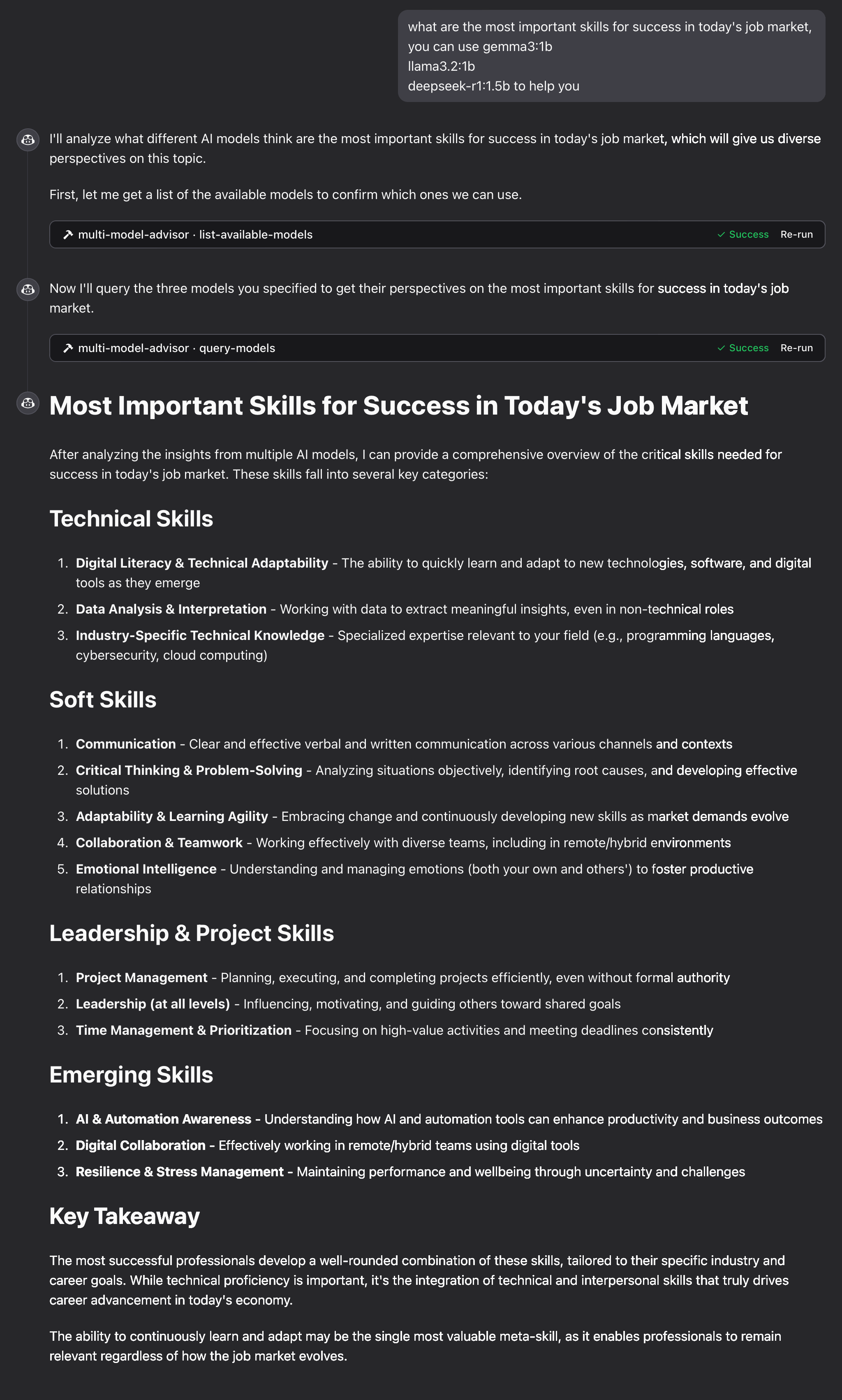
Simply ask Claude to use the multi-model advisor:
what are the most important skills for success in today's job market,
you can use gemma3:1b, llama3.2:1b, deepseek-r1:1.5b to help you
Claude will query all default models and provide a synthesized response based on their different perspectives.
list-available-models
List all available models in Ollama that can be used with query-models
query-models
Query multiple AI models via Ollama and get their responses to compare perspectives
If the tools don't appear in Claude:
- Ensure you've restarted Claude after updating the configuration
- Check the absolute path in claude_desktop_config.json is correct
- Look at Claude's logs for error messages
Claude Desktop / Cursor
Paste into your MCP client config file to install this server.
{
    "mcpServers": {
        "multi-model advisor": {
            "multi-model-advisor": {
                "command": "node",
                "args": [
                    "/absolute/path/to/multi-model-advisor/build/index.js"
                ]
            }
        }
    }
}McpServers
{
"multi-model-advisor": {
"command": "node",
"args": [
"/absolute/path/to/multi-model-advisor/build/index.js"
]
}
}(锵锵四人行)
A Model Context Protocol (MCP) server that queries multiple Ollama models and combines their responses, providing diverse AI perspectives on a single question. This creates a "council of advisors" approach where Claude can synthesize multiple viewpoints alongside its own to provide more comprehensive answers.
<a href="https://glama.ai/mcp/servers/@YuChenSSR/multi-ai-advisor-mcp">
</a>
graph TD
A[Start] --> B[Worker Local AI 1 Opinion]
A --> C[Worker Local AI 2 Opinion]
A --> D[Worker Local AI 3 Opinion]
B --> E[Manager AI]
C --> E
D --> E
E --> F[Decision Made]
Features
- Query multiple Ollama models with a single question
- Assign different roles/personas to each model
- View all available Ollama models on your system
- Customize system prompts for each model
- Configure via environment variables
- Integrate seamlessly with Claude for Desktop
Prerequisites
- Node.js 16.x or higher
- Ollama installed and running (see Ollama installation)
- Claude for Desktop (for the complete advisory experience)
Installation
Installing via Smithery
To install multi-ai-advisor-mcp for Claude Desktop automatically via Smithery:
npx -y @smithery/cli install @YuChenSSR/multi-ai-advisor-mcp --client claude
Manual Installation
1. Clone this repository: git clone https://github.com/YuChenSSR/multi-ai-advisor-mcp.git
cd multi-ai-advisor-mcp
2. Install dependencies:
npm install
3. Build the project:
npm run build
4. Install required Ollama models:
   ollama pull gemma3:1b

   ollama pull llama3.2:1b

   ollama pull deepseek-r1:1.5b
Configuration
Create a .env file in the project root with your desired configuration:
```
Sign in to leave a review
Use Google, GitHub, or an email account so ratings stay tied to real people.
No reviews posted yet.



