
open-code-review
About
🤖 AI code quality gate for AI-generated code. Detects hallucinated packages, phantom dependencies, stale APIs, and more. MCP Server + CLI + CI/CD Action.
Explore
<a href="https://www.producthunt.com/products/open-code-review"> </a>
</a>

Setting up with Highlight
This MCP is not yet compatible with Highlight’s one-click setup. However, you can still use it with Highlight by following these steps:
- Download and install Highlight from highlightai.com/download
- Navigate to the plugins tab and select "Add Custom Plugin"
-
Configure the plugin with the settings below
Plugin Name
open-code-reviewCommand (node, npx, python, etc.)Please refer to the README for specific instructions on how to obtain API keys or other required environment variables.
- Enable "Start Automatically" if you want the plugin to start when Highlight launches





From the repository
╔══════════════════════════════════════════════════════════════╗
║ Open Code Review — Deep Scan Report ║
╚══════════════════════════════════════════════════════════════╝
Project: packages/core/src
SLA: L3 Deep — Structural + Embedding + LLM Analysis
112 issues found in 110 files
Overall Score: 67/100 D
Threshold: 70 | Status: FAILED
Files Scanned: 110 | Languages: typescript | Duration: 12.3s
```
scan_directory
Scan a directory for AI-generated code quality issues. Detects hallucinated imports, phantom packages, stale APIs, security anti-patterns, and more. Supports TypeScript, JavaScript, Python, Java, Go, and Kotlin.
scan_diff
Scan git diff between two branches for code quality issues. Ideal for PR/MR review — only analyzes changed files and lines.
explain_issue
Explain a code quality issue detected by OCR. Returns detailed explanation, category context, and fix guidance for the AI agent to act on.
heal_code
Load a file's source code and prepare a repair prompt for the AI agent. The agent (you) should then apply the fix based on the issue description and suggestion. Returns the file content along with the repair context.
Claude Desktop / Cursor
Paste into your MCP client config file to install this server.
{
    "mcpServers": {
        "open-code-review": {
            "open-code-review": {
                "command": "npx",
                "args": [
                    "-y",
                    "@opencodereview/mcp-server"
                ]
            }
        }
    }
}McpServers
{
    "open-code-review": {
        "command": "npx",
        "args": [
            "-y",
            "@opencodereview/mcp-server"
        ]
    }
}
> The first open-source CI/CD quality gate built specifically for AI-generated code.
> Detects hallucinated imports, stale APIs, over-engineering, and security anti-patterns — powered by local LLMs and any OpenAI-compatible provider.
> Free. Self-hostable. 6 languages.






Works With




> Any AI tool that generates code — if it writes it, OCR reviews it.
What AI Linters Miss
AI coding assistants (Copilot, Cursor, Claude) generate code with defects that traditional tools miss entirely:
| Defect | Example | ESLint / SonarQube |
|--------|---------|-------------------|
| Hallucinated imports | import { x } from 'non-existent-pkg' | ❌ Miss |
| Stale APIs | Using deprecated APIs from training data | ❌ Miss |
| Context window artifacts | Logic contradictions across files | ❌ Miss |
| Over-engineered patterns | Unnecessary abstractions, dead code | ❌ Miss |
| Security anti-patterns | Hardcoded example secrets, eval() | ❌ Partial |
Open Code Review detects all of them — across 6 languages, for free.
Demo
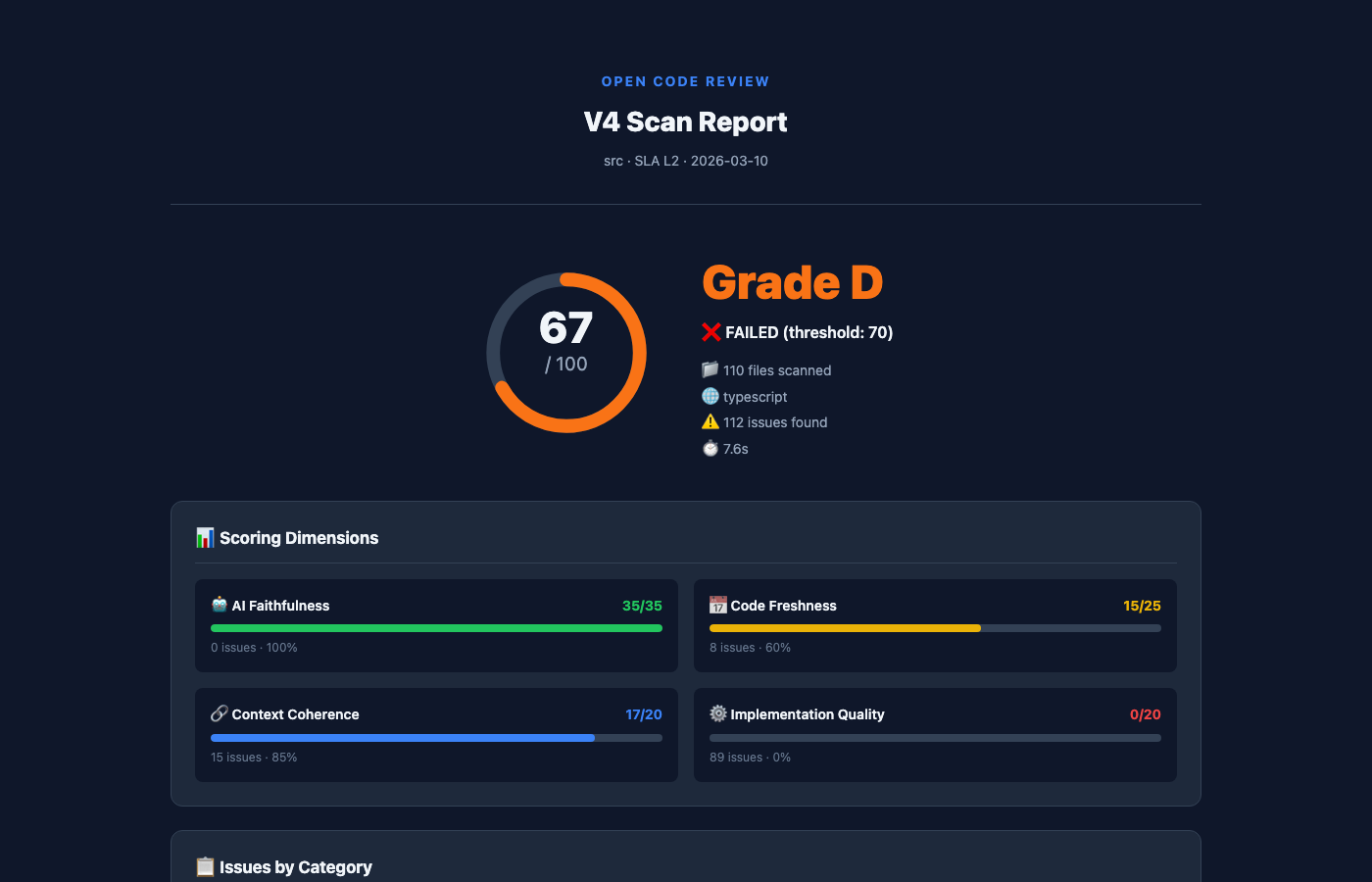
📄 View full interactive HTML report
Quick Preview
$ ocr scan src/ --sla L3
╔══════════════════════════════════════════════════════════════╗

║           Open Code Review — Deep Scan Report               ║

╚══════════════════════════════════════════════════════════════╝
Project: packages/core/src

  SLA: L3 Deep — Structural + Embedding + LLM Analysis
112 issues found in 110 files
Overall Score: 67/100  D

  Threshold: 70  |  Status: FAILED

  Files Scanned: 110  |  Languages: typescript  |  Duration: 12.3s
Deep Scan (L3) — How It Works
L3 combines three analysis layers for maximum coverage:
Layer 1: Structural Detection         Layer 2: Semantic Analysis        Layer 3: LLM Deep Scan
├── Hallucinated imports (npm/PyPI)   ├── Embedding similarity recall   ├── Cross-file coherence check
├── Stale API detection               ├── Risk scoring                  ├── Logic bug detection
├── Security patterns                 ├── Context window artifacts      ├── Confidence scoring
├── Over-engineering metrics          └── Enhanced severity ranking     └── AI-powered fix suggestions
└── A+ → F quality scoring
Powered by local LLMs or any OpenAI-compatible API. Run Ollama for 100% local analysis, or connect to any remote LLM provider — the interface is the same.
```bash
Sign in to leave a review
Use Google, GitHub, or an email account so ratings stay tied to real people.
No reviews posted yet.




