
Openops
About
The batteries-included, No-Code FinOps automation platform, with the AI you trust.
Explore
Pre-Built FinOps Workflows – A library of best-practice workflows designed with input from FinOps leaders. Covers cost optimization, tagging, budgeting, allocation, and reporting.
No-Code Experience – Approachable for non-technical practitioners, but allows "dropping into" code when needed.
Flexible Workflow Editor – Use OpenOps's dedicated No-Code editor to build workflows from scratch or customize existing ones.
Deep Integrations – OpenOps natively connects with cloud providers, databases, analysis tools, communication platforms, and project management systems.
Human-in-the-Loop Controls – OpenOps comes with HITL controls - across multiple channels - for critical approval workflows.
Workflow Versioning & Traceability – Test workflow steps, maintain workflow versions, and track every action inside a workflow with logs.
- Centralized Management – Log and process opportunities with tables that allow approvals, dismissals, false-positive marking, and snoozing.
Openops is available as a managed cloud service or as a free, ready‑to‑install Docker Compose‑based installation that can be run locally or in the cloud. To get started, follow the Quick Start Guide in the documentation.





😎 What is OpenOps?
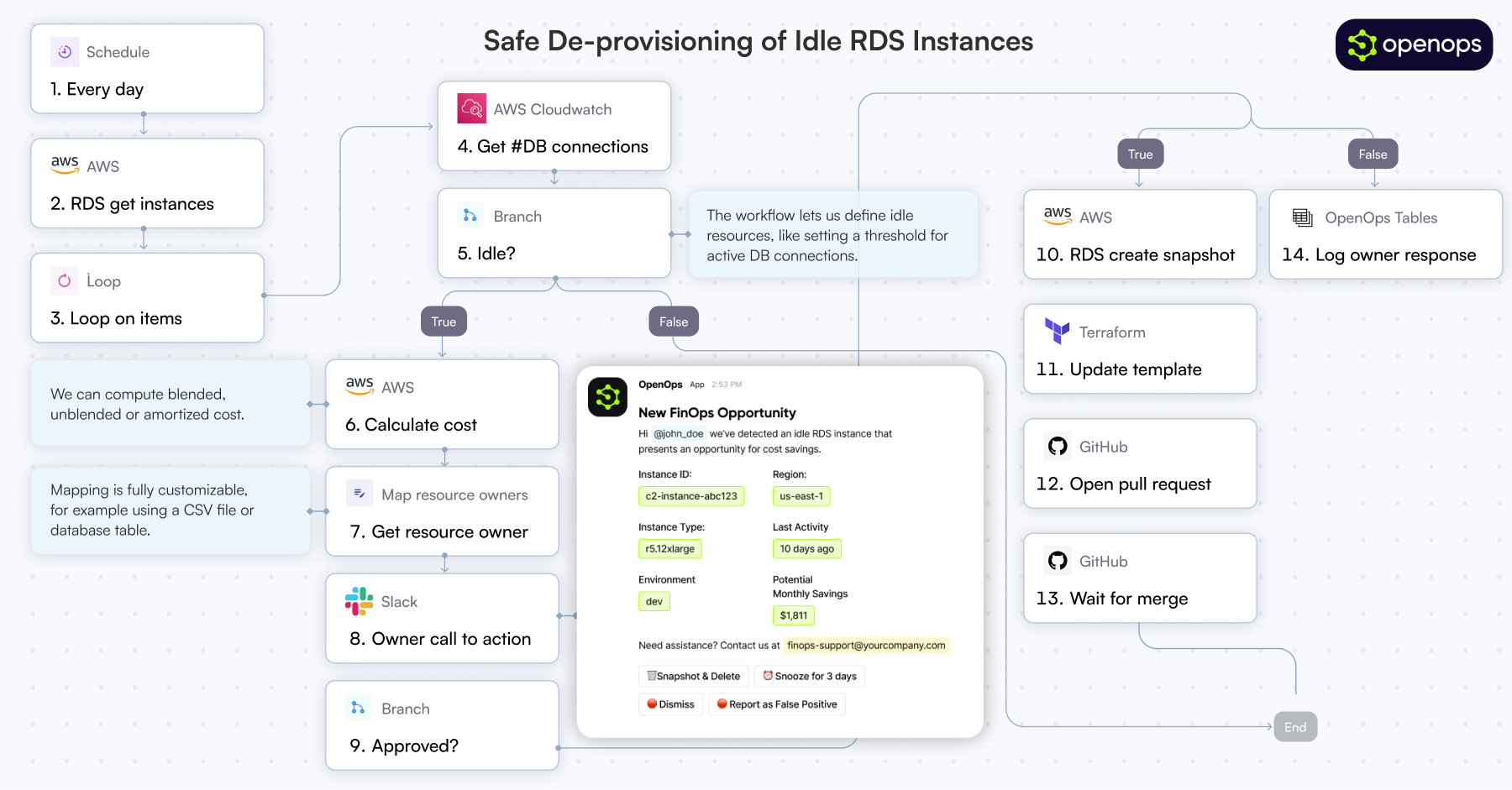
OpenOps is a No-Code FinOps automation platform that helps organizations reduce cloud costs and streamline financial operations.It provides customizable workflows to automate key FinOps processes like allocation, unit economics, anomaly management, workload optimization, safe de-provisioning and much, much more.
It also comes bundled with its own Excel-like database (OpenOps Tables) and its own visualization system (OpenOps Analytics).
At the same time, OpenOps enables collaboration between FinOps teams, engineers, DevOps, finance, and leadership, ensuring that cost-saving measures are not just identified but effectively implemented.
OpenOps integrates seamlessly with major cloud providers, many third-party FinOps tools, various communication platforms and a handful of project management tools.
> 🏁 Just want to get started? Click here.
🚀 Key Features
Pre-Built FinOps Workflows – A library of best-practice workflows designed with input from FinOps leaders. Covers cost optimization, tagging, budgeting, allocation, and reporting.
No-Code Experience – Approachable for non-technical practitioners, but allows "dropping into" code when needed.
Flexible Workflow Editor – Use OpenOps's dedicated No-Code editor to build workflows from scratch or customize existing ones.
Deep Integrations – OpenOps natively connects with cloud providers, databases, analysis tools, communication platforms, and project management systems.
Human-in-the-Loop Controls – OpenOps comes with HITL controls - across multiple channels - for critical approval workflows.
Workflow Versioning & Traceability – Test workflow steps, maintain workflow versions, and track every action inside a workflow with logs.
Centralized Management – Log and process opportunities with tables that allow approvals, dismissals, false-positive marking, and snoozing.
🌟 Why OpenOps?
FinOps practitioners struggle with visibility tools that surface cost-saving opportunities but lack implementation capabilities. Traditional automation tools, whether custom-built or off-the-shelf, fail to balance flexibility and maintainability.
OpenOps solves these challenges by:
Consolidating optimization opportunities from native and third-party FinOps visibility tools.
Suggesting practical optimization actions.
Enabling customization of pre-built optimizations or authoring new ones.
With OpenOps, organizations can automate cloud cost optimization, ensuring that FinOps processes are efficient, actionable, and aligned with business goals.
OpenOps integrates with a broad range of platforms, including cloud providers, databases, FinOps tools, communication platforms, and task management services.
⛅️ Cloud Providers
AWS
Azure
Google Cloud
⚙️ System Requirements
OpenOps is available as:
A managed cloud service (learn more)
No infrastructure requirements
Automatic updates and maintenance
Premium support and SLAs
A free, ready-to-install, docker-compose-based installation (can be installed locally or in the cloud)
📚 Documentation
For detailed documentation, visit our documentation portal.
Getting Started Guide
Workflow Templates & Management
OpenOps Tables
OpenOps Analytics
🤝 Contributing
We welcome contributions to OpenOps\! See our contributing guide for details.
📄 License
OpenOps is licensed under the Apache License 2.0.
💬 Community
OpenOps has a Slack community - feel free to join here.
📬 Contact
Website: https://openops.com
Email: [email protected]
Sign in to leave a review
Use Google, GitHub, or an email account so ratings stay tied to real people.
No reviews posted yet.