OracleDB MCP Server
About
A Model Context Protocol (MCP) server that exposes configured Oracle Database tables and columns as context for large language models (LLMs). It enables LLMs to interact with an Oracle database by generating SQL statements and returning query results from natural language…
Details
- License
- Apache-2.0
Explore
- Provides Oracle database schema as context to LLMs.
- Generates SQL statements from natural language prompts.
- Returns query results directly to the LLM.
- Configurable whitelist of tables and columns.
- Separate connection strings for metadata comments and queries.
- Optional debug logging and configurable result limit (default 10).

Setting up with Highlight
This MCP is not yet compatible with Highlight’s one-click setup. However, you can still use it with Highlight by following these steps:
- Download and install Highlight from highlightai.com/download
- Navigate to the plugins tab and select "Add Custom Plugin"
-
Configure the plugin with the settings below
Plugin Name
OracleDB MCP ServerCommand (node, npx, python, etc.)Please refer to the README for specific instructions on how to obtain API keys or other required environment variables.
- Enable "Start Automatically" if you want the plugin to start when Highlight launches





From the repository
- Install package
``bash`
pip install oracledb_mcp_server
- Create .env in a folder with minimum value of . Sample file available hereoracledb_mcp_server
- Test server using uv run oracledb_mcp_server` from the above folder.
Claude Desktop / Cursor
Paste into your MCP client config file to install this server.
{
    "mcpServers": {
        "oracledb mcp server": {
            "oracledb_mcp_server": {
                "command": "npx",
                "args": [
                    "@modelcontextprotocol/inspector",
                    "uv",
                    "--directory",
                    "D:\\MyDev\\mcp\\oracledb_mcp_server",
                    "run",
                    "-m",
                    "oracledb_mcp_server"
                ]
            }
        }
    }
}McpServers
{
    "oracledb_mcp_server": {
        "command": "npx",
        "args": [
            "@modelcontextprotocol/inspector",
            "uv",
            "--directory",
            "D:\\MyDev\\mcp\\oracledb_mcp_server",
            "run",
            "-m",
            "oracledb_mcp_server"
        ]
    }
}
Overview
- This project will installMCP - Model Context Protocol Server, that provides configured Oracle Database Table/Columns as context to LLM's.
- Using this we can enable LLMs to interact with Oracle Database, Generate SQL Statements and Return Results using LLM prompts.
Installation
- Install package ``bash
pip install oracledb_mcp_server
`
- Create .env in a folder with minimum value of Oracle DB Connection String. Sample file available here
- Test oracledb_mcp_server server using uv run oracledb_mcp_server from the above folder.
Claud Desktop
- Configuration details for Claud Desktop
`json
{
"mcpServers": {
"oracledb_mcp_server":{
"command": "uv",
"args": ["run","oracledb_mcp_server"],
"env": {
"DEBUG":"True",
"COMMENT_DB_CONNECTION_STRING":"oracle+oracledb://USERNAME:PASSWORD@IP:PORT/?service_name=SERVICENAME",
"DB_CONNECTION_STRING":"oracle+oracledb://USERNAME:PASSWORD@IP:PORT/?service_name=SERVICENAME",
"TABLE_WHITE_LIST":"ACCOUNTS,CUS_ACC_RELATIONS,CUSTOMERS",
"COLUMN_WHITE_LIST":"ACCOUNTS.ACC_AAD_ID,CUS_ACC_RELATIONS.CAR_CUS_ID,CUS_ACC_RELATIONS.CAR_AAD_ID,CUSTOMERS.CUS_ID"
}
}
}
}
`
Configuration

- List of available environment variables
- DEBUG: Enable debug logging (optional default is False)
- COMMENT_DB_CONNECTION_STRING: Oracle DB connection String for comments. (required)
- DB_CONNECTION_STRING: Oracle DB connection String for execution of queries. (required)
- TABLE_WHITE_LIST: White Listed table names in list format ["table1", "table2"] (required)
- COLUMN_WHITE_LIST: White Listed table-column names in list format ["table.column1", "table.column2"] (required)
- QUERY_LIMIT_SIZE: Default value is 10 records if not provided(optional default is 10)
Interceptor
`bash
npx @modelcontextprotocol/inspector uv --directory "D:\\MyDev\\mcp\\oracledb_mcp_server" run -m oracledb_mcp_server
``
Contributing
Contributions are welcome. Please feel free to submit a Pull Request.License
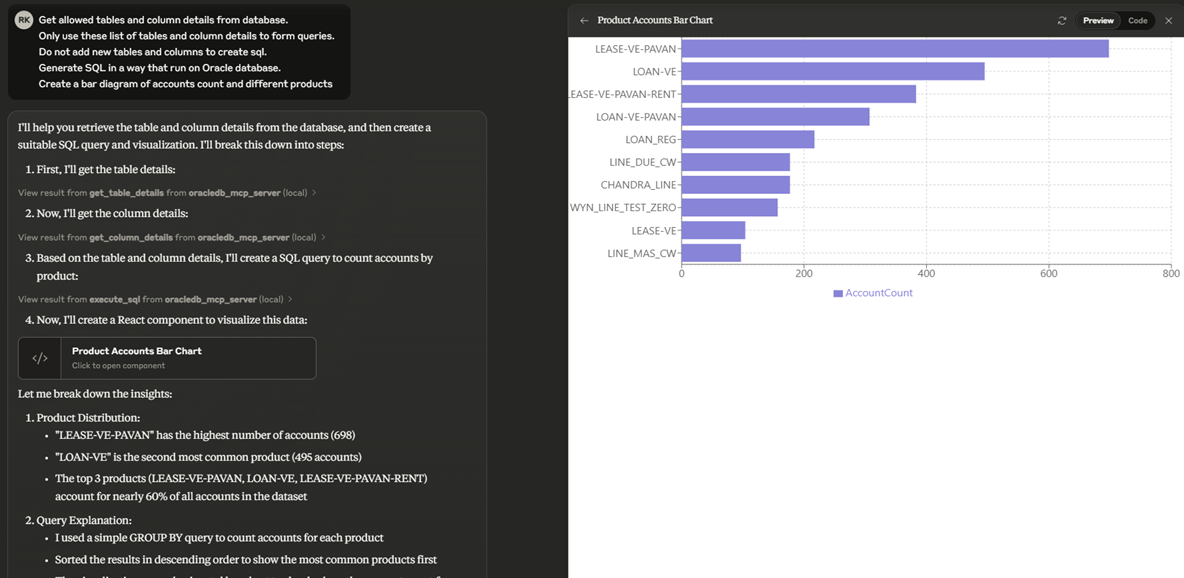
This project is licensed under the terms of the MIT license.Demo
Github Stars
Sign in to leave a review
Use Google, GitHub, or an email account so ratings stay tied to real people.
No reviews posted yet.