
<!-- mcp-name: io.github.llmsresearch/paperbanana -->
<table align="center" width="100%" style="border: none; border-collapse: collapse;">
<tr>
<td width="220" align="left" valign="middle" style="border: none;">
<img src="https://dwzhu-pku.github.io/PaperBanana/static/images/logo.jpg" alt="PaperBanana Logo" width="180"/>
</td>
<td align="left" valign="middle" style="border: none;">
<h1>PaperBanana</h1>
<p><strong>Automated Academic Illustration for AI Scientists</strong></p>
<p>
<a href="https://github.com/llmsresearch/paperbanana/actions/workflows/ci.yml"><img src="https://github.com/llmsresearch/paperbanana/actions/workflows/ci.yml/badge.svg" alt="CI"/></a>
<a href="https://pypi.org/project/paperbanana/"><img src="https://img.shields.io/pypi/dm/paperbanana?label=PyPI%20downloads&logo=pypi&logoColor=white" alt="PyPI Downloads"/></a>
<a href="https://huggingface.co/spaces/llmsresearch/paperbanana"><img src="https://img.shields.io/badge/Demo-HuggingFace-yellow?logo=huggingface&logoColor=white" alt="Demo"/></a>
<a href="https://colab.research.google.com/github/llmsresearch/paperbanana/blob/main/notebooks/PaperBanana_Colab_Quickstart.ipynb"><img src="https://colab.research.google.com/assets/colab-badge.svg" alt="Open in Colab"/></a>
<br/>
<a href="https://www.python.org/downloads/"><img src="https://img.shields.io/badge/python-3.10%2B-blue?logo=python&logoColor=white" alt="Python 3.10+"/></a>
<a href="https://arxiv.org/abs/2601.23265"><img src="https://img.shields.io/badge/arXiv-2601.23265-b31b1b?logo=arxiv&logoColor=white" alt="arXiv"/></a>
<a href="LICENSE"><img src="https://img.shields.io/badge/license-MIT-green?logo=opensourceinitiative&logoColor=white" alt="License: MIT"/></a>
<br/>
<a href="https://pydantic.dev"><img src="https://img.shields.io/badge/Pydantic-v2-e92063?logo=pydantic&logoColor=white" alt="Pydantic v2"/></a>
<a href="https://typer.tiangolo.com"><img src="https://img.shields.io/badge/CLI-Typer-009688?logo=gnubash&logoColor=white" alt="Typer"/></a>
<a href="https://ai.google.dev/"><img src="https://img.shields.io/badge/Gemini-Free%20Tier-4285F4?logo=google&logoColor=white" alt="Gemini Free Tier"/></a>
</p>
</td>
</tr>
</table>
---
> **Disclaimer**: This is an **unofficial, community-driven open-source implementation** of the paper
> *"PaperBanana: Automating Academic Illustration for AI Scientists"* by Dawei Zhu, Rui Meng, Yale Song,
> Xiyu Wei, Sujian Li, Tomas Pfister, and Jinsung Yoon ([arXiv:2601.23265](https://arxiv.org/abs/2601.23265)).
> This project is **not affiliated with or endorsed by** the original authors or Google Research.
> The implementation is based on the publicly available paper and may differ from the original system.
An agentic framework for generating publication-quality academic diagrams and statistical plots from text descriptions. Supports OpenAI (GPT-5.2 + GPT-Image-1.5), Azure OpenAI / Foundry, Google Gemini, and Atlas Cloud providers.
- Two-phase multi-agent pipeline with iterative refinement
- Multiple VLM and image generation providers (OpenAI, Azure, Gemini, Atlas Cloud)
- Input optimization layer for better generation quality
- Auto-refine mode and run continuation with user feedback
- CLI, Python API, and MCP server for IDE integration
- **Batch generation** from a manifest file (YAML/JSON) for multiple diagrams in one run
- **Batch plots** — `paperbanana plot-batch` runs many statistical plots from one manifest (CSV/JSON per item)
- **PDF inputs** for methodology context (optional `paperbanana[pdf]` / PyMuPDF), with per-page selection
- **PaperBanana Studio** — local Gradio web UI (`paperbanana studio`) for diagrams, plots, evaluation, batch, and run browser
- Claude Code skills for `/generate-diagram`, `/generate-plot`, and `/evaluate-diagram`
<p align="center">
<img src="assets/img/hero_image.png" alt="PaperBanana takes paper as input and provide diagram as output" style="max-width: 960px; width: 100%; height: auto;"/>
</p>
## Atlas Cloud
<p align="center">
<img src="assets/sponsors/atlas_cloud_logo.png" alt="Atlas Cloud Logo" width="180"/>
</p>
Atlas Cloud is a full-modal AI inference platform that gives developers a single AI API to access video generation, image generation, and LLM APIs. Instead of managing multiple vendor integrations, you connect once and get unified access to 300+ curated models across all modalities.
Check out Atlas Cloud's new coding plan promotion for more budget-friendly API access:
[https://www.atlascloud.ai/console/coding-plan](https://www.atlascloud.ai/console/coding-plan?utm_source=github&utm_medium=link&utm_campaign=paperbanana)
---
## Quick Start
> **Try it in your browser:** the
> [Colab quickstart notebook](https://colab.research.google.com/github/llmsresearch/paperbanana/blob/main/notebooks/PaperBanana_Colab_Quickstart.ipynb)
> walks through install → API key → diagram generation end-to-end, no local setup required.
### Prerequisites
- Python 3.10+
- An OpenAI API key ([platform.openai.com](https://platform.openai.com/api-keys)) or Azure OpenAI / Foundry endpoint
- Or a Google Gemini API key (free, [Google AI Studio](https://makersuite.google.com/app/apikey))
### Step 1: Install
```bash
pip install paperbanana
```
Or install from source for development:
```bash
git clone https://github.com/llmsresearch/paperbanana.git
cd paperbanana
pip install -e ".[dev,openai,google]"
```
#### Docker
Build the image from a clone of the repo and pass your API key at runtime:
```bash
docker build -t paperbanana .
docker run --rm -e GOOGLE_API_KEY paperbanana generate --help
```
To generate a diagram, mount your input and an outputs folder into `/work`:
```bash
docker run --rm -e GOOGLE_API_KEY \
-v "$(pwd)/method.txt:/work/method.txt:ro" \
-v "$(pwd)/outputs:/work/outputs" \
paperbanana generate --input method.txt --caption "Overview of our framework"
```
### Step 2: Get Your API Key
```bash
cp .env.example .env
# Edit .env and add your API key:
# OPENAI_API_KEY=your-key-here
# GOOGLE_API_KEY=your-key-here
#
# For Azure OpenAI / Foundry:
# OPENAI_BASE_URL=https://<resource>.openai.azure.com/openai/v1
#
# Optional Gemini overrides:
# GOOGLE_BASE_URL=https://your-gemini-proxy.example.com
# GOOGLE_VLM_MODEL=gemini-2.5-flash
# GOOGLE_IMAGE_MODEL=gemini-3-pro-image-preview
```
Or use the setup wizard for Gemini:
```bash
paperbanana setup
```
### Step 3: Generate a Diagram
```bash
paperbanana generate \
--input examples/sample_inputs/transformer_method.txt \
--caption "Overview of our encoder-decoder architecture with sparse routing"
```
With input optimization and auto-refine:
```bash
paperbanana generate \
--input my_method.txt \
--caption "Overview of our encoder-decoder framework" \
--optimize --auto
```
Output is saved to `outputs/run_<timestamp>/final_output.png` along with all intermediate iterations and metadata.
### PaperBanana Studio (local web UI)
Install the optional Gradio dependency, then start the app:
```bash
pip install 'paperbanana[studio]'
paperbanana studio
```
Open the URL shown in the terminal (default `http://127.0.0.1:7860/`). The Studio exposes the same workflows as the CLI: methodology diagrams, statistical plots, comparative evaluation, continuing a prior run, batch manifests (methodology or **plot** batch via the Batch tab), and a simple browser for `run_*` / `batch_*` output folders. Use `--host`, `--port`, `--config`, and `--output-dir` as needed.
---
## How It Works
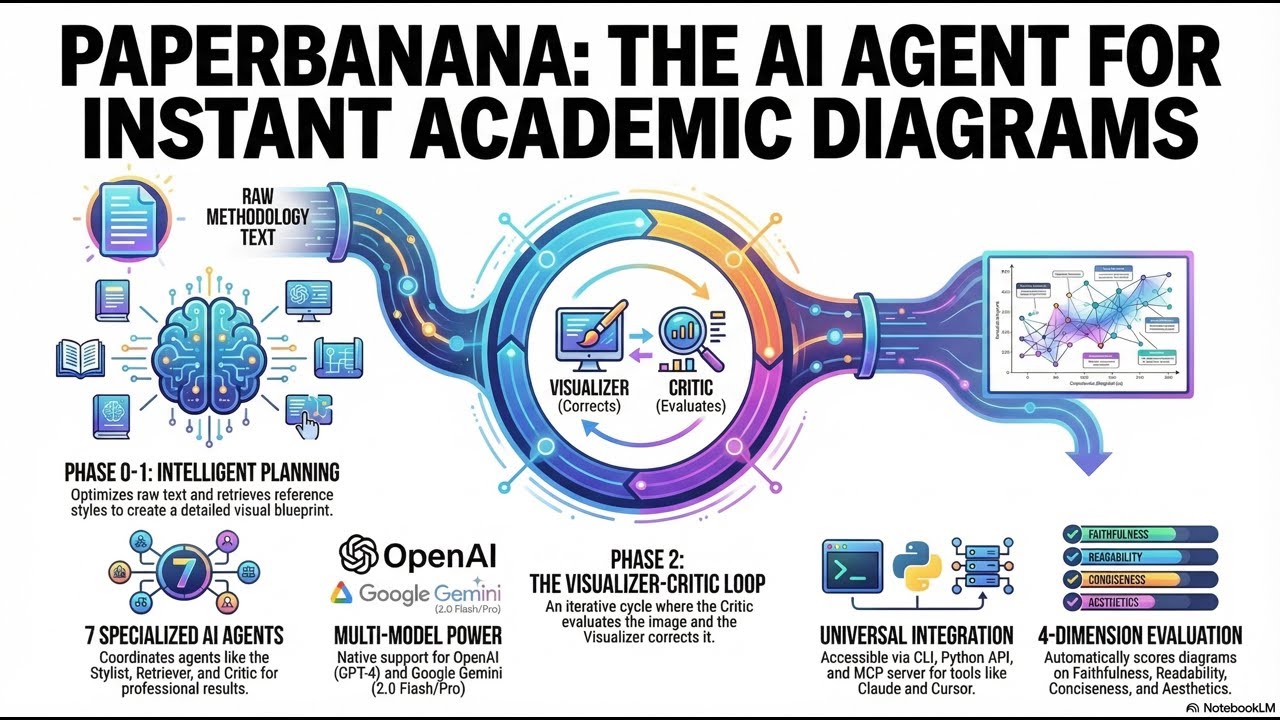
PaperBanana implements a multi-agent pipeline with up to 7 specialized agents:
**Phase 0 -- Input Optimization (optional, `--optimize`):**
0. **Input Optimizer** runs two parallel VLM calls:
- **Context Enricher** structures raw methodology text into diagram-ready format (components, flows, groupings, I/O)
- **Caption Sharpener** transforms vague captions into precise visual specifications
**Phase 1 -- Linear Planning:**
1. **Retriever** selects the most relevant reference examples from a curated set of 13 methodology diagrams spanning agent/reasoning, vision/perception, generative/learning, and science/applications domains
2. **Planner** generates a detailed textual description of the target diagram via in-context learning from the retrieved examples
3. **Stylist** refines the description for visual aesthetics using NeurIPS-style guidelines (color palette, layout, typography)
**Phase 2 -- Iterative Refinement:**
4. **Visualizer** renders the description into an image
5. **Critic** evaluates the generated image against the source context and provides a revised description addressing any issues
6. Steps 4-5 repeat for a fixed number of iterations (default 3), or until the critic is satisfied (`--auto`)
## Providers
PaperBanana supports multiple VLM and image generation providers:
| Component | Provider | Model | Notes |
|-----------|----------|-------|-------|
| VLM (planning, critique) | OpenAI | `gpt-5.2` | Default |
| Image Generation | OpenAI | `gpt-image-1.5` | Default |
| VLM | Atlas Cloud | `deepseek-ai/DeepSeek-V3-0324` | OpenAI-compatible chat endpoint |
| Image Generation | Atlas Cloud | `openai/gpt-image-2/text-to-image` | Async prediction API |
| VLM | Google Gemini | `gemini-2.5-flash` | Low cost |
| Image Generation | Google Gemini | `gemini-3-pro-image-preview` | $0.134/image (1K) |
| VLM / Image | OpenRouter | Any supported model | Flexible routing |
Azure OpenAI / Foundry endpoints are auto-detected — set `OPENAI_BASE_URL` to your endpoint.
Gemini-compatible gateways are also supported — set `GOOGLE_BASE_URL` when needed.
Atlas Cloud uses `ATLASCLOUD_BASE_URL=https://api.atlascloud.ai/v1` for chat and `ATLASCLOUD_IMAGE_BASE_URL=https://api.atlascloud.ai/api/v1` for image generation.
Atlas Cloud official site:
[https://www.atlascloud.ai/?utm_source=github&utm_medium=link&utm_campaign=paperbanana](https://www.atlascloud.ai/?utm_source=github&utm_medium=link&utm_campaign=paperbanana)
Recommended Atlas LLM models for `ATLASCLOUD_VLM_MODEL`:
- `deepseek-ai/DeepSeek-V3-0324` (default)
- `openai/gpt-4o`
- `openai/gpt-4.1`
- `google/gemini-2.5-flash`
- `anthropic/claude-sonnet-4.5-20250929`
These are stable, generally available models verified against the Atlas Cloud API. The full, always-current model pool (300+ models) is documented on Atlas Cloud's own docs — see [https://www.atlascloud.ai/models](https://www.atlascloud.ai/models?utm_source=github&utm_medium=link&utm_campaign=paperbanana) — and any model id listed there can be passed via `ATLASCLOUD_VLM_MODEL`.
Recommended Atlas image models for `ATLASCLOUD_IMAGE_MODEL`:
- `openai/gpt-image-2/text-to-image`
- `openai/gpt-image-2/edit`
- `baidu/ERNIE-Image-Turbo/text-to-image`
- `black-forest-labs/flux-dev`
- `black-forest-labs/flux-schnell`
- `qwen/qwen-image`
---
## CLI Reference
### `paperbanana generate` -- Methodology Diagrams
```bash
# Basic generation
paperbanana generate \
--input method.txt \
--caption "Overview of our framework"
# With input optimization and auto-refine
paperbanana generate \
--input method.txt \
--caption "Overview of our framework" \
--optimize --auto
# Continue the latest run with user feedback
paperbanana generate --continue \
--feedback "Make arrows thicker and colors more distinct"
# Continue a specific run
paperbanana generate --continue-run run_20260218_125448_e7b876 \
--iterations 3
# PDF as input (install PyMuPDF: pip install 'paperbanana[pdf]')
paperbanana generate \
--input paper.pdf \
--caption "Overview of our method" \
--pdf-pages "3-8"
# Guide generation with a reference/sketch image (repeatable)
paperbanana generate \
--input method.txt \
--caption "Overview of our framework" \
--image sketch.png --image prior_figure.png
```
| Flag | Short | Description |
|------|-------|-------------|
| `--input` | `-i` | Path to methodology text file or PDF (required for new runs) |
| `--caption` | `-c` | Figure caption / communicative intent (required for new runs) |
| `--image` | | Reference/sketch image (hand-drawn sketch, whiteboard photo, prior figure) that guides the Planner. Repeatable for multiple images |
| `--output` | `-o` | Output image path (default: auto-generated in `outputs/`) |
| `--iterations` | `-n` | Number of Visualizer-Critic refinement rounds (default: 3) |
| `--num-candidates` | `-k` | Generate N candidate images in parallel, 1-8 (default: 1). Planning runs once; refinement fans out per candidate with seed offsets. Outputs land in `candidates/cand_<i>/`; the run-root `final_output` is candidate 1. Cost estimates and `--budget` account for the fan-out |
| `--auto` | | Loop until critic is satisfied (with `--max-iterations` safety cap) |
| `--max-iterations` | | Safety cap for `--auto` mode (default: 30) |
| `--optimize` | | Preprocess inputs with parallel context enrichment and caption sharpening |
| `--continue` | | Continue from the latest run in `outputs/` |
| `--continue-run` | | Continue from a specific run ID |
| `--feedback` | | User feedback for the critic when continuing a run |
| `--pdf-pages` | | PDF input only: 1-based pages (e.g. `1-5`, `2,4,6-8`; default: all) |
| `--vlm-provider` | | VLM provider name (default: `openai`) |
| `--vlm-model` | | VLM model name (default: `gpt-5.2`) |
| `--image-provider` | | Image gen provider (default: `openai_imagen`) |
| `--image-model` | | Image gen model (default: `gpt-image-1.5`) |
| `--format` | `-f` | Output format: `png`, `jpeg`, or `webp` (default: `png`) |
| `--config` | | Path to YAML config file (see `configs/config.yaml`) |
| `--verbose` | `-v` | Show detailed agent progress and timing |
| `--progress-json` | | Emit JSON progress events to stdout during generation |
### `paperbanana plot` -- Statistical Plots
```bash
paperbanana plot \
--data results.csv \
--intent "Bar chart comparing model accuracy across benchmarks"
```
| Flag | Short | Description |
|------|-------|-------------|
| `--data` | `-d` | Path to data file, CSV or JSON (required) |
| `--intent` | | Communicative intent for the plot (required) |
| `--output` | `-o` | Output image path |
| `--iterations` | `-n` | Refinement iterations (default: 3) |
| `--vlm-provider` | | VLM provider name |
| `--vlm-model` | | VLM model name |
Plots are rendered via VLM-generated matplotlib code — no image-generation provider or credentials are required.
### `paperbanana venues` -- Custom Venue Style Packs
`--venue` selects a *venue style pack*: a directory with `methodology_style_guide.md`, `plot_style_guide.md`, and an optional `venue.yaml`. Built-in packs (`neurips`, `icml`, `acl`, `ieee`) ship with PaperBanana; you can add your own under `~/.config/paperbanana/venues/` (override with `--venue-dir` or `PAPERBANANA_VENUE_DIR`) without touching the repo:
```bash
# 1. Scaffold a pack (seeds both guides from the NeurIPS templates)
paperbanana venues init mylab
# 2. Edit the style guides — or generate them from a corpus of example figures:
# paperbanana guidelines synthesize --reference-set ./examples \
# --output ~/.config/paperbanana/venues/mylab/methodology_style_guide.md
# 3. Use it anywhere --venue is accepted
paperbanana generate --input method.txt --caption "Overview" --venue mylab
# See everything that's available (built-in + user, with source)
paperbanana venues list
```
`venue.yaml` (all fields optional):
```yaml
display_name: "My Lab Style" # shown by `paperbanana venues list`
aspect_ratio: "16:9" # default --aspect-ratio for this venue's runs
fonts: # preferred fonts, appended to the style guides
- "Helvetica"
```
On a name clash, built-in packs win — user packs cannot shadow built-in venues. Unknown venue names fail fast with the list of available packs from both sources.
### `paperbanana batch` -- Batch Generation
Generate multiple methodology diagrams from a single manifest file (YAML or JSON). Each item runs the full pipeline; outputs are written under `outputs/batch_<id>/run_<id>/` and a `batch_report.json` summarizes all runs.
```bash
paperbanana batch --manifest examples/batch_manifest.yaml --optimize
```
Manifest format (YAML or JSON with an `items` list):
```yaml
items:
- input: path/to/method1.txt
caption: "Overview of our encoder-decoder"
id: fig1
- input: method2.txt
caption: "Training pipeline"
id: fig2
- input: paper.pdf
caption: "System overview"
id: fig3
pdf_pages: "4-9" # optional; PDF inputs only
```
Paths in the manifest are resolved relative to the manifest file's directory.
**Composite figures:** Add an optional `composite` section to automatically stitch all generated panels into a single labeled figure after the batch completes:
```yaml
composite:
layout: "1x3" # rows x cols, or "auto"
labels: auto # (a), (b), (c)... or explicit list, or null
spacing: 20 # pixels between panels
label_position: bottom # top or bottom
output: "composite.png"
items:
- input: method_encoder.txt
caption: "Encoder architecture"
id: panel_a
# ...
```
The composite image is saved alongside the individual panels in the batch output directory. See `examples/composite_batch_manifest.yaml` for a complete example.
**Generate a human-readable report** from an existing batch run (Markdown or HTML):
```bash
paperbanana batch-report --batch-dir outputs/batch_20250109_123456_abc --format markdown
# or by batch ID (under default output dir)
paperbanana batch-report --batch-id batch_20250109_123456_abc --format html --output report.html
```
Diagram batch reports include `batch_kind: methodology`; plot batches use `batch_kind: statistical_plot`. Human-readable reports (`paperbanana batch-report`) show the batch kind when present.
**Sweep manifests** let you store the full sweep plan as YAML/JSON instead of eight comma-separated CLI flags. Mutually exclusive with the axis flags; see `examples/sweep_manifest.yaml`.
```bash
paperbanana sweep --manifest examples/sweep_manifest.yaml
```
**Sweep reports** produced by `paperbanana sweep` can be rendered the same way:
```bash
paperbanana sweep-report --sweep-dir outputs/sweep_20250109_123456_abc --format html
# or by sweep ID
paperbanana sweep-report --sweep-id sweep_20250109_123456_abc --format markdown
```
Rendered sweep reports include a summary, a top-5 ranked table, the full variants table (with per-variant provider/model, iterations, critic-suggestion count, proxy score, and output path), and the `quality_proxy_score` note. Dry-run reports render a simplified "Planned Variants" section.
| Flag | Short | Description |
|------|-------|-------------|
| `--manifest` | `-m` | Path to manifest file (required) |
| `--output-dir` | `-o` | Parent directory for batch run (default: outputs) |
| `--config` | | Path to config YAML |
| `--iterations` | `-n` | Refinement iterations per item |
| `--optimize` | | Preprocess inputs for each item |
| `--auto` | | Loop until critic satisfied per item |
| `--format` | `-f` | Output image format (png, jpeg, webp) |
| `--auto-download-data` | | Auto-download the PaperBananaBench reference set (~254 MB) if not cached |
### `paperbanana plot-batch` -- Batch Statistical Plots
Generate multiple plots from a manifest (YAML or JSON). Each item specifies a **data** file (CSV or JSON) and an **intent** string, mirroring `paperbanana plot`. Outputs live under `outputs/batch_<id>/run_<id>/` with the same `batch_report.json` and `paperbanana batch-report` workflow as diagram batches.
```bash
paperbanana plot-batch --manifest examples/plot_batch_manifest.yaml --optimize
```
Manifest format (`items` list):
```yaml
items:
- data: path/to/results.csv
intent: "Bar chart comparing accuracy across models"
id: fig_acc
- data: other.json
intent: "Scatter plot with trend line"
aspect_ratio: "16:9" # optional per item; CLI --aspect-ratio is the default when omitted
```
Paths are resolved relative to the manifest file’s directory.
| Flag | Short | Description |
|------|-------|-------------|
| `--manifest` | `-m` | Path to manifest (required) |
| `--output-dir` | `-o` | Parent directory for `batch_*` (default: outputs) |
| `--config` | | Path to config YAML |
| `--vlm-provider` | | VLM provider (default: gemini) |
| `--vlm-model` | | VLM model override |
| `--image-provider` | | Image gen provider |
| `--image-model` | | Image gen model |
| `--iterations` | `-n` | Refinement iterations per item |
| `--auto` | | Loop until critic satisfied per item |
| `--max-iterations` | | Safety cap for `--auto` |
| `--optimize` | | Input optimization per item |
| `--format` | `-f` | png, jpeg, or webp |
| `--save-prompts` / `--no-save-prompts` | | Persist prompts (default: on, same as `plot`) |
| `--venue` | | Venue style pack: built-in (neurips, icml, acl, ieee), a user pack, or `custom` |
| `--aspect-ratio` | `-ar` | Default aspect ratio when not set in the manifest |
| `--verbose` | `-v` | Verbose logging |
### `paperbanana orchestrate` -- Full-Paper Figure Package
Generate a publication-focused figure bundle from a full paper source, with optional data-driven plots. The command:
- parses the paper (`.txt`, `.md`, or `.pdf`)
- plans multiple methodology figures from section structure
- optionally discovers CSV/JSON files to plan statistical plots
- runs generation for all planned items
- writes a package folder containing `figure_package.json`, `figures/`, `figures.tex`, and `captions.md`
```bash
paperbanana orchestrate \
--paper paper.pdf \
--data-dir ./results \
--max-method-figures 4 \
--max-plot-figures 3 \
--optimize
```
Use `--dry-run` to only plan and inspect `orchestration_plan.json` without API calls.
Use `--resume-orchestrate <id-or-path>` to continue an interrupted orchestration from checkpoint state.
| Flag | Description |
|------|-------------|
| `--paper` / `-p` | Paper source path (`.txt`, `.md`, or `.pdf`) |
| `--resume-orchestrate` | Resume an existing orchestration by ID or directory |
| `--retry-failed` | When resuming, include previously failed tasks |
| `--max-retries` | Extra retries per task after first failure |
| `--data-dir` | Optional directory containing CSV/JSON files for plot planning |
| `--output-dir` / `-o` | Parent output directory (creates `orchestrate_*`) |
| `--max-method-figures` | Max methodology figures to plan/generate |
| `--max-plot-figures` | Max plot figures to plan/generate |
| `--pdf-pages` | PDF-only page selection (e.g. `1-5`, `2,4,6-8`) |
| `--optimize` | Enable input optimization for generated items |
| `--iterations` / `-n` | Refinement iterations per generated item |
| `--auto` + `--max-iterations` | Critic-driven auto-refine mode with safety cap |
| `--concurrency` | Parallel figure generation workers |
| `--format` / `-f` | Output format (`png`, `jpeg`, `webp`) |
| `--dry-run` | Plan package only; no generation calls |
### `paperbanana composite` -- Compose Multi-Panel Figures
Stitch multiple images into a single labeled figure with `(a)`, `(b)`, `(c)` sub-panel labels:
```bash
paperbanana composite \
panel_a.png panel_b.png panel_c.png \
--layout 1x3 \
--output figure2.png
```
| Flag | Short | Description |
|------|-------|-------------|
| `IMAGES` | | Positional: paths to images to compose |
| `--layout` | `-l` | Grid layout: `RxC` (e.g. `1x3`, `2x2`) or `auto` (default: auto) |
| `--labels` | | Comma-separated labels, or `none` to disable (default: auto `(a),(b),...`) |
| `--spacing` | `-s` | Pixel spacing between panels (default: 20) |
| `--label-position` | | `top` or `bottom` (default: bottom) |
| `--label-font-size` | | Font size for labels (default: 32) |
| `--output` | `-o` | Output path (default: composite_output.png) |
This command works on any existing images — no API calls needed. It is also triggered automatically when a batch manifest includes a `composite` section (see `paperbanana batch` above).
### `paperbanana evaluate` -- Quality Assessment
Comparative evaluation of a generated diagram against a human reference using VLM-as-a-Judge:
```bash
paperbanana evaluate \
--generated diagram.png \
--reference human_diagram.png \
--context method.txt \
--caption "Overview of our framework"
```
| Flag | Short | Description |
|------|-------|-------------|
| `--generated` | `-g` | Path to generated image (required) |
| `--reference` | `-r` | Path to human reference image (required) |
| `--context` | | Path to source context text file or PDF (required) |
| `--caption` | `-c` | Figure caption (required) |
| `--pdf-pages` | | PDF context only: 1-based page selection (default: all) |
Scores on 4 dimensions (hierarchical aggregation per the paper):
- **Primary**: Faithfulness, Readability
- **Secondary**: Conciseness, Aesthetics
### `paperbanana polish` -- Refine an Existing Figure
Bring your own figure: a VLM audits it against the venue style guide and proposes up to 10 concrete, actionable improvements, then an image-edit capable provider applies them to the original figure (guided edit). Suggestions are printed to the console so you can see exactly what changed.
```bash
paperbanana polish --input figure.png
paperbanana polish --input figure.png --venue icml --iterations 2 --output polished.png
```
| Flag | Short | Description |
|------|-------|-------------|
| `--input` | `-i` | Path to the existing figure image (required) |
| `--output` | `-o` | Output path (default: `outputs/polish_<timestamp>/final_output.png`) |
| `--venue` | | Venue style guide: `neurips` (default), `icml`, `acl`, `ieee`, `custom` |
| `--iterations` | `-n` | Polish rounds; each round suggests and applies improvements on the previous result (default: 1) |
| `--aspect-ratio` | `-ar` | Target aspect ratio (default: preserve the input figure's ratio) |
| `--num-candidates` | `-k` | Apply each round's suggestions N times in parallel (1-8) |
| `--budget` | | Budget cap in USD; polishing stops gracefully when exceeded |
| `--seed` | | Random seed for reproducible edits |
Requires an image provider that supports guided image edits (Google Gemini image models). If the figure already conforms to the style guide, polish exits without making changes.
### `paperbanana studio` -- Local web UI
Requires `pip install 'paperbanana[studio]'` (Gradio).
```bash
paperbanana studio
paperbanana studio --port 8080 --output-dir ./my_outputs
```
| Flag | Description |
|------|-------------|
| `--host` | Bind address (default `127.0.0.1`) |
| `--port` | Port (default `7860`) |
| `--share` | Create a temporary public Gradio link (do not use with sensitive data) |
| `--config` | Path to YAML config |
| `--output-dir` / `-o` | Default output directory for runs |
| `--root-path` | URL subpath when behind a reverse proxy |
### `paperbanana setup` -- First-Time Configuration
```bash
paperbanana setup
```
Interactive wizard that first asks whether to use the official Gemini API.
If you choose official API, it follows the default AI Studio key flow; if not, it asks for a custom Gemini-compatible URL and API key.
### `paperbanana data` -- Reference Dataset
```bash
# Download the PaperBananaBench reference set (~254 MB, one command)
paperbanana data download
# Import plot references too (or both)
paperbanana data download --task plot
paperbanana data download --task both
# Inspect / clear the cache
paperbanana data info
paperbanana data clear
```
The dataset is served from a project-hosted GitHub release mirror
([`bench-data-v1`](https://github.com/llmsresearch/paperbanana/releases/tag/bench-data-v1))
and its SHA256 checksum is verified before extraction. Credit to the
[PaperBananaBench](https://huggingface.co/datasets/dwzhu/PaperBananaBench) authors —
the mirror tracks their 2026-03-22 revision. The set is cached under
`~/.cache/paperbanana/` (override with `PAPERBANANA_CACHE_DIR`); generation
commands can also fetch it on first use via `--auto-download-data`.
---
## Python API
```python
import asyncio
from paperbanana import PaperBananaPipeline, GenerationInput, DiagramType
from paperbanana.core.config import Settings
settings = Settings(
vlm_provider="openai",
vlm_model="gpt-5.2",
image_provider="openai_imagen",
image_model="gpt-image-1.5",
optimize_inputs=True, # Enable input optimization
auto_refine=True, # Loop until critic is satisfied
)
pipeline = PaperBananaPipeline(settings=settings)
result = asyncio.run(pipeline.generate(
GenerationInput(
source_context="Our framework consists of...",
communicative_intent="Overview of the proposed method.",
diagram_type=DiagramType.METHODOLOGY,
)
))
print(f"Output: {result.image_path}")
```
**Progress callbacks:** `generate()` and `continue_run()` accept an optional `progress_callback` argument. The pipeline invokes it with `PipelineProgressEvent` objects (stage, message, seconds, iteration, extra) at each step (optimizer, retriever, planner, stylist, visualizer, critic), so you can show progress in UIs or log timing without patching agents.
To continue a previous run:
```python
from paperbanana.core.resume import load_resume_state
state = load_resume_state("outputs", "run_20260218_125448_e7b876")
result = asyncio.run(pipeline.continue_run(
resume_state=state,
additional_iterations=3,
user_feedback="Make the encoder block more prominent",
))
```
See `examples/generate_diagram.py` and `examples/generate_plot.py` for complete working examples.
---
## MCP Server
PaperBanana includes an MCP server for use with Claude Code, Cursor, or any MCP-compatible client. Add the following config to use it via `uvx` without a local clone:
```json
{
"mcpServers": {
"paperbanana": {
"command": "uvx",
"args": ["--from", "paperbanana[mcp]", "paperbanana-mcp"],
"env": { "GOOGLE_API_KEY": "your-google-api-key" }
}
}
}
```
Eleven MCP tools are exposed: `generate_diagram`, `generate_plot`, `continue_run` (resume a prior `run_*` with optional feedback), `continue_diagram`, `continue_plot`, `evaluate_diagram`, `evaluate_plot`, `orchestrate_figures` (full-paper figure packages), `batch_diagrams`, `batch_plots`, and `download_references`.
The repo also ships with 3 Claude Code skills:
- `/generate-diagram <file> [caption]` - generate a methodology diagram from a text file
- `/generate-plot <data-file> [intent]` - generate a statistical plot from CSV/JSON data
- `/evaluate-diagram <generated> <reference>` - evaluate a diagram against a human reference
See [`mcp_server/README.md`](mcp_server/README.md) for full setup details (Claude Code, Cursor, local developmen