
Parlay
About
Remote MCP server for prediction markets — search and compare live odds across Polymarket, Kalshi, and Limitless from Claude, ChatGPT, or Gemini. Six read-only tools, free tier available.
Details
- Transport
- SSE
- License
- MIT
Explore
- Cross-venue search and comparison of prediction markets
- Synthesized briefs combining real-money signals with community sentiment
- Browse trending, high-volume, fast-moving, or high-disagreement markets
- Surface price discrepancies across venues (informational only)
- Drill into individual venues for detailed analysis
- Read-only design: no order placement or fund custody

Setting up with Highlight
This MCP is not yet compatible with Highlight’s one-click setup. However, you can still use it with Highlight by following these steps:
- Download and install Highlight from highlightai.com/download
- Navigate to the plugins tab and select "Add Custom Plugin"
-
Configure the plugin with the settings below
Plugin Name
ParlayCommand (node, npx, python, etc.)Please refer to the README for specific instructions on how to obtain API keys or other required environment variables.
- Enable "Start Automatically" if you want the plugin to start when Highlight launches





From the repository
These clients read MCP server configuration from a JSON file and don't run an OAuth dance themselves. Use a personal access token instead.
1. Generate a token at https://parlay.run/settings/tokens
2. Export it: export PARLAY_TOKEN=parlay_pat_xxxxxxxxxxxx
Security: Treat your token as a secret. Do not share, log, or commit it. Store it only in your local MCP client configuration.
search_markets
Search live prediction markets and event contracts across Polymarket, Kalshi, Limitless (real-money) and Manifold (sentiment). Use for queries on election odds, political markets, Fed rate decisions, crypto prices, sports outcomes, geopolitics, and other binary markets with crowd-sourced probabilities. Returns unified results with title, current probability, volume, liquidity, expiration, source venue, and risk flags. For topic synthesis use `market_brief`; for browsing trending markets use `discover_markets`.
discover_markets
Browse trending, high-volume, fast-moving, or high-disagreement prediction markets across Polymarket, Kalshi, Limitless, and Manifold. Use when the user wants to explore what's happening — "what's hot on Polymarket today", "show me biggest political markets", "what events are ending soon" — rather than search a specific topic. Filter by category and sort by volume, newest, or ending soon.
compare_markets
Compare the same event contract across Polymarket, Kalshi, and Limitless side-by-side: probability, liquidity, settlement rules, and venue type. Use when the user wants to know "what's the spread between Polymarket and Kalshi on X" or "which venue has better liquidity for Y". Returns match confidence buckets (high/medium/low) and explains any mismatches. Real-money venues only — Manifold is excluded because play-money pricing isn't comparable to real-money.
scan_discrepancies
Surface cross-venue price discrepancies between Polymarket, Kalshi, and Limitless as a discovery feed for price discovery and divergence detection. Default threshold is 0.5% spread, below typical round-trip fees — most results are informational, not tradable arbitrage. Raise `min_spread` to 0.03+ for after-fee opportunities. The optional `query` parameter post-filters results by topic keywords on event titles — it does not perform a topic search; for topic-driven retrieval use `discover_markets` or `search_markets`. Pairs with missing volume data on at least one venue are flagged 'volume_unconfirmed'. All results are indicative only — not trade recommendations. Real-money venues only. Orderbook depth is not confirmed in Phase 1.
market_brief
Generate a synthesized brief for a topic, combining real-money signals from Polymarket, Kalshi, and Limitless with Manifold community sentiment. Use for analytical queries like "what do markets think about the 2028 election", "odds on a Fed rate cut", or "how is crypto priced for year-end". Returns top markets by volume, cross-venue divergences, venue coverage, and risk flags. For raw market lists use `search_markets`.
inspect_platform
Inspect a single named venue. Returns available capabilities, market data for the query, and metadata quality flags. Use when the user explicitly names a venue — "show me Polymarket markets on AI", "what's on Kalshi for Q4 inflation", "Manifold markets about geopolitics". For cross-venue queries use `search_markets` or `compare_markets`.
Claude Desktop / Cursor
Paste into your MCP client config file to install this server.
{
    "mcpServers": {
        "parlay": {
            "parlay": {
                "type": "streamable-http",
                "url": "https://mcp.parlay.run/mcp"
            }
        }
    }
}McpServers
{
    "parlay": {
        "type": "streamable-http",
        "url": "https://mcp.parlay.run/mcp"
    }
}
The AI-native intelligence layer for prediction markets.
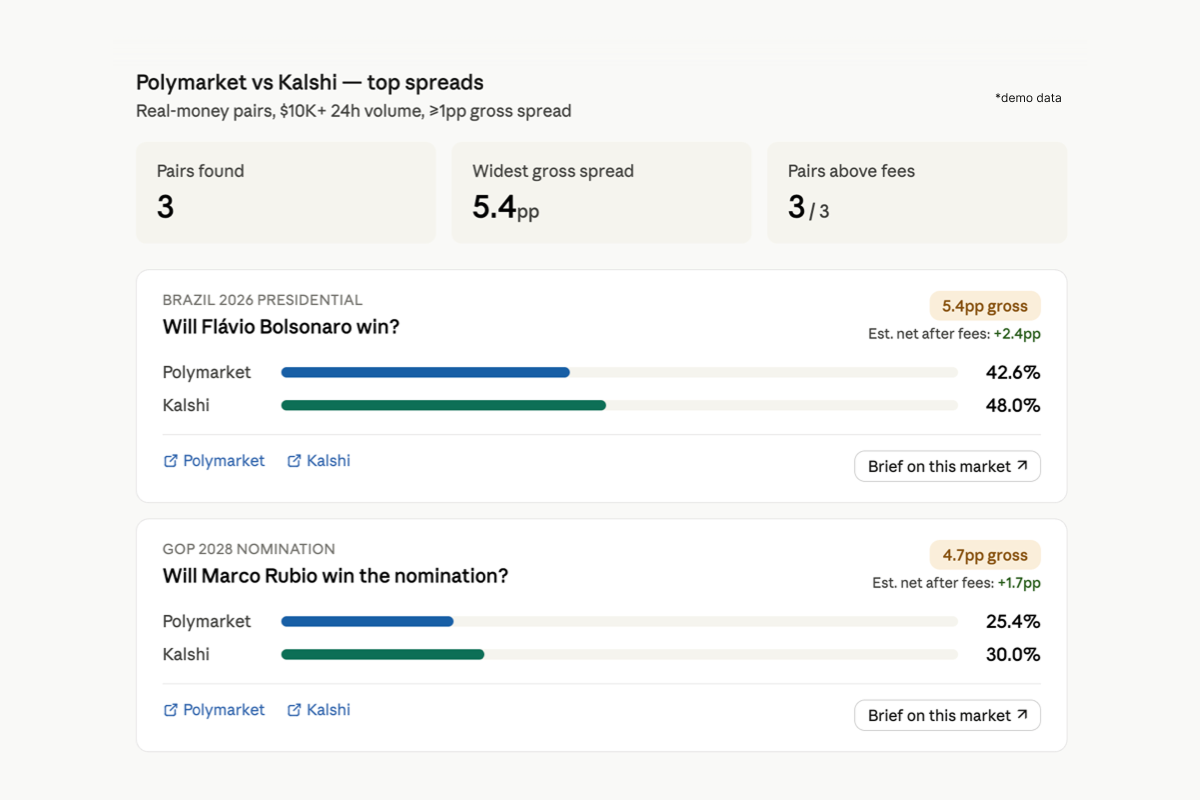
Parlay is a hosted MCP server for searching, comparing, and briefing prediction markets from AI assistants. It is a PMXT-backed aggregator over Polymarket, Kalshi, and Limitless, with Manifold treated separately as a sentiment-only signal. This repository is the public bundle and connection reference for the hosted Parlay service at https://mcp.parlay.run/mcp; it does not contain the MCP server implementation.
What it does
| Tool | What it does |
| --- | --- |
| search_markets | Cross-venue keyword search for live prediction markets and event contracts |
| market_brief | Synthesized brief on a topic, combining real-money signals with community sentiment |
| discover_markets | Browse trending, high-volume, fast-moving, or high-disagreement markets |
| compare_markets | Compare the same event contract across venues side-by-side — probability, liquidity, settlement |
| scan_discrepancies | Surface cross-venue price discrepancies as a discovery feed (informational, not trade recommendations) |
| inspect_platform | Drill into a single named venue |
Every tool response carries unified metadata: data freshness, venues queried, venues failed, market type (real_money / sentiment / mixed), match confidence (high / medium / low / not_applicable), liquidity status, risk flags, and a standard non-trade-recommendation disclaimer.
Connect
Parlay supports two connection paths depending on your client.
Path A — Claude.ai (Desktop, web, mobile, Cowork)
Parlay connects through Claude's Custom Connectors interface. The same flow works across all Claude surfaces.
1. Open Claude settings (profile icon → Settings).
2. In the sidebar, select Connectors.
3. Scroll to the bottom and click Add custom connector.
4. Enter URL: https://mcp.parlay.run/mcp
5. Click Add, then Connect to complete OAuth authorization.
Parlay's tools will appear in your tool list on the next message.
> Note: Custom Connectors are available on Free, Pro, Max, Team, and Enterprise plans. Free Claude users are limited to one custom connector at a time. Do not configure Parlay through claude_desktop_config.json — that file is for local stdio MCP servers only; Parlay is a remote MCP server.
Path B — OpenClaw, Cursor, Cline, Claude Code, LobeHub, and other JSON-config clients
These clients read MCP server configuration from a JSON file and don't run an OAuth dance themselves. Use a personal access token instead.
1. Generate a token at https://parlay.run/settings/tokens
2. Export it: export PARLAY_TOKEN=parlay_pat_xxxxxxxxxxxx
Security: Treat your token as a secret. Do not share, log, or commit it. Store it only in your local MCP client configuration.
Cline
Recommended: Use Cline's Remote Servers tab → "Add Server", entering https://mcp.parlay.run/mcp as the URL, selecting Streamable HTTP as the Transport Type, and adding Authorization: Bearer <your token> as a header.
For manual JSON editing or detailed troubleshooting, see llms-install.md. Do not copy .mcp.json verbatim into Cline — Cline uses a slightly different schema (covered in the install guide).
OpenClaw
git clone https://github.com/parlay-run/parlay-mcp.git
openclaw plugins install ./parlay-mcp
openclaw gateway restart
Cursor / Claude Code
Drop the parlay entry from .mcp.json (at the root of this repo) into your client's MCP server config.
{
  "mcpServers": {
    "parlay": {
      "url": "https://mcp.parlay.run/mcp",
      "transport": "streamable-http",
      "headers": {
        "Authorization": "Bearer ${PARLAY_TOKEN}"
      }
    }
  }
}
Coverage
- Real-money: Polymarket, Kalshi, Limitless
- Sentiment (architecturally separated): Manifold
- Catalog-only: Smarkets, Myriad, Metaculus, Probable, Baozi
Compliance posture
- Read-only. No order placement, no position management, no fund custody.
- No private credentials handled. Users never share venue API keys with Parlay.
- Sentiment isolation. Manifold is mechanically excluded from real-money tools (compare_markets, scan_discrepancies). The sentiment_market_excluded risk flag is emitted whenever it is filtered out.
- Settlement and liquidity risk flags. Markets with weak settlement criteria, missing volume data, or stale signals carry explicit risk flags in their metadata.
- Standard disclaimers. Every tool response carries a non-trade-recommendation disclaimer in its metadata block.
                  Claude / ChatGPT / Gemini / OpenClaw
                              ↕  (MCP over HTTPS)
                    ┌────────────────────┐
                    │  mcp.parlay.run    │
                    │   (this server)    │
                    └────────┬───────────┘
                             │
                ┌────────────┴────────────┐
                ↓                         ↓
       Real-money data layer    Sentiment data layer
       Polymarket, Kalshi       Manifold
       + secondary venues       (isolated)
Pricing
- Free: 15 tool calls / month (search_markets, market_brief)
- Pro: $29/mo, 150 calls / month
- Team: coming soon, 1,500 calls / month
Built on
Parlay's real-money venue access is built on PMXT, an open-source unified SDK for prediction market venues. Parlay adds the AI intelligence layer on top: event comparability, settlement-risk metadata, sentiment isolation, and tool orchestration for MCP. PMXT trading methods are explicitly not exposed by Parlay — the hosted product is read-only by design.
Resources
- parlay.run
- Server endpoint: https://mcp.parlay.run/mcp
License
This repository — including connection examples, metadata, and client configuration files for the hosted Parlay MCP service — is licensed under the MIT License. See LICENSE. The repository/service licensing split is also described in TERMS.md.
The hosted Parlay service at mcp.parlay.run, Parlay brand assets, APIs, data products, pricing, accounts, and service outputs are proprietary and governed by the Parlay Terms of Service: https://www.parlay.run/terms-of-service.
Sign in to leave a review
Use Google, GitHub, or an email account so ratings stay tied to real people.
No reviews posted yet.



