
PostgreSQL MCP Server
About
An MCP server for exploring and querying PostgreSQL databases.
Details
- License
- MIT
Explore
- Connect to any PostgreSQL database using a standard connection string
- Execute custom SELECT queries with results returned in a structured format
- List all tables in the connected database
- Get detailed schema information for any table
- Filter database records with simple equality conditions
- Get database statistics including size, table count, and largest tables

Setting up with Highlight
This MCP is not yet compatible with Highlight’s one-click setup. However, you can still use it with Highlight by following these steps:
- Download and install Highlight from highlightai.com/download
- Navigate to the plugins tab and select "Add Custom Plugin"
-
Configure the plugin with the settings below
Plugin Name
PostgreSQL MCP ServerCommand (node, npx, python, etc.)Please refer to the README for specific instructions on how to obtain API keys or other required environment variables.
- Enable "Start Automatically" if you want the plugin to start when Highlight launches





From the repository
- Python 3.7+
- Required Python packages (listed in requirements.txt):
- mcp
- pg8000
- sqlalchemy
Run the server by providing a PostgreSQL connection string:
python server.py postgresql://username:password@hostname:port/database
The Claude Desktop configuration file is typically located at:
- macOS: ~/Library/Application\ Support/Claude/claude_desktop_config.json
- Windows: %APPDATA%\Claude\claude_desktop_config.json
- Linux: ~/.config/Claude/claude_desktop_config.json
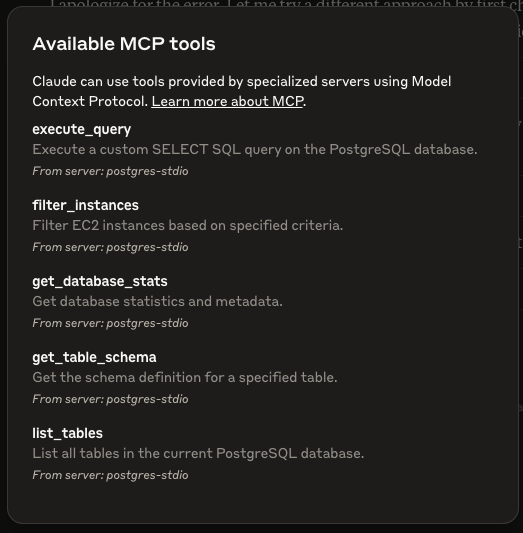
The server provides the following MCP tools:
Claude Desktop / Cursor
Paste into your MCP client config file to install this server.
{
    "mcpServers": {
        "postgresql mcp server": {
            "postgres-mcp-server-aadarshjain": {
                "command": "python",
                "args": [
                    "server.py",
                    "postgresql://username:password@hostname:port/database"
                ]
            }
        }
    }
}McpServers
{
    "postgres-mcp-server-aadarshjain": {
        "command": "python",
        "args": [
            "server.py",
            "postgresql://username:password@hostname:port/database"
        ]
    }
}
A Model Context Protocol (MCP) server implementation for PostgreSQL database exploration and querying.
Table of Contents
- Overview - Features - Requirements - Installation - Usage - Basic Usage - Using with Claude Desktop - Configuration File Location - Available Tools - execute_query - list_tables - get_table_schema - filter_instances - get_database_stats - Security Considerations - Example Interaction in Claude - Troubleshooting - ContactOverview
This project provides a Model Context Protocol (MCP) server that connects to a PostgreSQL database and exposes various data discovery and querying capabilities as MCP tools. These tools allow you to explore database structure, query data, and get database statistics through a standardized interface.
Features
- Connect to any PostgreSQL database using a standard connection string
- Execute custom SELECT queries with results returned in a structured format
- List all tables in the connected database
- Get detailed schema information for any table
- Filter database records with simple equality conditions
- Get database statistics including size, table count, and largest tables
Requirements
- Python 3.7+
- Required Python packages (listed in requirements.txt):
- mcp
- pg8000
- sqlalchemy
Installation
1. Clone this repository or download the source code
2. Create a virtual environment (recommended)
3. Install the required packages:
pip install -r requirements.txt
Usage
Basic Usage
Run the server by providing a PostgreSQL connection string:
python server.py postgresql://username:password@hostname:port/database
Using with Claude Desktop
To integrate with Claude Desktop, add the following configuration to your Claude Desktop config file:
{
  "mcpServers": {
    "postgres": {
      "command": "python",
      "args": [
        "/ABOSLUTE/PATH/TO/postgres-mcp-server/server.py",
        "postgresql://user:password@host:port/database"
      ]
    }
  }
}
> After adding or making any changes to above config file, make sure to relaunch the claude desktop by force quitting it.
Configuration File Location
The Claude Desktop configuration file is typically located at:
- macOS: ~/Library/Application\ Support/Claude/claude_desktop_config.json
- Windows: %APPDATA%\Claude\claude_desktop_config.json
- Linux: ~/.config/Claude/claude_desktop_config.json
Available Tools
The server provides the following MCP tools:
execute_query
Execute a custom SELECT SQL query and return the results.
list_tables
List all tables in the current PostgreSQL database.
get_table_schema
Get the schema definition for a specified table.
filter_instances
Filter database records based on specified criteria.
get_database_stats
Get general statistics and metadata about the PostgreSQL database.
Security Considerations
- This server only allows SELECT queries to prevent database modifications
- Connection credentials are provided via command line and not stored
- Consider using environment variables or a secure configuration method in production environments
Example Interaction in Claude
Once connected to Claude Desktop, you can ask questions like:
- "What tables are available in the database?"
- "Show me the schema for the customers table"
- "How many records are in the orders table?"
- "What's the total size of the database?"
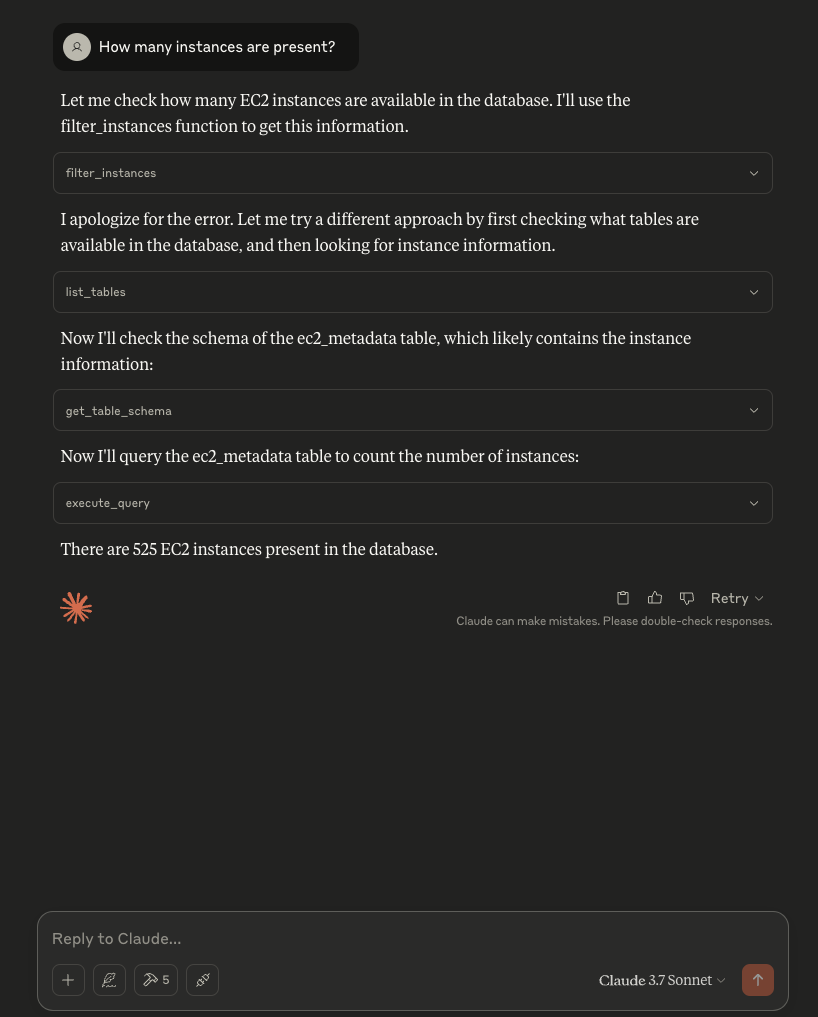
Claude will use the appropriate MCP tools to answer these questions by querying your PostgreSQL database.
Troubleshooting
- If connection fails, verify your PostgreSQL connection string is correct
- Check that your PostgreSQL server allows connections from your client machine
- Server Not Found: Ensure the paths in your configuration file are correct and absolute
> Use absolute path for command by running where python
> For example - "command": "python" should be written a "command": "/Users/username/miniconda3/bin/python"
- Permission Issues: Make sure the Claude Desktop app has permission to execute the script
- Server Crashes: Check the server logs for errors and ensure all dependencies are installed
Contact
Feel free to raise issue on this repository.
> SSE and Streamable-HTTP postgres-mcp-server is under development....
Sign in to leave a review
Use Google, GitHub, or an email account so ratings stay tied to real people.
No reviews posted yet.



