
Qa Use
About
An MCP (Model Context Protocol) server that provides comprehensive browser automation and QA testing capabilities. This server integrates with desplega.ai to offer automated testing, session monitoring, batch test execution, and intelligent test guidance using AAA (Arrange-Act-As
Explore
- Browser Management: Launch and control Playwright browser instances with headless/headed modes
- Tunneling: Create public tunnels for browser WebSocket endpoints using localtunnel
- API Integration: Full integration with desplega.ai API for comprehensive QA testing workflows
- Session Management: Create, monitor, and control multiple QA testing sessions with real-time status
- Smart session lifecycle management with automatic cleanup
- Up to 10 concurrent browser sessions with clear error handling
- 30-minute default TTL with automatic deadline refresh on interaction
- Background cleanup task for expired sessions
- Progress Monitoring: Real-time progress notifications with MCP timeout protection (25s max per call)
- Batch Test Execution: Run multiple automated tests simultaneously with dependency management
- Interactive Elicitation: Intelligent prompts when remote sessions need user input to continue
- Test Discovery: Search and list automated tests with pagination and filtering
- Test Run Analytics: View test execution history with performance metrics and flakiness scores
- AAA Framework Templates: Pre-built prompts for login, forms, e-commerce, navigation, and comprehensive testing scenarios
- User Registration: Built-in user registration system for new desplega.ai accounts
- Comprehensive Documentation: Built-in MCP resources with guides, workflows, and best practices

Setting up with Highlight
This MCP is not yet compatible with Highlight’s one-click setup. However, you can still use it with Highlight by following these steps:
- Download and install Highlight from highlightai.com/download
- Navigate to the plugins tab and select "Add Custom Plugin"
-
Configure the plugin with the settings below
Plugin Name
Qa UseCommand (node, npx, python, etc.)Please refer to the README for specific instructions on how to obtain API keys or other required environment variables.
- Enable "Start Automatically" if you want the plugin to start when Highlight launches





From the repository
The server requires a desplega.ai API key - you can get one by using the register_user tool or by signing up at desplega.ai.
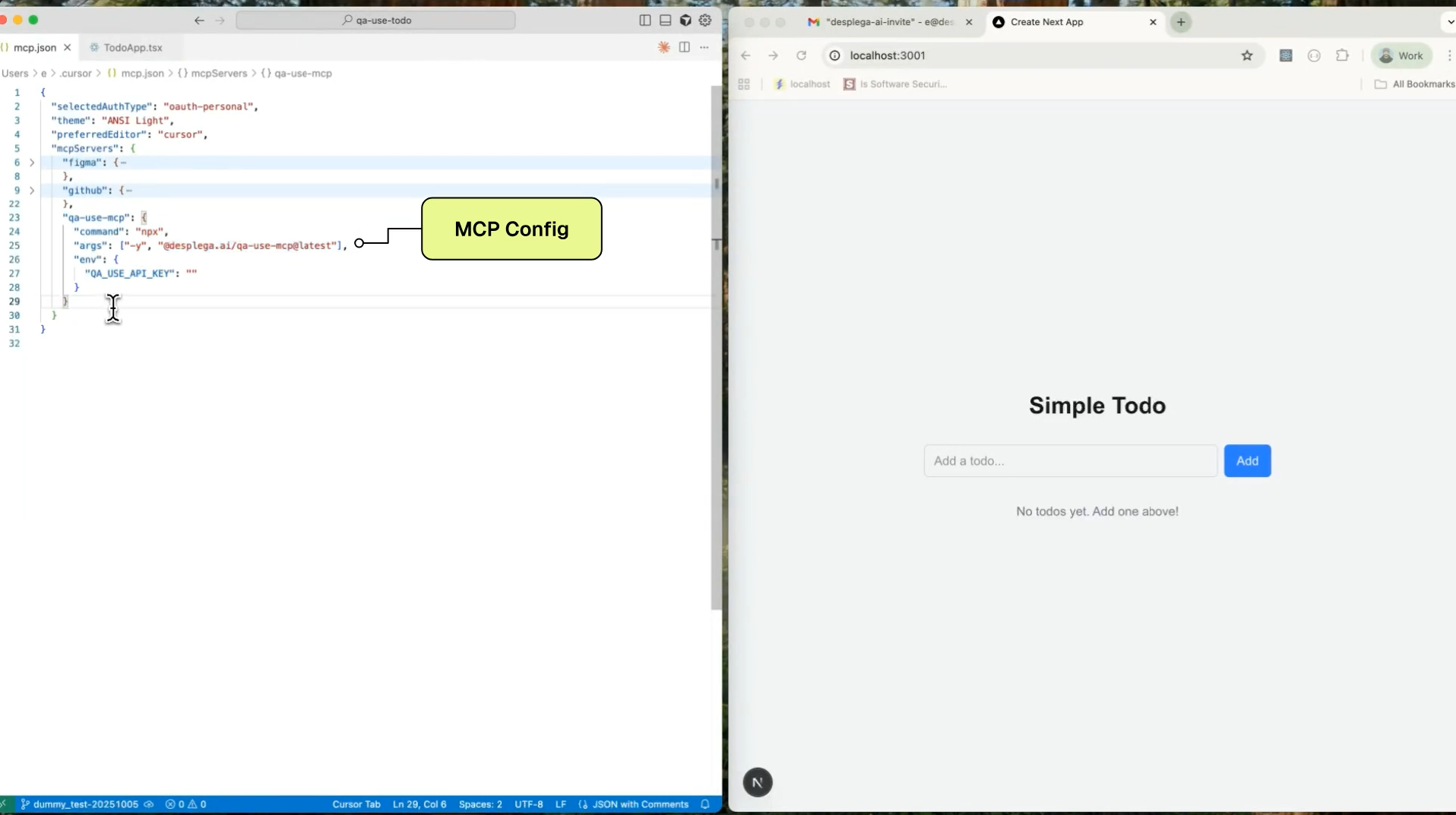
Standard configuration for most MCP clients:
<details>
<summary>Claude Code</summary>
Use the Claude Code CLI to add the QA-Use MCP server (<a href="https://docs.anthropic.com/en/docs/claude-code/mcp">guide</a>):
`bash
claude mcp add desplega-qa npx @desplega.ai/qa-use-mcp@latest --env QA_USE_API_KEY=your-desplega-ai-api-key
`
Or add without the API key and configure it later through the interactive setup:
`bash
claude mcp add desplega-qa npx @desplega.ai/qa-use-mcp@latest
`
</details>
<details>
<summary>Claude Desktop</summary>
Add to your <code>claude_desktop_config.json</code>:
`json
{
"mcpServers": {
"desplega-qa": {
"command": "npx",
"args": ["-y", "@desplega.ai/qa-use-mcp@latest"],
"env": {
"QA_USE_API_KEY": "your-desplega-ai-api-key"
}
}
}
}
`
</details>
<details>
<summary>Cline</summary>
Follow <a href="https://docs.cline.bot/mcp/configuring-mcp-servers">https://docs.cline.bot/mcp/configuring-mcp-servers</a> and use the config provided above.
</details>
<details>
<summary>Codex</summary>
Follow the <a href="https://github.com/openai/codex/blob/main/docs/advanced.md#model-context-protocol-mcp">configure MCP guide</a>
using the standard config from above. You can also install the QA-Use MCP server using the Codex CLI:
`bash
codex mcp add desplega-qa -- npx @desplega.ai/qa-use-mcp@latest
`
</details>
<details>
<summary>Copilot / VS Code</summary>
Follow the MCP install <a href="https://code.visualstudio.com/docs/copilot/chat/mcp-servers#_add-an-mcp-server">guide</a>,
with the standard config from above. You can also install the QA-Use MCP server using the VS Code CLI:
`bash
code --add-mcp '{"name":"desplega-qa","command":"npx","args":["-y","@desplega.ai/qa-use-mcp@latest"],"env":{"QA_USE_API_KEY":"your-desplega-ai-api-key"}}'
`
</details>
<details>
<summary>Cursor</summary>
Or install manually:
Go to Cursor Settings -> MCP -> New MCP Server. Use the config provided above.
</details>
<details>
<summary>Continue</summary>
Add to your Continue <code>config.json</code>:
`json
{
"mcpServers": {
"desplega-qa": {
"command": "npx",
"args": ["-y", "@desplega.ai/qa-use-mcp@latest"],
"env": {
"QA_USE_API_KEY": "your-desplega-ai-api-key"
}
}
}
}
`
</details>
<details>
<summary>Gemini CLI</summary>
Install the QA-Use MCP server using the Gemini CLI.
Project wide:
`bash
gemini mcp add desplega-qa npx @desplega.ai/qa-use-mcp@latest
`
Globally:
`bash
gemini mcp add -s user desplega-qa npx @desplega.ai/qa-use-mcp@latest
`
Alternatively, follow the <a href="https://github.com/google-gemini/gemini-cli/blob/main/docs/tools/mcp-server.md#how-to-set-up-your-mcp-server">MCP guide</a> and use the standard config from above.
</details>
<details>
<summary>Gemini Code Assist</summary>
Follow the <a href="https://cloud.google.com/gemini/docs/codeassist/use-agentic-chat-pair-programmer#configure-mcp-servers">configure MCP guide</a>
using the standard config from above.
</details>
<details>
<summary>JetBrains AI Assistant & Junie</summary>
Go to Settings | Tools | AI Assistant | Model Context Protocol (MCP) -> Add. Use the config provided above.
The same way @desplega.ai/qa-use-mcp can be configured for JetBrains Junie in Settings | Tools | Junie | MCP Settings -> Add. Use the config provided above.
</details>
<details>
<summary>Zed</summary>
Add to your Zed settings:
`json
{
"mcpServers": {
"desplega-qa": {
"command": "npx",
"args": ["-y", "@desplega.ai/qa-use-mcp@latest"],
"env": {
"QA_USE_API_KEY": "your-desplega-ai-api-key"
}
}
}
}
`
</details>
All MCP endpoints (except
/health) require authentication via Bearer token with a valid desplega.ai API key:
The HTTP mode is perfect for containerized deployments. Example Dockerfile:
dockerfile
FROM node:18-slim
RUN apt-get update && apt-get install -y \
libnss3 libatk-bridge2.0-0 libdrm2 libxkbcommon0 \
libgbm1 libasound2 libxshmfence1 \
&& rm -rf /var/lib/apt/lists/*
RUN npm install -g @desplega.ai/qa-use-mcp
ENV QA_USE_API_KEY=your-api-key-here
Deploy to Vercel for serverless hosting:

Quick setup:
npm i -g vercel
Ensure API key is set, validate authentication, and install Playwright browsers.
Parameters:
-
(string, optional): API key for desplega.ai (optional if QA_USE_API_KEY env var is set)
Update application configuration settings including base URL, login credentials, and viewport type.
Parameters:
-
base_url (string, optional): Base URL for the application being tested
- login_url (string, optional): Login page URL for the application
- login_username (string, optional): Default username for login testing
- login_password (string, optional): Default password for login testing
- vp_type (string, optional): Viewport configuration type: big_desktop, desktop, mobile, or tablet (default: desktop)
Get the current application configuration details including base URL, login settings, and viewport.
Parameters: None
Create a
.env` file in your project root or set the following environment variable:
bashQA_USE_API_KEY=your-desplega-ai-api-key
ensure_installed
update_configuration with base_url="https://app.example.com" and login_url="https://app.example.com/login" and login_username="[email protected]"
node scripts/mcp-test.js
ensure_installed
Ensure API key is set, validate authentication, and install Playwright browsers. Does not start browsers (lazy initialization on session start).
register_user
Register a new user and get API key
search_sessions
Search and list all sessions (automated tests and development sessions) with pagination and filtering
start_automated_session
Start an automated E2E test session for QA flows and automated testing. Returns sessionId (data.agent_id) for monitoring. URL is optional - uses app config base_url if not provided.
start_dev_session
Start an interactive development session for debugging and exploration. Session will not auto-pilot and allows manual browser interaction.
monitor_session
Monitor a session status. Keep calling until status is "closed". Will alert if session needs user input, is idle, or pending.
interact_with_session
Interact with a session - respond to questions, pause, or close the session
search_automated_tests
Search for automated tests by ID or query. If testId provided, returns detailed info for that test. Otherwise searches with optional query/pagination.
run_automated_tests
Execute multiple automated tests simultaneously. Uses the global browser WebSocket URL from init_qa_server.
search_automated_test_runs
Search automated test runs with optional filtering by test ID or run ID
update_configuration
Update application configuration settings including base URL, login credentials, and viewport type
get_configuration
Get the current application configuration details including base URL, login settings, and viewport
reset_browser_sessions
Reset and cleanup all active browser sessions. This will kill all browsers and tunnels. Use this when you hit the maximum session limit or need to free up resources.
curl -X POST http://localhost:3000/mcp \
-H "Authorization: Bearer YOUR_API_KEY" \
-H "Content-Type: application/json" \
-d '{
"jsonrpc": "2.0",
"id": 2,
"method": "tools/list",
"params": {}
}'
The server exposes the following MCP tools for browser automation and QA testing:
Claude Desktop / Cursor
Paste into your MCP client config file to install this server.
{
    "mcpServers": {
        "qa use": {
            "desplega-qa": {
                "command": "npx",
                "args": [
                    "-y",
                    "@desplega.ai/qa-use-mcp@latest"
                ],
                "env": {
                    "QA_USE_API_KEY": "your-desplega-ai-api-key"
                }
            }
        }
    }
}McpServers
{
"desplega-qa": {
"command": "npx",
"args": [
"-y",
"@desplega.ai/qa-use-mcp@latest"
],
"env": {
"QA_USE_API_KEY": "your-desplega-ai-api-key"
}
}
} > Learn more: Check out our comprehensive MCP integration guide for detailed setup instructions and advanced usage patterns.
Quick Start
``bash
Run with stdio transport (for MCP clients)
npx @desplega.ai/qa-use-mcp
Run with HTTP transport (for web/remote access)
npx @desplega.ai/qa-use-mcp --http --port 3000
`
Table of Contents
- MCP Client Configuration (stdio mode)
- HTTP Transport Mode (SSE)
- Features
- Installation
- Development
- Available Tools
MCP Client Configuration (stdio mode)
The server requires a desplega.ai API key - you can get one by using the register_user tool or by signing up at desplega.ai.

Standard configuration for most MCP clients:
`json
{
"mcpServers": {
"desplega-qa": {
"command": "npx",
"args": ["-y", "@desplega.ai/qa-use-mcp@latest"],
"env": {
"QA_USE_API_KEY": "your-desplega-ai-api-key"
}
}
}
}
`
<details>
  <summary>Claude Code</summary>
    Use the Claude Code CLI to add the QA-Use MCP server (<a href="https://docs.anthropic.com/en/docs/claude-code/mcp">guide</a>):
`bash
claude mcp add desplega-qa npx @desplega.ai/qa-use-mcp@latest --env QA_USE_API_KEY=your-desplega-ai-api-key
`
Or add without the API key and configure it later through the interactive setup:
`bash
claude mcp add desplega-qa npx @desplega.ai/qa-use-mcp@latest
`
</details>

<details>
  <summary>Claude Desktop</summary>
  Add to your <code>claude_desktop_config.json</code>:
`json
{
"mcpServers": {
"desplega-qa": {
"command": "npx",
"args": ["-y", "@desplega.ai/qa-use-mcp@latest"],
"env": {
"QA_USE_API_KEY": "your-desplega-ai-api-key"
}
}
}
}
`
</details>

<details>
  <summary>Cline</summary>
  Follow <a href="https://docs.cline.bot/mcp/configuring-mcp-servers">https://docs.cline.bot/mcp/configuring-mcp-servers</a> and use the config provided above.
</details>

<details>
  <summary>Codex</summary>
  Follow the <a href="https://github.com/openai/codex/blob/main/docs/advanced.md#model-context-protocol-mcp">configure MCP guide</a>
  using the standard config from above. You can also install the QA-Use MCP server using the Codex CLI:
`bash
codex mcp add desplega-qa -- npx @desplega.ai/qa-use-mcp@latest
`
</details>

<details>
  <summary>Copilot / VS Code</summary>
  Follow the MCP install <a href="https://code.visualstudio.com/docs/copilot/chat/mcp-servers#_add-an-mcp-server">guide</a>,
  with the standard config from above. You can also install the QA-Use MCP server using the VS Code CLI:
`bash
code --add-mcp '{"name":"desplega-qa","command":"npx","args":["-y","@desplega.ai/qa-use-mcp@latest"],"env":{"QA_USE_API_KEY":"your-desplega-ai-api-key"}}'
`
</details>

<details>
  <summary>Cursor</summary>

Or install manually:

Go to
Cursor Settings -> MCP -> New MCP Server. Use the config provided above.
</details>
<details>
<summary>Continue</summary>
Add to your Continue <code>config.json</code>:
`json
{
"mcpServers": {
"desplega-qa": {
"command": "npx",
"args": ["-y", "@desplega.ai/qa-use-mcp@latest"],
"env": {
"QA_USE_API_KEY": "your-desplega-ai-api-key"
}
}
}
}
`
</details>

<details>
  <summary>Gemini CLI</summary>
Install the QA-Use MCP server using the Gemini CLI.

Project wide:
`bash
gemini mcp add desplega-qa npx @desplega.ai/qa-use-mcp@latest
`
Globally:
`bash
gemini mcp add -s user desplega-qa npx @desplega.ai/qa-use-mcp@latest
`
Alternatively, follow the <a href="https://github.com/google-gemini/gemini-cli/blob/main/docs/tools/mcp-server.md#how-to-set-up-your-mcp-server">MCP guide</a> and use the standard config from above.

</details>

<details>
  <summary>Gemini Code Assist</summary>
  Follow the <a href="https://cloud.google.com/gemini/docs/codeassist/use-agentic-chat-pair-programmer#configure-mcp-servers">configure MCP guide</a>
  using the standard config from above.
</details>

<details>
  <summary>JetBrains AI Assistant & Junie</summary>

Go to
Settings | Tools | AI Assistant | Model Context Protocol (MCP) -> Add. Use the config provided above.
The same way @desplega.ai/qa-use-mcp can be configured for JetBrains Junie in Settings | Tools | Junie | MCP Settings -> Add. Use the config provided above.
</details>
<details>
<summary>Zed</summary>
Add to your Zed settings:
`json
{
"mcpServers": {
"desplega-qa": {
"command": "npx",
"args": ["-y", "@desplega.ai/qa-use-mcp@latest"],
"env": {
"QA_USE_API_KEY": "your-desplega-ai-api-key"
}
}
}
}
`
</details>

Your first prompt


Enter the following prompt in your MCP Client to check if everything is working:
`
Initialize QA server and test the login form at https://app.example.com
`
Your MCP client should initialize the server, set up browser automation, and start testing the specified form.

> [!NOTE]
> The MCP server will start browser and tunnel resources automatically when needed. First-time setup requires running
init_qa_server with interactive=true` or providing your desplega.ai API key.
Features
- Browser Management: Launch and control Playwright browser instances with headless/headed modes - Tunneling: Create public tunnels for browser WebSocket endpoints using localtunnel - API Integration: Full integration with desplega.ai API for comprehensive QA testing workflows - Session Management: Create, monitor, and control multiple QA testing sessions with real-time status - Smart session lifecycle management with automatic cleanup - Up to 10 concurrent browser sessions with clear error handling - 30-minute default TTL with automatic deadline refresh on interaction - Background cleanup task for expired sessions - Progress Monitoring: Real-time progress notifications with MCP timeout protection (25s max per call) - Batch Test Execution: Run multiple automated tests simultaneously with dependency management - Interactive Elicitation: Intelligent prompts when remote sessions need user input to continue - Test Discovery: Search and list automated tests with pagination and filtering - Test Run Analytics: View test execution history with performance metrics and flakiness scores - AAA Framework Templates: Pre-built prompts for login, forms, e-commerce, navigation, and comprehensive testing scenarios - User Registration: Built-in user registration system for new desplega.ai accounts - Comprehensive Documentation: Built-in MCP resources with guides, workflows, and best practicesHTTP Transport Mode (SSE)
In addition to the standard MCP stdio transport, QA-Use can run with StreamableHTTP transport using Server-Sent Events (SSE). This mode implements the official MCP Streamable HTTP specification and is useful for web-based integrations, remote a…
Sign in to leave a review
Use Google, GitHub, or an email account so ratings stay tied to real people.
No reviews posted yet.



