
MCP Server for ArangoDB
About
A TypeScript-based server to interact with ArangoDB using the Model Context Protocol, enabling database operations and integration with tools like Claude and VSCode extensions for streamlined data management.
Details
- Repository
- ravenwits/mcp-server-arangodb
- License
- MIT
Explore
- Execute AQL queries with guardrails and bind variables
- Perform read-only queries with write/DDL keyword rejection
- Discover database schema: collections, indexes, views, graphs
- Create, update, insert, and delete documents and collections
- Build and query ArangoSearch Views with BM25 ranking
- Traverse graphs and find shortest paths between vertices
- Backup collections to JSON files under a configurable root directory

Setting up with Highlight
This MCP is not yet compatible with Highlight’s one-click setup. However, you can still use it with Highlight by following these steps:
- Download and install Highlight from highlightai.com/download
- Navigate to the plugins tab and select "Add Custom Plugin"
-
Configure the plugin with the settings below
Plugin Name
MCP Server for ArangoDBCommand (node, npx, python, etc.)npxArguments-
Argument 1
-y -
Argument 2
arango-server
Environment-
ARANGO_DB
your_database_name -
ARANGO_URL
your_database_url -
ARANGO_PASSWORD
your_password -
ARANGO_USERNAME
your_username
Please refer to the README for specific instructions on how to obtain API keys or other required environment variables.
-
Argument 1
- Enable "Start Automatically" if you want the plugin to start when Highlight launches





From the repository
You can pretty much provide any meaningful prompt and Claude will try to execute the appropriate function.
Some example propmts:
- "List all collections in the database"
- "Query all users"
- "Insert a new document with name 'John Doe' and email "<[email protected]>' to the 'users' collection"
- "Update the document with key '123456' or name 'Jane Doe' to change the age to 48"
- "Create a new collection named 'products'"
To install arango-server globally via NPM, run the following command:
npm install -g arango-server
To run arango-server directly without installation, use the following command:
npx -y arango-server
To use arango-server with the VSCode Copilot agent, you must have at least VSCode 1.99.0 installed and follow these steps:
1. Create or edit the MCP configuration file:
- Workspace-specific configuration: Create or edit the .vscode/mcp.json file in your workspace.
- User-specific configuration: Optionally, specify the server in the setting(mcp) VS Code user settings to enable the MCP server across all workspaces.
_Tip: You can refer here to the MCP configuration documentation of VSCode for more details on how to set up the configuration file._
2. Add the following configuration:
{
"servers": {
"arango-mcp": {
"type": "stdio",
"command": "npx",
"args": ["-y", "arango-server"],
"env": {
"ARANGO_URL": "http://localhost:8529",
"ARANGO_DB": "your_database_name",
"ARANGO_USERNAME": "your_username",
"ARANGO_PASSWORD": "your_password"
}
}
}
}
3. Start the MCP server:
- Open the Command Palette in VSCode (Ctrl+Shift+P or Cmd+Shift+P on Mac).
- Run the command MCP: Start Server and select arango-mcp from the list.
4. Verify the server:
- Open the Chat view in VSCode and switch to Agent mode.
- Use the Tools button to verify that the arango-server tools are available.
The server requires the following environment variables:
- ARANGO_URL - ArangoDB server URL (note: 8529 is the default port for ArangoDB for local development)
- ARANGO_DB - Database name
- ARANGO_USERNAME - Database user
- ARANGO_PASSWORD - Database password
- ARANGO_BACKUP_ROOT - Optional root directory for arango_backup output. Defaults to ./backups.
arango_query
Execute general AQL with bind variables, bounded results, and query guardrails.
arango_read_query
Execute read-only AQL and reject write/DDL keywords.
arango_validate_query
Parse and validate AQL without executing it.
arango_explain_query
Inspect AQL execution plans, index usage, and optimizer output.
arango_describe_database
Summarize collections, counts, indexes, and sample fields.
arango_list_collections
List collections in the configured database.
arango_get_collection
Return collection properties, count, and indexes.
arango_create_collection
Create document or edge collections.
arango_drop_collection
Drop a collection, requiring `confirm: true`.
arango_get_document
Fetch one document by collection and `_key`.
arango_list_documents
List documents with `limit` and `offset` pagination.
arango_count_documents
Count documents in a collection.
arango_sample_documents
Return a small random sample for schema discovery.
arango_insert
Insert one document into a collection.
arango_bulk_insert
Insert up to 1000 documents in one request.
arango_update
Partially update one document by `_key`.
arango_bulk_update
Patch up to 1000 documents by `_key` or `_id`.
arango_remove
Remove one document by `_key`.
arango_list_indexes
List indexes for a collection.
arango_create_index
Create persistent, geo, TTL, or inverted indexes.
arango_list_views
List ArangoSearch and search-alias Views.
arango_create_search_view
Create an ArangoSearch View linked to a collection.
arango_search
Search an ArangoSearch View with analyzer-aware BM25 ranking.
arango_list_analyzers
List ArangoSearch Analyzers.
arango_create_analyzer
Create an ArangoSearch Analyzer.
arango_list_graphs
List named graphs.
arango_create_graph
Create a named graph with one edge definition.
arango_insert_edge
Insert an edge document with `_from` and `_to`.
arango_traverse
Traverse edges from a start vertex using an edge collection or named graph.
arango_shortest_path
Find the shortest path between two vertices using an edge collection or named graph.
arango_backup
Backup collections to JSON files under `ARANGO_BACKUP_ROOT`.
| Tool | Category | Read-only | Mutates data/schema | Purpose |
| --- | --- | --- | --- | --- |
| arango_query | Query | No | Maybe | Execute general AQL with bind variables, bounded results, and query guardrails. |
| arango_read_query | Query | Yes | No | Execute read-only AQL and reject write/DDL keywords. |
| arango_validate_query | Query | Yes | No | Parse and validate AQL without executing it. |
| arango_explain_query | Query | Yes | No | Inspect AQL execution plans, index usage, and optimizer output. |
| arango_describe_database | Discovery | Yes | No | Summarize collections, counts, indexes, and sample fields. |
| arango_list_collections | Discovery | Yes | No | List collections in the configured database. |
| arango_get_collection | Discovery | Yes | No | Return collection properties, count, and indexes. |
| arango_create_collection | Collection | No | Yes | Create document or edge collections. |
| arango_drop_collection | Collection | No | Yes | Drop a collection, requiring confirm: true. |
| arango_get_document | Document | Yes | No | Fetch one document by collection and _key. |
| arango_list_documents | Document | Yes | No | List documents with limit and offset pagination. |
| arango_count_documents | Document | Yes | No | Count documents in a collection. |
| arango_sample_documents | Document | Yes | No | Return a small random sample for schema discovery. |
| arango_insert | Document | No | Yes | Insert one document into a collection. |
| arango_bulk_insert | Document | No | Yes | Insert up to 1000 documents in one request. |
| arango_update | Document | No | Yes | Partially update one document by _key. |
| arango_bulk_update | Document | No | Yes | Patch up to 1000 documents by _key or _id. |
| arango_remove | Document | No | Yes | Remove one document by _key. |
| arango_list_indexes | Index | Yes | No | List indexes for a collection. |
| arango_create_index | Index | No | Yes | Create persistent, geo, TTL, or inverted indexes. |
| arango_list_views | ArangoSearch | Yes | No | List ArangoSearch and search-alias Views. |
| arango_create_search_view | ArangoSearch | No | Yes | Create an ArangoSearch View linked to a collection. |
| arango_search | ArangoSearch | Yes | No | Search an ArangoSearch View with analyzer-aware BM25 ranking. |
| arango_list_analyzers | Analyzer | Yes | No | List ArangoSearch Analyzers. |
| arango_create_analyzer | Analyzer | No | Yes | Create an ArangoSearch Analyzer. |
| arango_list_graphs | Graph | Yes | No | List named graphs. |
| arango_create_graph | Graph | No | Yes | Create a named graph with one edge definition. |
| arango_insert_edge | Graph | No | Yes | Insert an edge document with _from and _to. |
| arango_traverse | Graph | Yes | No | Traverse edges from a start vertex using an edge collection or named graph. |
| arango_shortest_path | Graph | Yes | No | Find the shortest path between two vertices using an edge collection or named graph. |
| arango_backup | Backup | No | Filesystem | Backup collections to JSON files under ARANGO_BACKUP_ROOT. |
All tools return JSON text and structuredContent when successful. Read-heavy tools expose bounded limit parameters to keep responses agent-friendly. Query tools also support guardrails such as memoryLimit, maxRuntime, and failOnWarning where applicable.
Claude Desktop / Cursor
Paste into your MCP client config file to install this server.
{
    "mcpServers": {
        "mcp server for arangodb": {
            "env": {
                "ARANGO_DB": "your_database_name",
                "ARANGO_URL": "your_database_url",
                "ARANGO_PASSWORD": "your_password",
                "ARANGO_USERNAME": "your_username"
            },
            "args": [
                "-y",
                "arango-server"
            ],
            "command": "npx"
        }
    }
}Linux
{
"env": {
"ARANGO_DB": "your_database_name",
"ARANGO_URL": "your_database_url",
"ARANGO_PASSWORD": "your_password",
"ARANGO_USERNAME": "your_username"
},
"args": [
"-y",
"arango-server"
],
"command": "npx"
}Macos
{
"env": {
"ARANGO_DB": "your_database_name",
"ARANGO_URL": "your_database_url",
"ARANGO_PASSWORD": "your_password",
"ARANGO_USERNAME": "your_username"
},
"args": [
"-y",
"arango-server"
],
"command": "npx"
}Windows
{
"env": {
"ARANGO_DB": "your_database_name",
"ARANGO_URL": "your_database_url",
"ARANGO_PASSWORD": "your_password",
"ARANGO_USERNAME": "your_username"
},
"args": [
"/c",
"npx",
"-y",
"arango-server"
],
"command": "cmd"
}
A Model Context Protocol server for ArangoDB
This is a TypeScript-based MCP server that provides database interaction capabilities through ArangoDB. It implements core database operations and allows seamless integration with ArangoDB through MCP tools. You can use it wih Claude app and also extension for VSCode that works with mcp like Cline!
Features
Tools
| Tool | Category | Read-only | Mutates data/schema | Purpose |
| --- | --- | --- | --- | --- |
| arango_query | Query | No | Maybe | Execute general AQL with bind variables, bounded results, and query guardrails. |
| arango_read_query | Query | Yes | No | Execute read-only AQL and reject write/DDL keywords. |
| arango_validate_query | Query | Yes | No | Parse and validate AQL without executing it. |
| arango_explain_query | Query | Yes | No | Inspect AQL execution plans, index usage, and optimizer output. |
| arango_describe_database | Discovery | Yes | No | Summarize collections, counts, indexes, and sample fields. |
| arango_list_collections | Discovery | Yes | No | List collections in the configured database. |
| arango_get_collection | Discovery | Yes | No | Return collection properties, count, and indexes. |
| arango_create_collection | Collection | No | Yes | Create document or edge collections. |
| arango_drop_collection | Collection | No | Yes | Drop a collection, requiring confirm: true. |
| arango_get_document | Document | Yes | No | Fetch one document by collection and _key. |
| arango_list_documents | Document | Yes | No | List documents with limit and offset pagination. |
| arango_count_documents | Document | Yes | No | Count documents in a collection. |
| arango_sample_documents | Document | Yes | No | Return a small random sample for schema discovery. |
| arango_insert | Document | No | Yes | Insert one document into a collection. |
| arango_bulk_insert | Document | No | Yes | Insert up to 1000 documents in one request. |
| arango_update | Document | No | Yes | Partially update one document by _key. |
| arango_bulk_update | Document | No | Yes | Patch up to 1000 documents by _key or _id. |
| arango_remove | Document | No | Yes | Remove one document by _key. |
| arango_list_indexes | Index | Yes | No | List indexes for a collection. |
| arango_create_index | Index | No | Yes | Create persistent, geo, TTL, or inverted indexes. |
| arango_list_views | ArangoSearch | Yes | No | List ArangoSearch and search-alias Views. |
| arango_create_search_view | ArangoSearch | No | Yes | Create an ArangoSearch View linked to a collection. |
| arango_search | ArangoSearch | Yes | No | Search an ArangoSearch View with analyzer-aware BM25 ranking. |
| arango_list_analyzers | Analyzer | Yes | No | List ArangoSearch Analyzers. |
| arango_create_analyzer | Analyzer | No | Yes | Create an ArangoSearch Analyzer. |
| arango_list_graphs | Graph | Yes | No | List named graphs. |
| arango_create_graph | Graph | No | Yes | Create a named graph with one edge definition. |
| arango_insert_edge | Graph | No | Yes | Insert an edge document with _from and _to. |
| arango_traverse | Graph | Yes | No | Traverse edges from a start vertex using an edge collection or named graph. |
| arango_shortest_path | Graph | Yes | No | Find the shortest path between two vertices using an edge collection or named graph. |
| arango_backup | Backup | No | Filesystem | Backup collections to JSON files under ARANGO_BACKUP_ROOT. |
All tools return JSON text and structuredContent when successful. Read-heavy tools expose bounded limit parameters to keep responses agent-friendly. Query tools also support guardrails such as memoryLimit, maxRuntime, and failOnWarning where applicable.
Installation
Installing via NPM
To install arango-server globally via NPM, run the following command:
npm install -g arango-server
Running via NPX
To run arango-server directly without installation, use the following command:
npx -y arango-server
Configuring for VSCode Agent
To use arango-server with the VSCode Copilot agent, you must have at least VSCode 1.99.0 installed and follow these steps:
1. Create or edit the MCP configuration file:
- Workspace-specific configuration: Create or edit the .vscode/mcp.json file in your workspace.
- User-specific configuration: Optionally, specify the server in the setting(mcp) VS Code user settings to enable the MCP server across all workspaces.
_Tip: You can refer here to the MCP configuration documentation of VSCode for more details on how to set up the configuration file._
2. Add the following configuration:
   {
     "servers": {
       "arango-mcp": {
         "type": "stdio",
         "command": "npx",
         "args": ["-y", "arango-server"],
         "env": {
           "ARANGO_URL": "http://localhost:8529",
           "ARANGO_DB": "your_database_name",
           "ARANGO_USERNAME": "your_username",
           "ARANGO_PASSWORD": "your_password"
         }
       }
     }
   }
3. Start the MCP server:
- Open the Command Palette in VSCode (Ctrl+Shift+P or Cmd+Shift+P on Mac).
- Run the command MCP: Start Server and select arango-mcp from the list.
4. Verify the server:
- Open the Chat view in VSCode and switch to Agent mode.
- Use the Tools button to verify that the arango-server tools are available.
To use with Claude Desktop
Go to: Settings > Developer > Edit Config or
- MacOS: ~/Library/Application Support/Claude/claude_desktop_config.json
- Windows: %APPDATA%/Claude/claude_desktop_config.json
You can check out mcp documentation to set it up too.
To use with OpenCode
Add the following configuration to your OpenCode config file, such as opencode.json or opencode.jsonc:
{
  "$schema": "https://opencode.ai/config.json",
  "mcp": {
    "arango": {
      "type": "local",
      "command": ["npx", "-y", "arango-server"],
      "enabled": true,
      "environment": {
        "ARANGO_URL": "your_database_url",
        "ARANGO_DB": "your_database_name",
        "ARANGO_USERNAME": "your_username",
        "ARANGO_PASSWORD": "your_password"
      }
    }
  }
}
After restarting OpenCode, ask it to use the arango MCP tools for ArangoDB tasks.
To use with Cline VSCode Extension
Go to: Cline Extension > MCP Servers > Edit Configuration or
- MacOS: ~/Library/Application Support/Code/User/globalStorage/cline.cline/config.json
- Windows: %APPDATA%/Code/User/globalStorage/cline.cline/config.json
Add the following configuration to the mcpServers section:
{
  "mcpServers": {
    "arango": {
      "command": "npx",
      "args": ["-y", "arango-server"],
      "env": {
        "ARANGO_URL": "your_database_url",
        "ARANGO_DB": "your_database_name",
        "ARANGO_USERNAME": "your_username",
        "ARANGO_PASSWORD": "your_password"
      }
    }
  }
}
You can also use the above configuration to get this server working with WARP
Environment Variables
The server requires the following environment variables:
- ARANGO_URL - ArangoDB server URL (note: 8529 is the default port for ArangoDB for local development)
- ARANGO_DB - Database name
- ARANGO_USERNAME - Database user
- ARANGO_PASSWORD - Database password
- ARANGO_BACKUP_ROOT - Optional root directory for arango_backup output. Defaults to ./backups.
Usage
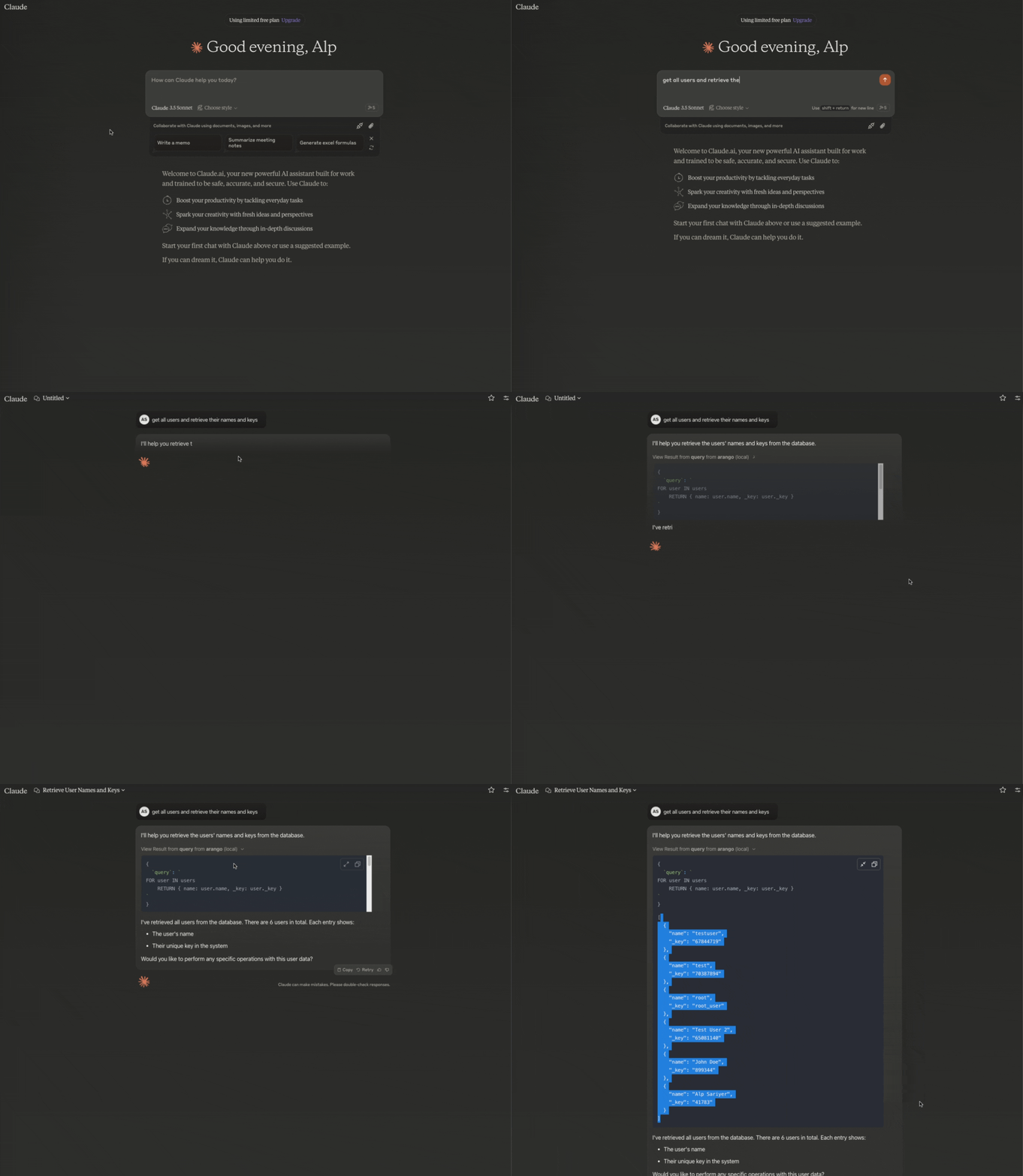
You can pretty much provide any meaningful prompt and Claude will try to execute the appropriate function.
Some example propmts:
- "List all collections in the database"
- "Query all users"
- "Insert a new document with name 'John Doe' and email "<[email protected]>' to the 'users' collection"
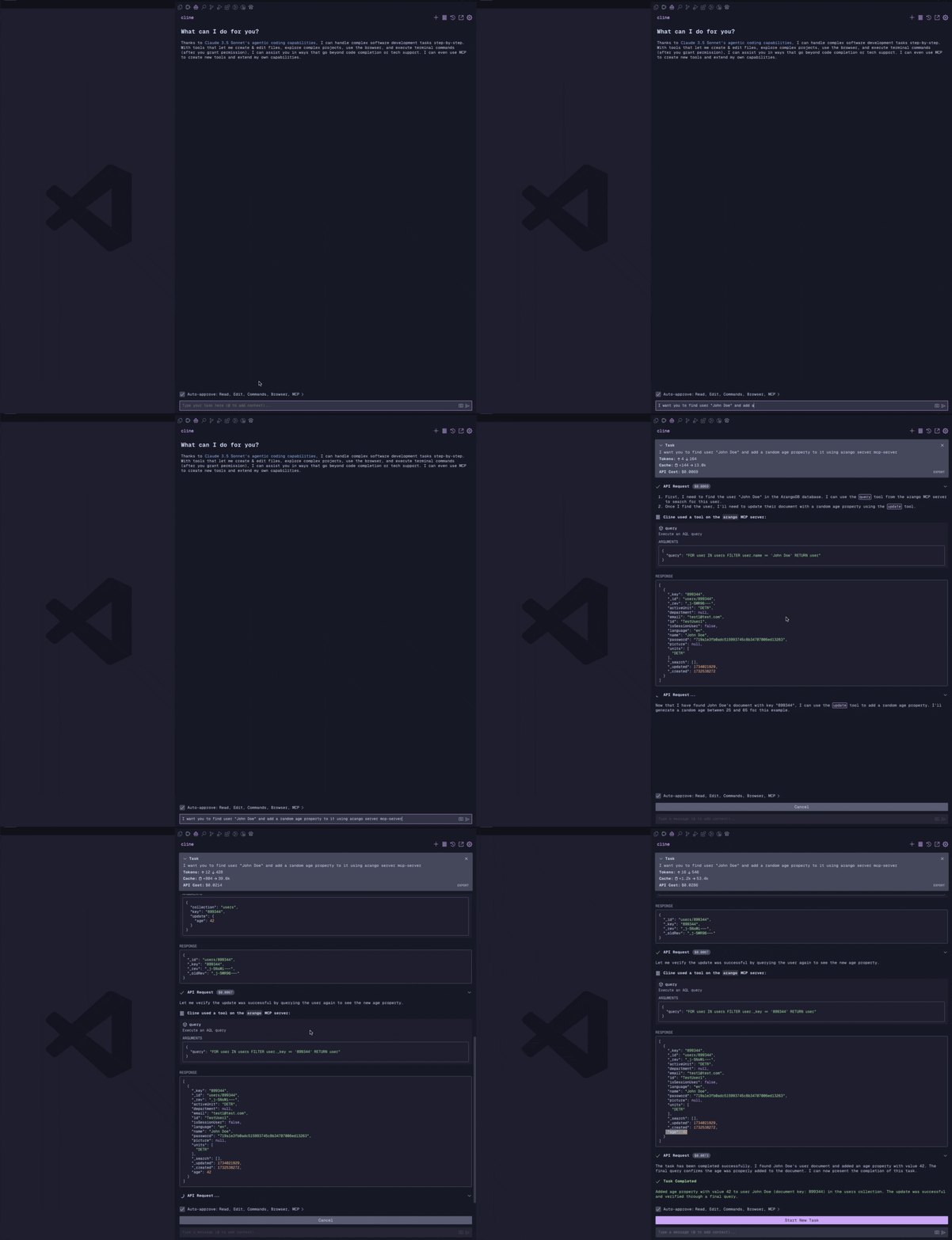
- "Update the document with key '123456' or name 'Jane Doe' to change the age to 48"
- "Create a new collection named 'products'"
Usage with Claude App
Uasge with Cline VSCode extension
Query all users:
{
  "query": "FOR user IN users RETURN user",
  "limit": 100
}
Insert a new document:
{
  "collection": "users",
  "document": {
    "name": "John Doe",
    "email": "[email protected]"
  }
}
Update a document:
{
  "collection": "users",
  "key": "123456",
  "update": {
    "name": "Jane Doe"
  }
}
Remove a document:
{
  "collection": "users",
  "key": "123456"
}
List all collections:
{
} // No parameters required
Backup database collections:
{
  "outputDir": "nightly_1", // Safe subdirectory name under ARANGO_BACKUP_ROOT. Absolute paths and slashes are rejected.
  "collection": "users", // Optional. If omitted, all collections are backed up.
  "docLimit": 1000 // Optional. Maximum documents per collection. Defaults to 1000 and is capped at 10000.
}
Set ARANGO_BACKUP_ROOT to choose where backups are stored. The server rejects path traversal, absolute paths, symlink escapes, and existing output files to mitigate arbitrary file write risks.
Create a new collection:
{
  "name": "products",
  "type": "document", // "document" or "edge" (optional, defaults to "document")
  "waitForSync": false // Optional, defaults to false
}
Drop a collection:
{
  "name": "products",
  "confirm": true
}
Sign in to leave a review
Use Google, GitHub, or an email account so ratings stay tied to real people.
No reviews posted yet.



