
Data Exploration
About
MCP server for autonomous data exploration on .csv-based datasets, providing intelligent insights with minimal effort.
Explore
- Pre-built explore-data prompt template for data exploration.
- Tools to load CSV files and execute Python scripts.
- Handles large datasets (e.g., 2.2 million entries, 178.9 MB).
- Generates visualizations and summary reports.
- Open source under the MIT License.
- Contributed by ReadingPlus.AI LLC.

Setting up with Highlight
This MCP is not yet compatible with Highlight’s one-click setup. However, you can still use it with Highlight by following these steps:
- Download and install Highlight from highlightai.com/download
- Navigate to the plugins tab and select "Add Custom Plugin"
-
Configure the plugin with the settings below
Plugin Name
Data ExplorationCommand (node, npx, python, etc.)Please refer to the README for specific instructions on how to obtain API keys or other required environment variables.
- Enable "Start Automatically" if you want the plugin to start when Highlight launches





From the repository
- macOS: ~/Library/Application\ Support/Claude/claude_desktop_config.json
- Windows: %APPDATA%/Claude/claude_desktop_config.json
csv_path
(string, required): Path to the CSV file
df_name
(string, optional): Name for the DataFrame. Defaults to df_1, df_2, etc., if not provided
script
(string, required): The script to execute
1. load-csv
- Function: Loads a CSV file into a DataFrame
- Arguments:
- csv_path (string, required): Path to the CSV file
- df_name (string, optional): Name for the DataFrame. Defaults to df_1, df_2, etc., if not provided
2. run-script
- Function: Executes a Python script
- Arguments:
- script (string, required): The script to execute
Claude Desktop / Cursor
Paste into your MCP client config file to install this server.
{
    "mcpServers": {
        "data exploration": {
            "mcp-server-data-exploration": {
                "command": "python",
                "args": [
                    "setup.py"
                ]
            }
        }
    }
}McpServers
{
    "mcp-server-data-exploration": {
        "command": "python",
        "args": [
            "setup.py"
        ]
    }
}
MCP Server for Data Exploration
MCP Server is a versatile tool designed for interactive data exploration.
Your personal Data Scientist assistant, turning complex datasets into clear, actionable insights.
<a href="https://glama.ai/mcp/servers/hwm8j9c422"></a>
🚀 Try it Out
1. Download Claude Desktop
- Get it here
2. Install and Set Up
- On macOS, run the following command in your terminal:
python setup.py
3. Load Templates and Tools
- Once the server is running, wait for the prompt template and tools to load in Claude Desktop.
4. Start Exploring
- Select the explore-data prompt template from MCP
- Begin your conversation by providing the required inputs:
- csv_path: Local path to the CSV file
- topic: The topic of exploration (e.g., "Weather patterns in New York" or "Housing prices in California")
Examples
These are examples of how you can use MCP Server to explore data without any human intervention.
Case 1: California Real Estate Listing Prices
- Kaggle Dataset: USA Real Estate Dataset - Size: 2,226,382 entries (178.9 MB) - Topic: Housing price trends in California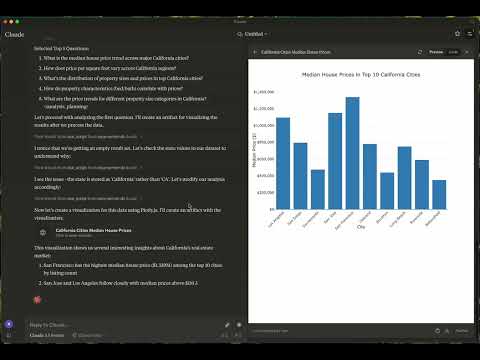
Case 2: Weather in London
- Kaggle Dataset: 2M+ Daily Weather History UK - Size: 2,836,186 entries (169.3 MB) - Topic: Weather in London - Report: View Report - Graphs: - London Temperature Trends- Temperature-Humidity Relationship by Season
- Wind Direction Pattern by Season
📦 Components
Prompts
- explore-data: Tailored for data exploration tasksTools
1. load-csv - Function: Loads a CSV file into a DataFrame - Arguments: -csv_path (string, required): Path to the CSV file
- df_name (string, optional): Name for the DataFrame. Defaults to df_1, df_2, etc., if not provided
2. run-script
- Function: Executes a Python script
- Arguments:
- script (string, required): The script to execute
⚙️ Modifying the Server
Claude Desktop Configurations
- macOS:~/Library/Application\ Support/Claude/claude_desktop_config.json
- Windows: %APPDATA%/Claude/claude_desktop_config.json
Development (Unpublished Servers)
"mcpServers": {
  "mcp-server-ds": {
    "command": "uv",
    "args": [
      "--directory",
      "/Users/username/src/mcp-server-ds",
      "run",
      "mcp-server-ds"
    ]
  }
}
Published Servers
"mcpServers": {
  "mcp-server-ds": {
    "command": "uvx",
    "args": [
      "mcp-server-ds"
    ]
  }
}
🛠️ Development
Building and Publishing
1. Sync Dependencies uv sync
2. Build Distributions
uv build
Generates source and wheel distributions in the dist/ directory.
3. Publish to PyPI
uv publish
🤝 Contributing
Contributions are welcome! Whether you're fixing bugs, adding features, or improving documentation, your help makes this project better.
Reporting Issues
If you encounter bugs or have suggestions, open an issue in the issues section. Include: - Steps to reproduce (if applicable) - Expected vs. actual behavior - Screenshots or error logs (if relevant)📜 License
This project is licensed under the MIT License.
See the LICENSE file for details.
💬 Get in Touch
Questions? Feedback? Open an issue or reach out to the maintainers. Let's make this project awesome together!
About
This is an open source project run by ReadingPlus.AI LLC. and open to contributions from the entire community.
Sign in to leave a review
Use Google, GitHub, or an email account so ratings stay tied to real people.
No reviews posted yet.