
Getting Started with Remote MCP Servers using Azure Functions (Node.js/TypeScript)
About
This is a quickstart template to easily build and deploy a custom remote MCP server to the cloud using Azure functions. You can clone/restore/run on your local machine with debugging, and azd up to have it in the cloud in a couple minutes. The MCP server is secured by design.
Details
- License
- MIT
Explore
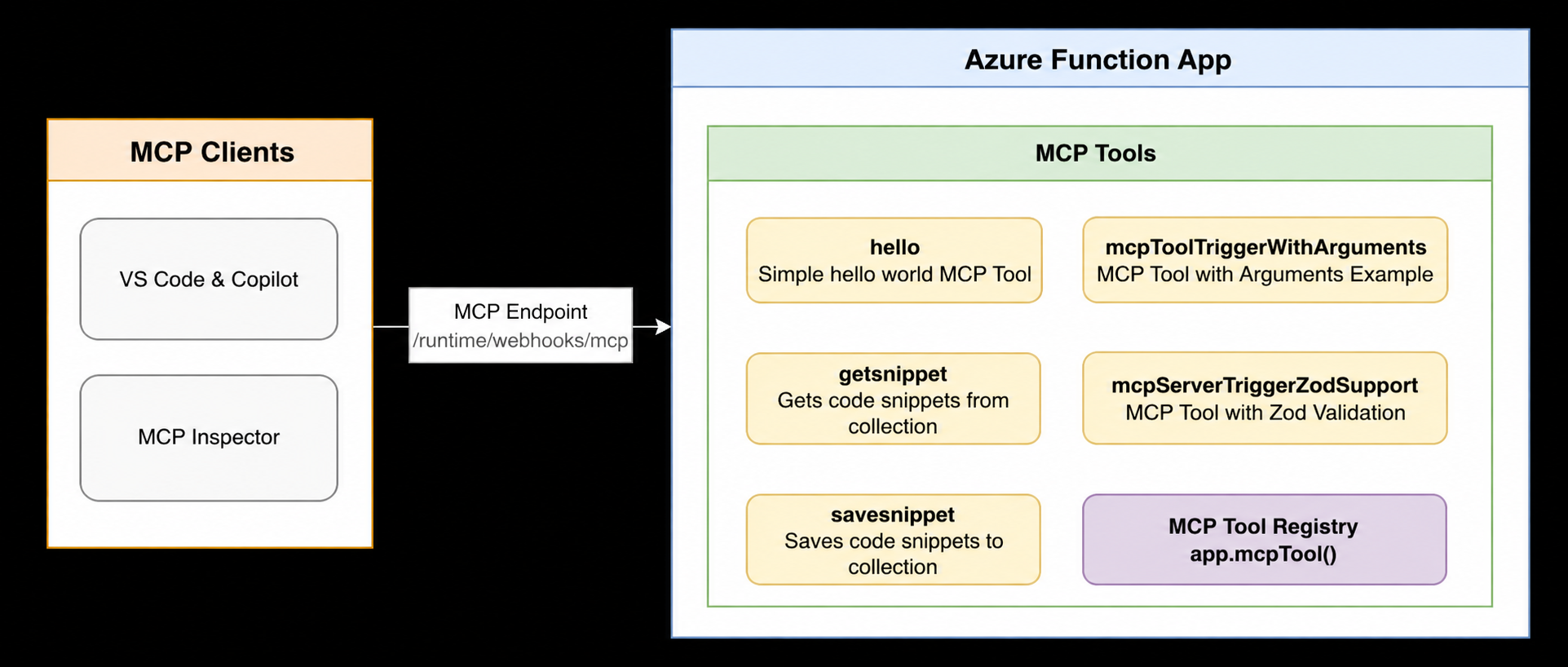
- MCP Tool triggers for hello world and Blob storage snippets
- MCP Prompt triggers for reusable, parameterized prompt templates
- MCP App with interactive weather widget in a sandboxed iframe
- Sample demonstrates structured content (images, resource links)
- Includes code review, summarize, and documentation prompt templates
- Self-contained quickstarts with local run and one‑command cloud deployment
Install these before working with any sample:
+ Node.js version 18 or higher
+ Azure Functions Core Tools >= 4.0.7030
+ Azure Developer CLI (azd)
+ Visual Studio Code with the Azure Functions extension (recommended)
+ Docker — Runs Azurite, the local Azure Storage emulator
Remote MCP Servers using Azure Functions (Node.js/TypeScript)
Build and deploy remote MCP servers to Azure using Azure Functions. Each sample is a self-contained quickstart you can clone, run locally, and azd up to the cloud in minutes.

Looking for another language? See the .NET/C# and Python versions.
Watch the video overview
<a href="https://www.youtube.com/watch?v=U9DsLcP5vEk">
</a>
Prerequisites
Install these before working with any sample:
+ Node.js version 18 or higher
+ Azure Functions Core Tools >= 4.0.7030
+ Azure Developer CLI (azd)
+ Visual Studio Code with the Azure Functions extension (recommended)
+ Docker — Runs Azurite, the local Azure Storage emulator
Samples
| Sample | Get started | What it demonstrates |
|--------|-------------|---------------------|
| mcp-tools | README | MCP Tool triggers: hello world, snippet save/get with Azure Blob bindings, structured content (images, resource links) |
| mcp-prompts | README | MCP Prompt triggers: reusable, parameterized prompt templates (code review, summarize, documentation) |
| mcp-weather-app | README | MCP Apps: tool + UI resource serving an interactive weather widget in a sandboxed iframe |
Next Steps
+ Learn more about the Azure Functions MCP extension
+ Learn more about built-in MCP auth
+ Follow our blog posts on Azure SDK Blog and Tech Community for updates.
Sign in to leave a review
Use Google, GitHub, or an email account so ratings stay tied to real people.
No reviews posted yet.



