
Rongcloud Native
About
# Rongcloud Native MCP RongCloud IM service based on MCP protocol (wrapping Rust SDK) ## Usage ### Prerequisites - Install UV Package Manager ```bash pip install uv ``` UV is a Python package installation and dependency management tool written in Rust, offering faster and more efficient experience than traditional…
Explore
- Send text messages to specified users (private chat).
- Send text messages to specified groups (group chat).
- Retrieve historical private chat messages.
- Retrieve historical group chat messages.
- Send image messages with thumbnail base64 and image URI.
- Recall sent messages using the complete message object.

Setting up with Highlight
This MCP is not yet compatible with Highlight’s one-click setup. However, you can still use it with Highlight by following these steps:
- Download and install Highlight from highlightai.com/download
- Navigate to the plugins tab and select "Add Custom Plugin"
-
Configure the plugin with the settings below
Plugin Name
Rongcloud NativeCommand (node, npx, python, etc.)Please refer to the README for specific instructions on how to obtain API keys or other required environment variables.
- Enable "Start Automatically" if you want the plugin to start when Highlight launches





From the repository
pip install uv
UV is a Python package installation and dependency management tool written in Rust, offering faster and more efficient experience than traditional tools (like pip). It focuses on two core objectives:
Speed: UV is optimized for package installation, dependency resolution, and virtual environment creation, providing significant performance improvements.
Efficiency: UV reduces resource consumption, especially in large projects.
The UVX command we'll use later means "download if not local, then run", and it runs in a separate virtual environment each time, making it ideal for large model/Agent-related scenarios.
- APP_KEY: (Required) Your Rongcloud application key
- TOKEN: (Required) Application SDK token, obtained from Server API
- AREA_CODE: (Optional) Data center region code:
- 1: Beijing
- 2: Singapore
- 3: North America
- 4: Singapore B
- 5: Saudi Arabia
- Note: Do not set for non-public cloud customers
- NAVI_URL: (Optional) Navigation URL, required for non-public cloud customers
- STATS_URL: (Optional) Statistics URL, required for non-public cloud customers
A: If the server list shows a yellow dot, try installing the UV command first, then restart Cursor and re-enable the service switch.
The server exposes the following tools through the MCP protocol:
A: Make sure environment variables (APP_KEY, TOKEN, NAVI_URL, AREA_CODE, STATS_URL) are correctly set, restart the service, and try calling the tools again.
Claude Desktop / Cursor
Paste into your MCP client config file to install this server.
{
    "mcpServers": {
        "rongcloud native": {
            "rongcloud-native-mcp-python": {
                "name": "rongcloud-native-mcp-python",
                "type": "stdio",
                "command": "uvx",
                "args": [
                    "rongcloud-native-mcp-python"
                ],
                "env": {
                    "APP_KEY": "YOUR_APP_KEY",
                    "TOKEN": "YOUR_TOKEN",
                    "AREA_CODE": "YOUR_AREA_CODE"
                }
            }
        }
    }
}McpServers
{
    "rongcloud-native-mcp-python": {
        "name": "rongcloud-native-mcp-python",
        "type": "stdio",
        "command": "uvx",
        "args": [
            "rongcloud-native-mcp-python"
        ],
        "env": {
            "APP_KEY": "YOUR_APP_KEY",
            "TOKEN": "YOUR_TOKEN",
            "AREA_CODE": "YOUR_AREA_CODE"
        }
    }
}
RongCloud IM service based on MCP protocol (wrapping Rust SDK)
Usage
Prerequisites - Install UV Package Manager
pip install uv
UV is a Python package installation and dependency management tool written in Rust, offering faster and more efficient experience than traditional tools (like pip). It focuses on two core objectives:
Speed: UV is optimized for package installation, dependency resolution, and virtual environment creation, providing significant performance improvements.
Efficiency: UV reduces resource consumption, especially in large projects.
The UVX command we'll use later means "download if not local, then run", and it runs in a separate virtual environment each time, making it ideal for large model/Agent-related scenarios.
Using in Cursor (Similar for Cline / Claude)
Configuration path: Cursor -> Preferences -> Cursor Settings -> MCP -> Add new global MCP server
Configuration content:
{
  "mcpServers": {
    "rongcloud-native-mcp-python": {
      "name": "rongcloud-native-mcp-python",
      "type": "stdio",
      "command": "uvx",
      "args": [
        "rongcloud-native-mcp-python"
      ],
      "env": {
          "APP_KEY": "Rongcloud App Key",
          "TOKEN": "Application SDK Token (obtained from Server API)",
          "AREA_CODE": "Data center region code, do not set for non-public cloud customers",
          "NAVI_URL": "Nav URL (for non-public cloud customers)",
          "STATS_URL": "Statistics URL (for non-public cloud customers)"
      }
    }
  }
}
Environment Variables
- APP_KEY: (Required) Your Rongcloud application key
- TOKEN: (Required) Application SDK token, obtained from Server API
- AREA_CODE: (Optional) Data center region code:
- 1: Beijing
- 2: Singapore
- 3: North America
- 4: Singapore B
- 5: Saudi Arabia
- Note: Do not set for non-public cloud customers
- NAVI_URL: (Optional) Navigation URL, required for non-public cloud customers
- STATS_URL: (Optional) Statistics URL, required for non-public cloud customers
Using in Cherry Studio
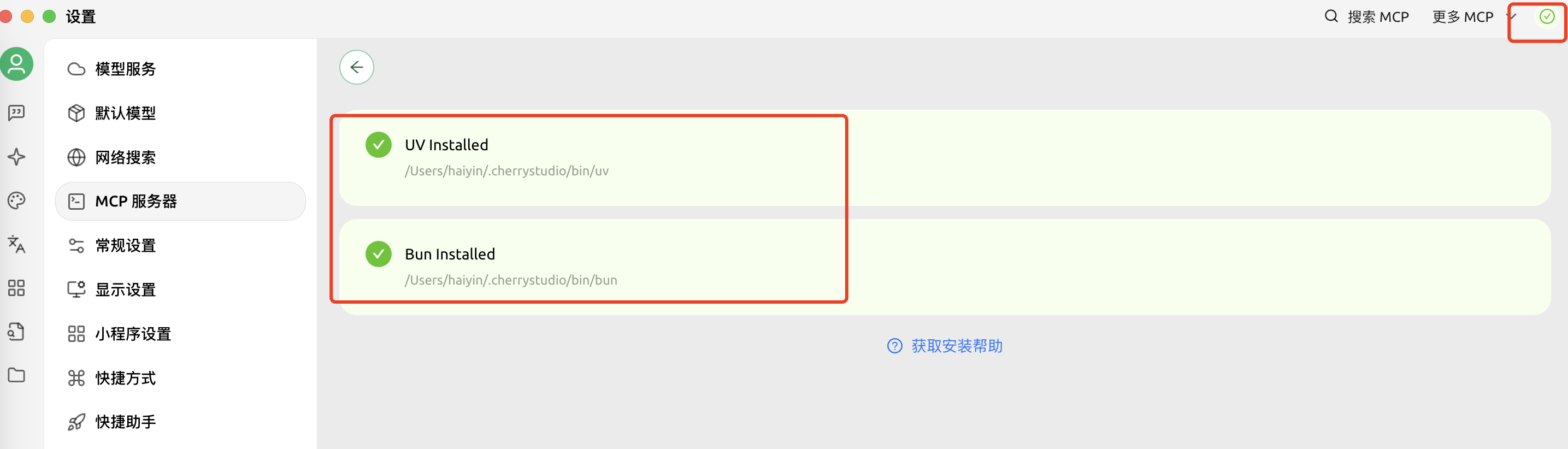
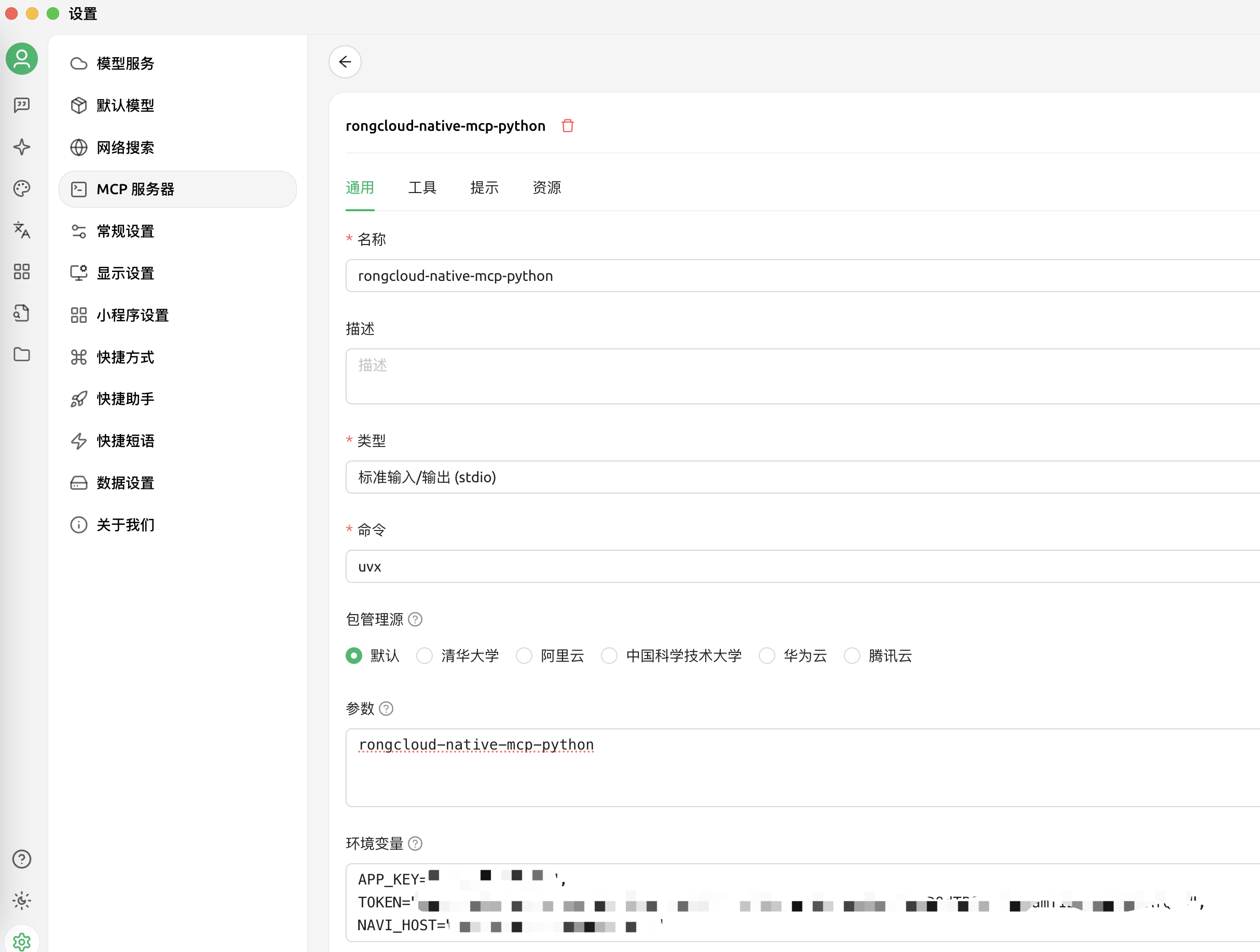
First install both UV and Bun (both required), then restart Cherry Studio. Configure as shown in the images below:
Main Features and Tools Description (Continuously Updated)
The server exposes the following tools through the MCP protocol:
1. send_private_text_message
- Function: Send IM message to specified user (private chat)
- Parameters:
- user_id (str, default ""): Message recipient's user ID
- content (str, default ""): Message content
- ext_content (dict, default {}): Extended content dictionary for additional message data
- Returns:
- Failure: Dictionary containing code and error
- Success: Dictionary containing code, message_id and message
2. send_group_text_message
- Function: Send IM message to specified group (group chat)
- Parameters:
- group_id (str, default ""): Group ID
- content (str, default ""): Message content
- ext_content (dict, default {}): Extended content dictionary for additional message data
- Returns:
- Failure: Dictionary containing code and error
- Success: Dictionary containing code, message_id and message
3. get_private_messages
- Function: Get historical messages with specified user (private chat)
- Parameters:
- user_id (str, default ""): User ID
- order_asc (bool, default False): Sort order, False=descending, True=ascending
- count (int, default 10): Number of messages to retrieve
- Returns:
- Failure: Dictionary containing code and error
- Success: Dictionary containing code and message array
4. get_group_messages
- Function: Get historical messages of specified group (group chat)
- Parameters:
- group_id (str, default ""): Group ID
- order_asc (bool, default False): Sort order, False=descending, True=ascending
- count (int, default 10): Number of messages to retrieve
- Returns:
- Failure: Dictionary containing code and error
- Success: Dictionary containing code and message array
5. send_private_image_message
- Function: Send image message to specified user (private chat)
- Parameters:
- user_id (str, default ""): Message recipient's user ID
- thumbnail_base64 (str, default ""): Thumbnail image in base64 encoding
- image_uri (str, default ""): Image URI address
- ext_content (dict, default {}): Extended content dictionary for additional message data
- Returns:
- Failure: Dictionary containing code and error
- Success: Dictionary containing code, message_id and message
6. send_group_image_message
- Function: Send image message to specified group (group chat)
- Parameters:
- group_id (str, default ""): Group ID
- thumbnail_base64 (str, default ""): Thumbnail image in base64 encoding
- image_uri (str, default ""): Image URI address
- ext_content (dict, default {}): Extended content dictionary for additional message data
- Returns:
- Failure: Dictionary containing code and error
- Success: Dictionary containing code, message_id and message
7. recall_message
- Function: Recall specified message
- Parameters:
- message_dict (dict): Complete message object containing message_id, conversation_type, target_id, etc.
- Returns:
- Failure: Dictionary containing code and error
- Success: Dictionary containing code and message
Note:
- The IM engine will automatically initialize and connect on the first call to any message-related tool
- Resource cleanup is automatically handled when the server disconnects
- All message sending tools support the ext_content parameter for sending extended content
- Image messages require providing the image URI address and thumbnail base64 encoding
- Message recall requires providing complete message object information
Version Changelog
v0.1.3 (Latest)
- ✨ New Features: - Addedsend_private_image_message and send_group_image_message image message sending tools
- Added recall_message message recall tool
- Added ext_content parameter support for all message sending tools, allowing extended content
- 📖 Documentation Updates:
- Improved English documentation translation
- Updated parameter descriptions and usage examples for all tools
- Fixed parameter documentation consistency
v0.1.2
- 🌍 Regional Support: Support for setting data center region code (AREA_CODE) - 🔧 Optimization: Improved initialization and connection check logicCommon Issues
Q: Why does the server list show a yellow dot in Cursor even after configuration?
A: If the server list shows a yellow dot, try installing the UV command first, then restart Cursor and re-enable the service switch.
Q: Why does Cherry Studio keep reporting errors?
A: Make sure both UV and Bun are installed successfully, restart Cherry Studio, and then re-enable the service switch.
Q: Why do tool calls return errors?
A: Make sure environment variables (APP_KEY, TOKEN, NAVI_URL, AREA_CODE, STATS_URL) are correctly set, restart the service, and try calling the tools again.
Technical Support
If you encounter issues, please:
1. Check if environment variables are correctly set
2. Check log output for specific error messages
3. Create an issue in the open source project
Sign in to leave a review
Use Google, GitHub, or an email account so ratings stay tied to real people.
No reviews posted yet.



