
sample-serverless-mcp-server
About
# sample-serverless-mcp-server A Github MCP Server implementation based on Amazon Lambda and Streamable HTTP protocol. ## Project Description This project demonstrates how to transform the official TypeScript MCP Server to support Streamable HTTP protocol and deploy it via Amazon Lambda. The implementation leverages…
Details
- License
- MIT-0
Explore
- Streamable HTTP MCP protocol support
- Elastic deployment based on Amazon Lambda
- Optimized cost-performance balance
- Node.js 20+
- AWS CLI configured
- OSS-Serverless CLI
This project needs to set up a GITHUB_PERSONAL_ACCESS_TOKEN, which has been stored in Amazon Lambda environment variables.
Never submit your serverless.yml to a GitHub public repository.
npm install
npm install -g osls
#Set your github personal access token in serverless.yml

cp serverless.example.yml serverless.yml

#edit serverless.yml , GITHUB_PERSONAL_ACCESS_TOKEN: <Your GitHub Personal Access Token>
npm sls deploy
A Github MCP Server implementation based on Amazon Lambda and Streamable HTTP protocol.
Project Description
This project demonstrates how to transform the official TypeScript MCP Server to support Streamable HTTP protocol and deploy it via Amazon Lambda. The implementation leverages new features introduced in MCP v2025.03.26, including:
- Stream transmission based on HTTP Chunked Transfer Encoding
- Dynamic context priority control
- Seamless integration with existing HTTP infrastructure
Key Features
- Streamable HTTP MCP protocol support
- Elastic deployment based on Amazon Lambda
- Optimized cost-performance balance
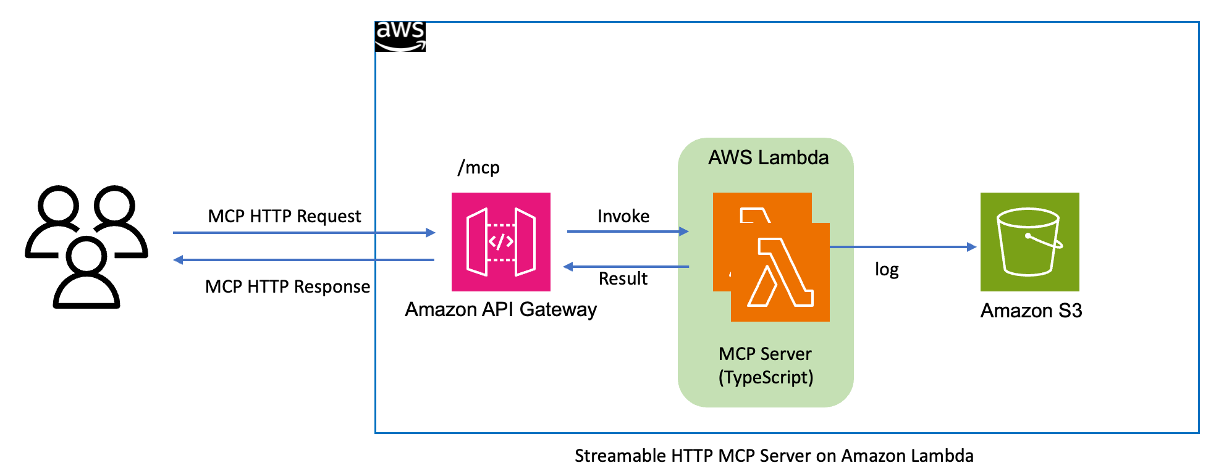
MCP Server on Amazon Lambda Architecture
Quick Start
Prerequisites
- Node.js 20+
- AWS CLI configured
- OSS-Serverless CLI
Serverless Streamable HTTP MCP Server
- Github MCP Server
How to deploy Github MCP Server on Amazon Lambda :
This project needs to set up a GITHUB_PERSONAL_ACCESS_TOKEN, which has been stored in Amazon Lambda environment variables.
Never submit your serverless.yml to a GitHub public repository.
```bash
Sign in to leave a review
Use Google, GitHub, or an email account so ratings stay tied to real people.
No reviews posted yet.



