Shots Ai App Store Screenshot Generator
About
Generate App Store screenshots and app icon concepts from Codex, Claude Code, and MCP clients.
Details
- Transport
- SSE
- License
- MIT
Explore
- Generate App Store screenshots directly from your coding agent.
- Revise generated screenshots with targeted feedback.
- Translate screenshot copy for 50 App Store locales.
- Research an app and build a screenshot strategy.
- Brainstorm app icon concepts and generate final candidates.
- Import App Store metadata and existing screenshots.

Setting up with Highlight
This MCP is not yet compatible with Highlight’s one-click setup. However, you can still use it with Highlight by following these steps:
- Download and install Highlight from highlightai.com/download
- Navigate to the plugins tab and select "Add Custom Plugin"
-
Configure the plugin with the settings below
Plugin Name
Shots Ai App Store Screenshot GeneratorCommand (node, npx, python, etc.)Please refer to the README for specific instructions on how to obtain API keys or other required environment variables.
- Enable "Start Automatically" if you want the plugin to start when Highlight launches





From the repository
1. Install the plugin for your agent (see Install below).
2. Sign in when prompted — first use opens a browser window for OAuth.
3. Run /shots and ask: "Generate App Store screenshots for my app".
4. Review, revise, and download the results in Shots Studio.
/plugins
Or install directly from the command line:
codex plugin add shots@shots
```
Claude Desktop / Cursor
Paste into your MCP client config file to install this server.
{
    "mcpServers": {
        "shots   ai app store screenshot generator": {
            "shots": {
                "type": "http",
                "url": "https://shots.run/api/mcp"
            }
        }
    }
}McpServers
{
    "shots": {
        "type": "http",
        "url": "https://shots.run/api/mcp"
    }
}



Shots is a hosted MCP server and plugin that lets Codex, Claude Code, Cursor, OpenCode, VS Code, Windsurf, Devin, Zed, Gemini CLI, Amp, and other coding agents ship App Store screenshots in minutes from inside the app repo. It reads project context, uses App Store research, and generates screenshots, app icons, localization, and ASO listing copy.
Start free: 3 free screenshots, no card required — shots.run
Quick start
1. Install the plugin for your agent (see Install below).
2. Sign in when prompted — first use opens a browser window for OAuth.
3. Run /shots and ask: "Generate App Store screenshots for my app".
4. Review, revise, and download the results in Shots Studio.
Demo
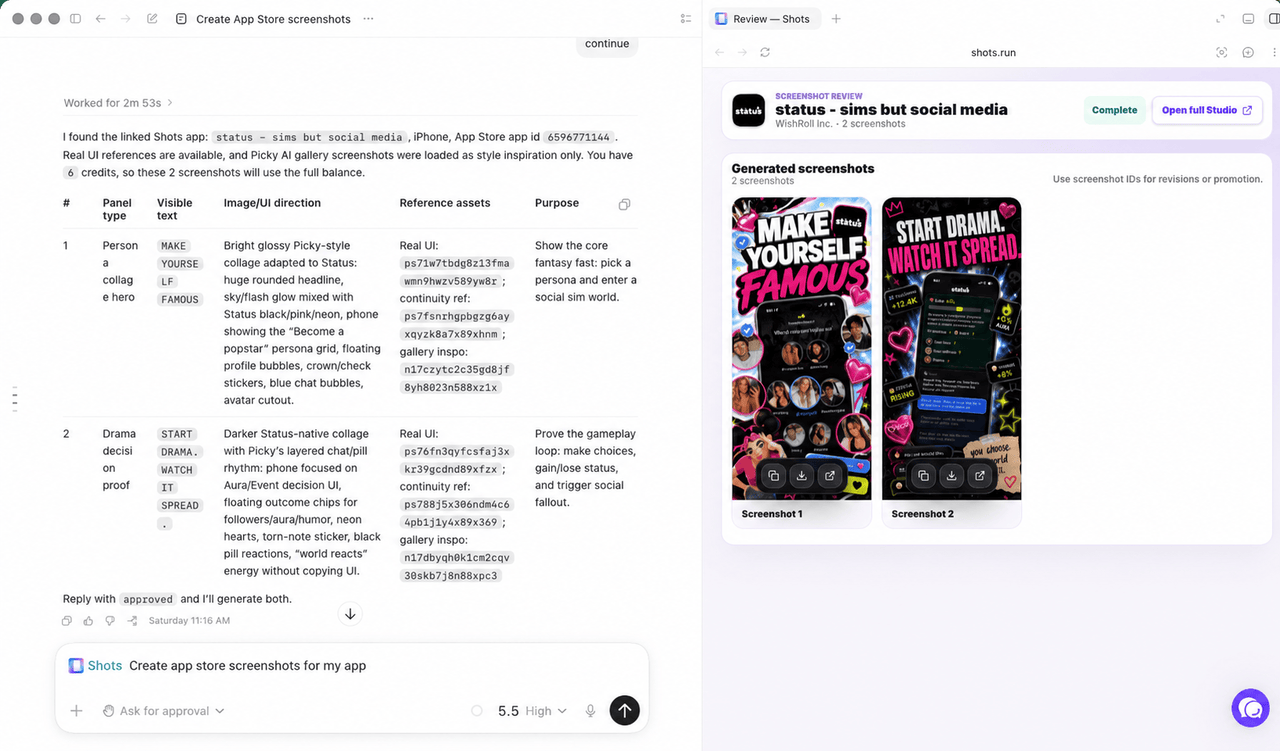
Generate App Store screenshots directly from your coding agent. Review and refine with the Shots Studio integration.
Install
Codex
Add the marketplace:
codex plugin marketplace add hitSlop/shots
Install the plugin from inside Codex:
```
codex
Sign in to leave a review
Use Google, GitHub, or an email account so ratings stay tied to real people.
No reviews posted yet.



