SonarQube
About
The SonarQube MCP (Model Context Protocol) Server is a custom-built AI-powered backend designed to integrate with SonarQube and enable intelligent, context-aware interactions between static code analysis and modern AI agents like GitHub Copilot, VS Code Agents, or any LLM-powered
Explore
- Health check endpoint to verify server status
- Token validation to authenticate and retrieve user info
- Fetch unresolved issues (bugs, code smells, vulnerabilities)
- List all accessible SonarQube projects
- Retrieve key quality metrics (bugs, coverage, duplication, ratings)

Setting up with Highlight
This MCP is not yet compatible with Highlight’s one-click setup. However, you can still use it with Highlight by following these steps:
- Download and install Highlight from highlightai.com/download
- Navigate to the plugins tab and select "Add Custom Plugin"
-
Configure the plugin with the settings below
Plugin Name
SonarQubeCommand (node, npx, python, etc.)Please refer to the README for specific instructions on how to obtain API keys or other required environment variables.
- Enable "Start Automatically" if you want the plugin to start when Highlight launches





From the repository
The server uses the following environment variables:
SONARQUBE_URL=http://localhost:9000 # Default SonarQube server URL
SONARQUBE_TOKEN= # Your SonarQube authentication token
PROJECT_KEY=default_project # Default project key for operations
"sonarqubemcp": {
"command": "docker",
"args": [
"run",
"-i",
"--rm",
"--init",
"-e",
"SONARQUBE_URL",
"-e",
"SONARQUBE_TOKEN",
"-e",
"PROJECT_KEY",
"dhanushhypervisor/sonarqube_mcp_server"
],
"env": {
"SONARQUBE_URL": "<server_url>",
"SONARQUBE_TOKEN" : "<server_token>",
"PROJECT_KEY": "<project_name>",
}
}
When running the container, configure these required environment variables:
- SONARQUBE_URL: URL of your SonarQube server
- SONARQUBE_TOKEN: Your SonarQube authentication token
- PROJECT_KEY: The default project key to analyze
The server runs on Python 3.10 and uses the uv package manager for dependency management and execution.
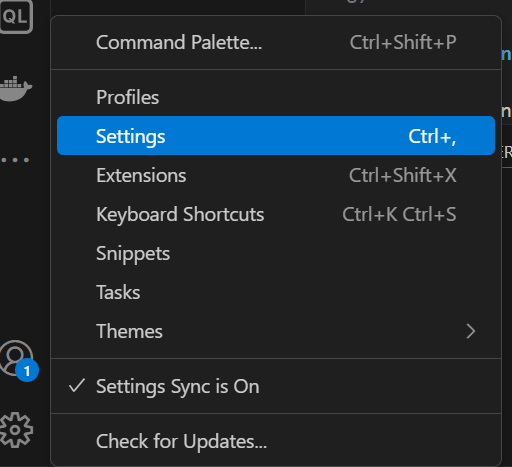
- Open your VS Code Settings
- In the search bar, type mcp
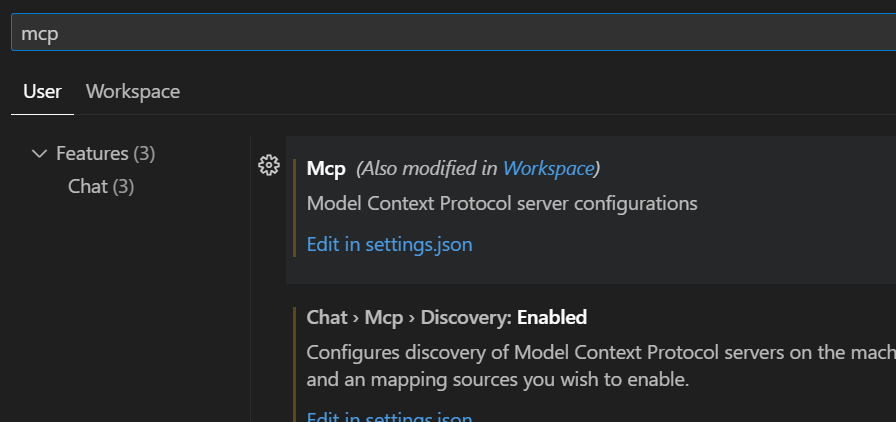
- Click on “Edit in settings.json”
- Under the mcp section, add the following configuration:
Claude Desktop / Cursor
Paste into your MCP client config file to install this server.
{
    "mcpServers": {
        "sonarqube": {
            "sonarqubemcp": {
                "command": "docker",
                "args": [
                    "run",
                    "-i",
                    "--rm",
                    "--init",
                    "-e",
                    "SONARQUBE_URL",
                    "-e",
                    "SONARQUBE_TOKEN",
                    "-e",
                    "PROJECT_KEY",
                    "dhanushhypervisor/sonarqube_mcp_server"
                ],
                "env": {
                    "SONARQUBE_URL": "",
                    "SONARQUBE_TOKEN": "",
                    "PROJECT_KEY": ""
                }
            }
        }
    }
}McpServers
{
"sonarqubemcp": {
"command": "docker",
"args": [
"run",
"-i",
"--rm",
"--init",
"-e",
"SONARQUBE_URL",
"-e",
"SONARQUBE_TOKEN",
"-e",
"PROJECT_KEY",
"dhanushhypervisor/sonarqube_mcp_server"
],
"env": {
"SONARQUBE_URL": "",
"SONARQUBE_TOKEN": "",
"PROJECT_KEY": ""
}
}
}This is a FastMCP server that provides a bridge to interact with SonarQube APIs. The server offers various tools to monitor and analyze code quality using SonarQube.
Features
1. Health Check
- Endpoint:sonar_health_check
- Checks the status of your SonarQube server
- Returns the current health status and connection information
2. Token Validation
- Endpoint:get_token_info
- Validates the SonarQube authentication token
- Returns authentication status and associated user information
3. Project Issues
- Endpoint:get_project_issues
- Fetches unresolved issues for a specific project
- Returns detailed information about:
- Bugs
- Code smells
- Vulnerabilities
- Issue severity and status
- File location and line numbers
4. Project Listing
- Endpoint:list_projects
- Lists all accessible SonarQube projects
- Provides project keys, names, and visibility settings
5. Project Metrics
- Endpoint:get_project_metrics
- Retrieves key quality metrics for a project including:
- Bug count
- Vulnerability count
- Code smell count
- Code coverage
- Duplicated lines density
- Reliability rating
- Security rating
- Maintainability rating (SQALE)
Configuration
The server uses the following environment variables:
SONARQUBE_URL=http://localhost:9000  # Default SonarQube server URL
SONARQUBE_TOKEN=                     # Your SonarQube authentication token
PROJECT_KEY=default_project          # Default project key for operations
Requirements
Check the requirements.txt file for all dependencies. The main requirements include:
- FastMCP
- Requests
Usage
1. Set up your environment variables
2. Install the requirements
3. Run the server using Python
The server will start and provide MCP-compliant endpoints for interacting with your SonarQube instance.
Docker Usage
Security Notice
For security reasons, sensitive environment variables likeSONARQUBE_TOKEN and PROJECT_KEY should not be stored in the Dockerfile. Instead, they should be passed at runtime using environment variables or environment files.
💡 How to Integrate This Tool with VS Code and Make It Smarter
- Open your VS Code Settings
- In the search bar, type mcp
- Click on “Edit in settings.json”
- Under the mcp section, add the following configuration:
Adding it in MCP server config
      "sonarqubemcp": {
        "command": "docker",
        "args": [
          "run",
          "-i",
          "--rm",
          "--init",
          "-e",
          "SONARQUBE_URL",
          "-e",
          "SONARQUBE_TOKEN",
          "-e",
          "PROJECT_KEY",
          "dhanushhypervisor/sonarqube_mcp_server"
        ],
        "env": {
          "SONARQUBE_URL": "<server_url>",
          "SONARQUBE_TOKEN" : "<server_token>",
          "PROJECT_KEY": "<project_name>",
        }
      }
Environment Variables
When running the container, configure these required environment variables:
- SONARQUBE_URL: URL of your SonarQube server
- SONARQUBE_TOKEN: Your SonarQube authentication token
- PROJECT_KEY: The default project key to analyze
The server runs on Python 3.10 and uses the uv package manager for dependency management and execution.
Error Handling
The server includes comprehensive error handling for:
- Connection issues
- Authentication failures
- Permission problems
- Invalid project keys
- General API errors
Each endpoint returns detailed error messages to help diagnose issues.
Sign in to leave a review
Use Google, GitHub, or an email account so ratings stay tied to real people.
No reviews posted yet.



