
Tax Depreciation
About
Tax Depreciation MCP server based on MACRS from IRS publication 946.
Explore
- Retrieve asset class information for a given asset.
- Get the full MACRS depreciation schedule for an asset.
- Calculate depreciation amount for a specific year and asset.
- Determine the applicable convention (e.g., half-year, mid-quarter).
- Test connectivity with a built-in ping tool.

Setting up with Highlight
This MCP is not yet compatible with Highlight’s one-click setup. However, you can still use it with Highlight by following these steps:
- Download and install Highlight from highlightai.com/download
- Navigate to the plugins tab and select "Add Custom Plugin"
-
Configure the plugin with the settings below
Plugin Name
Tax DepreciationCommand (node, npx, python, etc.)Please refer to the README for specific instructions on how to obtain API keys or other required environment variables.
- Enable "Start Automatically" if you want the plugin to start when Highlight launches





From the repository
Add the remote endpoint https://tax-depreciation-mcp.onrender.com/mcp to your MCP client (e.g., Cursor) via the command palette (MCP: Add Endpoint to Cursor) or by manually including the mcpServers configuration in JSON. Once connected, send queries such as “Calculate year 3 depreciation for a $50,000 delivery truck” or “Get class info for computers.”
get_asset_class
Retrieve the asset class information for a given asset.
get_depreciation_schedule
Get the full MACRS depreciation schedule for an asset.
calculate_depreciation_amount
Calculate the depreciation amount for a specific year and asset.
choose_convention
Determine the applicable convention (half-year, mid-quarter, etc.) for an asset.
ping
Test connectivity to the MCP endpoint.
The following tools are available via the Tax Depreciation MCP endpoint. All are based on the MACRS from IRS Publication 946:
- get_asset_class: Retrieve the asset class information for a given asset.
- get_depreciation_schedule: Get the full MACRS depreciation schedule for an asset.
- calculate_depreciation_amount: Calculate the depreciation amount for a specific year and asset.
- choose_convention: Determine the applicable convention (half-year, mid-quarter, etc.) for an asset.
- ping: Test connectivity to the MCP endpoint.
Claude Desktop / Cursor
Paste into your MCP client config file to install this server.
{
    "mcpServers": {
        "tax depreciation": {
            "tax-depreciation-mcp": {
                "url": "https://tax-depreciation-mcp.onrender.com/mcp"
            }
        }
    }
}McpServers
{
    "tax-depreciation-mcp": {
        "url": "https://tax-depreciation-mcp.onrender.com/mcp"
    }
}
A guide and example queries for interacting with the Tax Depreciation MCP server based on MACRS from IRS publication 946.
Remote MCP Endpoint
The remote MCP is hosted at:
https://tax-depreciation-mcp.onrender.com/mcp
Available Tools
The following tools are available via the Tax Depreciation MCP endpoint. All are based on the MACRS from IRS Publication 946:
- get_asset_class: Retrieve the asset class information for a given asset.
- get_depreciation_schedule: Get the full MACRS depreciation schedule for an asset.
- calculate_depreciation_amount: Calculate the depreciation amount for a specific year and asset.
- choose_convention: Determine the applicable convention (half-year, mid-quarter, etc.) for an asset.
- ping: Test connectivity to the MCP endpoint.
Usage
Add to Cursor
If you are using a tool or extension that supports MCP queries (such as the Model Context Protocol extension in VS Code), you can add the endpoint to your cursor by:
1. Opening the command palette (usually Cmd+Shift+P on macOS).
2. Typing MCP: Add Endpoint to Cursor and selecting it.
3. Entering the endpoint URL:
https://tax-depreciation-mcp.onrender.com/mcp
4. Now, you can type your query in the editor and run it directly against the MCP endpoint.
Alternatively, you can manually add the endpoint to your tool's configuration if required.
{
    "mcpServers": {
        "tax-depreciation-mcp": {
            "url": "https://tax-depreciation-mcp.onrender.com/mcp"
        }
    }
}
Example Queries
You can try queries like:
- Calculate year 3 depreciation for a $50,000 delivery truck
- Get class info for computers
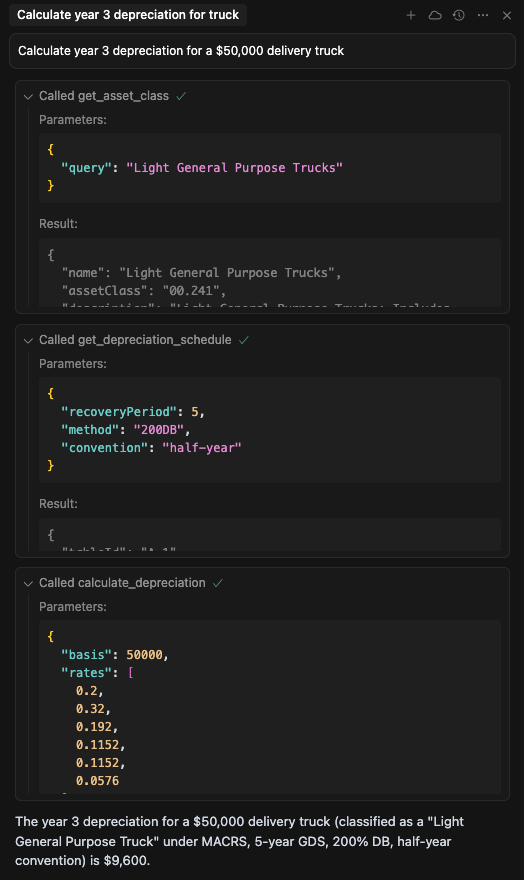
These queries can be sent to the MCP endpoint to retrieve tax depreciation calculations and class information for various assets.
About MCP
The Model Context Protocol (MCP) is a standard for querying and interacting with financial and tax models via a consistent API.
---
For more information, see the MCP documentation.
Sign in to leave a review
Use Google, GitHub, or an email account so ratings stay tied to real people.
No reviews posted yet.



