
AI Humanizer MCP Server
About
Helps refine AI-generated content to sound more natural and human-like. Built with advanced AI detection and text enhancement capabilities.
Details
- Repository
- Text2Go/ai-humanizer-mcp-server
- License
- MIT
Explore
- 🤖 AI Detection - Accurately identify AI-generated content
- 👤 Natural Language Enhancement - Transform robotic text into natural human-like writing
- ⭐ Grammar Perfection - Ensure flawless grammatical accuracy
- 📋 Readability Optimization - Improve text flow and comprehension
- 📏 Length Control - Adjust content length while preserving meaning
- ⚖️ Term Preservation - Maintain specific terminology and key phrases

Setting up with Highlight
This MCP is not yet compatible with Highlight’s one-click setup. However, you can still use it with Highlight by following these steps:
- Download and install Highlight from highlightai.com/download
- Navigate to the plugins tab and select "Add Custom Plugin"
-
Configure the plugin with the settings below
Plugin Name
AI Humanizer MCP ServerCommand (node, npx, python, etc.)npxArguments-
Argument 1
-y -
Argument 2
ai-humanizer-mcp-server
Please refer to the README for specific instructions on how to obtain API keys or other required environment variables.
-
Argument 1
- Enable "Start Automatically" if you want the plugin to start when Highlight launches





From the repository
Prerequisites
- node version >= 16
- Claude Desktop latest version
Claude Desktop / Cursor
Paste into your MCP client config file to install this server.
{
    "mcpServers": {
        "ai humanizer mcp server": {
            "cwd": "<YOUR_PROJECT_PATH>/build",
            "env": {},
            "args": [
                "-y",
                "ai-humanizer-mcp-server"
            ],
            "shell": false,
            "command": "npx"
        }
    }
}Linux
{
    "cwd": "<YOUR_PROJECT_PATH>/build",
    "env": [],
    "args": [
        "-y",
        "ai-humanizer-mcp-server"
    ],
    "shell": false,
    "command": "npx"
}
Macos
{
    "cwd": "<YOUR_PROJECT_PATH>/build",
    "env": [],
    "args": [
        "-y",
        "ai-humanizer-mcp-server"
    ],
    "shell": false,
    "command": "npx"
}
Windows
{
    "cwd": "<YOUR_PROJECT_PATH>/build",
    "env": [],
    "args": [
        "/c",
        "npx",
        "-y",
        "ai-humanizer-mcp-server"
    ],
    "shell": false,
    "command": "cmd"
}Powered by text2go.
---
Table of Contents
1. Key Features
2. Screenshot
3. Prerequisites
4. Installation
5. Usage
- AI Text Detection
---
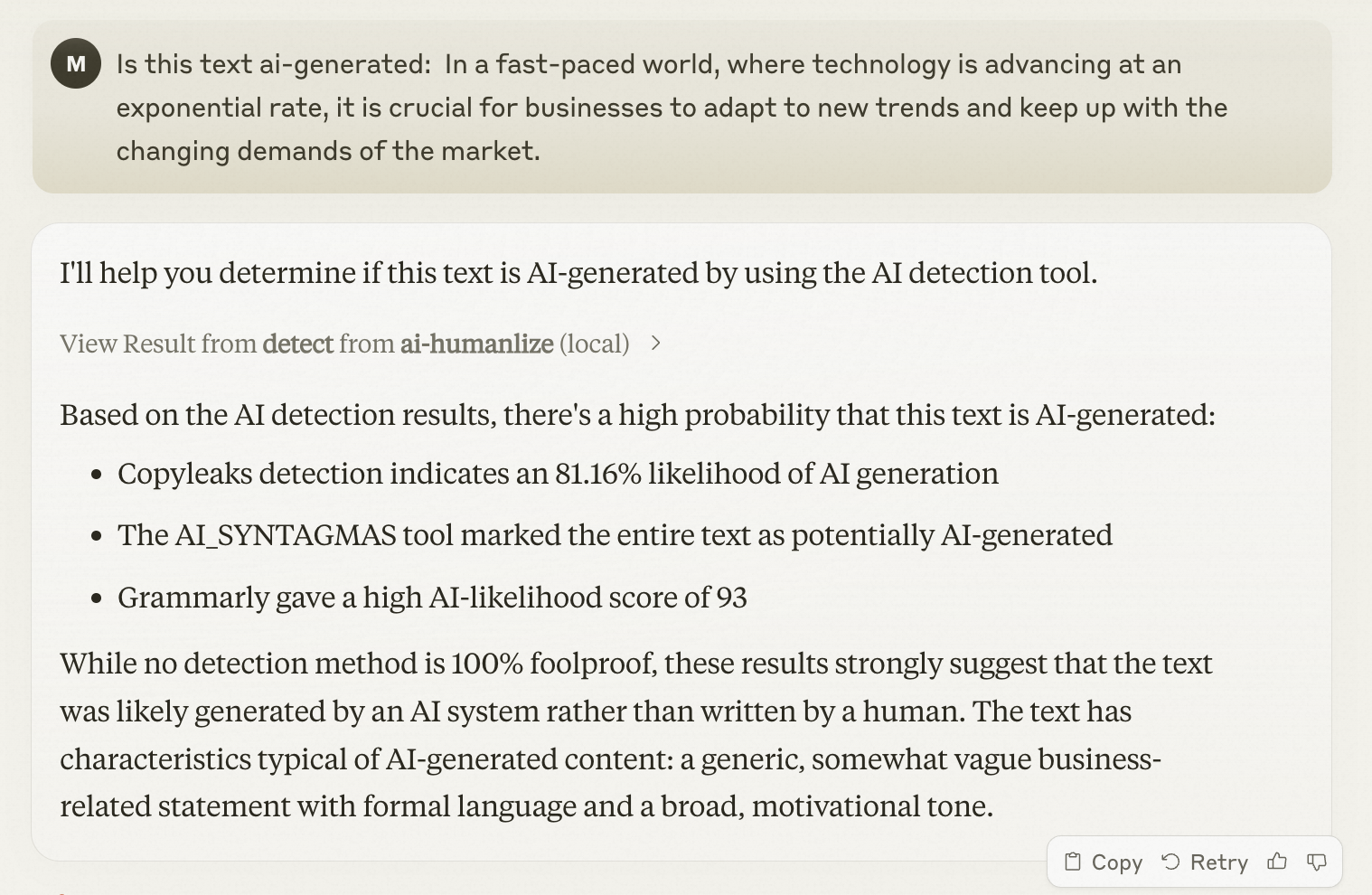
Screenshot
✨ Key Features
- 🤖 AI Detection - Accurately identify AI-generated content
- 👤 Natural Language Enhancement - Transform robotic text into natural human-like writing
- ⭐ Grammar Perfection - Ensure flawless grammatical accuracy
- 📋 Readability Optimization - Improve text flow and comprehension
- 📏 Length Control - Adjust content length while preserving meaning
- ⚖️ Term Preservation - Maintain specific terminology and key phrases
Prerequisites
- node version >= 16 - Claude Desktop latest versionInstallation
By npx
1. Configure Claude Desktop: - Open Claude Desktop - Navigate to Settings → Developer → Edit Config - Add the following configuration:{
"mcpServers": {
"ai-humanizer": {
"command": "npx",
"args": ["-y", "ai-humanizer-mcp-server"]
}
}
}
By Source Code
1. Clone this repository 2. Install Dependenciesnpm install
npm run build
{
  "mcpServers": {
    "ai-humanizer": {
      "command": "node",
      "args": ["<YOUR_PROJECT_PATH>/build/index.js"]
    }
  }
}
💡 Usage
AI Text Detection
To check if text is AI-generated, simply ask Claude:
Is this text ai-generated: In a fast-paced world, where technology is advancing at an exponential rate, it is crucial for businesses to adapt to new trends and keep up with the changing demands of the market.
Star History
29:["$","div",null,{"className"
Sign in to leave a review
Use Google, GitHub, or an email account so ratings stay tied to real people.
No reviews posted yet.