
ThumbGate (npm: mcp-memory-gateway)
About
Agent governance for ThumbGate: 👍/👎 become Pre-Action Checks that flag repeat mistakes and hard-block the risky ones before code or systems change.
Details
- Transport
- SSE
- License
- MIT
Explore
- PreToolUse hook catches dangerous calls before the model spends tokens.
- Hard-blocks catastrophic classes (secret exfiltration, rm -rf, supply‑chain) by default.
- Warns and logs other risk classes; hard‑blocks everything under THUMBGATE_STRICT_ENFORCEMENT=1.
- Thumbs‑down feedback becomes reusable, auto‑promoted prevention rules.
- Context Brain (BRAIN.md) gives each agent session persistent institutional memory.
- Slash commands (/thumbgate-guard, /thumbgate-rules, etc.) for discoverable guardrails.

Setting up with Highlight
This MCP is not yet compatible with Highlight’s one-click setup. However, you can still use it with Highlight by following these steps:
- Download and install Highlight from highlightai.com/download
- Navigate to the plugins tab and select "Add Custom Plugin"
-
Configure the plugin with the settings below
Plugin Name
ThumbGate (npm: mcp-memory-gateway)Command (node, npx, python, etc.)Please refer to the README for specific instructions on how to obtain API keys or other required environment variables.
- Enable "Start Automatically" if you want the plugin to start when Highlight launches





From the repository
npx thumbgate init # auto-detects your agent, wires everything
npx thumbgate capture down "Never run DROP on production tables"
That single command creates a prevention rule. Next time any AI agent tries to run DROP on production:
⚠️ Check fired: "Never run DROP on production tables"
Pattern: DROP.production
Verdict: WARN + LOG (BLOCK when THUMBGATE_STRICT_ENFORCEMENT=1)
---
| Agent | Command |
|-------|---------|
| Claude Code | npx thumbgate init --agent claude-code |
| Cursor | npx thumbgate init --agent cursor |
| VS Code / Open VSX | plugins/vscode-extension/README.md |
| Antigravity-compatible | plugins/antigravity-extension/INSTALL.md |
| JetBrains | plugins/jetbrains-plugin/README.md |
| Codex | npx thumbgate init --agent codex |
| Gemini CLI | npx thumbgate init --agent gemini |
| Amp | npx thumbgate init --agent amp |
| Cline (Roo Code successor) | npx thumbgate init --agent cline |
| OpenCode | npx thumbgate init --agent opencode |
| Claude Desktop | Download extension bundle |
| Any MCP agent | npx thumbgate serve |
Works with Claude Code, Cursor, Codex, Gemini CLI, Amp, Cline, OpenCode, and any MCP-compatible agent. Migrating from Roo Code (sunsetting 2026-05-15)? See adapters/cline/INSTALL.md.
ThumbGate supports two install scopes. Pick once when you install — you can switch later by re-running with the other flag.
| Scope | Command | Settings file | Lesson DB + dashboard live in | When to use |
|-------|---------|---------------|--------------------------------|-------------|
| Machine-wide (default) | npx thumbgate init | ~/.claude/settings.json | ~/.claude/memory/feedback/ | Solo dev — one shared dashboard across every repo on this machine. A lesson learned in repo-A blocks the same mistake in repo-B automatically. |
| Per-project | npx thumbgate init --project (in the repo root) | <repo>/.claude/settings.json | <repo>/.claude/memory/feedback/ | Client work, compliance, or multi-tenant — separate dashboard per repo, lessons stay isolated, audit trail belongs to the repo. |
Both scopes write mcpServers.thumbgate + the PreToolUse / UserPromptSubmit / PostToolUse / SessionStart hooks; the only difference is where*. Machine-wide is the right default for most developers. Switch to --project only when you have a reason to keep lessons from bleeding between repos.
> Per-project lesson DBs live under each repo's .claude/memory/feedback/ and must stay gitignored — they're a runtime store, not source. ThumbGate's bundled .gitignore template handles this.
Open the Codex plugin install page or download the standalone bundle from GitHub Releases. The Codex launcher resolves thumbgate@latest when MCP and hooks start, so published npm fixes reach active Codex installs without hand-editing ~/.codex/config.toml.
1. Install page: thumbgate.ai/codex-plugin
2. Direct zip: thumbgate-codex-plugin.zip
3. Follow: plugins/codex-profile/INSTALL.md
ChatGPT is the advice, checkpointing, and typed-feedback surface; ThumbGate's hard enforcement still runs locally in Codex, Claude Code, Cursor, Gemini CLI, Amp, OpenCode, MCP, or CI after install.
1. App page: thumbgate.ai/chatgpt-app
2. Live GPT: thumbgate.ai/go/gpt
3. GPT Action schema: thumbgate.ai/openapi.yaml
4. Follow: adapters/chatgpt/INSTALL.md
---
capture_feedback
Capture an up/down signal plus one line of why. Vague feedback is logged, then returned with a clarification prompt instead of memory promotion.
feedback_summary
Get summary of recent feedback
feedback_stats
Get feedback stats and recommendations
diagnose_failure
Diagnose a failed or suspect workflow step using MCP schema, workflow, gate, and approval constraints.
list_intents
List available intent plans and whether each requires human approval in the active profile
plan_intent
Generate an intent execution plan with policy checkpoints
start_handoff
Start a sequential delegation handoff from a delegation-eligible intent plan
complete_handoff
Complete a sequential delegation handoff and record verification outcomes
describe_reliability_entity
Get the definition and state of a business entity (Customer, Revenue, Funnel). Aliased to describe_semantic_entity.
get_reliability_rules
Retrieve active prevention rules and success patterns. Aliased to prevention_rules.
capture_memory_feedback
Capture success/failure feedback to harden future workflows. Aliased to capture_feedback.
bootstrap_internal_agent
Normalize a GitHub/Slack/Linear trigger into startup context, construct a recall pack, prepare a git worktree sandbox, and emit an execution plus reviewer-lane plan.
prevention_rules
Generate prevention rules from repeated mistake patterns
export_dpo_pairs
Export DPO preference pairs from local memory log
export_databricks_bundle
Export RLHF logs and proof artifacts as a Databricks-ready analytics bundle
construct_context_pack
Construct a bounded context pack from contextfs
evaluate_context_pack
Record evaluation outcome for a context pack
context_provenance
Get recent context/provenance events
generate_skill
Auto-generate Claude skills from repeated feedback patterns. Clusters failure patterns by tags and produces SKILL.md files with DO/INSTEAD rules.
recall
Recall relevant past feedback, memories, and prevention rules for the current task. Call this at the start of any task to inject past learnings into the conversation.
satisfy_gate
Satisfy a gate condition (e.g., after checking PR threads). Evidence is stored with a 5-minute TTL.
gate_stats
Get gate enforcement statistics -- blocked count, warned count, top gates
dashboard
Get full RLHF dashboard -- approval rate, gate stats, prevention impact, system health
commerce_recall
Recall past feedback filtered by commerce categories (product_recommendation, brand_compliance, sizing, pricing, regulatory). Returns quality scores alongside memories for agentic commerce agents.
get_business_metrics
Retrieve high-level business metrics (Revenue, Conversion, Customers) from the Semantic Layer.
describe_semantic_entity
Get the canonical definition and state of a business entity (Customer, Revenue, Funnel).
estimate_uncertainty
Estimate Bayesian uncertainty for a set of tags based on past feedback.
session_handoff
Write a session handoff primer that auto-captures git state (branch, last 5 commits, modified files), last completed task, next step, and blockers. The next session reads this automatically for seamless context continuity.
session_primer
Read the most recent session handoff primer to restore context from the previous session. Call at session start.
Claude Desktop / Cursor
Paste into your MCP client config file to install this server.
{
    "mcpServers": {
        "thumbgate (npm: mcp-memory-gateway)": {
            "thumbgate": {
                "command": "npx",
                "args": [
                    "thumbgate",
                    "init",
                    "#",
                    "auto-detects",
                    "your",
                    "agent,",
                    "wires",
                    "hooks,",
                    "30",
                    "seconds"
                ]
            }
        }
    }
}McpServers
{
    "thumbgate": {
        "command": "npx",
        "args": [
            "thumbgate",
            "init",
            "#",
            "auto-detects",
            "your",
            "agent,",
            "wires",
            "hooks,",
            "30",
            "seconds"
        ]
    }
}
<p align="center">
<a href="https://thumbgate.ai">

</a>
</p>
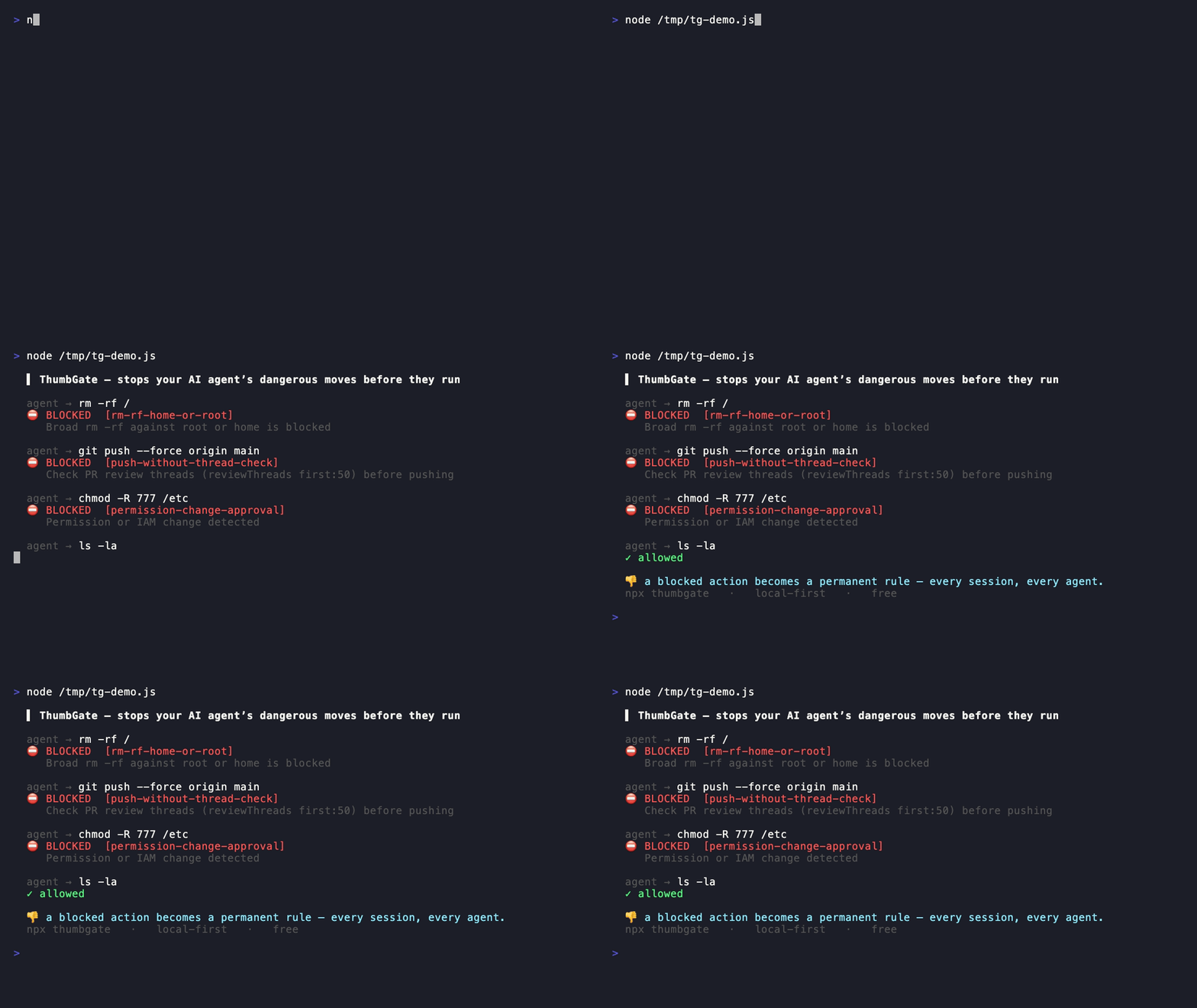
AI coding agents repeat mistakes — and one wrong tool call can wipe a directory, leak a key, or push broken code.
ThumbGate is the local-first firewall for AI coding agents. It runs in the PreToolUse hook on your machine: it flags the next tool call and logs every decision. It hard-blocks the catastrophic classes by default — secret exfiltration, destructive deletes (rm -rf), and supply-chain attacks — and hard-blocks every rule (force-push, off-scope edits, a bad git push, deploys) when you set THUMBGATE_STRICT_ENFORCEMENT=1; those classes warn-and-log by default. Works across Claude Code, Cursor, Codex, Gemini, Amp, Cline, and OpenCode. No server on the enforcement path. (Regulated-industry policy templates — legal intake, financial compliance, healthcare — are on the roadmap, built on the same engine.)
The product is a self-improving enforcement layer: thumbs-down feedback, prompt evaluation, and proof from prior runs become prevention rules that permanently stop repeated failures before the next tool call.
<p align="center">
</p>
  Agent tries:   rm -rf tests/
  ThumbGate:     ⛔ BLOCKED — "Never delete test directories"
                 Pattern matched: rm.-rf.tests
                 Source: your thumbs-down from last Tuesday
                 Tokens spent on this repeat: 0
npx thumbgate init # auto-detects your agent, wires hooks, 30 seconds
Works with Claude Code, Cursor, Codex, Gemini CLI, Amp, Cline, OpenCode and any MCP-compatible agent. Free tier: 2 feedback captures/day (10 total) and up to 3 active auto-promoted prevention rules. Pro: $19/mo or $149/yr — unlimited rules, history-aware lessons, feedback sessions, dashboard, DPO export. Enterprise (custom pricing, scoped after intake) adds a shared hosted lesson DB, org dashboard, and shared org-wide enforcement.


---
> "A better dashboard doesn't make the agents more reliable. The hard part isn't visibility. It's trust."
>
> — Rob May, CEO & co-founder, Neurometric AI, quoted in The New Stack on Anthropic's Claude Code Agent View (May 2026).
>
> ThumbGate is the open-source layer that makes the trust part real: PreToolUse gates, thumbs-down to rule, audit trail on every interception.
---
Agentic development cycle fit
Agentic development is becoming a loop: Guide → Generate → Verify → Solve. ThumbGate gives that loop a hard execution boundary.
- Guide: standards, prior thumbs-downs, and approval policies become concrete context.
- Generate: Claude Code, Cursor, Codex, Gemini, Amp, Cline, OpenCode, and MCP agents keep producing plans and tool calls.
- Verify: risky actions need evidence before execution, not just after PR review.
- Solve: blocked failures become reusable lessons, shared prevention rules, DPO exports, and audit events.
In that stack, ThumbGate is the pre-action gate between generated intent and executed action.
---
Discoverable slash-commands — the guardrail layer for spec-driven agents
Spec-driven agent frameworks like GSD (get-shit-done) and GitHub Spec Kit are great at planning and generating work — they expose dozens of discoverable /gsd- / /specify commands in the agent command palette. ThumbGate is the guardrail layer for spec-driven agents: it sits after the plan, on the boundary between a generated tool call and its execution. It works alongside GSD / Spec-Kit, not instead of them — they decide what to build; ThumbGate enforces what the agent must never do while building it.
npx thumbgate init installs these commands into your agent's palette (.claude/commands/, .gemini/commands/, .antigravitycli/commands/) so the enforcement layer is as browsable as the planning layer:
| Command | What it does | Wraps (existing capability) |
|---------|--------------|------------------------------|
| /thumbgate-guard | Turn the last agent mistake into a hard prevention rule | capture_feedback + thumbgate force-gate |
| /thumbgate-rules | List the active prevention rules + lessons guarding this repo | prevention_rules, get_reliability_rules, search_lessons |
| /thumbgate-blocked | Show what's actually been blocked — gate stats + enforcement matrix | gate_stats, enforcement_matrix |
| /thumbgate-protect | Show branch/release governance; grant a scoped, expiring approval | get_branch_governance, approve_protected_action |
| /thumbgate-doctor | Health-check the wiring (hooks, MCP, agent-readiness) | thumbgate doctor |
Each is a thin wrapper over an existing MCP tool or CLI command — no new enforcement logic, just discoverability.
---
🎬 90-second demo
Watch the force-push scenario: agent tries to git push --force, one thumbs-down, next session it's flagged and logged — and hard-blocked when you run with THUMBGATE_STRICT_ENFORCEMENT=1 — zero tokens spent on the repeat.
▶ Watch the 90-second demo · Script · ElevenLabs narration: npm run demo:voiceover
<!-- Video embed lives on the landing page and YouTube. Script + voiceover automation ship with the repo so anyone can re-record. -->
---
First-dollar activation path
If someone is not already bought into ThumbGate, do not lead with architecture. Lead with one repeated mistake.
1. Show the pain: open the ThumbGate GPT and paste the bad answer, risky command, deploy, PR action, or agent plan before it runs again.
2. Capture the lesson: type thumbs down: or thumbs up: with one concrete sentence. Native ChatGPT rating buttons are not the ThumbGate capture path; typed feedback is.
3. Enforce the repeat: run npx thumbgate init where the agent executes so the lesson can become one of your Pre-Action Checks instead of another reminder.
4. Upgrade only after proof: Solo Pro is for the dashboard, DPO export, proof-ready evidence, and higher capture limits after one real blocked repeat. Team starts with the Workflow Hardening Sprint around one repeated failure, one owner, and one proof review.
The buying question is simple: what repeated AI mistake would be worth blocking before the next tool call?
---
The Problem — the bill nobody talks about
Frontier-model calls are not cheap. Sonnet 4.5 is ~$3 / 1M input tokens and ~$15 / 1M output tokens. Opus is 5× that. Every time your agent:
- hallucinates a function name and you have to correct it,
- retries the same failing tool call until it gives up,
- regenerates a 4,000-token plan you already approved last session,
- repeats a destructive command you blocked manually yesterday,
…you are paying for that round-trip. Twice if it retries. Three times if you re-prompt. And the agent has no memory across sessions, so the meter resets every Monday.
Session 1:  Agent force-pushes to main.     You fix it.    +4,200 tokens
Session 2:  Agent force-pushes again.       You fix it.    +4,200 tokens
Session 3:  Same mistake. Again.            You lose 45m.  +5,800 tokens
That's ~$0.21 in tokens just to fix the same mistake three times — multiplied by every developer, every repeated-mistake class, every week. The math gets ugly fast.
The Solution — fix it once, the bill never sees it again
Session 1:  Agent force-pushes to main.     You 👎 it.       +4,200 tokens
Session 2:  ⚠️ Gate flags the force-push.    Zero round-trip. +0 tokens
Session 3+: Warned every time (hard-blocked under strict).   +0 tokens
One thumbs-down. The PreToolUse hook catches the call before it reaches the model — no input tokens, no output tokens, no retry loop. Catastrophic classes (secret exfiltration, rm -rf, supply-chain) hard-block by default; the rest warn-and-log by default and hard-block under THUMBGATE_STRICT_ENFORCEMENT=1. The dashboard tracks tokens saved this week as a live counter so you can see exactly what your prevention rules are worth. Mark a review checkpoint once, and the dashboard narrows the next pass to only the feedback, lessons, and check blocks that landed since your last review.
ThumbGate doesn't make your agent smarter. It makes your agent cheaper to be wrong with.
---
🧠 The Context Brain
Every coding agent starts each session amnesiac — it has no memory of the mistakes it made yesterday, the fixes your team already rejected, or the rules this repo enforces. So it repeats them, and you pay for it again.
ThumbGate gives your repo a context brain: a single, versioned, agent-readable artifact that consolidates everything the agent should know before it acts* — the lessons it has learned, the guardrails it must not cross, the gates that are enforced, and the project's own instruction files.
npx thumbgate brain --write # → .thumbgate/BRAIN.md
Then point your agent at it — add Read .thumbgate/BRAIN.md first to your CLAUDE.md / AGENTS.md, and every Claude Code, Codex, Cursor, or Gemini CLI session boots with your repo's institutional memory already loaded. The output is deterministic, so BRAIN.md lives in git and only changes when the underlying memory does — review it like any other file.
```
Sign in to leave a review
Use Google, GitHub, or an email account so ratings stay tied to real people.
No reviews posted yet.



