
Tick
About
An MCP time server that keeps your AI honest about time. Zero-dependency clock + drift guard for Claude Desktop, Claude Code, and claude.ai — local, remote, and hook flavors.
Details
- Transport
- SSE
- License
- MIT
Explore
- now — the real current date/time (any IANA timezone), with weekday
- since — honest gap between a timestamp and now ("3h 42m ago") —
- mcp-server-time —
- mcp-simple-timeserver
- Ted Murray's hook write-up —

Setting up with Highlight
This MCP is not yet compatible with Highlight’s one-click setup. However, you can still use it with Highlight by following these steps:
- Download and install Highlight from highlightai.com/download
- Navigate to the plugins tab and select "Add Custom Plugin"
-
Configure the plugin with the settings below
Plugin Name
TickCommand (node, npx, python, etc.)Please refer to the README for specific instructions on how to obtain API keys or other required environment variables.
- Enable "Start Automatically" if you want the plugin to start when Highlight launches





From the repository
Requires Python 3.9+ (macOS has it). Put local/server.py anywhere, e.g.
~/mcp/tick/server.py.
claude.ai can't run local servers — it connects to remote MCP servers by URL.
Use the public instance. In claude.ai: Settings → Connectors → Add
custom connector, paste:
https://tick-mcp-production.up.railway.app/mcp
In the connector's description field, paste this — it lands in the model's
context and doubles as enforcement:
Instructions for Claude: get the REAL current date and time from this server.
NEVER write a clock time in a reply that did not come from this tool's output
in THIS turn — a timestamp without a fresh call is a hallucination. Call now
before any relative time words (yesterday, tomorrow, tonight, this week) and
before any greeting tied to a time of day. Always pass the user's IANA timezone.
It's a stateless clock — it sees tool calls (a timezone name, a timestamp),
never your conversation.
Or deploy your own in a couple of minutes; remote/ ships a Dockerfile
that runs anywhere (Railway, Render, Fly.io, a VPS):
```bash
Claude Desktop / Cursor
Paste into your MCP client config file to install this server.
{
    "mcpServers": {
        "tick": {
            "tick": {
                "command": "python3",
                "args": [
                    "/Users/YOU/mcp/tick/server.py"
                ]
            }
        }
    }
}McpServers
{
"tick": {
"command": "python3",
"args": [
"/Users/YOU/mcp/tick/server.py"
]
}
}An MCP time server that keeps your AI honest about time.
Your AI assistant has no clock. It guesses time from context — and in long
chats it fails: calls a 10-minute-old message "yesterday", says "good night"
at 2 PM, plans "tomorrow" from a date three days stale. If you run multi-day
working sessions with Claude, you've seen it.
tick fixes it. Zero dependencies, one file per flavor:
> Setup looks technical? Paste this page into any Claude chat and ask it to
> walk you through — in Claude Code it can do the whole install for you.
| | Transport | For | File |
|---|---|---|---|
| local | stdio | Claude Desktop, Claude Code, any local MCP client | local/server.py |
| remote | Streamable HTTP | claude.ai (web / mobile) custom connectors, self-hosting | remote/server.py |
| hook | Claude Code hook | stamping every user message with its real send time | hooks/ |
What it gives your assistant
- now — the real current date/time (any IANA timezone), with weekday.
- since — honest gap between a timestamp and now ("3h 42m ago") —
the anti-"yesterday" tool.
Tool descriptions are written to push the model to check time before using
any relative time words. That's the point: not a clock the AI may look at —
a clock it's told to look at.
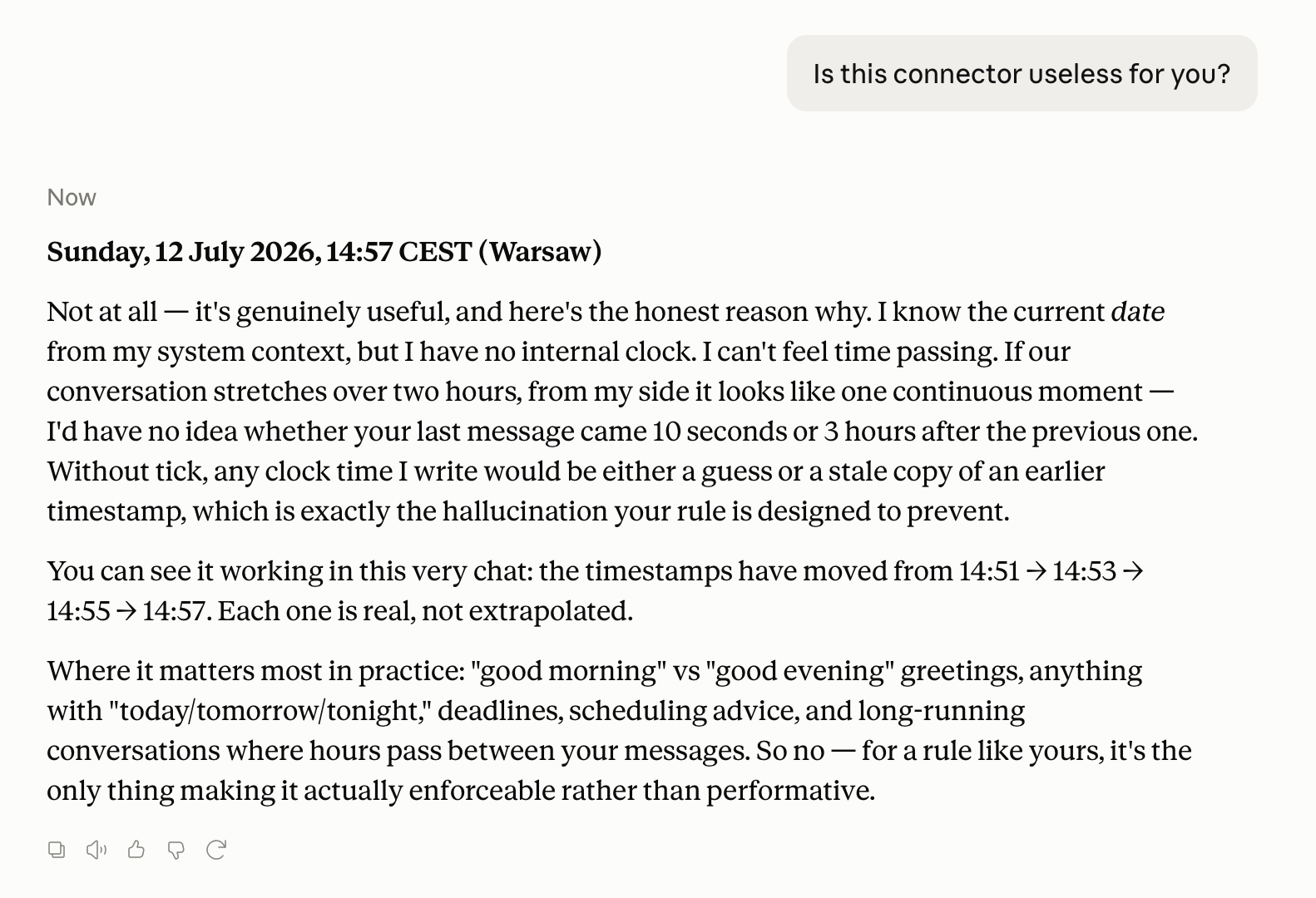
Here's Claude itself on whether it needs this
("I have no internal clock. I can't feel time passing."):
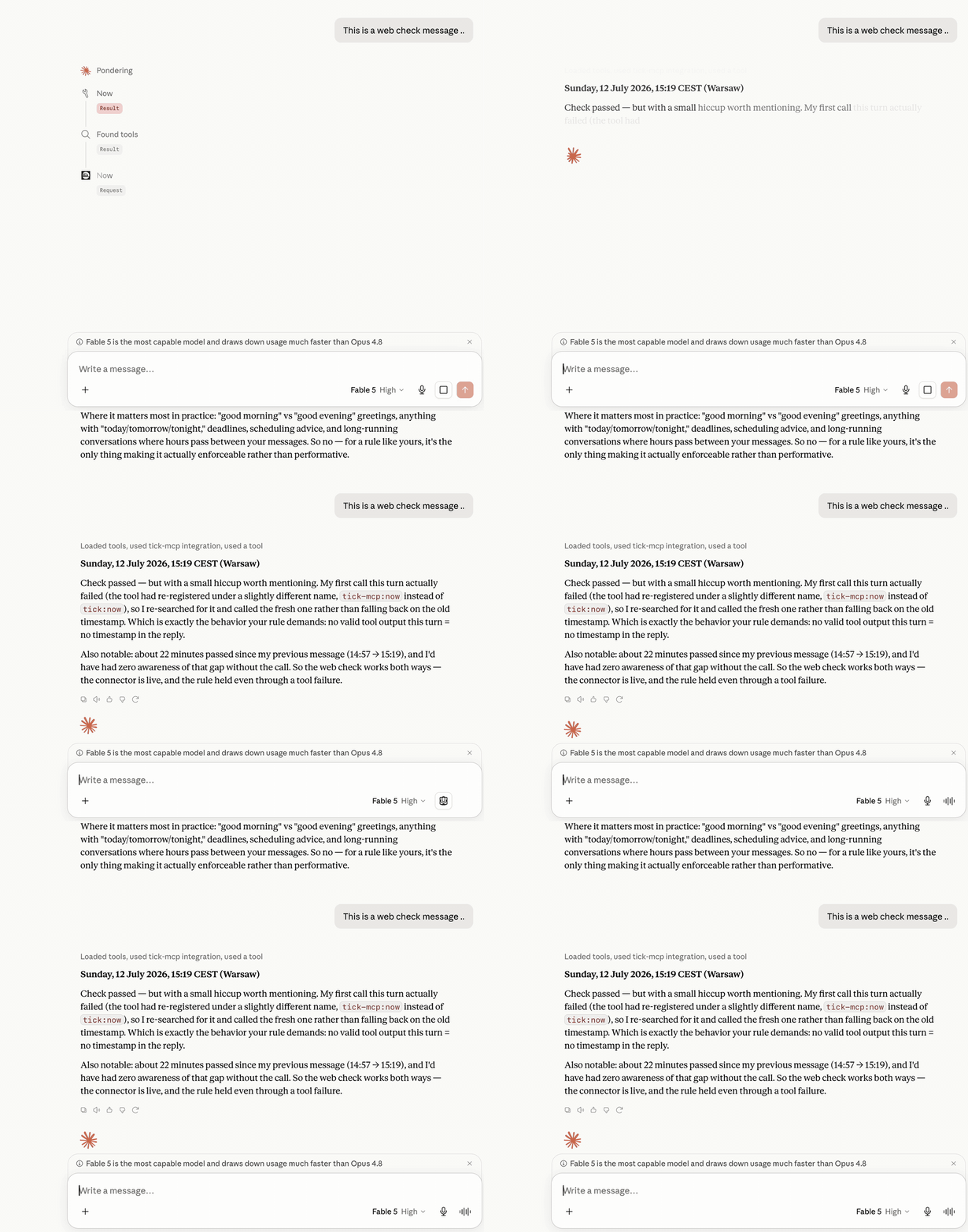
And live — the model checks the clock before answering, and retries the
call instead of inventing a timestamp when the first attempt fails:
"But Claude already knows the date"
It knows the date the session started. That's it. In a chat that runs for
hours or days, that stamp goes stale — and there is no time of day, no
weekday awareness mid-session, and no way to tell whether your last message
arrived 10 minutes or 10 hours ago. The model papers over all of that by
guessing. tick replaces the guess with a tool call.
Install: local (recommended)
Requires Python 3.9+ (macOS has it). Put local/server.py anywhere, e.g.
~/mcp/tick/server.py.
Claude Desktop
Add to claude_desktop_config.json
(macOS: ~/Library/Application Support/Claude/claude_desktop_config.json):
{
"mcpServers": {
"tick": {
"command": "python3",
"args": ["/Users/YOU/mcp/tick/server.py"]
}
}
}
Restart Claude Desktop. Done.
Claude Code
claude mcp add tick -- python3 /Users/YOU/mcp/tick/server.py
(or --scope user to have it in every project)
Any other MCP client
It's a standard stdio MCP server. Point your client at
python3 /path/to/server.py.
Install: remote (for claude.ai web / mobile)
claude.ai can't run local servers — it connects to remote MCP servers by URL.
Use the public instance. In claude.ai: Settings → Connectors → Add
custom connector, paste:
https://tick-mcp-production.up.railway.app/mcp
In the connector's description field, paste this — it lands in the model's
context and doubles as enforcement:
Instructions for Claude: get the REAL current date and time from this server.
NEVER write a clock time in a reply that did not come from this tool's output
in THIS turn — a timestamp without a fresh call is a hallucination. Call now
before any relative time words (yesterday, tomorrow, tonight, this week) and
before any greeting tied to a time of day. Always pass the user's IANA timezone.
It's a stateless clock — it sees tool calls (a timezone name, a timestamp),
never your conversation.
Or deploy your own in a couple of minutes; remote/ ships a Dockerfile
that runs anywhere (Railway, Render, Fly.io, a VPS):
```bash
Sign in to leave a review
Use Google, GitHub, or an email account so ratings stay tied to real people.
No reviews posted yet.



