
Upcloud MCP Server
About
# Upcloud MCP Server ## Work in progress!!! This is a work in progress and not yet ready for any type of use. Please check back later for updates. ## Overview The Upcloud MCP Server is a [Model Context Protocol (MCP)](https://modelcontextprotocol.io/introduction) server that provides seamless integration with Upcloud…
Details
- License
- MIT
Explore
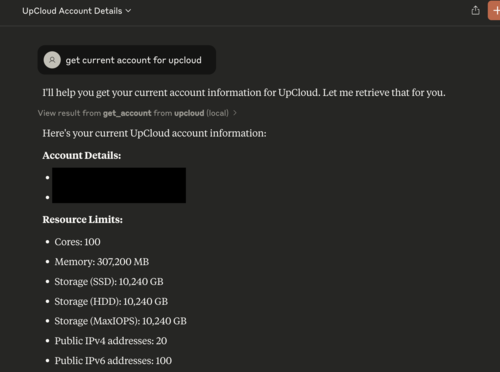
- Account management (get account, details, list)
- Managed database retrieval by UUID
- Server listing and detail retrieval by UUID
- Kubernetes cluster and plan operations
- Ready to integrate with MCP-compatible clients

Setting up with Highlight
This MCP is not yet compatible with Highlight’s one-click setup. However, you can still use it with Highlight by following these steps:
- Download and install Highlight from highlightai.com/download
- Navigate to the plugins tab and select "Add Custom Plugin"
-
Configure the plugin with the settings below
Plugin Name
Upcloud MCP ServerCommand (node, npx, python, etc.)Please refer to the README for specific instructions on how to obtain API keys or other required environment variables.
- Enable "Start Automatically" if you want the plugin to start when Highlight launches





From the repository
1. To run the server in a container, you will need to have Docker installed.
2. Once Docker is installed, you will also need to ensure Docker is running.
3. Lastly you will need to populate UPCLOUD_USERNAME and UPCLOUD_PASSWORD variables.
go build cmd/upcloud-mcp-server
and move the binary to your bin location and move the claude_desktop_config.json to Claude configuration directory. Don't forget to populate ENV variables!
On Mac: ~/Library/Application\ Support/Claude/claude_desktop_config.json
On Windows: AppData\Claude\claude_desktop_config.json
{
"mcpServers": {
"github": {
"command": "docker",
"args": [
"run",
"-i",
"--rm",
"-e",
"UPCLOUD_USERNAME",
"-e",
"UPCLOUD_PASSWORD",
"ghcr.io/marinx/upcloud-mcp-server"
],
"env": {
"UPCLOUD_USERNAME": "<YOUR_USERNAME>",
"UPCLOUD_PASSWORD": "<YOUR_PASSWORD>"
}
}
}
}
Claude Desktop / Cursor
Paste into your MCP client config file to install this server.
{
    "mcpServers": {
        "upcloud mcp server": {
            "upcloud-mcp-server": {
                "command": "docker",
                "args": [
                    "run",
                    "-i",
                    "--rm",
                    "-e",
                    "UPCLOUD_USERNAME",
                    "-e",
                    "UPCLOUD_PASSWORD",
                    "ghcr.io/marinx/upcloud-mcp-server"
                ],
                "env": {
                    "UPCLOUD_USERNAME": "",
                    "UPCLOUD_PASSWORD": ""
                }
            }
        }
    }
}McpServers
{
"upcloud-mcp-server": {
"command": "docker",
"args": [
"run",
"-i",
"--rm",
"-e",
"UPCLOUD_USERNAME",
"-e",
"UPCLOUD_PASSWORD",
"ghcr.io/marinx/upcloud-mcp-server"
],
"env": {
"UPCLOUD_USERNAME": "",
"UPCLOUD_PASSWORD": ""
}
}
}Work in progress!!!
This is a work in progress and not yet ready for any type of use. Please check back later for updates.
Overview
The Upcloud MCP Server is a Model Context Protocol (MCP)
server that provides seamless integration with Upcloud APIs, enabling advanced
automation and interaction capabilities for developers and tools.
The idea comes from Github MCP server
Use Cases
- Extracting and analyzing data from Upcloud services.
- Building AI powered tools and applications that interact with Upcloud's ecosystem.
Prerequisites
1. To run the server in a container, you will need to have Docker installed.
2. Once Docker is installed, you will also need to ensure Docker is running.
3. Lastly you will need to populate UPCLOUD_USERNAME and UPCLOUD_PASSWORD variables.
Installation
Local usage
go build cmd/upcloud-mcp-server
and move the binary to your bin location and move the claude_desktop_config.json to Claude configuration directory. Don't forget to populate ENV variables!
On Mac: ~/Library/Application\ Support/Claude/claude_desktop_config.json
On Windows: AppData\Claude\claude_desktop_config.json
Usage with Claude Desktop
{
  "mcpServers": {
    "github": {
      "command": "docker",
      "args": [
        "run",
        "-i",
        "--rm",
        "-e",
        "UPCLOUD_USERNAME",
        "-e",
        "UPCLOUD_PASSWORD",
        "ghcr.io/marinx/upcloud-mcp-server"
      ],
      "env": {
        "UPCLOUD_USERNAME": "<YOUR_USERNAME>",
        "UPCLOUD_PASSWORD": "<YOUR_PASSWORD>"
      }
    }
  }
}
Tools
Account
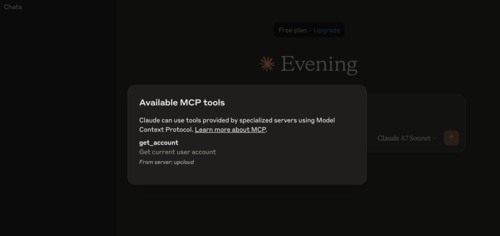
- get_account - Get account of current user
- get_account_details - Get account details by username
- username: Account username (string, required)
- get_account_list - Get account list
Database
- get_database - Get managed database by uuid
- uuid: Database UUID (string, required)
Server
- get_servers - Get servers
- get_server_details - Get server details
- uuid: Server UUID (string, required)
Kubernetes
- get_kubernetes_clusters - Get kubernetes clusters
- get_kubernetes_cluster - Get kubernetes cluster
- uuid: Cluster UUID (string, required)
- get_kubernetes_plans - Get kubernetes plans
License
This project is licensed under the terms of the MIT open source license. Please refer to MIT for the full terms.
Sign in to leave a review
Use Google, GitHub, or an email account so ratings stay tied to real people.
No reviews posted yet.



