
Pandoc
About
MCP server for seamless document format conversion using Pandoc, supporting Markdown, HTML, and plain text, with other formats like PDF, csv and docx in development.
Details
- License
- MIT
Explore
- Single tool convert-contents for all conversions
- Supports 10 formats: markdown, HTML, TXT, DOCX, PDF, RST, LaTeX, EPUB, IPYNB, ODT
- Bidirectional conversion between all supported formats (PDF output only)
- Advanced features: defaults files (YAML) and Pandoc filters
- DOCX output supports custom styling via reference documents
- Basic conversions display in chat; advanced formats require output file path

Setting up with Highlight
This MCP is not yet compatible with Highlight’s one-click setup. However, you can still use it with Highlight by following these steps:
- Download and install Highlight from highlightai.com/download
- Navigate to the plugins tab and select "Add Custom Plugin"
-
Configure the plugin with the settings below
Plugin Name
PandocCommand (node, npx, python, etc.)Please refer to the README for specific instructions on how to obtain API keys or other required environment variables.
- Enable "Start Automatically" if you want the plugin to start when Highlight launches





From the repository
<!-- Uncomment after smithery fix
New to mcp-pandoc? Check out 📖 CHEATSHEET.md for
- ⚡ Copy-paste examples for all formats
- 🔄 Bidirectional conversion matrix
- 🎯 Common workflows and pro tips
- 🌟 Reference document styling guide
_Perfect for quick lookups and getting started fast!_
Use defaults files to create reusable conversion templates with consistent formatting:
NOTE: Ensure to complete installing required packages mentioned below under "Critical Requirements".
To use the published one
{
"mcpServers": {
"mcp-pandoc": {
"command": "uvx",
"args": ["mcp-pandoc"]
}
}
}
💡 Quick Start: See CHEATSHEET.md for copy-paste examples and common workflows.
- Verify: pandoc --version
2. UV package installation
- Required: Install uv package (includes uvx command)
- Installation:
-->
- On MacOS: open ~/Library/Application\ Support/Claude/claude_desktop_config.json
- On Windows: %APPDATA%/Claude/claude_desktop_config.json
a) Only for local development & contribution to this repo
<details>
<summary>Development/Unpublished Servers Configuration</summary>
ℹ️ Replace <DIRECTORY> with your locally cloned project path
"mcpServers": {
"mcp-pandoc": {
"command": "uv",
"args": [
"--directory",
"<DIRECTORY>/mcp-pandoc",
"run",
"mcp-pandoc"
]
}
}
</details>
b) Published Servers Configuration - Consumers should use this config
"mcpServers": {
"mcp-pandoc": {
"command": "uvx",
"args": [
"mcp-pandoc"
]
}
}
<!-- Uncomment after smithery cli fix
Run the following bash command to install published mcp-pandoc pypi for Claude Desktop automatically via Smithery:
npx -y @smithery/cli install mcp-pandoc --client claude
```
-->
- If you face any issue, use the "Published Servers Configuration" above directly instead of this cli.
Note: To use locally configured mcp-pandoc, follow "Development/Unpublished Servers Configuration" step above.
contents
(string): Source content to convert (required if input_file not provided)
input_file
(string): Complete path to input file (required if contents not provided)
input_format
(string): Source format of the content (defaults to markdown)
output_format
(string): Target format (defaults to markdown)
output_file
(string): Complete path for output file (required for pdf, docx, rst, latex, epub formats)
reference_doc
(string): Path to a reference document to use for styling (supported for docx output format)
defaults_file
(string): Path to a Pandoc defaults file (YAML) containing conversion options
filters
(array): List of Pandoc filter paths to apply during conversion
1. convert-contents
- Transforms content between supported formats
- Inputs:
- contents (string): Source content to convert (required if input_file not provided)
- input_file (string): Complete path to input file (required if contents not provided)
- input_format (string): Source format of the content (defaults to markdown)
- output_format (string): Target format (defaults to markdown)
- output_file (string): Complete path for output file (required for pdf, docx, rst, latex, epub formats)
- reference_doc (string): Path to a reference document to use for styling (supported for docx output format)
- defaults_file (string): Path to a Pandoc defaults file (YAML) containing conversion options
- filters (array): List of Pandoc filter paths to apply during conversion
- Supported input/output formats:
- markdown
- html
- pdf
- docx
- rst
- latex
- epub
- txt
- ipynb
- odt
- Note: For advanced formats (pdf, docx, rst, latex, epub), an output_file path is required
Claude Desktop / Cursor
Paste into your MCP client config file to install this server.
{
    "mcpServers": {
        "pandoc": {
            "mcp-pandoc": {
                "command": "npx",
                "args": [
                    "-y",
                    "@smithery/cli",
                    "install",
                    "mcp-pandoc",
                    "--client",
                    "claude"
                ]
            }
        }
    }
}McpServers
{
    "mcp-pandoc": {
        "command": "npx",
        "args": [
            "-y",
            "@smithery/cli",
            "install",
            "mcp-pandoc",
            "--client",
            "claude"
        ]
    }
}
mcp-pandoc: A Document Conversion MCP Server
> Officially included in the Model Context Protocol servers open-source project. 🎉
Overview
A Model Context Protocol server for document format conversion using pandoc. This server provides tools to transform content between different document formats while preserving formatting and structure.
Please note that mcp-pandoc is currently in early development. PDF support is under development, and the functionality and available tools are subject to change and expansion as we continue to improve the server.
Credit: This project uses the Pandoc Python package for document conversion, forming the foundation for this project.
📋 Quick Reference
New to mcp-pandoc? Check out 📖 CHEATSHEET.md for
- ⚡ Copy-paste examples for all formats
- 🔄 Bidirectional conversion matrix
- 🎯 Common workflows and pro tips
- 🌟 Reference document styling guide
_Perfect for quick lookups and getting started fast!_
Demo
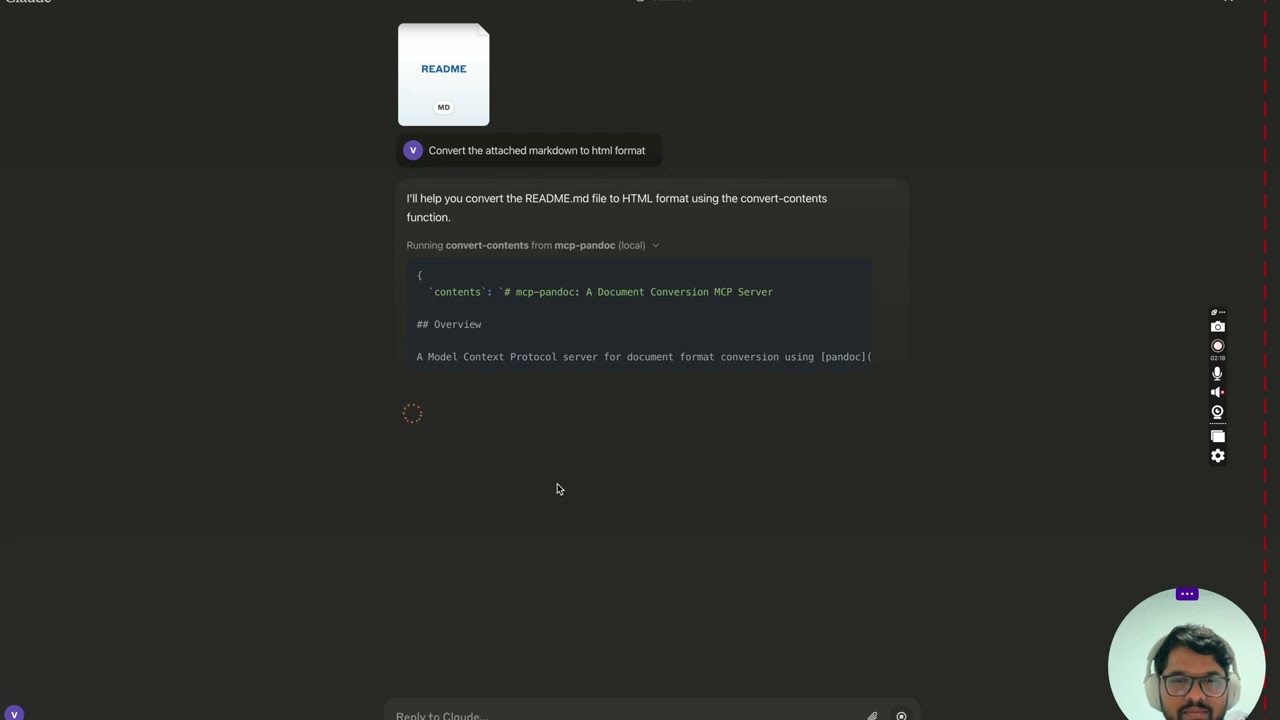
> 🎥 Watch on YouTube
<details>
<summary>Screenshots</summary>
</details>
More to come...
Tools
1. convert-contents
- Transforms content between supported formats
- Inputs:
- contents (string): Source content to convert (required if input_file not provided)
- input_file (string): Complete path to input file (required if contents not provided)
- input_format (string): Source format of the content (defaults to markdown)
- output_format (string): Target format (defaults to markdown)
- output_file (string): Complete path for output file (required for pdf, docx, rst, latex, epub formats)
- reference_doc (string): Path to a reference document to use for styling (supported for docx output format)
- defaults_file (string): Path to a Pandoc defaults file (YAML) containing conversion options
- filters (array): List of Pandoc filter paths to apply during conversion
- Supported input/output formats:
- markdown
- html
- pdf
- docx
- rst
- latex
- epub
- txt
- ipynb
- odt
- Note: For advanced formats (pdf, docx, rst, latex, epub), an output_file path is required
🔧 Advanced Features
Defaults Files (YAML Configuration)
Use defaults files to create reusable conversion templates with consistent formatting:
```yaml
Sign in to leave a review
Use Google, GitHub, or an email account so ratings stay tied to real people.
No reviews posted yet.





