
Wellness Nourish
About
<!-- delx-wellness header v2 --> <h1 align="center">Wellness Nourish</h1> <div align="center"> <img src="assets/banner.png" alt="Wellness Nourish — Nourish MCP for AI agents" width="85%" /> </div> <h3 align="center"> Local-first nutrition MCP — food search, barcode lookup, intake logging, hydration. Works…
Explore
- Food search via USDA FoodData Central
- Packaged‑food barcode lookup via Open Food Facts
- Local barcode image decoding with ZXing
- Photo‑assisted meal estimation (agent describes visible items)
- Local estimator with a pt‑BR/Brazilian‑food catalog
- Intake logging with preview mode (log --preview)
- Hydration and goal tracking
- Daily and weekly summaries, exports, meal memory
- Coach‑style nutrition workflows (“what should I eat now?”)

Setting up with Highlight
This MCP is not yet compatible with Highlight’s one-click setup. However, you can still use it with Highlight by following these steps:
- Download and install Highlight from highlightai.com/download
- Navigate to the plugins tab and select "Add Custom Plugin"
-
Configure the plugin with the settings below
Plugin Name
Wellness NourishCommand (node, npx, python, etc.)Please refer to the README for specific instructions on how to obtain API keys or other required environment variables.
- Enable "Start Automatically" if you want the plugin to start when Highlight launches





From the repository
npm install
npm run build
Run the MCP server over stdio:
npm start
Run Streamable HTTP locally:
node dist/index.js --http
Ready-to-use examples live in examples/:
- examples/claude-desktop.json
- examples/codex.json
- examples/cursor.json
- examples/windsurf.json
- examples/hermes.md
- examples/hermes-skill.md
- examples/openclaw.md
Claude Desktop style:
{
"mcpServers": {
"nourish": {
"command": "npx",
"args": ["-y", "wellness-nourish"],
"env": {
"FDC_API_KEY": "${FDC_API_KEY}",
"NOURISH_OFF_ENABLED": "1"
}
}
}
}
For a personal Hermes server connected to your Telegram bot, let the package write the Hermes config and skill:
npx -y wellness-nourish setup --client hermes --profile david --local-dir /root/.hermes/nourish/david
npx -y wellness-nourish doctor --client hermes --json
hermes mcp test nourish
This adds a nourish MCP server block to ~/.hermes/config.yaml, installs ~/.hermes/skills/nourish-mcp/SKILL.md, and pins the npm package version. After config changes, use /reload-mcp or hermes mcp test nourish.
Hermes setup also writes ~/.hermes/scripts/nourish-mcp-wrapper.sh. The wrapper sources ~/.hermes/secrets/nourish.env when present, so FDC_API_KEY can be managed as a server-side secret without pasting it into chat or relying on a stale shell session.
Recommended Telegram flow:
1. User says what they ate.
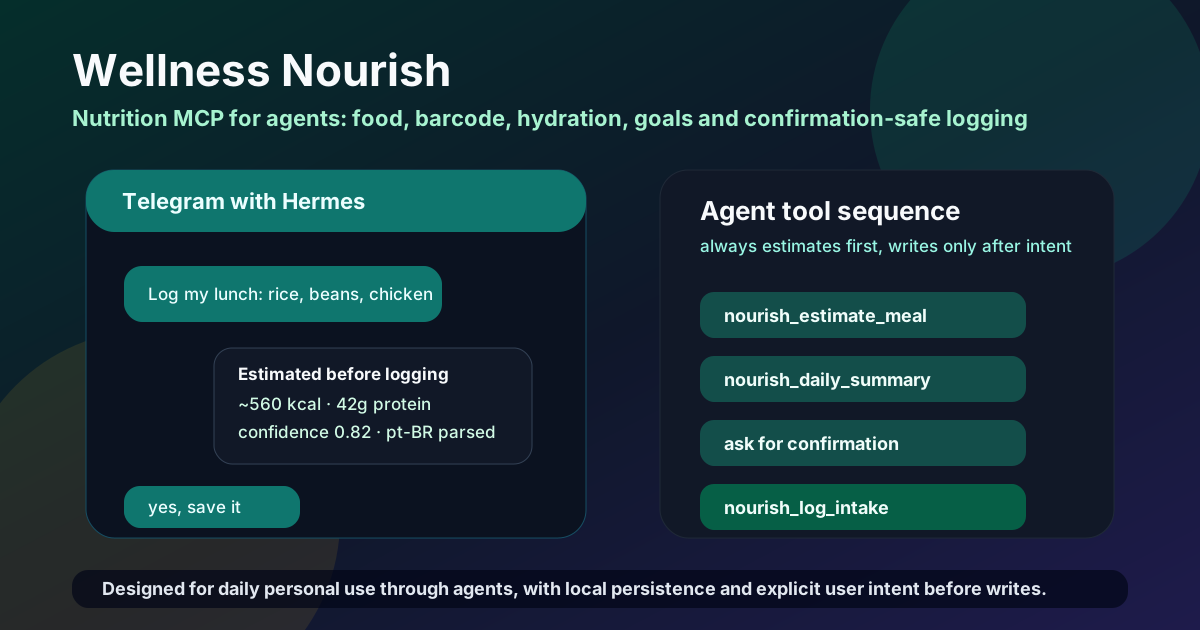
2. Hermes calls nourish_estimate_meal and replies with calories, protein, confidence and warnings.
3. For barcode photos, Hermes calls nourish_lookup_barcode_image when it has an image path, base64 image, or data URI.
4. For mixed food photos, Hermes calls nourish_analyze_food_image with barcode observations, label OCR, detected items, or image description.
5. For meal photos, Hermes describes visible food and portions, calls nourish_estimate_meal_photo, and asks for portion confirmation.
6. For "what should I eat now?" questions, Hermes calls nourish_daily_coach or nourish_suggest_next_meal, optionally passing wearable context from WHOOP/Garmin/Oura.
7. For repeated meals, Hermes can call nourish_remember_meal after explicit user intent so future phrases like "meu café normal" expand locally.
8. User confirms saving.
9. Hermes calls nourish_log_intake with explicit_user_intent: true.
10. User can ask for today, weekly summaries, goals, hydration, edits, deletes or exports.
Local build:
{
"mcpServers": {
"nourish": {
"command": "node",
"args": ["/absolute/path/to/wellness-nourish/dist/index.js"],
"env": {
"NOURISH_LOCAL_DIR": "/absolute/path/to/.wellness-nourish"
}
}
}
}
nourish_agent_manifest
Return agent-facing install, safety, resource, and first-call guidance.
nourish_capabilities
Describe supported nutrition workflows, providers, and recommended first tools.
nourish_connection_status
Report local storage, fixture, USDA, and Open Food Facts readiness without returning secrets.
nourish_quickstart
Personalized 3-step setup walkthrough for the human user. Adapts to current state (USDA key set? OFF enabled? local-dir writable?). Call this first when the user asks 'how do I use this?'
nourish_demo
Returns synthetic example payloads of nourish_search_food, nourish_estimate_meal, and nourish_daily_summary so agents see the contract before any real call. Shapes are verified against the real pipelines by scripts/demo-contract-test.mjs, so they are safe to write a parser against; `inputs` shows the call that produced each sample.
nourish_privacy_audit
Describe local storage, secret handling, source licensing, and safety boundaries.
nourish_profile_get
Returns the shared Delx Wellness profile (~/.delx-wellness/profile.json). Read-only. Surfaces calorie/macro targets, dietary preferences, restrictions/allergies, and goals so nourish coach/suggest tools can personalize meals.
nourish_profile_update
Persist a partial patch to the shared Delx Wellness profile. Requires explicit_user_intent: true. Rejects any field containing oauth/token/secret/password/cookie/refresh/api_key/session — the profile is for non-secret wellness context only.
nourish_onboarding
Returns the 11-question onboarding flow for the shared Delx Wellness profile. Read-only. The agent should ask these questions next so wellness-nourish (and the rest of the wellness stack) can personalize responses — non-secret data only, stored at ~/.delx-wellness/profile.json.
nourish_search_food
Search food providers by query. Use taco or br_local for Brazilian staples, open_food_facts for packaged products, usda for generic foods, or all.
nourish_lookup_barcode
Lookup a packaged food barcode in Open Food Facts.
nourish_decode_barcode_image
Decode a barcode from an image path, base64 image, or data URI without logging intake.
nourish_lookup_barcode_image
Decode a packaged-food barcode image, then lookup the product in Open Food Facts.
nourish_get_food
Fetch a USDA food by source_id, an Open Food Facts food by barcode source_id, or a TACO food by source_id.
nourish_estimate_meal
Estimate nutrition for a short meal text using local deterministic defaults. Accepts text or meal_text; preserve unresolved and confidence.
nourish_estimate_meal_photo
Estimate meal nutrition from an agent-provided photo observation; always requires user confirmation before logging.
nourish_analyze_food_image
Route agent-provided food image observations across barcode, nutrition label OCR, or meal-photo estimation without logging.
nourish_log_intake
Log an intake entry only after explicit user intent. Pass explicit_user_intent: true after the user asks to save/log/register; accepts text or meal_text plus structured food data.
nourish_daily_coach
Summarize today, goal gaps, wearable context, and a safe next action for Telegram-style coaching.
nourish_suggest_next_meal
Suggest a next meal from today's intake, goals, personal memory, and optional wearable context.
nourish_after_log_review
Review the day after a meal log and explain what changed plus the next correction or action.
nourish_pre_workout_nutrition
Suggest light pre-workout nutrition using goals, current intake, and optional WHOOP/Garmin context.
nourish_evening_checkin
Check late-day protein, calories, and hydration gaps with a compact Telegram-friendly next step.
nourish_pull_wearable_context
Read the most recent shared wellness_context (delx-wellness-context/v1) written by a wearable connector to ~/.delx-wellness/, so coach tools can be recovery/strain-aware without the agent passing it inline. Read-only; never fabricates wearable data. If no connector has persisted a context yet, returns available:false with the expected path. The returned context can be passed straight into nourish_daily_coach / nourish_suggest_next_meal / nourish_pre_workout_nutrition as wearable_context (or set auto_wearable:true on those tools to pull it automatically).
nourish_remember_meal
Save a personal meal shortcut locally after explicit user intent, for example 'meu cafe normal' -> '2 ovos e banana'.
nourish_list_memory
Read local remembered meals and nutrition preferences for personal Telegram shortcuts.
nourish_forget_memory
Delete a local remembered meal by id or label after explicit user intent.
nourish_update_intake
Update a local intake entry by id. Quantity or grams_estimate changes rescale nutrients to keep summaries consistent. Gated: requires explicit user intent — agents must not call this autonomously.
nourish_list_intake
List local intake entries with optional filters: date OR since/until range, meal_type, tag, source_trace, min_confidence, limit. All filters AND together. Returns most-recent-first.
nourish_delete_intake
Delete a local intake entry by id. Gated: requires explicit user intent — agents must not call this autonomously.
nourish_clear_day
Delete all local intake entries for a date after explicit user intent.
nourish_delete_water
Delete a single local hydration entry by id after explicit user intent.
nourish_clear_hydration_day
Delete all local hydration entries for a date after explicit user intent. Does not touch intake — pair with nourish_clear_day or use nourish_clear_day { include_hydration: true } for both.
nourish_carbon_summary
Estimate the carbon footprint (kg CO2-equivalent) of a meal, plus optional lower-carbon swap suggestions. Pass `items: [{name, grams}, ...]` for an arbitrary meal, OR `date: YYYY-MM-DD` to compute carbon over that day's logged intake. Data: Agribalyse 3.1 (Etalab Open License) + Our World in Data / Poore & Nemecek 2018 (CC-BY 4.0). Read-only; never mutates state.
nourish_undo_last
Undo the most recently logged intake or hydration entry. The most common Telegram/agent recovery move ('I logged the wrong thing'). Returns what was undone so the agent can confirm. Requires explicit_user_intent. Pass kind: 'intake' | 'hydration' | 'any' (default 'any') to scope the undo.
nourish_log_water
Log local hydration in milliliters after explicit user intent. Pass explicit_user_intent: true after the user asks to save/log water.
nourish_hydration_summary
Summarize local hydration for a date.
nourish_get_goals
Read local calorie, macro, and hydration goals.
nourish_set_goals
Set local calorie, macro, and hydration goals after explicit user intent. Use daily: {...} or flat shortcuts like calories_kcal/protein_g; pass explicit_user_intent: true after confirmation.
nourish_goal_progress
Compute per-day progress vs configured goals (kcal, protein, carbs, fat, water) for today / yesterday / last_7_days / last_30_days. Returns per-day breakdown (consumed, goal, pct, delta_to_goal), period totals, multi-day averages, days_on_target count, and locale-aware next-action recommendations (pt-BR if profile language is Portuguese, otherwise en). Read-only: no logging side effects, no explicit_user_intent required.
nourish_daily_summary
Summarize local intake totals, confidence, and source coverage for a date. Pass `compare_to: 'yesterday'` or `compare_to: '7d_avg'` to add a `comparison` block with per-nutrient deltas — useful for trend coaching ('your protein is low again — third day in a row').
nourish_compare_days
Compute a per-nutrient diff between two days' summaries. Returns deltas (date_b - date_a) for calories, protein, carbs, fat, fiber, sugar, sodium plus what changed by meal type. Useful for 'how was today vs yesterday?' coaching.
nourish_bulk_log_intake
Log multiple intake entries in a single call. Requires explicit user intent (explicit_user_intent: true). Each item is processed through the same text-estimator pipeline as `nourish_log_intake`, but the entire batch shares one intent flag — perfect for Telegram users who say 'log everything I ate today: breakfast was X, lunch was Y, dinner was Z'. Returns per-item success/failure so a partial failure doesn't lose the rest.
nourish_weekly_summary
Summarize seven days of local intake totals from a start date.
nourish_export_data
Export local intake data as JSONL or CSV without provider secrets or tokens. Defaults to the 500 most-recent rows; pass since/until to scope by date or max_rows to widen/narrow. Omitted rows are reported so you can refine instead of dumping months of history into chat (use the `wellness-nourish export` CLI for a full unbounded dump).
nourish_chatgpt_dashboard
Open an interactive ChatGPT/MCP Apps dashboard for today's nutrition summary, safe meal estimation, and next-meal coaching. Read-only; logging still requires explicit user confirmation through existing tools.
Claude Desktop / Cursor
Paste into your MCP client config file to install this server.
{
    "mcpServers": {
        "wellness nourish": {
            "nourish": {
                "command": "npx",
                "args": [
                    "-y",
                    "wellness-nourish"
                ]
            }
        }
    }
}McpServers
{
"nourish": {
"command": "npx",
"args": [
"-y",
"wellness-nourish"
]
}
}<!-- delx-wellness header v2 -->
<h1 align="center">Wellness Nourish</h1>
<div align="center">
</div>
<h3 align="center">
Local-first nutrition MCP — food search, barcode lookup, intake logging, hydration. Works without OAuth.<br>
Local-first MCP server — <strong>tokens never leave your machine</strong>.
</h3>
<p align="center">
<a href="https://www.npmjs.com/package/wellness-nourish">
<a href="https://www.npmjs.com/package/wellness-nourish">
<a href="LICENSE">
<a href="https://wellness.delx.ai/nutrition">
</p>
<p align="center">
<a href="https://github.com/davidmosiah/wellness-nourish/stargazers">
<a href="https://modelcontextprotocol.io">
<a href="https://github.com/davidmosiah/delx-wellness-hermes">
<a href="https://github.com/davidmosiah/delx-wellness-openclaw">
<a href="https://github.com/davidmosiah/delx-wellness">
</p>
<p align="center">
<strong>📈 Published on npm and used by AI agents and MCP clients</strong> — see the live <a href="https://www.npmjs.com/package/wellness-nourish">download badge</a> above for current numbers.<br>
<sub>If Nourish helps your agent, a ⭐ on this repo makes it easier for other AI builders to find.</sub>
</p>
> ⚡ One-command install — pick your runtime:
> - Delx Wellness for Hermes: npx -y delx-wellness-hermes setup
> - Delx Wellness for OpenClaw: npx -y delx-wellness-openclaw setup
>
> Both preconfigure this connector and the full Delx Wellness stack into a dedicated profile. Or wire it standalone into Claude Desktop / Cursor / ChatGPT Desktop — see the install section below.
>
> Want runnable agent examples? Use the Delx Agent Workbench for prompt packs, MCP client configs and local-first workflow templates.
---
<!-- /delx-wellness header v2 -->
Overview
Wellness Nourish is a local MCP server for nutrition search, barcode lookup, barcode photo lookup, photo-assisted meal estimation, intake logging, hydration, goals, exports, daily or weekly summaries, personal meal memory, and coach-style nutrition workflows. It runs over stdio by default for MCP clients and can also run a Streamable HTTP endpoint at POST /mcp.
> If this nutrition layer helps your agent workflow, please star the repo. Stars make the project easier for other AI builders to discover and help Delx keep shipping local-first wellness infrastructure.
<p align="center">
</p>
Field guide: Why local-first wellness agents need MCP.
Try It In 60 Seconds
npx -y wellness-nourish doctor
npx -y wellness-nourish search banana
npx -y wellness-nourish barcode 0000000000000
npx -y wellness-nourish log --preview "2 ovos, banana e café preto"
Demo (offline, no API key)
NOURISH_FIXTURE_MODE=1 serves the bundled fixtures/ instead of calling
USDA or Open Food Facts, so you can see the exact shape of every response with
zero network access or keys. The outputs below are captured verbatim from this
mode:
$ NOURISH_FIXTURE_MODE=1 wellness-nourish search banana
Bananas, raw usda 89 kcal/100g
BANANA usda 312 kcal/100g
$ NOURISH_FIXTURE_MODE=1 NOURISH_OFF_ENABLED=1 wellness-nourish barcode 737628064502
{
"name": "Peanut Butter",
"barcode": "737628064502",
"brand": "Fixture Foods",
"serving": { "quantity": 1, "unit": "serving", "grams": 32 },
"nutrients_per_serving": {
"calories_kcal": 188.16,
"protein_g": 8,
"carbohydrates_g": 6.4,
"fat_g": 16,
"fiber_g": 1.92,
"sugar_g": 2.88,
"saturated_fat_g": 3.2,
"sodium_mg": 128
},
"license": { "name": "Open Food Facts ODbL" },
"data_quality": { "completeness": "high", "confidence": 0.75, "warnings": [] }
// ...full record also includes nutrients_per_100g, available_portions, carbon
}
log --preview estimates a meal locally without writing anything:
$ wellness-nourish log --preview "2 eggs and a banana"
{
"would_write": false,
"total_nutrients": {
"calories_kcal": 248.02,
"protein_g": 13.89,
"carbohydrates_g": 27.65,
"fat_g": 9.89,
"fiber_g": 3.07,
"sugar_g": 14.43
},
"confidence": 0.7,
"warnings": ["Nutrition values are estimates from simple food defaults."]
// ...full record also includes per-item breakdown and entry_preview
}
For the full Telegram/Hermes flow:
npx -y delx-wellness-hermes setup
hermes -p delx-wellness
The connector uses USDA FoodData Central as the primary food search provider. Open Food Facts is used for packaged-food barcode lookup and product-name search when enabled. Local barcode image decoding is supported with ZXing. Meal photos are estimated only from an agent-provided visual observation and always require confirmation before logging. The local estimator includes a pt-BR/Brazilian-food catalog for common meals, kitchen units, and shortcuts such as arroz, feijão, frango, ovos, banana, tapioca, picanha, feijoada and salada. It does not provide hosted sync, autonomous photo upload, recipe generation, or medical advice.
Install
npm install
npm run build
Run the MCP server over stdio:
npm start
Run Streamable HTTP locally:
node dist/index.js --http
ChatGPT App / MCP Apps UI
Nourish also exposes a compact MCP Apps-compatible dashboard for ChatGPT and other compatible hosts:
- Tool: nourish_chatgpt_dashboard
- UI resource: ui://widget/nourish-dashboard-v1.html
- MIME type: text/html;profile=mcp-app
The dashboard shows the daily nutrition summary, hydration progress, profile gaps and next-meal coaching, and it can call nourish_estimate_meal from the embedded UI for preview-only estimates. It does not write intake, water or goals; mutating tools still require explicit user confirmation through the normal MCP tools.
Optional environment:
FDC_API_KEY=your_usda_key
NOURISH_OFF_ENABLED=1
NOURISH_LOCAL_DIR=~/.wellness-nourish
NOURISH_MCP_PORT=3000
Agents should never ask users to paste API keys, tokens, raw health exports, or private food logs into chat. Configure secrets through environment variables or local files.
CLI Commands
…
Sign in to leave a review
Use Google, GitHub, or an email account so ratings stay tied to real people.
No reviews posted yet.



