
Workflows MCP Server
About
A server that provides an integration through both direct REST endpoints and Model Context Protocol (MCP) integration to a workflow engine.
Explore
- This server exposes workflows as tools that can be consumed by agents. In this case a weather workflow is exposed as a set of tools:
- Exposes a get-weather tool that fetches weather data for any city
- Provides a check-weather prompt template for easy integration with LLMs
- Uses HTTP/SSE transport for communication with clients

Setting up with Highlight
This MCP is not yet compatible with Highlight’s one-click setup. However, you can still use it with Highlight by following these steps:
- Download and install Highlight from highlightai.com/download
- Navigate to the plugins tab and select "Add Custom Plugin"
-
Configure the plugin with the settings below
Plugin Name
Workflows MCP ServerCommand (node, npx, python, etc.)Please refer to the README for specific instructions on how to obtain API keys or other required environment variables.
- Enable "Start Automatically" if you want the plugin to start when Highlight launches





From the repository
- Node.js 18 or higher
- npm or yarn
1. Start the server:
node direct-server.js
2. The server will start on port 3000 and provide:
- Weather API: http://localhost:3000/api/weather?city=New%20York
- Health check: http://localhost:3000/health
3. Run the client example:
node direct-client.js
This approach requires building the TypeScript code and may have some compatibility issues:
1. Build the project:
npm run build
2. Start the server:
npm start
3. The server will start on port 3000:
- SSE endpoint: http://localhost:3000/sse
- Messages endpoint: http://localhost:3000/messages?connectionId=YOUR_CONNECTION_ID
- Health check: http://localhost:3000/health
Claude Desktop / Cursor
Paste into your MCP client config file to install this server.
{
    "mcpServers": {
        "workflows mcp server": {
            "workflows-mcp-server": {
                "command": "node",
                "args": [
                    "direct-server.js"
                ]
            }
        }
    }
}McpServers
{
    "workflows-mcp-server": {
        "command": "node",
        "args": [
            "direct-server.js"
        ]
    }
}
This is a Model Context Protocol (MCP) server that provides weather information for cities through a simple API.
Features
- This server exposes workflows as tools that can be consumed by agents. In this case a weather workflow is exposed as a set of tools: - Exposes aget-weather tool that fetches weather data for any city
- Provides a check-weather prompt template for easy integration with LLMs
- Uses HTTP/SSE transport for communication with clients
Workflow Architecture
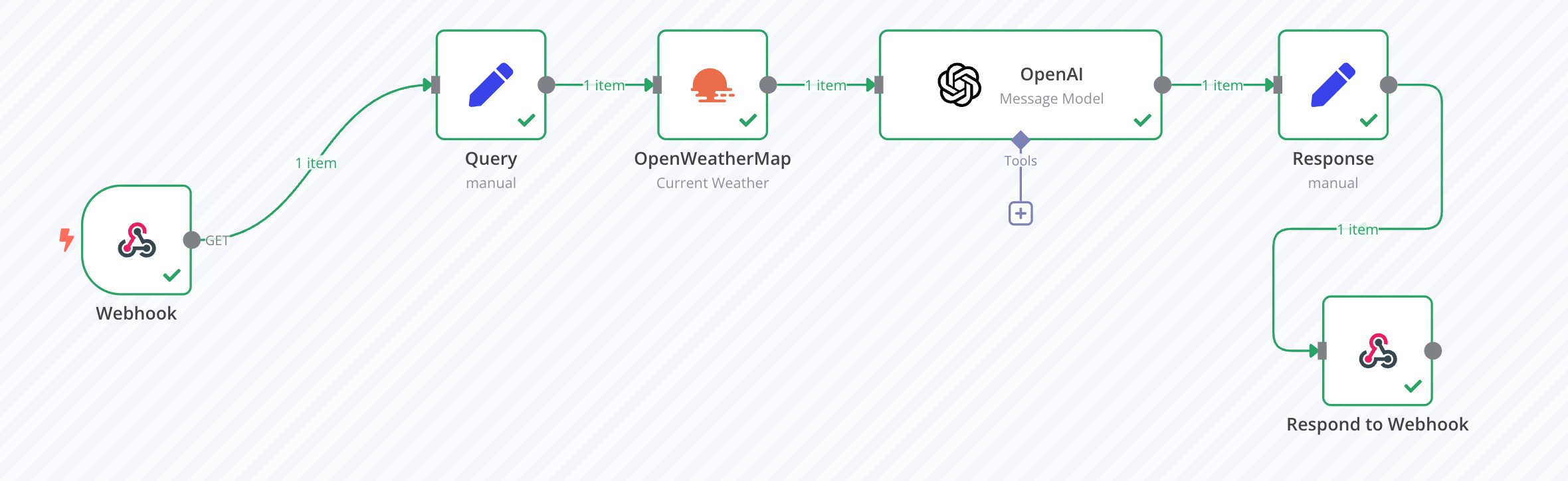
When the get-weather tool is called, it triggers a workflow that:
1. Takes the city name as input
2. Queries the OpenWeatherMap service for current weather data at that location
3. Passes the raw weather data to an LLM for interpretation
4. Returns a friendly, natural language description of the current weather conditions
This architecture allows for both accurate weather data retrieval and intelligent processing to provide weather information in a more conversational and easily understood format.
Note on Current Implementation
Due to some technical challenges with the MCP protocol implementation, we've provided two approaches:
1. Original MCP Server - The TypeScript implementation in the src directory, which may have some compatibility issues with current SDK versions.
2. Simplified Direct API - A plain JavaScript implementation in the root directory (direct-server.js and direct-client.js) that provides a simple RESTful endpoint without using the MCP protocol.
For immediate functionality, we recommend using the simplified direct API approach.
Prerequisites
- Node.js 18 or higher
- npm or yarn
Installation
1. Clone this repository
2. Install dependencies:
npm install
Usage - Simplified API Approach
1. Start the server:
node direct-server.js
2. The server will start on port 3000 and provide:
- Weather API: http://localhost:3000/api/weather?city=New%20York
- Health check: http://localhost:3000/health
3. Run the client example:
node direct-client.js
Usage - MCP Approach
This approach requires building the TypeScript code and may have some compatibility issues:
1. Build the project:
npm run build
2. Start the server:
npm start
3. The server will start on port 3000:
- SSE endpoint: http://localhost:3000/sse
- Messages endpoint: http://localhost:3000/messages?connectionId=YOUR_CONNECTION_ID
- Health check: http://localhost:3000/health
Understanding the Connection ID
The connection ID is a unique identifier assigned to each client session when connecting to the SSE endpoint. It serves as a crucial mechanism for maintaining bidirectional communication:
- When a client connects to the /sse endpoint, the server generates a unique connection ID
- This ID is returned to the client in the initial SSE response
- The client must include this ID as a query parameter in all subsequent requests to the /messages endpoint
- This allows the server to route responses back to the correct client's SSE connection
For example, if your connection ID is 1742761520489, you would make tool calls to:
http://localhost:3000/messages?connectionId=1742761520489
API Reference
Direct API
GET /api/weather
Fetches weather information for a specified city.
Parameters:
- city (string): The name of the city to get weather for.
Returns:
- JSON response with weather information.
MCP Tools
get-weather
Fetches weather information for a specified city.
Parameters:
- city (string): The name of the city to get weather for.
Returns:
- Weather information as text.
MCP Prompts
check-weather
A prompt template for asking an LLM to check and summarize weather information.
Parameters:
- city (string): The name of the city to check weather for.
License
MIT
Sign in to leave a review
Use Google, GitHub, or an email account so ratings stay tied to real people.
No reviews posted yet.



