🛡️ A.I.G(AI-Infra-Guard)
About
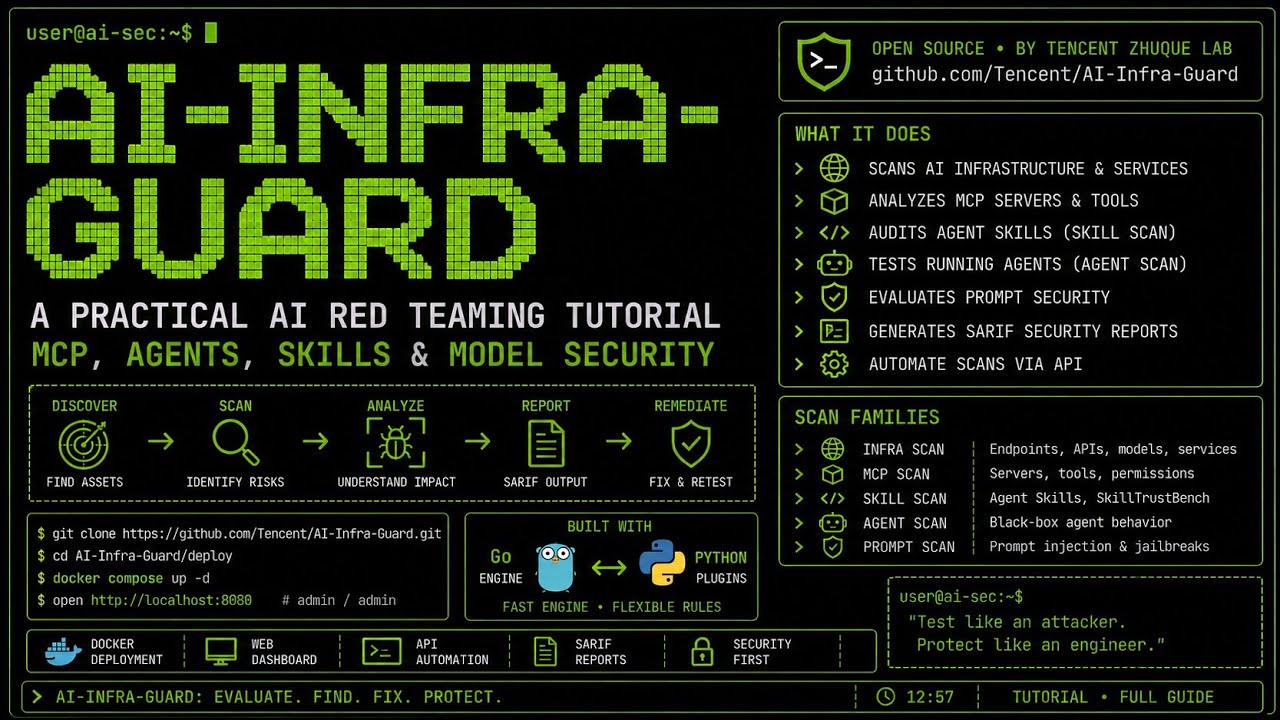
A full-stack AI Red Teaming platform securing AI ecosystems via OpenClaw Security Scan, Agent Scan, Skills Scan, MCP scan, AI Infra scan and LLM jailbreak evaluation.
Details
- License
- Apache-2.0
Explore
| Feature | More Info |
|:--------|:------------|
| ClawScan(OpenClaw Security Scan) | Supports one-click evaluation of OpenClaw security risks. It detects insecure configurations, Skill risks, CVE vulnerabilities, and privacy leakage. |
| Agent Scan | This is an independent, multi-agent automated scanning framework. It is designed to evaluate the security of AI agent workflows. It seamlessly supports agents running across various platforms, including Dify and Coze. |
| MCP Server & Agent Skills scan | It thoroughly detects 14 major categories of security risks. The detection applies to both MCP Servers and Agent Skills. It flexibly supports scanning from both source code and remote URLs. |
| AI infra vulnerability scan | This scanner precisely identifies over 100 AI framework components. It covers more than 1900 known CVE vulnerabilities. Supported frameworks include Ollama, ComfyUI, vLLM, n8n, Triton Inference Server and more. |
| Jailbreak Evaluation | It assesses prompt security risks using carefully curated datasets. The evaluation applies multiple attack methods to test robustness. It also provides detailed cross-model comparison capabilities. |
<details>
<summary><strong>💎 Additional Benefits</strong></summary>
- 🖥️ Modern Web Interface: User-friendly UI with one-click scanning and real-time progress tracking
- 🔌 Complete API: Full interface documentation and Swagger specifications for easy integration
- 🤖 Agent-Ready: Plug-and-play agent skills on ClawHub — EdgeOne ClawScan, EdgeOne Skill Scanner, and AIG Scanner — seamlessly embed security scanning into any AI agent workflow
- 🌐 Multi-Language: Chinese and English interfaces with localized documentation
- 🐳 Cross-Platform: Linux, macOS, and Windows support with Docker-based deployment
- 🆓 Free & Open Source: Completely free under the Apache 2.0 license
</details>
<br />
| Docker | RAM | Disk Space |
|:-------|:----|:----------|
| 20.10 or higher | 4GB+ | 10GB+ |
Method 2: One-Click Install Script (Recommended)
curl https://raw.githubusercontent.com/Tencent/AI-Infra-Guard/refs/heads/main/docker.sh | bash
Method 3: Build and run from source
git clone https://github.com/Tencent/AI-Infra-Guard.git
cd AI-Infra-Guard
> After deployment, open http://localhost:8088 in your browser.
If you are interested in code security, check out A.S.E (AICGSecEval), the industry's first repository-level AI-generated code security evaluation framework open-sourced by the Tencent Wukong Code Security Team.
<br>
<br>
<p align="center">
<h1 align="center"> </h1>
</h1>
</p>
<p align="center">
<a href="https://tencent.github.io/AI-Infra-Guard/">📖 Documentation</a> |
🌐 <a href="./readme/README_ZH.md">🇨🇳 中文</a> · <a href="./readme/README_JA.md">🇯🇵 日本語</a> · <a href="./readme/README_ES.md">🇪🇸 Español</a> · <a href="./readme/README_DE.md">🇩🇪 Deutsch</a> · <a href="./readme/README_FR.md">🇫🇷 Français</a> · <a href="./readme/README_KR.md">🇰🇷 한국어</a> · <a href="./readme/README_PT.md">🇧🇷 Português</a> · <a href="./readme/README_RU.md">🇷🇺 Русский</a>
</p>
<p align="center">
<a href="https://github.com/tencent/AI-Infra-Guard/stargazers">
</a>
<a href="https://github.com/Tencent/AI-Infra-Guard">
</a>
<a href="https://github.com/Tencent/AI-Infra-Guard">

</a>
<a href="https://github.com/Tencent/AI-Infra-Guard">
</a>
<a href="https://deepwiki.com/Tencent/AI-Infra-Guard">

</a>
</p>
<p align="center">
<a href="https://clawhub.ai/aigsec/edgeone-clawscan" target="_blank">
</a>
<a href="https://clawhub.ai/aigsec/edgeone-skill-scanner" target="_blank">
</a>
<a href="https://clawhub.ai/aigsec/aig-scanner" target="_blank">
</a>
</p>
<p align="center">
<a href="https://trendshift.io/repositories/13637" target="_blank"><picture><source media="(prefers-color-scheme: dark)" srcset="https://trendshift.io/api/badge/repositories/13637"><source media="(prefers-color-scheme: light)" srcset="https://trendshift.io/api/badge/repositories/13637"></picture></a>
<a href="https://www.blackhat.com/eu-25/arsenal/schedule/index.html#aigai-infra-guard-48381" target="_blank"> </a>
</a>
<a href="https://github.com/deepseek-ai/awesome-deepseek-integration" target="_blank"> </a>
</a>
</p>





<br>
<p align="center">
<h2 align="center">🚀 AI Red Teaming Platform by Tencent Zhuque Lab</h2>
</p>
<b>A.I.G (AI-Infra-Guard)</b> integrates capabilities such as ClawScan(OpenClaw Security Scan), Agent Scan,AI infra vulnerability scan, MCP Server & Agent Skills scan, and Jailbreak Evaluation, aiming to provide users with the most comprehensive, intelligent, and user-friendly solution for AI security risk self-examination.
<p>
We are committed to making A.I.G(AI-Infra-Guard) the industry-leading AI red teaming platform. More stars help this project reach a wider audience, attracting more developers to contribute, which accelerates iteration and improvement. Your star is crucial to us!
</p>
<p align="center">
<a href="https://github.com/Tencent/AI-Infra-Guard">
</a>
</p>

<br>
📋 User Feedback Survey
Help us improve A.I.G! Please take 3-5 minutes to fill out our User Feedback Survey. Users who provide high-quality feedback and leave a valid email address will receive an exclusive Tencent souvenir gift.
<br>
🚀 What's New
- 2026-06-25 · v4.1.15 — MCP Scan: 3 new threat detection rules (tool poisoning, credential exfiltration, command injection); 6 new llama.cpp CVE rules; model.token now optional with system default fallback.
- 2026-06-18 · v4.1.14 — Prompt Security: 9 new single-turn jailbreak operators; new aig-agent-redteam skill for comprehensive Agent red-team assessment.
- 2026-06-11 · v4.1.13 — New version check API endpoint; security scoring switched to absolute deduction model for clearer risk assessment.
- 2026-06-08 · v4.1.12 — Fingerprint library expanded: 39 new AI Web fingerprints added, 18 existing fingerprints enhanced.
- 2026-05-28 · v4.1.10 — Coverage expanded to 68 AI components (added junoclaw, lollms, sglang); 600+ new CVE rules; WebSocket agent provider support for Agent Scan.
👉 Earlier releases · 🩺 Try EdgeOne ClawScan
Table of Contents
- 🚀 Quick Start - ✨ Features - 🖼️ Showcase - 📖 User Guide - 🔧 API Documentation - 🏗️ Architecture Evolution - 📝 Contribution Guide - 🛡️ About the Team - 🙏 Acknowledgements - 💬 Join the Community - 📖 Citation - 📚 Papers - ⚖️ License & Attribution <br><br>🚀 Quick Start
Deployment with Docker
| Docker | RAM | Disk Space |
|:-------|:----|:----------|
| 20.10 or higher | 4GB+ | 10GB+ |
# This method pulls pre-built images from Docker Hub for a faster start
git clone https://github.com/Tencent/AI-Infra-Guard.git
cd AI-Infra-Guard
For Docker Compose V2+, replace 'docker-compose' with 'docker compose'
docker-compose -f docker-compose.images.yml up -d
Once the service is running, you can access the A.I.G web interface at:
http://localhost:8088
<br>
Use from OpenClaw
You can also call A.I.G directly from OpenClaw chat via the aig-scanner skill.
clawhub install aig-scanner
Then configure AIG_BASE_URL to point to your running A.I.G service.
For more details, see the aig-scanner README.
<details>
<summary><strong>📦 More installation options</strong></summary>
Other Installation Methods
Method 2: One-Click Install Script (Recommended)
# This method will automatically install Docker and launch A.I.G with one command

curl https://raw.githubusercontent.com/Tencent/AI-Infra-Guard/refs/heads/main/docker.sh | bash
Method 3: Build and run from source
git clone https://github.com/Tencent/AI-Infra-Guard.git

cd AI-Infra-Guard

This method builds a Docker image from local source code and starts the service

(For Docker Compose V2+, replace 'docker-compose' with 'docker compose')

docker-compose up -d
Note: The AI-Infra-Guard project is positioned as an AI red teaming platform for internal use by enterprises or individuals. It currently lacks an authentication mechanism and should not be deployed on public networks.
For more information, see: https://tencent.github.io/AI-Infra-Guard/?menu=getting-started
</details>
…
Sign in to leave a review
Use Google, GitHub, or an email account so ratings stay tied to real people.
No reviews posted yet.