MCP-X Agent 🤿 🤖
About
这是一个MCP客户端,让你轻松配置各个大模型,对接各种MCP Server而开发。This is an MCP client that allows you to easily configure various large models and develop interfaces with various MCP servers.
Details
- License
- Apache-2.0
Explore
- 🌐 Universal LLM Support: Compatible with ChatGPT, Anthropic, Ollama and OpenAI-compatible models
- 💻 Cross-Platform: Available for Windows, MacOS, and Linux
- 📚 Knowledge Base Management: Upload, search, and reference knowledge documents, let AI answer based on your materials
- 🔄 Model Context Protocol: Enabling seamless MCP AI agent integration on both stdio and SSE mode
- 🤖 AI Agent System: Rich professional AI agents covering various domain-specific needs
- 🌍 Multi-Language Support: Traditional Chinese, Simplified Chinese, English, Spanish with more coming soon
- ⚙️ Advanced API Management: Multiple API keys and model switching support
- 💡 Custom Instructions: Personalized system prompts for tailored AI behavior
- 🔄 Auto-Update Mechanism: Automatically checks for and installs the latest application updates

Setting up with Highlight
This MCP is not yet compatible with Highlight’s one-click setup. However, you can still use it with Highlight by following these steps:
- Download and install Highlight from highlightai.com/download
- Navigate to the plugins tab and select "Add Custom Plugin"
-
Configure the plugin with the settings below
Plugin Name
MCP-X Agent 🤿 🤖Command (node, npx, python, etc.)Please refer to the README for specific instructions on how to obtain API keys or other required environment variables.
- Enable "Start Automatically" if you want the plugin to start when Highlight launches





From the repository
Get the latest version of MCP-X:

For Windows users: 🪟
- Download the .exe version
- Python and Node.js environments are pre-installed
For MacOS users: 🍎
- Download the .dmg version
- You need to install Python and Node.js (with npx uvx) environments yourself
- Follow the installation prompts to complete setup
For Linux users: 🐧
- Download the .AppImage version
- You need to install Python and Node.js (with npx uvx) environments yourself
- For Ubuntu/Debian users:
- You may need to add --no-sandbox parameter
- Or modify system settings to allow sandbox
- Run chmod +x to make the AppImage executable
Add this JSON configuration to your MCP-X MCP settings to enable both tools:
"mcpServers":{
"fetch": {
"command": "uvx",
"args": [
"mcp-server-fetch",
"--ignore-robots-txt"
],
"enabled": true
},
"filesystem": {
"command": "npx",
"args": [
"-y",
"@modelcontextprotocol/server-filesystem",
"/path/to/allowed/files"
],
"enabled": true
},
"youtubedl": {
"command": "npx",
"args": [
"@kevinwatt/yt-dlp-mcp"
],
"enabled": true
}
}
yt-dlp-mcp requires the yt-dlp package. Install it based on your operating system:
Claude Desktop / Cursor
Paste into your MCP client config file to install this server.
{
    "mcpServers": {
        "mcp-x agent \ud83e\udd3f \ud83e\udd16": {
            "MCP_SERVER_NAME": {
                "enabled": true,
                "transport": "sse",
                "url": "YOUR_SSE_SERVER_URL"
            }
        }
    }
}McpServers
{
"MCP_SERVER_NAME": {
"enabled": true,
"transport": "sse",
"url": "YOUR_SSE_SERVER_URL"
}
}







MCP-X is an open-source MCP Host Desktop Application that seamlessly integrates with any LLMs supporting function calling capabilities. ✨

Use Cases 🎯
AI Agent
MCP-X good at agent and understanding various types of content through its powerful AI agents. Here's an example of food content agent: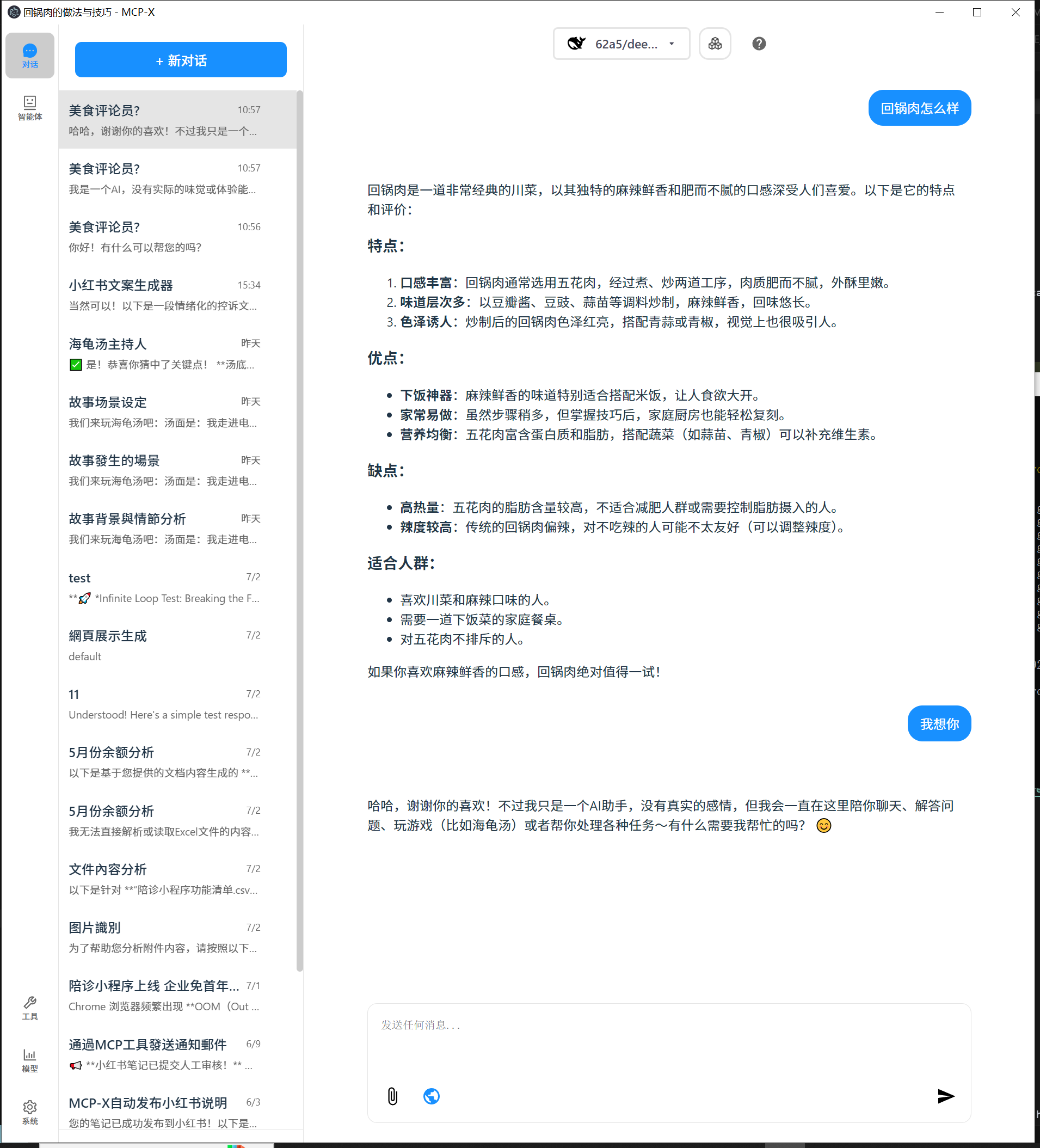
Key Features Demonstrated:
- 🍽️ Food Content Analysis: Detailed breakdown of dishes, ingredients, and nutritional information
- 🎯 Targeted Recommendations: Personalized suggestions based on user preferences
- 📊 Structured Output: Well-organized information with clear categorization
- 💬 Interactive Chat: Natural conversation flow with comprehensive responses
Perfect for:
- Food bloggers and content creators
- Nutritionists and health professionals
- Restaurant owners and chefs
- Anyone interested in food analysis and recommendations
This showcases how MCP-X can transform simple queries into detailed, actionable insights across various domains.
What's New
We've just rolled out major updates to improve your experience:
📚 Brand New Knowledge Base Feature (v0.1.0)
MCP-X now supports powerful knowledge base management! - Knowledge Management: Upload, view, search, and delete knowledge documents (supports txt, md, json, csv, xml, html formats) - Smart Search: Full-text search by filename and content with highlighted matching results - Chat References: One-click reference to knowledge base documents in chat, AI can answer based on your knowledge base content - Document Preview: Real-time document content preview with file metadata display - Responsive Design: Perfect adaptation for desktop and mobile devices🚀 AI Agent System
MCP-X as a full-fledged AI agent platform. - New Agent Sidebar: Discover, manage, and search for specialized AI agents. - One-Click Talk: Instantly talk to any agent for your current task. - Agent Profiles: See what each agent can do, with details on their skills and example uses. - Organized for You: Agents are sorted into categories like content creation, data analysis, and programming.🎨 A Fresh New Look
We've redesigned the app to be cleaner and more intuitive. - New Side Navigation: A permanent sidebar gives you quick access to Chat, Agents, Knowledge Base, Tools, Models, and System settings. - Clearer Icons: Navigation icons now have text labels so you know exactly where you're going. - Consistent Design: We've unified the color scheme and layout for a more polished feel.This update also includes a move to a more professional icon set (react-icons) and various under-the-hood CSS and component optimizations for better performance.
Features 🎯
- 🌐 Universal LLM Support: Compatible with ChatGPT, Anthropic, Ollama and OpenAI-compatible models
- 💻 Cross-Platform: Available for Windows, MacOS, and Linux
- 📚 Knowledge Base Management: Upload, search, and reference knowledge documents, let AI answer based on your materials
- 🔄 Model Context Protocol: Enabling seamless MCP AI agent integration on both stdio and SSE mode
- 🤖 AI Agent System: Rich professional AI agents covering various domain-specific needs
- 🌍 Multi-Language Support: Traditional Chinese, Simplified Chinese, English, Spanish with more coming soon
- ⚙️ Advanced API Management: Multiple API keys and model switching support
- 💡 Custom Instructions: Personalized system prompts for tailored AI behavior
- 🔄 Auto-Update Mechanism: Automatically checks for and installs the latest application updates
Download and Install ⬇️
Get the latest version of MCP-X:
For Windows users: 🪟
- Download the .exe version
- Python and Node.js environments are pre-installed
For MacOS users: 🍎
- Download the .dmg version
- You need to install Python and Node.js (with npx uvx) environments yourself
- Follow the installation prompts to complete setup
For Linux users: 🐧
- Download the .AppImage version
- You need to install Python and Node.js (with npx uvx) environments yourself
- For Ubuntu/Debian users:
- You may need to add --no-sandbox parameter
- Or modify system settings to allow sandbox
- Run chmod +x to make the AppImage executable
MCP Tips
While the system comes with a default echo MCP Server, your LLM can access more powerful tools through MCP. Here's how to get started with two beginner-friendly tools: Fetch and Youtube-dl.
Quick Setup
Add this JSON configuration to your MCP-X MCP settings to enable both tools:
 "mcpServers":{
    "fetch": {
      "command": "uvx",
      "args": [
        "mcp-server-fetch",
        "--ignore-robots-txt"
      ],
      "enabled": true
    },
    "filesystem": {
      "command": "npx",
      "args": [
        "-y",
        "@modelcontextprotocol/server-filesystem",
        "/path/to/allowed/files"
      ],
      "enabled": true
    },
    "youtubedl": {
      "command": "npx",
      "args": [
        "@kevinwatt/yt-dlp-mcp"
      ],
      "enabled": true
    }
  }
Using SSE Server for MCP
You can also connect to an external MCP server via SSE (Server-Sent Events). Add this configuration to your MCP-X MCP settings:
{
  "mcpServers": {
    "MCP_SERVER_NAME": {
      "enabled": true,
      "transport": "sse",
      "url": "YOUR_SSE_SERVER_URL"
    }
  }
}
Additional Setup for yt-dlp-mcp
yt-dlp-mcp requires the yt-dlp package. Install it based on your operating system:
Windows
winget install yt-dlp
MacOS
brew install yt-dlp
Linux
pip install yt-dlp
Usage Guide 📖
How to use Knowledge Base:
1. Add Documents: Click "Knowledge Base" in sidebar → Upload supported file formats (txt, md, json, csv, xml, html)
2. Search Documents: Use search box in knowledge base page, supports search by filename and content
3. Reference Documents: Click knowledge base button (📚) in chat → Search and select document → Auto-insert reference
4. Manage Documents: Preview, delete documents, view detailed information and metadata
For more details, see CHANGELOG.md.
Build 🛠️
See BUILD.md for more details.
Connect With Us 🌐
- 💬 Join our Home - 🐦 Follow us on RedNote - ⭐ Star us on GitHub - 🐛 Report issues on our Issue TrackerSign in to leave a review
Use Google, GitHub, or an email account so ratings stay tied to real people.
No reviews posted yet.