
Gemini Thinking Mcp
About
# Gemini Thinking MCP Server A Model Context Protocol (MCP) server implementation for the Google Gemini language model. This server allows Claude Desktop users to access the powerful reasoning capabilities of Gemini-2.0-flash-thinking-exp-01-21 model. ## What is Gemini Flash? Gemini-2.0-flash-thinking-exp-01-21 is a…
Details
- License
- MIT
Explore
- Exposes Gemini‑2.0‑flash‑thinking‑exp‑01‑21 to Claude Desktop
- Optimized for fast, high‑quality reasoning
- Supports mathematical reasoning and logical deduction
- Enables step‑by‑step structured thinking
- Configurable parameters: prompt, max_tokens, temperature
- Local setup with a single API key

Setting up with Highlight
This MCP is not yet compatible with Highlight’s one-click setup. However, you can still use it with Highlight by following these steps:
- Download and install Highlight from highlightai.com/download
- Navigate to the plugins tab and select "Add Custom Plugin"
-
Configure the plugin with the settings below
Plugin Name
Gemini Thinking McpCommand (node, npx, python, etc.)Please refer to the README for specific instructions on how to obtain API keys or other required environment variables.
- Enable "Start Automatically" if you want the plugin to start when Highlight launches





From the repository
- Node.js (v18 or higher)
- npm
- Claude Desktop
- Google Gemini API key
To use this MCP server with Claude Desktop, update your Claude Desktop configuration:
1. Locate your Claude Desktop config file:
- Windows: %APPDATA%\Claude\claude_desktop_config.json
- macOS: ~/Library/Application Support/Claude/claude_desktop_config.json
2. Add the following to the mcpServers section:
``json``
"gemini-thinking": {
"command": "node",
"args": ["/path/to/gemini-thinking-mcp/build/index.js"],
"env": {
"GEMINI_API_KEY": "your-api-key"
}
}
3. Restart Claude Desktop to apply the changes.
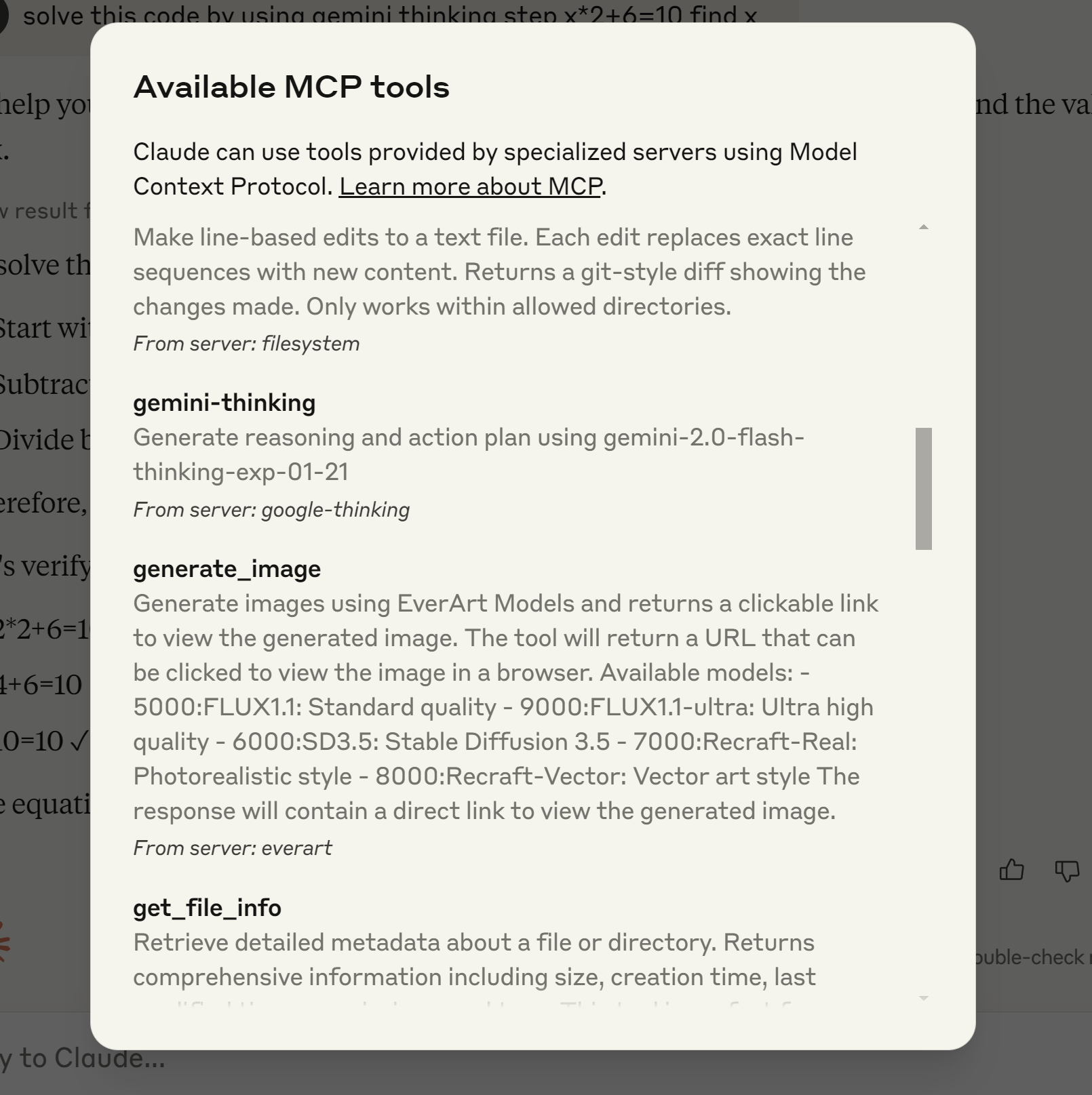
This example shows the process of installing and configuring the Gemini Thinking MCP server in Claude Desktop environment.
Claude Desktop / Cursor
Paste into your MCP client config file to install this server.
{
    "mcpServers": {
        "gemini thinking mcp": {
            "gemini-thinking": {
                "command": "node",
                "args": [
                    "/path/to/gemini-thinking-mcp/build/index.js"
                ],
                "env": {
                    "GEMINI_API_KEY": ""
                }
            }
        }
    }
}McpServers
{
    "gemini-thinking": {
        "command": "node",
        "args": [
            "/path/to/gemini-thinking-mcp/build/index.js"
        ],
        "env": {
            "GEMINI_API_KEY": ""
        }
    }
}What is Gemini Flash?
Gemini-2.0-flash-thinking-exp-01-21 is a specialized version of Google's Gemini model that's optimized for fast responses while maintaining high quality. It excels at: - Mathematical reasoning - Logical deduction - Step-by-step analysis - Structured thinkingInstallation
Prerequisites
- Node.js (v18 or higher) - npm - Claude Desktop - Google Gemini API keySetup
1. Clone this repository: ``bash
git clone https://github.com/falahgs/gemini-thinking-mcp.git
cd gemini-thinking-mcp
`
2. Install dependencies:
`bash
npm install
`
3. Create a .env file with your Google API key:
`
GEMINI_API_KEY=your-api-key-here
`
4. Build the project:
`bash
npm run build
`
Configuring Claude Desktop


To use this MCP server with Claude Desktop, update your Claude Desktop configuration:

1. Locate your Claude Desktop config file:
   - Windows:
%APPDATA%\Claude\claude_desktop_config.json
- macOS: ~/Library/Application Support/Claude/claude_desktop_config.json
2. Add the following to the mcpServers section:
`json
"gemini-thinking": {
"command": "node",
"args": ["/path/to/gemini-thinking-mcp/build/index.js"],
"env": {
"GEMINI_API_KEY": "your-api-key"
}
}
`
3. Restart Claude Desktop to apply the changes.

Usage


Once configured, you can access the Gemini model in your Claude Desktop conversations:
`
@gemini-thinking Can you help me solve this math problem step by step?
`
Parameters


You can adjust the model parameters:

- prompt: Your input text for Gemini (required)
- max_tokens: Maximum tokens to generate (default: 8192)
- temperature: Controls randomness (default: 0.2)
Examples
Here are some examples of the Gemini Thinking MCP server setup and usage:
Example 1: Installing MCP Server
This example shows the process of installing and configuring the Gemini Thinking MCP server in Claude Desktop environment.
Example 2: Testing Mathematical Problem Solving
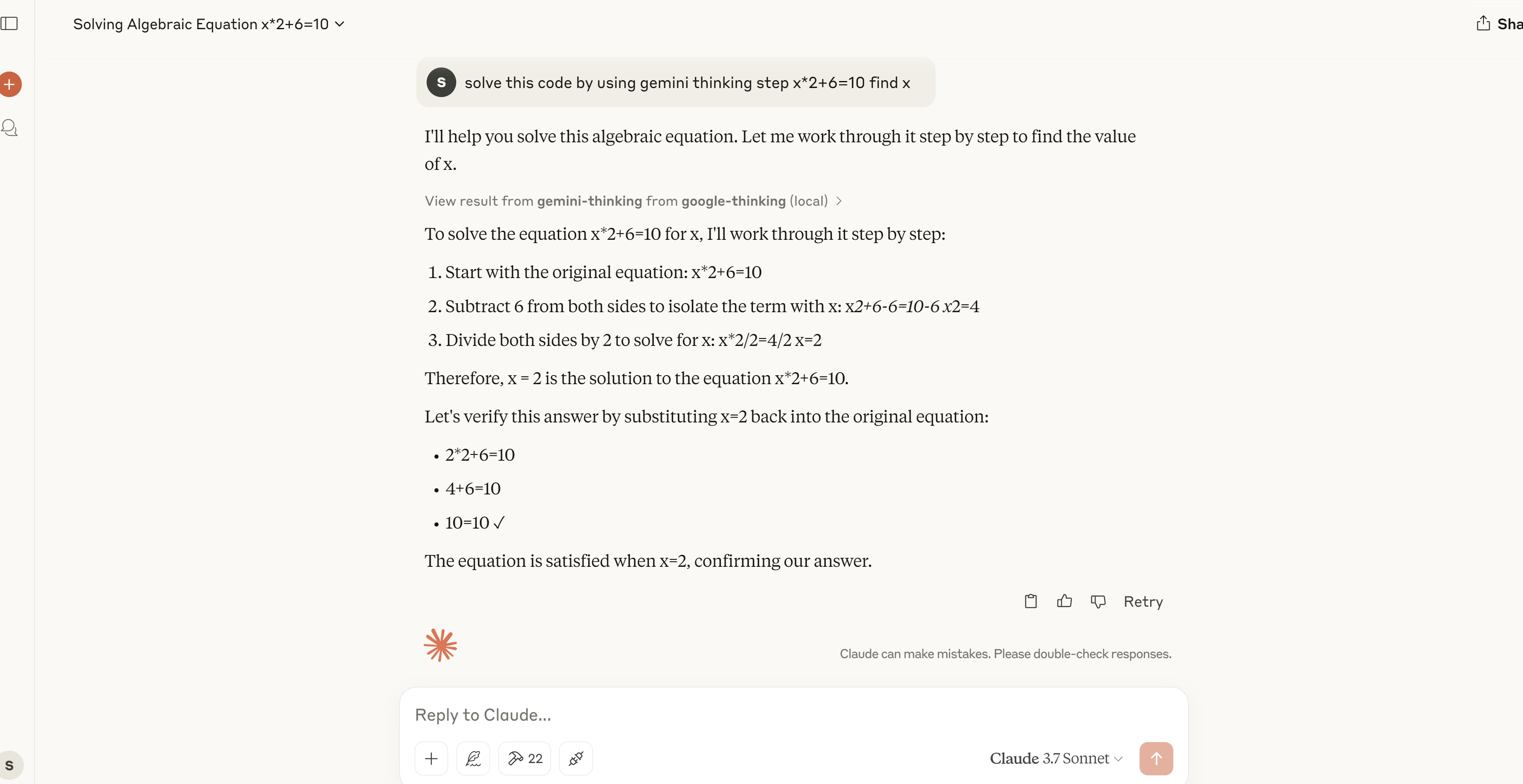 A demonstration of the MCP server solving a mathematical equation step by step, showing its problem-solving capabilities.
Development
`bash
npm run dev # Watch mode
npm run build # Build for production
npm start # Run the server
``
Contributing
Contributions are welcome! Please feel free to submit a Pull Request.License
MITSign in to leave a review
Use Google, GitHub, or an email account so ratings stay tied to real people.
No reviews posted yet.



